Travel connectivity guide
Chaguanas eSIM Guide: Mobile Data in Trinidad
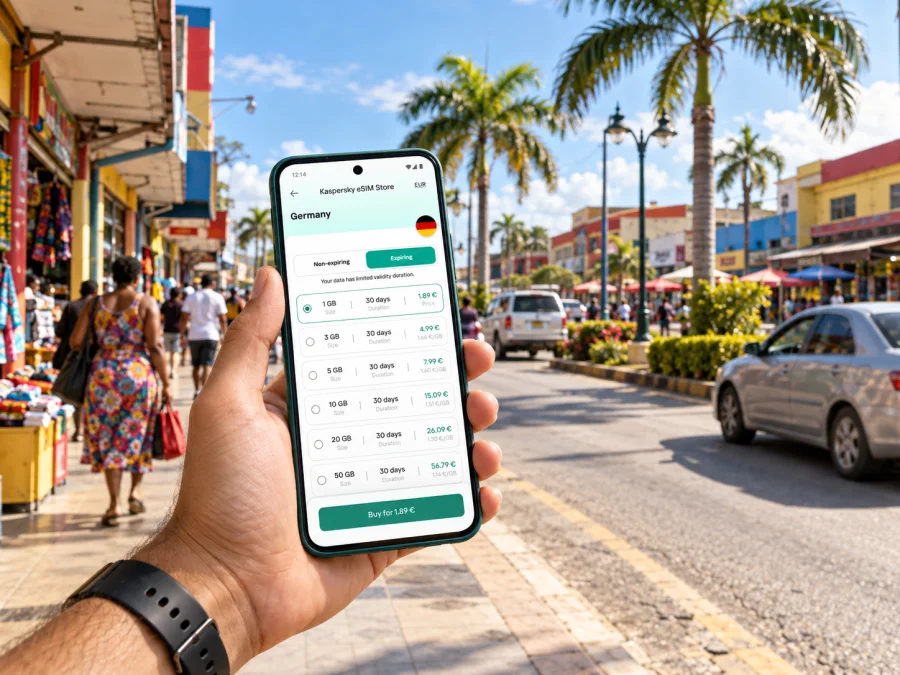
Chaguanas eSIM: mobile connection and internet for your trip
Chaguanas is a practical base for exploring central Trinidad, visiting family, attending meetings, or travelling between Port of Spain and the south of the island. A working mobile data connection helps with the everyday details: confirming your airport transfer, checking a route, messaging your host, finding a shop, or adjusting plans when traffic changes. An eSIM can make that preparation easier, provided your phone supports it and the plan you choose covers Trinidad and Tobago.
This guide focuses on using mobile internet around Chaguanas: arrival through Piarco International Airport, getting into town, moving between neighbourhoods, planning a short stay, and deciding what kind of data setup suits your itinerary. It also explains what to check before you travel, since eSIM support and service availability depend on the exact device and plan.
Where Chaguanas fits into a Trinidad itinerary
Chaguanas is a borough in west-central Trinidad. It sits between Port of Spain to the north and San Fernando to the south, with commercial, residential and community areas spread across the borough. That position makes it useful as a stop in its own right and as a base for trips elsewhere on the island. The borough includes districts such as Charlieville, Cunupia, Montrose, Enterprise, Felicity and Endeavour; an address in one of these areas may be some distance from the central business district, so save the exact destination rather than searching only for “Chaguanas.”
The centre is oriented around busy roads and shopping areas rather than a compact historic core designed for walking. Your phone is likely to be most useful for checking the precise location of a hotel, office, mall, restaurant or meeting point, then switching between navigation and messaging as you travel. A data plan is especially handy when an address uses a local landmark or district name that is unfamiliar to a visitor.
Useful way to think about the borough: Chaguanas is both a destination and a road-connected hub. Plan by door-to-door journey, not just by the distance shown on a map.
Arriving through Piarco International Airport
For a trip to Chaguanas, Piarco International Airport (POS) is the relevant airport on Trinidad. It is managed alongside A.N.R. Robinson International Airport on Tobago by the Airports Authority of Trinidad and Tobago. The trip from the airport to your accommodation is a separate leg from getting around the borough, and its duration can change with traffic, time of day and the exact destination. Confirm the pickup arrangement before leaving the terminal: share your arrival details with the driver, save the accommodation address, and agree on a meeting point that is easy to identify.
Mobile data is useful as soon as you can safely use your phone. You may need to contact a driver, send a message that your flight has landed, look up directions, or check that a booking is still current. If you plan to use a travel eSIM, install it while you have reliable internet access before departure where possible. Keep the QR code or installation details available, and do not delete an eSIM profile while troubleshooting unless the provider’s instructions specifically tell you to do so.
A practical arrival sequence:
- Before flying, save your accommodation address, host or driver contact, and any booking confirmation for offline access.
- Check that your phone is unlocked and supports eSIM in its exact regional model variant.
- Install the travel eSIM when instructed by the plan provider; keep your usual SIM active if you need its number for calls or verification messages.
- At arrival, select the travel eSIM for mobile data if that is how your plan is configured. Follow the plan’s activation instructions, including any data-roaming setting it requires.
- Confirm the pickup point with your driver before walking away from the terminal or changing locations.
Do not assume that an airport Wi-Fi connection, a specific pickup service, or mobile coverage will be available in every spot. Keep essential booking information offline and have a backup contact method.
Choosing a mobile data setup for Chaguanas
A travel eSIM is a digital SIM profile that can be installed on a compatible device. In many travel plans it is intended for mobile data; a local phone number, ordinary voice calls and SMS may not be included. Read the selected plan’s terms carefully and keep your regular SIM available if you need calls or texts on your existing number.
Kaspersky eSIM Store is an app and website where you can choose, purchase and activate an eSIM with a suitable data plan for an international trip. Available destinations, plan sizes, validity periods and supported networks can vary. A destination label alone does not guarantee service in every district or on every route. Coverage depends on the specific plan’s partner network in Trinidad and Tobago, the phone’s supported radio bands, local terrain and buildings, and current network conditions.
Before you choose, compare the plan with your actual itinerary rather than looking only at the headline data amount:
| Your travel pattern | What to consider |
|---|---|
| One or two days in Chaguanas | A smaller allowance may be sufficient if you mainly use maps, messaging and booking details. |
| Several days with frequent navigation | Allow extra data for repeated route checks, ride coordination, browsing and image sharing. |
| Work calls and hotspot use | Check whether tethering is permitted and estimate the data used by video meetings and laptop updates. |
| A wider Trinidad itinerary | Confirm that the plan is for Trinidad and Tobago and review its conditions for use across the places you expect to visit. |
| Staying in Tobago as well | Do not assume that a plan shown for Trinidad automatically has the same service conditions throughout the country; check its destination coverage and terms. |
For the country-level options, you can review eSIM plans for Trinidad and Tobago and compare the details against your dates and intended use. Check whether the validity period begins at installation, activation or first network connection, and whether the plan has a data cap, speed policy or other condition that matters to you.
Routes, traffic and getting around
Chaguanas is connected to other parts of Trinidad by major roads, including the Uriah Butler Highway and Southern Main Road. The Chaguanas Borough Corporation describes the borough as lying between Port of Spain and San Fernando and identifies those roads as important connectors. In practice, a route that looks short on a map can take longer when traffic builds up, particularly around busy commercial areas or at commuter times. Check the live route shortly before you leave and confirm the drop-off point with the person you are meeting.
The Public Transport Service Corporation (PTSC) has a Chaguanas terminal, but routes, schedules, service notices and terminal arrangements can change. Check current official information on the day you travel rather than relying on an old timetable or a route description saved from a previous visit. If you are using a taxi or a pre-arranged driver, agree on the fare and destination before departure, and verify that the map pin matches the entrance you need.
Navigation works best when you make the journey specific:
- Search for the complete venue name and district, not just “Chaguanas.”
- Ask your host whether the map pin points to the correct entrance or only the centre of a large complex.
- Save the destination and a return address before setting out.
- Keep an eye on the route while travelling, but do not handle the phone while driving.
- If the route changes, message your host or driver from a safe place and agree on a clear new meeting point.
Finding your way around the borough
Visitors often use Chaguanas as a reference point for shopping, appointments, meals and family visits. District names matter: Charlieville and Cunupia, for example, are not interchangeable with the town centre. Enterprise, Felicity, Endeavour, Montrose and other parts of the borough also cover distinct areas. If someone gives you a nearby landmark instead of a street number, ask for a precise pin and the name of the district.
Large retail complexes can have multiple entrances, parking areas and adjoining businesses. A map may place a pin at a broad site rather than at the shop or office door. When meeting someone, agree on a named entrance, floor, or visible public point. For a rideshare or taxi pickup, send the pin from your current position only after you are safely outside and know which access road the vehicle can use.
Walking can be practical for short errands in a compact area, but do not assume every route is pedestrian-friendly or shaded. Check the route, weather, daylight and pavement conditions. In warm or rainy weather, a short distance can feel different on foot than it does in a car. Keep water with you, take breaks, and use a vehicle for stretches that are unsuitable for walking.
Where mobile internet helps most
In Chaguanas, data is useful for arranging airport pickup, finding a district or meeting entrance, sharing a location, checking opening details, accessing bookings and looking up onward travel. A data-only eSIM generally does not replace your normal mobile number. Keep your home SIM available for calls or SMS if needed, and review its roaming charges. On a dual-SIM phone, choose which line handles mobile data. For lower data use, download maps and documents ahead of time and turn off automatic backups or app updates over mobile data.
Device compatibility: check the exact model
Do not rely on a phone family name alone. Some manufacturers sell different regional variants under the same broad model name, and eSIM support may vary by model number, country of sale, carrier lock or software configuration. A device that supports eSIM in one market may have a different SIM configuration in another. Confirm the exact model variant in the manufacturer’s specifications and in your phone settings, and check that the device is not locked to an operator.
You can check whether your device supports eSIM before selecting a plan. Also make sure the phone can connect to the network technologies and bands used by the plan’s partner network. The provider’s plan information and the device maker’s regional specifications are the right references for those details; do not infer compatibility from a friend’s similar-looking phone.
A simple pre-purchase check:
- Find the exact model number in Settings or the device’s regulatory information.
- Check the manufacturer’s eSIM instructions for that regional variant.
- Confirm that the phone is carrier-unlocked.
- Check available eSIM storage and whether a profile is already active.
- Ensure the operating system is up to date enough for the installation method.
- Keep access to Wi-Fi or another internet connection during setup.
If the device is incompatible or locked, a travel eSIM will not solve the problem. Arrange another way to connect before departure, and avoid deleting a working profile or resetting network settings unless you understand how to restore them.
Install and activate before you need directions
Installation steps differ between devices and plan providers. Follow the instructions supplied for your selected plan, and use the matching platform guide: eSIM installation instructions for Android and eSIM installation instructions for iOS.
A careful setup usually follows this order:
- Choose the destination and plan, then review the data amount, validity, activation conditions and supported network information.
- Confirm device compatibility and carrier-unlocked status.
- Install the eSIM over a stable internet connection, using the QR code or in-app method supplied for that plan.
- Label the new line clearly, such as “Travel data,” so you can identify it later.
- Set your preferred line for mobile data and leave calls and SMS on the usual SIM if needed.
- Wait until the plan’s activation conditions are met. Some plans activate on installation; others start on first connection or another defined event.
- Once in Trinidad and Tobago, follow the provider’s instructions for selecting the line, enabling data roaming if required, and allowing time for registration.
Keep the installation email or account details accessible without relying on the eSIM you are trying to configure. If activation does not complete, check the plan instructions, the selected data line and the device settings first. Contact the plan’s support channel if you need help; do not repeatedly scan or reinstall the same QR code unless instructed, because some profiles are limited to one installation.
Short stays, work visits and onward travel
The best setup depends on the way you will spend time in Chaguanas. For a short stop between flights, prioritize the essentials: a reachable driver, exact accommodation details and enough data for route checks. If you have meetings, confirm office addresses and keep calendar invitations or documents available offline in case a connection drops. For a family visit, save each address separately; several destinations may be described informally by a village or district name.
If Chaguanas is your base for visiting other places on Trinidad, plan each day as a separate trip. Check departure times, return arrangements and the route back before leaving. A data plan can help with changes along the way, but remote stretches may have variable coverage. For a visit to Tobago, remember that it is a separate island: confirm inter-island transport and the eSIM plan’s country coverage and terms rather than assuming every itinerary detail is included by a Trinidad-focused plan.
| Scenario | Prepare before leaving |
|---|---|
| Airport transfer | Driver contact, saved address and pickup point |
| Business visit | Office name, district, entrance and contact |
| Day trip | Current transport details, return option and offline map |
| Remote work | Meeting files, data allowance and backup connection |
Keep your connection dependable
Reception varies by partner network, device radio configuration, buildings, congestion and local conditions. Save key directions in advance and share your itinerary with someone you trust. Set app updates and cloud backups to Wi-Fi, monitor your data allowance and carry a power bank for long days of navigation. Public Wi-Fi can be convenient; avoid entering sensitive information on a network you do not trust.
Frequently asked questions
Is Chaguanas a city or a borough?
Chaguanas is officially administered as a borough by the Chaguanas Borough Corporation. It is a major urban and commercial centre in central Trinidad, but “borough” is the accurate administrative term.
Which airport should I use for Chaguanas?
Piarco International Airport serves Trinidad, while A.N.R. Robinson International Airport is on Tobago. Plan ground transport from Piarco to your specific destination in Chaguanas; travel time depends on traffic and the address.
Will an eSIM work everywhere in Chaguanas?
No plan should be assumed to work in every location. Coverage depends on the exact plan and its local partner network, the supported bands of your device, and conditions such as indoor construction and congestion. Check the plan details and keep offline directions for important journeys.
Can I use a travel eSIM for regular calls and SMS?
Many travel eSIM plans are data-only and do not include an ordinary local phone number, voice service or SMS. Check the specific plan’s terms. You may be able to use internet-based calling and messaging apps over data, while retaining your usual SIM for calls and texts.
Should I install the eSIM before travelling?
If the provider’s instructions allow it, installing before departure can give you time to resolve setup issues while you have reliable internet access. Activation timing differs by plan, so read whether validity starts at installation, activation or first network connection.
What if my phone shows no service after arrival?
Confirm that the travel line is enabled, selected for mobile data and configured according to the provider’s instructions. Check whether data roaming is required, restart the phone once if appropriate, and verify that the plan is active and covers Trinidad and Tobago. If service still does not register, use the plan provider’s support guidance and a backup connection.
A simple plan for your stay
Before departure, verify the exact phone variant, unlock status and plan conditions. Save addresses and contacts offline. Install the eSIM according to its instructions and keep your usual number available if needed. In Chaguanas, search by district and venue, check transport information close to departure, and allow for traffic. Monitor data use and battery between stops.
Kaspersky eSIM Store helps you prepare by letting you choose, purchase and activate an eSIM with a data plan for an international trip. Review the current options and select a plan that fits your dates and expected use: prepare an eSIM plan for Trinidad and Tobago.


