Travel connectivity guide
Charlotte eSIM Guide: Mobile Data for Your Trip
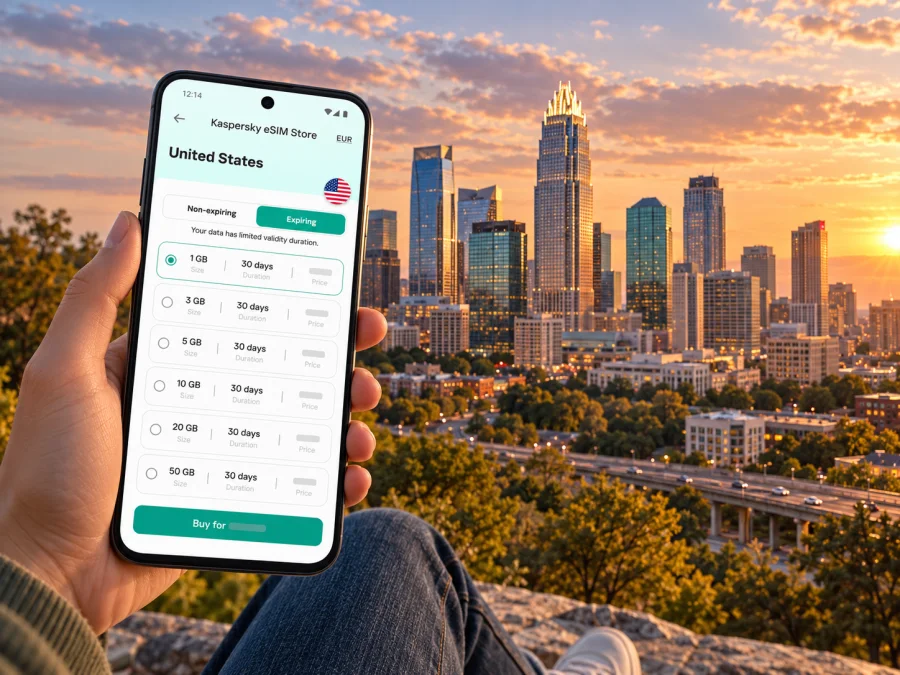
Charlotte eSIM: Mobile Connection and Internet for Your City Trip
Charlotte is a city where a short ride can take you from the airport to Uptown, from the Blue Line to South End, or from a business meeting to a neighborhood restaurant. A working mobile connection helps you check directions, coordinate a pickup, look up transit changes and keep reservations at hand. An eSIM can be a practical way to prepare mobile internet for a visit to Charlotte, North Carolina, without swapping a physical SIM card.
The details matter, though. Charlotte Douglas International Airport (CLT) has bus connections into the city, while the LYNX Blue Line serves a separate corridor through Uptown, South End and University City. The airport is not on the Blue Line. Your best setup depends on where you are staying, how you plan to move around and whether your phone supports the eSIM profile you intend to use.
This guide focuses on Charlotte itself: arriving at CLT, reaching central neighborhoods, choosing data for a weekend or work trip, and staying prepared when plans change. It also explains what to check before buying and installing an eSIM for travel in the United States.
What an eSIM can do during a Charlotte visit
An eSIM is a digital SIM profile stored on a compatible device. A travel eSIM plan can provide mobile data through a partner network in the destination, according to the plan’s own coverage, data allowance and validity terms. It can help with common city tasks:
- Open a map while walking between Uptown offices, museums, restaurants or hotels.
- Check a CATS route and service alert before heading to a bus stop or rail station.
- Find the designated pickup area at CLT or share your arrival details with a host.
- Use a rideshare app, translate a menu, confirm a reservation or send a message over the internet.
- Keep your home SIM active for calls or account verification, if your device and home carrier allow dual SIM use.
A data-only eSIM does not automatically provide a U.S. phone number, conventional voice calls or SMS. Check the specific plan terms. Messaging and voice apps can work over data, but they are not a substitute for SMS-based verification if a service requires a text to your regular number. Keep access to that number in mind when changing mobile-data settings.
Charlotte is in the United States, so select a plan that explicitly covers the United States. The city name can help you plan your route, but plan eligibility is normally defined by a country or region rather than by a city boundary. If your itinerary continues beyond Charlotte, verify the covered destinations for every stop rather than assuming a Charlotte-focused plan covers the whole route.
Arriving at CLT: get online before you leave the terminal
After landing, travelers often need an address, a pickup point and a route into the city at the same time. Save your accommodation address and a map area before departure, then use mobile data or airport Wi-Fi to confirm current instructions.
Charlotte Douglas International Airport (CLT) lists taxis, rental cars, ride-app pickup, courtesy vehicles and CATS service among its ground-transport options. Follow current airport signs; pickup zones can change. If someone is meeting you, agree on a specific location and share it by message rather than relying on “I’m outside.”
CATS Route 5, the Sprinter, connects the airport with the Charlotte Transportation Center in Uptown. Route 60 connects the airport to the Tyvola Road area and the Blue Line at Tyvola Station. These routes serve different parts of the city. Check live schedules, alerts and stop locations before setting out, especially for a late arrival, weekend trip or journey with luggage. Transit may also require a final walk or transfer to reach your hotel.
Before leaving the terminal:
- Confirm your hotel’s neighborhood and exact address.
- Follow current signs for your chosen pickup or transit service.
- If riding CATS, verify Route 5 or Route 60 times and alerts.
- Keep the address and route available offline in case data takes time to connect.
- Check that your phone is using the intended data line once underway.
Pick a base that matches your itinerary
Charlotte covers a broad area. A hotel described as being in Charlotte may still be a long drive from your destination, so compare the actual address with your plans. A mobile connection helps you check travel time, transfers and the last stretch between a station and the door.
| Area or trip pattern | What to plan for | Useful mobile tasks |
|---|---|---|
| Uptown | Central offices, venues, museums and the Charlotte Transportation Center. | Walking directions, venue details and CATS connections. |
| South End | Restaurants and lodging along the Blue Line corridor, with the Rail Trail nearby. | Find a station, check alerts and navigate between stops. |
| NoDa | Neighborhood destination north of central Charlotte, along the Blue Line corridor. | Confirm the best station and walk for your specific address. |
| University City | UNC Charlotte and the eastern end of the Blue Line. | Plan the rail trip and find campus locations or a last-mile ride. |
| SouthPark | Shopping and business destination south of Uptown; not every address is beside a rail station. | Compare bus, car and rideshare routes to the exact location. |
| Airport or west side | Useful for flights or meetings near CLT, but not necessarily close to Uptown. | Check airport connections, hotel shuttles and next-day routes. |
Treat these as orientation, not a promise about every block. Check walking distance, crossings and whether the route suits your luggage or mobility needs. For meetings in Uptown and dinners in South End, a hotel near a Blue Line station may simplify some trips. For an event at UNC Charlotte, University City may be more convenient. A day spanning SouthPark, the airport and a suburban client site may be easier by car or rideshare than by rail. Let your itinerary decide.
Choosing a data plan for your time in Charlotte
There is no single data allowance for every traveler. Someone who mainly checks maps and messages uses data differently from a person joining video calls, uploading media or sharing a connection. Review the plan’s destination, allowance, validity and activation conditions before checkout.
| Trip pattern | Planning approach |
|---|---|
| Brief stopover | Save airport, hotel and departure details. Match the plan’s validity to your stop and onward route. |
| Weekend visit | Allow for maps, transit checks, tickets and browsing. Download large files over Wi-Fi where practical. |
| Work trip | Account for calls, email attachments and cloud files; check whether tethering is allowed. Keep a backup for an important meeting. |
| Multi-city stay | Check coverage for the full route, duration, data allowance and any top-up terms. |
Ask before choosing: Does the plan cover the United States for your dates? When does validity begin? Is tethering supported? What happens when data or validity runs out? Does the setup require data roaming for the eSIM? Follow the selected plan’s instructions.
Read the actual terms rather than relying on a label such as “travel” or “regional.” Availability and performance can vary by partner network, location, building, congestion and device; do not assume a particular speed or coverage at every address.
Kaspersky eSIM Store is an app and website that helps travelers choose, arrange and activate an eSIM with a suitable data plan for an international trip. To review current destination options and conditions, browse eSIM plans for the United States. These are country-level options, not a Charlotte-only tariff. Check the details for your selected plan.
Using mobile data around the city
The LYNX Blue Line runs between the I-485/South Boulevard area, Uptown and University City. Airport access is by CATS bus connections, not a Blue Line stop at the terminal. Check the route map and the station nearest your actual address. Rail is useful along its corridor, but it will not cover the final mile for every hotel or venue.
Before a transit ride, confirm both endpoints, direction, station name, service alerts and the last train or bus you may need. Allow time to walk between a bus stop and rail platform. Save a screenshot as a fallback, but refresh live information before leaving because service can change.
For a rideshare or taxi, enter the full address or venue entrance. Large campuses and shopping areas may have several entrances; if the map pin is unclear, use the venue’s arrival directions or agree on a pickup point. When walking, download map areas in advance and stop somewhere safe before checking a route. Mobile data helps you adapt, but it does not replace attention to traffic and pedestrian signs.
If you need data for a laptop
Hotspot availability depends on the specific plan and its terms. Check before relying on a phone for a presentation or work call. Tethering can use data quickly and drain the battery, so bring a charger and download essential files ahead of time. For an important meeting, use a connection you have tested rather than depending on a moving vehicle or crowded venue.
Check device and regional compatibility before buying
Compatibility depends on the exact device, its regional model and whether it is carrier-unlocked. The same product family can have different SIM configurations in different markets. For example, Apple’s current support documentation distinguishes U.S.-sold iPhone variants from models sold in other regions; do not assume a model name alone settles eSIM support. Android manufacturers also vary by model and market.
Before purchase, check the device maker’s current specifications for your exact model and confirm that the phone is not locked to a carrier that restricts adding another profile. If you are unsure, check whether your device is compatible and verify the model variant in your settings or original purchase information. A device that supports eSIM in one market does not prove that every regional version does.
Also make sure you can access an internet connection during installation. Depending on the device and activation method, you may need Wi-Fi to add the profile. If the eSIM is intended for a future trip, you can often prepare it before departure, but activation timing differs by plan. Follow the plan’s instructions and avoid deleting a profile as a troubleshooting shortcut unless support tells you to do so; an eSIM may not be transferable or reinstallable under the same conditions.
Install and activate before you need directions
The exact screens differ between Android devices and iPhones, so follow the instructions for your operating system and the activation method supplied with the plan. The general sequence is:
- Check the essentials. Confirm eSIM compatibility, carrier unlock status, plan destination and validity rules. Keep Wi-Fi available during setup if required.
- Open the installation instructions. Use the Android eSIM setup guide or the iOS eSIM setup guide for the steps that match your phone.
- Add the eSIM profile. Scan the supplied QR code or follow the supported in-app or manual method. Keep the activation details accessible on another screen or device if scanning from the phone itself is not possible.
- Label the line clearly. A name such as “Travel data” can help you distinguish it from your home line in the phone’s settings.
- Choose the data line deliberately. Set the travel eSIM as the mobile-data line when you want to use it. Keep your home line configured for calls or verification only if that matches your needs and carrier terms.
- Review roaming and switching settings. Enable data roaming for the travel line only if the plan’s instructions require it. Check that automatic data switching will not route usage to a line with unexpected roaming charges.
- Test before leaving Wi-Fi. Confirm the eSIM is active, open a simple page or map and check that the correct line is carrying data. If the plan activates on first connection, do this when you are ready for its validity period to begin.
Installation and first connection are not always the same event. Some plans start their validity when installed, while others begin on activation or first use on a supported network. Confirm the rule in the plan details. If you want to set up the profile at home but begin using it after landing, follow the plan-specific timing carefully.
Keep your connection useful and your data predictable
- Turn off automatic downloads and cloud photo uploads over mobile data if you want to conserve the allowance.
- Download maps, boarding passes, hotel details and tickets before heading out.
- Keep access to your home number for verification if needed, and check its roaming terms.
- Confirm the selected data line after changing settings; carry a charger for navigation-heavy days.
- Keep plan and support details accessible, but do not share QR codes or activation data.
If data does not work after arrival, check that the eSIM is switched on, selected for data and active for the United States. Confirm remaining data and validity, then toggle airplane mode or restart the phone. Review the plan’s network-selection and roaming instructions. If the issue continues, connect to Wi-Fi and contact the support channel shown with your purchase. Do not delete the profile unless the instructions recommend it.
Short stopover, leisure weekend or business trip?
| Scenario | Useful preparation |
|---|---|
| Short stopover | Prioritize airport, lodging and onward departure. Check CATS service times against your arrival; do not assume a late-night bus is available. |
| Leisure weekend | Save places you want to visit, then check current routes. Uptown, South End, NoDa, University City and SouthPark may call for different connections. |
| Business visit | Keep meeting addresses and entry instructions offline. Estimate drive time for off-corridor destinations and use a tested connection for calls. |
| Multi-city trip | Verify the plan covers every destination and review validity, data and tethering terms for the entire route. |
Common questions
Does the Blue Line go to Charlotte Douglas International Airport?
No. CLT is connected to the city by CATS buses, including Route 5 Sprinter and Route 60. The Blue Line serves its own corridor through Uptown, South End and University City. Check current schedules before travel.
Is Charlotte a separate eSIM destination?
Charlotte is a city in North Carolina, United States. Plan eligibility is generally listed by country or region. Confirm that the United States is covered and check for exclusions; a city guide does not imply a city-specific plan.
Can I keep my regular number while using an eSIM?
A compatible phone may support more than one SIM line, depending on its model and regional version. You may be able to use one for data and retain another for calls or verification. Check your device settings and home-carrier roaming terms.
Will a travel eSIM give me a U.S. number?
Not necessarily. Many travel plans are data-only and do not include a regular number, voice service or SMS. Internet calling apps can use data, but SMS verification may still require your usual line.
How much data should I choose?
Estimate from your usage: maps and messages need less than frequent video calls, media uploads or hotspot sharing. Compare the displayed allowance, validity, destination and permitted uses, then monitor usage in your phone or app.
Should I install the eSIM before flying?
You can prepare it before departure if the plan allows it. Check when validity begins, whether setup requires Wi-Fi and what to do at arrival. Follow the plan guidance if the timer begins at activation or first connection.
What if my phone was bought outside the United States?
Check the exact regional variant with the device maker. eSIM support can differ between versions with the same model name, and the phone may need to be unlocked.
Get ready for Charlotte
A smooth first day starts with a confirmed address, the right airport connection and current transit information. Keep offline details as a backup, then use mobile data for updates as you move between Uptown, South End, NoDa, University City or another part of Charlotte.
Before departure, confirm your exact device’s eSIM compatibility, review the United States plan’s data and validity terms, and follow your phone’s setup instructions. Kaspersky eSIM Store’s app and website help you choose, arrange and activate an eSIM with a suitable plan for an international trip. Explore eSIM plan options for the United States and choose one that fits your itinerary.


