
Travel connectivity guide
Chefchaouen eSIM: Mobile Internet Guide
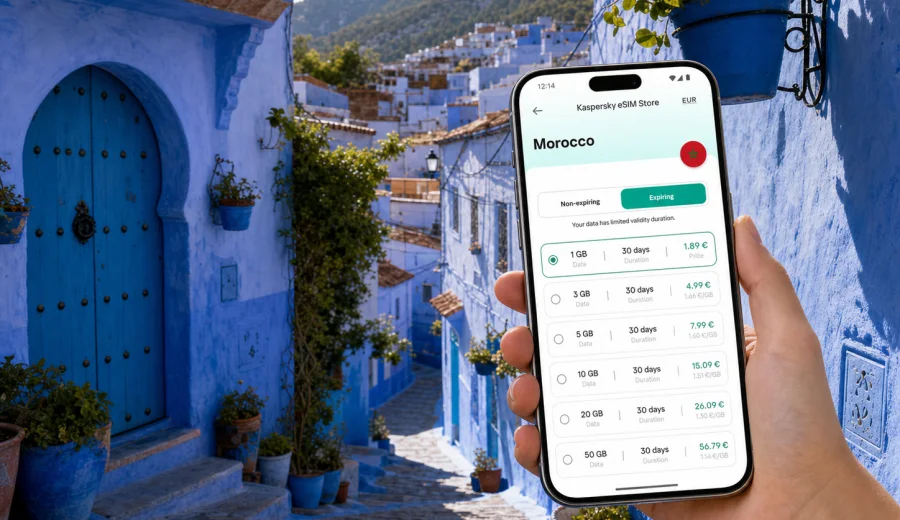
Chefchaouen eSIM: mobile connection and internet for your Morocco trip
Chefchaouen is a city where your phone becomes part of the trip from the first minute. You may arrive after a long transfer from Tangier, Tetouan, Fez, Rabat, or Casablanca; you may need the exact location of a riad inside the blue medina; you may want to message a driver before entering narrow streets where cars cannot always stop near the door. A practical mobile connection and reliable internet access can make the difference between a calm arrival and a confusing first hour.
An eSIM is useful in Chefchaouen because the city is compact, walkable, and visually memorable, but not always straightforward for first-time visitors. Blue lanes, stepped alleys, small squares, rooftop terraces, and hillside viewpoints all create small moments when mobile data helps: opening a map, translating a message, checking a booking, confirming a transfer, sharing your live location, or finding the right turn.
This guide focuses on using eSIM for a trip to Chefchaouen, not on Morocco in general. You will find practical advice for arrival, local movement, hotels, short stays, business travel, day trips, and choosing a data plan before you go.
Why eSIM is useful in Chefchaouen
Chefchaouen is not a large transport hub with a major international airport inside the city. Many travelers reach it by road after landing elsewhere in Morocco. That means your first practical internet needs often begin before you see the blue streets: arranging a pickup, checking bus information, or messaging a hotel.
In the city itself, mobile internet can help with:
- navigation from the drop-off point to a riad in the medina;
- taxi, transfer, and bus coordination;
- messaging hotels when streets are pedestrian-only or hard to describe;
- restaurant reservations, opening hours, and cash-point searches;
- translation for simple travel questions;
- photo backup from busy sightseeing days;
- online check-in for onward travel;
- work calls or urgent messages during a short business stop;
- route planning to Akchour, Tetouan, Tangier, or Fez.
The key benefit of eSIM is preparation. You can choose a data plan for Morocco before departure, install it on a compatible phone, and use mobile data after arrival without looking for a physical SIM card shop at the start of the trip. Conditions depend on the selected plan and local network availability, so it is still important to read the plan details carefully.
Arrival scenarios: when mobile data matters most
Your internet needs in Chefchaouen depend on how you arrive. The city can feel simple once you are settled, but the approach may involve several moving parts.
| Arrival route | Typical mobile internet task | Why it matters |
|---|---|---|
| From Tangier | Track the road transfer, message a driver, confirm arrival time | Many travelers continue by road after landing or arriving by ferry |
| From Tetouan | Navigate the final part of the journey and coordinate local transport | The route can be direct, but hotel access may still require instructions |
| From Fez | Check bus or transfer details and share updates during a longer trip | The journey can take several hours, so plans may change |
| From Casablanca or Rabat | Keep booking details, maps, and messages available during a longer connection | Long-distance travel makes offline-only planning less flexible |
| By rental car | Use navigation outside the medina and find parking areas | The old town is best explored on foot, so the final approach matters |
If you are staying inside the medina, ask your hotel or riad for the nearest accessible drop-off point before arrival. Mobile data helps you open the location, save the route, and call or message the property if the driver stops outside the pedestrian area. This is especially useful after dark, during rain, or when you are carrying luggage through stepped lanes.
Chefchaouen is walkable, but maps still help
The old town is the reason many people come to Chefchaouen. It is compact enough to explore on foot, but it is not a grid. Alleys curve, steps appear unexpectedly, and many streets look similar because of the blue walls, doors, and decorative details. A map is not only for finding major sights; it helps you return to your hotel, choose a quieter route, or decide whether a viewpoint is close enough before sunset.
Mobile internet is useful around:
- the medina lanes and small guesthouse entrances;
- Plaza Uta el-Hammam and nearby cafes;
- Ras El Maa and the uphill paths around it;
- the Spanish Mosque viewpoint;
- local taxi points outside the older pedestrian lanes;
- bus or transfer meeting points on the edge of town.
For sightseeing, you do not need constant high-volume data. Messaging, maps, translation, and booking apps usually use modest amounts of traffic. Photo and video backup, video calls, cloud workspaces, and streaming use much more. If you plan to film a lot of short videos or upload photos every evening, choose a larger data allowance than you would for a simple weekend.
How to choose an eSIM data plan for Chefchaouen
For a city trip, choose the data plan by matching it to your itinerary, not just by looking at the city name. Chefchaouen is in Morocco, so the relevant country plan should cover Morocco. If your route includes several countries or a wider region, check whether a regional or global option is more suitable, and always compare the included destinations in the plan details.
Consider five factors before you buy:
1. Trip length: a one-night photo stop and a week of slow travel need different validity periods.
2. Data allowance: maps and messaging use less data than video calls and cloud backups.
3. Route: a Morocco-only trip and a multi-country route may need different plan coverage.
4. Activation timing: check when the validity period starts and how activation works.
5. Device support: eSIM requires a compatible, unlocked device.
Kaspersky eSIM Store is an app and website where you can choose, order, and activate an eSIM with a suitable data plan for mobile internet in an overseas trip. It helps you compare available options by destination, data amount, duration, and price before you travel, while the actual connection experience depends on the selected plan, your device, and local network conditions.
For Chefchaouen, the most practical approach is to prepare your Morocco data plan before departure and keep the installation details available offline. When you are ready to compare options, you can choose a data plan for your trip to Chefchaouen and review the terms for Morocco before your journey.
How much data do you need in Chefchaouen?
There is no universal data amount for every traveler, but the city lends itself to clear usage scenarios. Use this table as a planning guide, then check your own habits.
| Traveler type | Likely usage in Chefchaouen | Planning tip |
|---|---|---|
| Short-stay visitor | Maps, messaging, booking checks, light browsing | A smaller data package may be enough for one or two days |
| Photo-focused traveler | Maps plus frequent photo uploads and social media | Choose more data if you upload without hotel Wi-Fi |
| Remote worker | Email, cloud documents, calls, hotspot for a laptop | Pick a larger allowance and confirm hotspot support in the plan terms |
| Family traveler | Several people coordinating routes and reservations | Each device may need its own setup, or one phone may act as the main online device |
| Road-trip traveler | Navigation before and after Chefchaouen | Account for data outside the city as well as inside it |
Avoid choosing only by the lowest price. A plan that is too small can become inconvenient if you need maps during a long transfer or have to join an urgent video call. A plan that is too large may be unnecessary if your hotel Wi-Fi handles most uploads. The useful choice fits your actual route and expected behavior.
Before you buy: compatibility and device checks
eSIM is not available on every phone, and even compatible models can have restrictions. Before purchasing a plan, check your device, confirm that it supports eSIM, and make sure it is not locked to another carrier. If you use a work phone, also check whether your company policy allows adding an eSIM profile.
Prepare this checklist before leaving for Morocco:
- your phone supports eSIM;
- your device is unlocked for mobile data use abroad;
- you have a stable internet connection for installation;
- you know which SIM profile will handle mobile data;
- roaming data settings are understood for the eSIM profile if required by the plan;
- your primary number remains available for calls or SMS if you need it;
- you have saved your hotel address and transfer details offline.
An eSIM data plan usually does not include a regular local phone number, voice calls, or SMS unless the selected plan specifically states otherwise. For most travel needs in Chefchaouen, you can use internet-based messaging and calling apps over mobile data.
Installing eSIM before departure or after arrival
It is usually more comfortable to install your eSIM while you still have a stable Wi-Fi connection, for example at home or at your hotel before moving to Chefchaouen. Activation and validity rules depend on the selected plan, so read the instructions before switching it on.
The basic flow is simple:
1. Choose Morocco as the destination or select the relevant regional option.
2. Review data allowance, validity period, price, and plan conditions.
3. Complete the order.
4. Install the eSIM profile using the instructions provided.
5. Set the eSIM as the mobile data line when you are ready to use it.
6. Keep your primary SIM active only for the services you still need.
For device-specific setup, follow the Android installation guide or the iOS installation guide. The exact steps may vary by device model and operating system version, so do not wait until you are standing in a busy arrival area with low battery.
Local movement in Chefchaouen: practical data moments
Chefchaouen encourages slow wandering, but mobile internet still solves real travel friction. You may start the morning with a route to the Spanish Mosque viewpoint, return through quieter lanes, stop for lunch near the main square, then find a taxi or driver for the next day. Each step is easier when maps, messages, and booking details are available.
Useful mobile data habits in the city:
- Save your hotel location and a nearby landmark before leaving.
- Download an offline map, then use mobile data for live updates and search.
- Keep the hotel phone number or messaging contact available.
- Screenshot the address in Arabic or French if the property provides it.
- Use mobile data for navigation, but conserve battery with lower screen brightness.
- Upload large photo sets on trusted hotel Wi-Fi if your data package is limited.
The medina can be busy in popular photo spots. If you are traveling with friends, agree on a meeting point in advance and use messaging only as a backup. Mobile data is helpful, but a clear plan is still better than trying to coordinate from separate alleys with a weak battery.
Hotels, riads, and remote work
Many Chefchaouen stays are in riads, guesthouses, or small hotels. Wi-Fi quality can vary by building and room location. An eSIM data plan gives you a second option for essential tasks: confirming transport, checking email, using a map, or joining a short call.
For remote work, be realistic. Chefchaouen is a scenic mountain city, not a large business district. If you must work while there, plan around:
- time-sensitive calls before or after sightseeing;
- a quiet place with power access;
- backup mobile data for email and documents;
- hotel Wi-Fi for heavier uploads when stable;
- a larger data allowance if you use your phone as a hotspot;
- battery management during long walking days.
If you need hotspot or tethering, check whether the selected eSIM plan allows it. Video calls can consume data quickly, especially if they run for a long time or use high resolution.
Short stopovers and one-night stays
Chefchaouen is often part of a wider Morocco route rather than the only destination. Travelers may stop for one night between Tangier and Fez, or make a scenic detour from Tetouan. In a short stay, mobile data helps you avoid losing time.
For a short visit, prioritize:
- fast arrival coordination with your accommodation;
- saved walking routes from the drop-off point;
- sunset timing and viewpoint planning;
- restaurant and cafe searches near your route;
- onward bus, taxi, or transfer messages;
- online check-in for the next city.
A short trip does not always require a large data allowance, but it does require readiness. Install the eSIM before the transfer and keep booking confirmations easy to find.
Trips from Chefchaouen
Mobile internet is useful not only inside the city but also for routes from Chefchaouen. Many travelers continue to Tangier, Tetouan, Fez, Rabat, or coastal towns. Others plan a nature trip to Akchour or another mountain area. Coverage and speed can vary outside the city, so keep some offline backup.
Before leaving Chefchaouen for a day trip or onward route:
- save the destination and return point offline;
- check the meeting point with your driver or guide;
- keep emergency contacts and hotel details accessible;
- avoid relying only on cloud documents;
- charge your phone and carry a power bank for long days;
- track data usage if your package is limited.
For road trips, navigation can use more data than a simple walking day. A Morocco data plan is usually more practical than thinking only about Chefchaouen itself, because your travel day starts and ends beyond the city.
Common mistakes to avoid
Some eSIM problems are preventable. Most come from rushing setup or not checking the device and plan terms.
Avoid these mistakes:
- buying before confirming that your phone supports eSIM;
- installing the profile on the wrong device;
- deleting the eSIM profile after activation without checking whether it can be reinstalled;
- assuming the plan includes calls or SMS;
- ignoring when the validity period begins;
- leaving mobile data on the wrong SIM profile;
- relying on hotel Wi-Fi for installation when you are already in transit;
- using cloud backup or video streaming without watching your data balance.
The safest routine is simple: check compatibility, read the plan details, install over stable Wi-Fi, understand activation timing, and test settings before you need them in the street.
Quick planning checklist for Chefchaouen
Use this checklist before departure:
- Choose a data plan that includes Morocco.
- Confirm your phone supports eSIM and is unlocked.
- Install the eSIM profile while you have reliable Wi-Fi.
- Save hotel address, transfer details, and map locations offline.
- Keep the eSIM installation email or profile details accessible.
- Decide whether your primary SIM or eSIM will handle mobile data.
- Check whether your plan allows hotspot use if you need it.
- Bring a charger or power bank for long walking days.
Use this checklist after arrival:
- Turn on the eSIM mobile data line when appropriate.
- Check that data roaming is set as required by the plan.
- Open your map before leaving the transfer point.
- Message your accommodation if the medina entrance is unclear.
- Track data usage if you plan to upload photos or work remotely.
- Keep important documents available offline.
FAQ: eSIM and mobile internet in Chefchaouen
Can I use eSIM for navigation in Chefchaouen?
Yes, an eSIM data plan can be useful for maps, walking routes, taxi coordination, and hotel directions. The medina is walkable but can be confusing on a first visit, so mobile data helps with live search and messaging.
Should I install eSIM before traveling to Morocco?
Installing before departure is often more convenient because you can use stable Wi-Fi and avoid setup pressure during arrival. Check the plan rules so you understand when validity starts and when you should activate mobile data.
Does eSIM include a Moroccan phone number?
Usually, travel eSIM data plans focus on mobile internet and do not include a regular local phone number, voice calls, or SMS unless stated in the selected plan. You can use internet-based apps for calls and messages.
Is eSIM enough for a remote work day in Chefchaouen?
It can help as backup mobile data for email, documents, messaging, and some calls. For long video calls or large uploads, choose a plan with enough data and use stable hotel Wi-Fi when available.
What if I continue from Chefchaouen to another Moroccan city?
Choose a plan for Morocco rather than thinking only about the city. That way your data planning covers transfers, road navigation, and onward stops such as Tangier, Tetouan, Fez, Rabat, or Casablanca, subject to the selected plan terms and local network conditions.
Choose eSIM for a smoother Chefchaouen trip
Chefchaouen rewards unhurried travel, but your arrival, hotel access, transport, and onward route are easier when mobile internet is ready. With Kaspersky eSIM Store, you can review options for Morocco, choose a suitable data plan, install the eSIM on a compatible device, and manage mobile data through the app or website.
Before you leave, check your device, read the plan conditions, install the eSIM over a stable connection, and save the essentials offline. Then you can spend less time solving connection problems and more time enjoying the blue streets, viewpoints, and mountain routes around Chefchaouen. When your itinerary is set, prepare an eSIM data plan for Morocco before your trip.