Travel connectivity guide
Chernivtsi eSIM: Mobile Internet for Your Trip
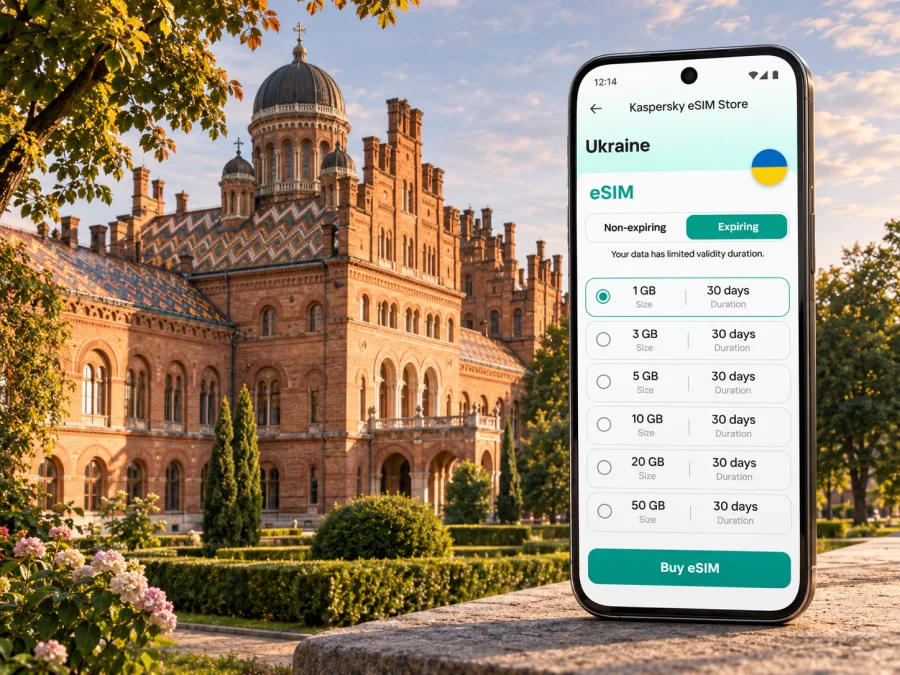
Chernivtsi eSIM: Mobile Connection and Internet for Your Trip
Chernivtsi rewards a slower arrival: a walk through the historic centre, a visit to the former Residence of the Metropolitans of Bukovyna and Dalmatia, and time to find your bearings between the railway station, your accommodation and the old streets. A mobile connection helps with each practical step, from checking a train update to finding a route or messaging your host. An eSIM can provide mobile data without replacing the physical SIM in your phone, provided your device supports it and the selected plan covers Ukraine.
There is an important travel detail to plan around. Ukraine’s airspace remains closed to civil aviation, so do not assume you can fly directly to Chernivtsi or another Ukrainian airport. Recheck official travel information and transport arrangements close to departure. Many itineraries involve an international arrival outside Ukraine followed by onward ground travel; the best route depends on your starting point and current conditions. This guide focuses on getting online for the Chernivtsi part of the journey, rather than treating the city as a generic country destination.
Plan the first connection before you set out
For a visitor, mobile data is most useful when it solves a real transition: locating the right station entrance, checking a transfer, letting a host know when you expect to arrive, or opening a saved booking while moving through an unfamiliar area. If you are arriving by train or bus, download tickets and key addresses before departure as well. A data connection is useful, but it should not be the only copy of information you need.
Chernivtsi is the administrative centre of Chernivtsi Oblast in western Ukraine. The wider region borders Romania and Moldova, but a city trip and a cross-border itinerary are different data-use cases. A plan intended for Ukraine should not be assumed to cover Romania or Moldova. If your route crosses a border, check each destination in the plan terms or choose an option that explicitly includes every country you will visit.
Before leaving your departure city, save these details offline:
- the accommodation name, street address and a local-language version if available;
- train or bus booking references, departure times and the station or terminal name;
- the route from your arrival point to your accommodation;
- a map area covering the centre and any place you expect to visit outside it;
- a contact method for your host or meeting organiser.
This small backup matters if a station is busy, a device battery is low, a connection takes time to register, or your itinerary changes. Keep your phone charged and carry a power bank if you will be navigating for several hours.
Getting to Chernivtsi and staying oriented
Do not plan your journey around a direct flight into Chernivtsi while Ukrainian civilian airspace is closed. Instead, confirm the complete route from your origin: the international arrival point, the onward train or coach, any border crossing, and the final transfer into the city. These are separate legs and may have different schedules, ticket rules and connection risks. Allow a comfortable margin between them rather than relying on a tight same-day transfer.
Chernivtsi railway station has passenger services, but routes and departure times can change. Check the current timetable and ticket conditions through the railway operator before travel, then recheck for updates on the day. If your route includes a coach, confirm the precise departure point: a city can have more than one stop or terminal, and a booking confirmation may name a street or platform rather than simply “Chernivtsi.” Ask your carrier or accommodation to clarify any ambiguous location before you leave.
At the station or terminal, a working data connection can help you compare your saved address with the map, message someone if a train is delayed, and arrange the next leg. It is sensible to keep your first destination written down as well. If mobile data is not active yet, show the address to a driver or ask station staff for directions rather than trying to troubleshoot while crossing a road or walking with luggage.
For the first transfer, use a simple sequence:
- Confirm the name of the arrival station or stop against your ticket.
- Open the saved route to your accommodation and check that its starting point matches your actual location.
- Compare any taxi or local transport details with the information from your host or carrier.
- Send a short arrival update once you are safely stopped and have a reliable connection.
- Keep the written address available in case your battery or data connection runs out.
An eSIM is a mobile-data option, not a transport booking or a guarantee of coverage at every point on a route. Keep critical travel documents accessible offline and follow local instructions if services or routes are disrupted.
Finding your way around the city
Chernivtsi’s central sights are compact enough that many visitors plan part of the day on foot. Central Square, Teatralna Square, Philharmonic Square and Olha Kobylianska Street are useful names to recognise when planning a walk through the historic centre. The former Residence of the Metropolitans of Bukovyna and Dalmatia, now Yuriy Fedkovych Chernivtsi National University, is another major landmark; its distinctive architectural ensemble is part of the city’s identity. Check visitor access and opening arrangements before making it the fixed point of a tight schedule.
A map is especially handy when you move between the centre and places farther away, when you return after dark, or when you have an appointment at a precise address. Save places by their full name rather than relying on a pin alone: several listings can have similar names, and a pin may represent an entrance on a different street. If you are meeting someone, share both the place name and the nearest street or square.
Public transport routes, stops and service patterns can change. Use a current local route planner or operator information on the day, and check that the stop shown in the app is on the correct side of the street. When a route involves a transfer, keep the next stop’s name in view before you board. A map connection can help you adjust if you miss a stop, but it is still wise to have your destination written down or saved offline.
| City situation | What mobile data can help with | Useful backup |
|---|---|---|
| Arriving at the railway station | Checking the route and contacting your accommodation | Saved address and booking details |
| Walking between central landmarks | Maps, opening updates and meeting messages | Offline map and a short list of place names |
| Using local transport | Looking up routes and checking stop names | Route details saved before boarding |
| Working from a hotel or café | Email, calendar and file access | Downloaded documents and a Wi-Fi fallback |
| Leaving the city for a day trip | Checking connections and confirming the return plan | Ticket details and a charged power bank |
Connectivity can vary between buildings, vehicles and streets. Thick walls, underground spaces, network congestion and the specific local network used by a plan can all affect the experience. Treat navigation as a combination of live information and preparation, not as something that must work perfectly at every moment.
Choose a plan for the whole itinerary
A city name helps you picture where you will use data, but the plan’s coverage is normally defined by country or region. For a stay in Chernivtsi, check that Ukraine is explicitly included. For a trip that continues to another country, verify that destination separately; nearby geography does not imply that a plan crosses borders with you.
Estimate usage from your own routine rather than choosing by trip length alone. Messaging, maps and ticket checks are usually lighter than frequent video calls, uploading large files or streaming. If you need to work remotely, consider how often you will join calls and whether your accommodation has a dependable Wi-Fi connection. Download entertainment and large work files in advance when practical, and use Wi-Fi for updates when it suits you.
Before choosing, compare the details that affect your trip:
- Coverage area: Ukraine, or every country on a multi-country itinerary, must be named in the plan terms.
- Data allowance: estimate maps, messaging, browsing, calls over apps and any work use.
- Validity period: check when the validity begins and whether it covers your arrival and departure dates.
- Top-up or renewal rules: see whether the plan can be extended and how additional data is handled.
- Price and payment currency: review the amount shown at checkout and any applicable payment conditions.
- Device requirements: confirm eSIM support and that the phone is not restricted by a carrier lock.
Kaspersky eSIM Store is an app and website that helps you choose, purchase and activate an eSIM with a suitable plan for mobile data while travelling abroad. The available options and conditions depend on the destination and the selected plan. You can review eSIM plan options for Ukraine and check the current coverage, data allowance, validity and price shown for each option before deciding. A country page is a starting point for checking plans; it does not mean that a particular tariff is available or appropriate for every traveller.
Estimate your data needs
List the days when you will need data away from accommodation, then note whether you will mostly use maps and messaging or also make video calls, upload files and use a hotspot. Download maps and large files over Wi-Fi where practical. Choose an allowance and validity period that fit your itinerary, with a little room for delays, and recheck coverage and activation terms before payment. A short visit may need less data than a work trip, but usage depends on your habits rather than a fixed daily estimate.
Check device compatibility first
An eSIM plan can only be installed on a compatible device. Support varies by make, model and regional version, and some phones are locked to a mobile operator. Check the exact device variant, the manufacturer’s current specifications and your carrier’s unlocking status before purchase. A model name alone may not tell the whole story if regional variants differ.
Check whether your device supports eSIM before you choose a plan. If you use a phone with two SIM lines, also confirm how it handles mobile data selection and whether your existing number can remain active for calls or messages. Keep in mind that a travel eSIM plan is generally for mobile data; it does not automatically provide a regular phone number, voice calls or SMS unless the plan terms explicitly say otherwise. Messaging and voice apps can use data, subject to the app and service conditions.
Install and activate before departure or after arrival
If possible, install the eSIM while you have a stable internet connection and enough time to follow the instructions. Whether you install before leaving or after reaching Ukraine depends on the plan’s activation rules: some plans start validity on installation, while others start when they first connect to a supported network. Read the plan details so you do not begin the validity period earlier than intended.
Connect to Wi-Fi and keep the installation information available on a second screen or in a saved message if you need to scan a QR code. Do not delete an eSIM profile unless the instructions say it can be installed again; some profiles are limited to one installation or one device.
A general setup sequence is:
- Check that the selected plan includes Ukraine and review its activation instructions.
- Connect your phone to Wi-Fi and open its mobile-network settings.
- Choose the option to add an eSIM, then scan the supplied QR code or follow the app’s installation flow.
- Label the new line clearly, for example “Travel data,” so it is easy to identify.
- Select the travel eSIM for mobile data when you are ready to use it.
- Turn on data roaming for that eSIM only if the plan instructions require it; follow the provider’s stated setup steps.
- Wait for registration and check the data connection with a simple page or message.
The precise menu names differ between phones and operating-system versions. Follow the relevant Android eSIM installation instructions or iOS eSIM installation instructions. Keep your home SIM settings as you want them for calls and messages, and check which line is selected for mobile data. If the connection does not appear, confirm the plan’s activation conditions, selected data line and roaming setting before trying again. Activation can take a few minutes and depends on the device and local network.
Match the plan to your stay or onward route
A one-night stop: prioritise the station-to-hotel route, your next ticket and the accommodation address. Download the route and booking details before departure; check the plan validity against the short visit rather than assuming every short-stay option starts at the same time.
A work visit: estimate usage from calls, file access and any hotspot use. Check whether tethering is permitted, confirm the venue’s Wi-Fi arrangements and save essential documents offline. Keep your regular SIM available for calls or messages if your device and home carrier settings allow it.
A regional itinerary: list every country on the route and verify coverage for each. Chernivtsi’s oblast borders Romania and Moldova, but a Ukraine plan should not be treated as regional coverage. A different or multi-country option may be needed for the rest of the trip.
For sightseeing, save the day’s main places and check your return transport before leaving the centre. If a connection is delayed, use current carrier information to update your plan and contact your accommodation; keep tickets and addresses offline as a backup.
If mobile data does not connect
Work through a few checks calmly before changing settings at random:
- Confirm that the eSIM line is enabled and selected for mobile data.
- Check that the plan includes Ukraine and that its validity has started.
- Review whether data roaming must be enabled for the travel line.
- Toggle airplane mode briefly or restart the device, then allow time to register.
- Check that the phone has not selected another SIM for mobile data.
- Move to a different location and retry; indoor reception can differ from outdoor reception.
- Use Wi-Fi to review the plan instructions or contact support if the issue remains.
Do not remove the eSIM profile unless the instructions or support team tells you to. Removing it may make reinstallation difficult or impossible, depending on the profile terms. If you are navigating, use your saved offline map and written address while you troubleshoot.
Questions travellers ask
Can I fly directly to Chernivtsi?
Do not plan on a commercial flight into Chernivtsi while Ukraine’s airspace is closed to civil aviation. Check current official notices and build an itinerary using confirmed international and ground transport connections. Conditions can change, so recheck close to travel.
Does a Ukraine eSIM plan cover Romania or Moldova?
Not automatically. Coverage is determined by the plan terms, not by proximity. Check that every country on your itinerary is listed before you buy or activate a plan.
Can I use an eSIM in Chernivtsi without removing my regular SIM?
Often, a compatible dual-SIM phone can keep a physical SIM installed while using an eSIM for data. The exact options depend on the device and plan. Check which line handles mobile data and review your home carrier’s roaming settings to avoid unexpected charges.
Does a travel eSIM give me a Ukrainian phone number?
Not unless the selected plan explicitly includes a number and calls or SMS. Travel eSIM plans are commonly designed for mobile data. Use internet-based messaging for app calls and messages, or keep another calling option if you need to reach a conventional phone number.
Should I install the eSIM before I travel?
You can install it beforehand if the plan instructions allow it and you have a reliable connection. Check when the validity period begins. If it starts on first network connection, installing early may be convenient; if validity starts at installation, wait until the timing suits your trip.
What should I save offline for a Chernivtsi visit?
Keep your accommodation address, ticket details, key contacts, a map of the centre and any important venue information accessible without mobile data. Offline preparation is useful even when your eSIM is installed and working.
Get ready for Chernivtsi
Before you set off, confirm the route into Ukraine, check your onward transport, save your first address and make sure your phone can use eSIM. Compare plan coverage, data allowance, validity and activation terms for the full itinerary. Kaspersky eSIM Store helps you choose, purchase and activate an eSIM for mobile data while travelling abroad; the selected plan’s terms determine where and how it works.
When your device and route are ready, check the available eSIM options for Ukraine, choose a plan that fits your travel dates and data needs, and follow the installation instructions for your phone. Keep your tickets and essential addresses offline as a dependable backup, then enjoy exploring Chernivtsi with a clearer plan for staying connected.


