
Travel connectivity guide
Chicago eSIM for Mobile Internet Travel
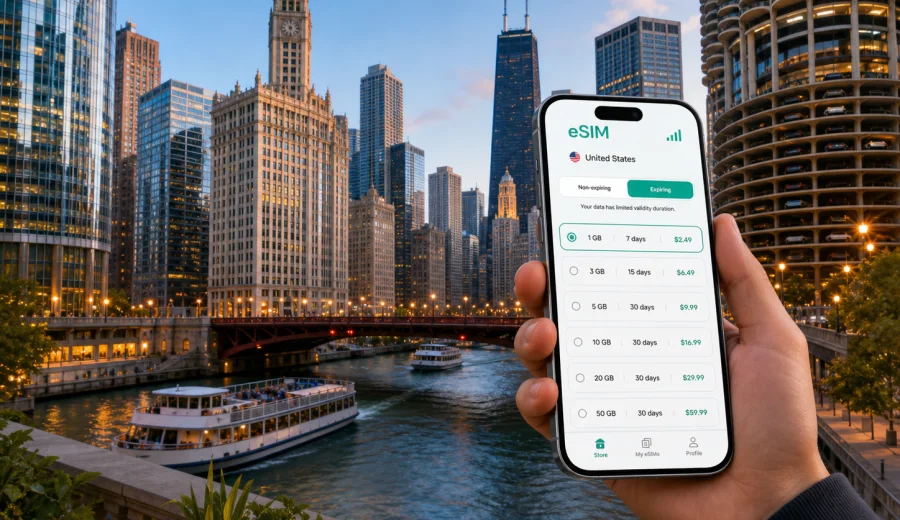
Chicago eSIM: mobile connection and internet for your trip
Chicago is an easy city to love, but it is not a city where you want to arrive offline. The distance between O'Hare International Airport, downtown hotels, lakefront museums, business districts, neighborhood restaurants, and suburban meeting points can be significant. You may need a ride-share pickup zone, a train route, a restaurant reservation, a hotel check-in message, or a map while you are still finding your bearings.
An eSIM can make that first hour simpler. Instead of searching for a physical SIM card after a long flight, you can prepare mobile internet before your trip and use a compatible phone to get online when the selected tariff conditions allow activation. For Chicago, that matters because many travel decisions happen on the move: choosing between the Blue Line and a taxi, checking Metra schedules, finding the right entrance at McCormick Place, or navigating from River North to the West Loop for dinner.
This guide focuses on Chicago, not just the United States in general. You will find practical scenarios for arrivals, public transport, downtown walks, business trips, hotels, short stopovers, and side trips from the city.
Why mobile internet matters in Chicago
Chicago rewards travelers who can make quick decisions. The city has a strong public transport network, dense downtown streets, lakefront paths, large event venues, and neighborhoods that feel distinct from one another. Mobile data helps you connect these pieces without depending on hotel Wi-Fi or asking for directions every time plans change.
Mobile internet is useful from the first airport decision to the last hotel message. It helps with CTA train routes, ride-share pickup points, restaurant bookings, digital tickets, weather changes, and group coordination when plans split across downtown, the lakefront, and outer neighborhoods.
Arrival scenarios: O'Hare, Midway, and the first ride
Most international travelers arrive through O'Hare International Airport. The airport is large, busy, and connected to downtown by the CTA Blue Line. Midway International Airport is smaller and connected to the Loop by the Orange Line. In both cases, mobile data is useful before you leave the terminal.
| Arrival point | Typical route into the city | Why mobile data helps |
|---|---|---|
| O'Hare International Airport | CTA Blue Line, taxi, ride-share, hotel shuttle | Compare travel time, find pickup zones, message your hotel |
| Midway International Airport | CTA Orange Line, taxi, ride-share | Check train timing, choose the right stop, confirm late arrivals |
| Union Station | Taxi, walk, CTA, bus | Navigate street exits, bridges, and downtown transfers |
| Ogilvie Transportation Center | Walk, CTA, ride-share | Reach Loop, River North, West Loop, or hotel addresses faster |
If you plan to use public transport, you will likely check routes more than once. Chicago's CTA system is practical, but visitors may need time to understand train colors, platform directions, bus stops, and transfer points. A data connection is also useful for ride-share instructions at airports and large hotels.
Which Chicago neighborhoods change your data needs?
Chicago is not one compact tourist zone. Your data needs depend on where you stay and how often you move between districts.
| Area | Why data helps |
|---|---|
| Loop and River North | Bridges, river crossings, office towers, hotels, and architecture tour meeting points |
| Streeterville and Magnificent Mile | Shopping, Navy Pier routes, hospital visits, hotel entrances, and taxi pickups |
| West Loop and Fulton Market | Restaurant bookings, office addresses, evening rides, and warehouse-style blocks |
| South Loop and Museum Campus | Digital tickets, lakefront weather, event timing, and attraction-to-attraction navigation |
| Wicker Park, Logan Square, Pilsen, Hyde Park, Lincoln Park | Longer neighborhood routes, music venues, local food, universities, and buses |
How much data should you plan for?
There is no single correct amount of data for Chicago. A traveler who only uses maps and messaging needs much less than someone who uploads videos, works from a laptop, or uses hotspot mode. The table below gives a practical way to think about it.
| Trip style | Typical online activity | Data planning tip |
|---|---|---|
| Short stopover | Maps, messaging, ride-share, flight updates | Choose a small package with enough validity for arrival and departure |
| Weekend city break | Maps, restaurant searches, tickets, photos, messaging | Allow extra data for navigation and social apps |
| Business trip | Email, chat, calendars, document previews, taxi apps | Choose enough data for work gaps between Wi-Fi networks |
| Family trip | Maps, messaging, attraction tickets, translation, shared plans | Add a buffer because several people may depend on one organizer's phone |
| Longer stay | Daily transit, food delivery, video calls, hotspot when allowed | Check validity period and top-up options before you travel |
Video streaming, cloud photo backup, video calls, and hotspot use can consume data quickly. For routine travel tasks in Chicago, maps, messaging, email, and ticket apps are usually the priority.
Before buying any eSIM tariff, check your device. Your phone or tablet needs eSIM support, and it should not be locked in a way that prevents using another mobile plan. This is worth checking before you leave, especially if your device was bought with a carrier contract.
Practical checklist before flying to Chicago
Use this checklist a day or two before your flight:
- confirm that your device supports eSIM and is not restricted by your current carrier;
- update your phone's operating system if you have been postponing updates;
- decide whether you need data only for Chicago or for a wider United States route;
- estimate your trip length and choose a validity period that covers arrival and departure;
- keep your primary SIM active if you need bank messages or calls on your usual number;
- save hotel address, airport route, and first meeting location offline as a backup;
- keep the QR code or installation details accessible before you travel;
- check whether data roaming must be enabled for the eSIM profile after activation.
An eSIM is mainly about mobile internet. It usually does not include a regular local phone number, voice calls, or SMS unless the tariff conditions say otherwise. For calls and messages, many travelers use internet-based apps while keeping their primary SIM available for essential services.
Choosing an eSIM tariff for Chicago
For a Chicago trip, the country destination is the United States. That matters because the tariff should match the country where you will use mobile data. If your route includes only Chicago and nearby Illinois or Midwest destinations, a United States option is usually the relevant starting point. If your itinerary crosses several countries, compare regional or global alternatives separately.
When you compare tariffs, focus on four details:
1. Data volume. Choose enough gigabytes for maps, messaging, tickets, email, and any work tasks away from Wi-Fi.
2. Validity period. Make sure the tariff covers the full stay, including arrival and departure days.
3. Activation conditions. Check when the validity period starts and what steps are needed before using the eSIM.
4. Device rules. Confirm compatibility, QR-code use, and whether the eSIM can be reinstalled if you change devices.
Kaspersky eSIM Store is an app and website where you can quickly choose, arrange, and activate an eSIM with a suitable mobile data tariff for international travel. For Chicago, you can choose an eSIM tariff for your trip to the United States and review the available data volumes, validity periods, destination, and price before you decide.
This preparation is especially helpful if you land late, travel with children, or go straight from the airport to a meeting.
How to install and activate an eSIM
The exact steps depend on your device and the selected tariff, but the general flow is simple:
1. Choose the destination and tariff that fit your Chicago trip.
2. Complete the order and keep the installation details available.
3. Add the eSIM profile to your compatible phone.
4. Set the eSIM as the line for mobile data when you are ready to use it.
5. Enable data roaming for the eSIM if the instructions for your tariff require it.
6. Keep your primary SIM settings as you prefer for calls, SMS, and banking messages.
If you need device-specific guidance, use the Android installation instructions or the iOS installation instructions. Install the profile while you have stable Wi-Fi, and avoid deleting the eSIM profile unless the instructions or support team tells you to do so.
Chicago transport: where eSIM helps most
Chicago has several movement patterns, and each one creates different connectivity needs:
- airport to downtown: compare the Blue Line, Orange Line, taxi, hotel shuttle, and ride-share options;
- downtown walking: navigate bridges, riverwalk entrances, construction, and underground sections;
- CTA trains and buses: compare train and bus routes when neighborhood transfers are not obvious;
- Metra and Amtrak: check schedules and station details for suburban or regional travel;
- ride-share and taxis: coordinate pickup points near airports, stadiums, hotels, and event venues.
Business trips and conferences
Chicago is a major business city, with offices in the Loop, River North, Fulton Market, West Loop, and along suburban corridors. It also hosts large events at McCormick Place and conferences at downtown hotels. For this kind of trip, mobile internet is less about sightseeing and more about avoiding gaps between Wi-Fi networks.
Useful business scenarios include calendar changes between meetings, team messages after delays, venue entrance searches, dinner coordination after a conference day, and hotspot use if the selected tariff and device settings allow it. For sensitive work, follow your company's security rules and avoid unknown public Wi-Fi for important accounts.
Hotels, apartments, and Wi-Fi gaps
Many Chicago hotels offer Wi-Fi, but mobile data still matters. You may not have your room yet, the login page may require a confirmation code, or the connection may not be convenient in lobbies, elevators, taxis, restaurants, or conference spaces. An eSIM gives you a separate way to handle those travel tasks outside your room.
Short stopovers in Chicago
If you have a long connection through O'Hare, mobile data can help you decide whether leaving the airport is realistic. Downtown is not next door, and traffic can be unpredictable. With mobile internet, you can check transit time, flight status, security wait expectations, and weather before making a decision.
For a short stopover, think in practical terms: how many hours you have, whether you must recheck luggage, whether the next flight is domestic or international, and whether a nearby meal or lounge is more realistic than a city visit. Even if you stay at the airport, data is useful for messaging, rebooking, food ordering, entertainment, and travel documents.
Trips from Chicago
Chicago often acts as a base for wider travel in the United States. You might visit suburbs for work, take a train to Milwaukee, drive around Lake Michigan, or continue to New York, Los Angeles, Las Vegas, Miami, or another U.S. city. If your tariff covers the United States, it can remain relevant beyond Chicago, subject to the selected tariff conditions and validity period.
For road trips, mobile data supports navigation, fuel stops, hotel changes, and route updates. For train or flight connections, it helps with tickets, delay alerts, and arrival logistics. Before you extend your route, check whether your data volume is enough for the extra days.
FAQ: eSIM and mobile internet in Chicago
Is an eSIM enough for calls and SMS?
In many travel tariffs, eSIM is focused on mobile internet. Standard phone calls and SMS are not included unless the selected tariff says so. You can use internet-based calling and messaging apps over mobile data.
Can I install the eSIM before arriving in Chicago?
You can usually install the eSIM profile before travel while you have Wi-Fi, then activate or start using it according to the tariff instructions. Check the activation rules carefully so the validity period starts when you expect.
Will public Wi-Fi be enough in Chicago?
Public Wi-Fi can help in airports, hotels, cafes, and venues, but it is not a consistent travel plan. Mobile data is more practical for movement, maps, ride-share coordination, and urgent messages.
Can I use eSIM for a laptop hotspot?
Possibly, but it depends on the selected tariff, your device, and hotspot settings. Check the conditions before relying on it for work.
Final preparation before you go
A good Chicago connectivity plan is simple: check eSIM compatibility, choose the right destination, install the profile on stable Wi-Fi, understand when activation begins, and keep enough data for the way you actually move around the city. Focus on the moments when being offline would interrupt the trip: airport arrival, transit decisions, hotel check-in, meeting changes, digital tickets, and navigation between neighborhoods.
Before departure, open Kaspersky eSIM Store on the site or in the app, review the available data volumes and validity periods, and prepare an eSIM tariff for your United States trip. With the right setup, your mobile connection in Chicago becomes one less thing to solve after landing.