
Travel connectivity guide
eSIM for China: mobile internet guide
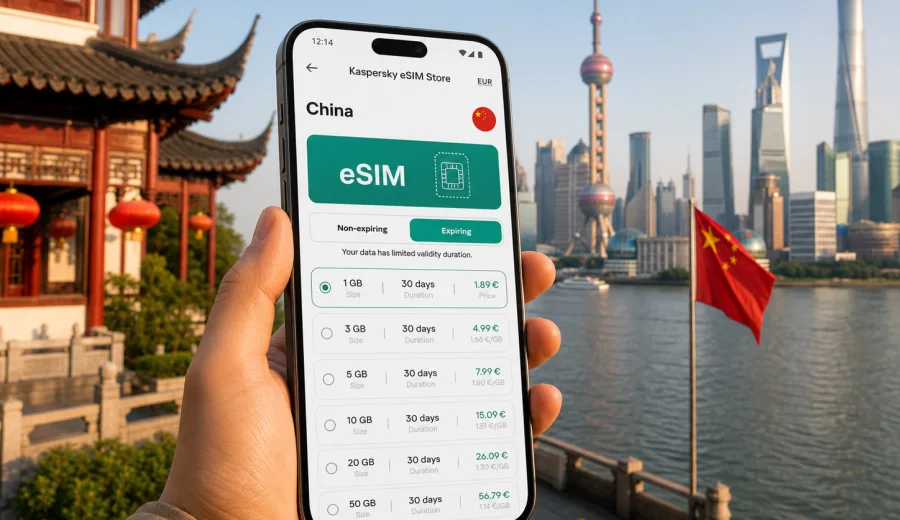
eSIM for China: mobile connection and internet guide for your trip
China is a country where mobile internet quickly becomes part of the route itself. You may need it to show a hotel address in Chinese, order a ride from the airport, pay for a metro ticket, translate a menu, follow a high-speed rail schedule, or keep in touch with colleagues across time zones. A stable mobile connection is not just a convenience here; it helps you move through a very large country with less friction.
An eSIM can make that preparation simpler. Instead of looking for a physical SIM card after arrival, you can prepare a digital SIM profile on a compatible device and use a data plan for your trip. Kaspersky eSIM Store is an app and website where you can quickly choose, arrange and activate an eSIM with a suitable mobile data plan for international travel. It is designed for travellers who want clear plan conditions before they leave or soon after they arrive.
This guide explains how to think about eSIM, mobile connection and internet use in China: what to check before buying a plan, how much data you may need, when to install the eSIM, and how to avoid common travel mistakes.
Why mobile internet matters in China
China is highly digital in everyday travel situations. In large cities such as Beijing, Shanghai, Guangzhou, Shenzhen, Chengdu, Xi'an and Hangzhou, many routine tasks are easier when your phone is online. You may use maps to find a metro entrance, translation apps in restaurants, ride-hailing apps for longer transfers, messenger calls over data, airline apps for flight changes, and banking apps for travel payments or card checks.
The need becomes even clearer when you leave the airport. Hotel names may have different English and Chinese versions. Taxi drivers may need the address in Chinese characters. Railway stations can be large and busy. Some attractions require timed-entry reservations or digital confirmations. Public Wi-Fi may exist in hotels, cafes or airports, but it is not a reliable primary plan for moving around a country this large.
An eSIM gives you a separate mobile data line on the same device, if your phone supports eSIM. You keep your usual physical SIM or existing eSIM for calls and important messages, while the travel eSIM handles data. This setup is useful when you want to reduce dependence on standard roaming and avoid searching for offline SIM counters after a long flight.
What an eSIM does and does not do
An eSIM is a digital SIM profile installed on your phone or tablet. For a trip to China, it is mainly useful for mobile internet. It usually does not include a regular local phone number, voice calls or SMS unless those conditions are clearly stated in the selected plan. For calls and messages, you can often use internet-based apps when mobile data is active.
Think of the eSIM as one part of your travel connectivity setup, not as a full replacement for every communication need. It helps you get data on a compatible device, while your usual number can remain available for bank alerts, account verification or emergency contacts if your home plan supports it.
Key points to remember:
- eSIM is installed digitally, without inserting a plastic SIM card.
- It works only on devices that support eSIM and are not locked to another carrier.
- The plan conditions define the country, data allowance, validity period and price.
- Some plans start counting validity after activation, while others start after the first network connection; always read the plan details.
- Data roaming may need to be enabled for the eSIM line on some phones.
Before you buy: compatibility checklist
Before choosing a data plan, confirm that your device can use eSIM. This is the most important technical check, because not every phone model supports it and some devices are restricted by region or carrier lock.
Use this checklist before payment:
- Your phone or tablet supports eSIM.
- The device is not locked to one mobile carrier.
- You have a stable internet connection for installation.
- You know which SIM line should be used for mobile data after arrival.
- You have enough battery and time to complete installation calmly.
- You can open the email, app or profile details needed for installation.
If you are not sure whether your phone supports eSIM, check your device before selecting a plan. It is better to verify this while you still have reliable home internet than to discover a compatibility issue at the airport.
How much data do you need in China?
The right data allowance depends on your route, travel style and how often you use maps, translation, video calls and cloud services. China rewards planning because journeys can involve airports, metro systems, high-speed trains, hotel transfers and city-to-city routes. A small data plan may be enough for a short business trip, while a longer itinerary needs more room.
| Trip style | Typical mobile internet use | Practical data approach |
|---|---|---|
| 2-3 day business trip | Email, messengers, maps, taxi apps, hotel details | Choose a smaller plan if you mostly use hotel Wi-Fi for heavy tasks |
| 5-7 day city break | Maps, translation, restaurant searches, tickets, photos, messaging | A medium data allowance is usually more comfortable |
| 10-14 day multi-city route | High-speed rail, ride-hailing, maps, travel apps, cloud backups | Choose more data or plan for top-ups if available |
| Remote work trip | Video calls, file transfers, hotspot, constant messaging | Estimate your work usage separately; video can consume data quickly |
| Family travel | Navigation, tickets, shared rides, group coordination | Consider one larger plan on the main organiser's phone |
For most travellers, maps and translation are not the biggest data consumers. Video streaming, large cloud photo backups, app updates, social media uploads and laptop hotspot sessions use data much faster. If you want predictable usage, disable automatic cloud backups and app updates before the trip.
When to install and activate your eSIM
Install the eSIM when you have stable Wi-Fi and time to follow the steps carefully. For many travellers, this means installing it before departure and activating data use at the right moment according to the plan rules. You should read the validity conditions first, because some plans begin their validity period when activated and some begin after connecting to a supported network.
The general installation flow is simple:
1. Choose the country and a data plan that fits your trip.
2. Confirm that your phone supports eSIM.
3. Complete the purchase flow and open the installation details.
4. Install the eSIM profile using the QR code or manual details.
5. Set the eSIM as the line for mobile data when you are ready to use it.
6. Enable data roaming for the eSIM line if the instructions for your device require it.
7. Keep your primary line available if you need your usual number for calls or account messages.
For device-specific steps, follow the Android installation guide or the iOS installation guide. Do not delete an installed eSIM profile unless you are sure you no longer need it; in many cases, an eSIM profile cannot simply be moved to another device after activation.
Choosing a plan for China
Once you understand your route and data needs, compare plans by four practical criteria: data volume, validity period, destination coverage and total price. A plan with more data is not automatically better if your trip is short, and a small plan may feel restrictive if you are moving between cities every day.
For a balanced choice, ask yourself:
- How many days will I be in China?
- Will I use hotel and office Wi-Fi for heavy tasks?
- Do I need mobile data for work calls or hotspot use?
- Will I travel beyond one city?
- Do I want a smaller plan first and top up later if the option is available?
- Am I travelling alone or coordinating a group?
Kaspersky eSIM Store helps you prepare for this decision by showing plan details before you activate the eSIM. You can review the country, data allowance, validity and price, then select the option that fits the trip. If you are ready to compare options, you can choose an eSIM data plan for China before departure or when you still have reliable Wi-Fi.
Practical data-saving settings
A travel eSIM works best when your phone is set up to avoid silent data waste. Many devices use mobile data in the background for syncing, app updates and media backups. These actions can consume a large part of your allowance without helping your trip.
Before leaving, adjust these settings:
- Turn off automatic app updates over mobile data.
- Pause cloud photo and video backups until you are on Wi-Fi.
- Download offline maps for key areas where your map app supports it.
- Save hotel addresses, booking confirmations and train details offline.
- Disable automatic video playback in social and news apps.
- Set messenger media downloads to Wi-Fi only.
- Use lower video quality for calls when the connection is limited.
- Track usage in your phone settings during the first day.
A simple rule works well: use mobile data for navigation, communication and travel tasks; use Wi-Fi for heavy downloads, long video calls and large uploads. This keeps the plan useful for the moments when you actually need mobility.
Common mistakes to avoid
Most eSIM problems are caused by rushed preparation rather than the technology itself. Avoid these mistakes:
- Buying a plan before checking whether your phone supports eSIM.
- Installing the eSIM on the wrong device when you plan to use another phone for travel.
- Forgetting to set the eSIM as the mobile data line.
- Leaving your primary SIM selected for data and unintentionally using roaming.
- Starting plan validity too early without reading the conditions.
- Deleting the eSIM profile after installation.
- Using mobile data for cloud backups and video streaming on the first day.
- Assuming an eSIM includes a phone number, SMS or voice calls when the plan does not state that.
The safer approach is to install calmly, label the eSIM line clearly in phone settings, check data settings before takeoff, and confirm the active mobile data line after landing.
Quick preparation checklist
Use this checklist a few days before your trip:
1. Confirm your phone supports eSIM and is not carrier-locked.
2. Check your travel dates and choose a validity period that covers them.
3. Estimate data use for maps, translation, messaging and work.
4. Save hotel addresses in English and Chinese if available.
5. Download key documents for offline access.
6. Install the eSIM while you still have stable Wi-Fi.
7. Read activation and validity rules before switching it on.
8. Keep installation instructions available offline.
9. Pack a power bank if you will navigate for long periods.
10. Track data usage during the first full day in China.
This preparation takes less time than solving connectivity problems during a transfer. It also gives you more control over costs and settings.
FAQ
Can I use an eSIM for mobile internet in China?
Yes, if your device supports eSIM, is unlocked and the selected plan covers China. Always check plan details and device compatibility before purchase.
Does an eSIM include calls and SMS?
Travel eSIM plans are usually focused on mobile data. Calls, SMS and a regular phone number are not included unless the selected plan clearly says so. You can use internet-based messaging and calling apps over data where available.
Should I install the eSIM before flying?
It is often convenient to install the eSIM before departure while you have stable Wi-Fi. Before activating it, read when the validity period begins. Some plans start after activation, while others start after connecting to a supported network.
Can I keep my usual SIM active?
In many dual-SIM setups, yes. You can keep your primary line for your usual number and set the travel eSIM as the mobile data line. Phone settings vary by device, so check them carefully.
What should I do if data does not connect after arrival?
Check that the eSIM is selected for mobile data, data roaming is enabled for that line if required, airplane mode is off, and the device has restarted if the instructions recommend it. Also confirm that the plan is active and valid for China.
Is eSIM useful for train travel in China?
Yes. High-speed rail routes often involve station navigation, digital tickets, hotel coordination and map checks. A mobile data plan can make these transitions easier, though network experience still depends on location, device settings and plan conditions.
Final advice for a smoother trip
For China, mobile internet is part of practical travel planning. It helps with maps, transport, translation, reservations, work messages and daily coordination. An eSIM is useful because you can prepare it digitally, avoid handling a physical SIM card and keep your main number available on the same device if your phone supports dual-SIM use.
Before you travel, check compatibility, estimate data needs and read the validity rules. Then install the eSIM when you have stable Wi-Fi and enough time to follow the steps. With those basics covered, you can focus on the route instead of searching for connectivity after arrival.
If your device is ready, you can prepare an eSIM data plan for your trip to China through Kaspersky eSIM Store and keep mobile internet planning clear before you go.