Travel connectivity guide
Chinatown eSIM for Singapore Travel | Mobile Internet
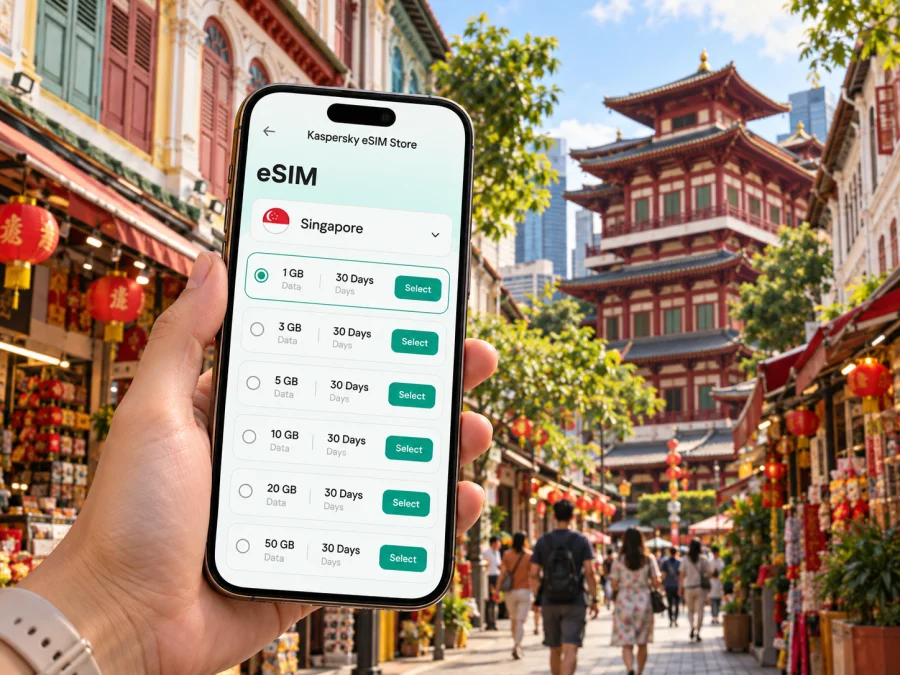
Chinatown eSIM for mobile connection and internet in Singapore
Chinatown is a practical base for a Singapore visit, with heritage streets, hotels, food stops and rail connections close together. Mobile data can help you follow the airport route, confirm your address and adapt plans without a physical SIM card. This guide covers arrival, local movement and choosing an eSIM for a short stay, work visit or longer itinerary.
When an eSIM can help in Chinatown
The first few hours in a new city often involve several small tasks rather than one long journey. You may need to confirm a pickup point, look up the nearest station exit, open a hotel booking, translate a message or tell someone that your arrival time has changed. Mobile data makes these tasks available while you are away from hotel Wi-Fi.
Chinatown is walkable in parts, but the streets are busy and the neighbourhood is not a single indoor complex. You might move between Pagoda Street, South Bridge Road, Smith Street, Temple Street and the shophouse lanes around Kreta Ayer. A map helps with the last few turns, especially when an entrance is set back from the main road or a hotel has a similarly named address nearby. Save the full address and booking details as well, so you are not relying on a map pin alone.
Mobile data is useful for more than maps. Common travel tasks include:
- checking rail and bus routes before leaving a hotel;
- confirming opening information or making a reservation with a venue;
- using ride-hailing or taxi apps to enter an exact pickup point;
- sharing a live location or sending a message to a travel companion;
- accessing digital tickets, work files and meeting updates;
- translating a sign, menu or short message when needed.
Getting from arrival to your Chinatown address
From Changi Airport, compare public transport and taxi or ride-hailing options against your arrival time, luggage and exact address. Rail journeys may involve a change, so check a current journey planner before setting off.
Before leaving the terminal, it helps to have these details ready:
- The hotel or apartment name and complete street address.
- The nearest MRT station, if you plan to use the train.
- A preferred pickup point if you plan to take a car.
- A backup way to reach your host, such as a saved message or booking contact.
- A route to your first stop that remains readable offline, if your map app supports offline areas.
At Chinatown MRT station, the North East Line and Downtown Line connect the neighbourhood with other parts of Singapore. The station is useful for more than arriving in Chinatown: it can also be a starting point for a day that combines the central area with other districts. For a specific hotel, however, compare the station exit and walking route with the address. Chinatown has a network of small streets and crossings, and the nearest station entrance is not always the easiest route with luggage.
A quick arrival check helps: confirm luggage or check-in arrangements, choose transport for your actual arrival time, then open the final walking directions. If the entrance or pickup point is unclear, message your host before leaving the station or car.
Moving around the neighbourhood and beyond
Chinatown is easiest to explore on foot when you group nearby stops. Pagoda Street, South Bridge Road and the lanes around Smith Street make useful waypoints for finding heritage sites, food and local businesses. Choose the route based on current opening information, crowds and weather rather than relying on a fixed sequence.
Nearby Telok Ayer, Ann Siang Hill and Duxton Hill can extend a walk from Chinatown. Heat, rain, luggage or a tight meeting schedule may make a shorter loop more comfortable. Use the map to check a turn, then put the phone away when crossing.
For trips farther afield, the MRT is often a straightforward way to connect with the city's broader rail network. Chinatown station is served by two lines, and nearby stations can be useful depending on your destination. Look up the full route for the day, including any transfer and the walk at either end. If service notices affect your plans, a live route check is more dependable than an itinerary saved well in advance.
Keep these navigation habits in mind:
| Situation | Useful preparation |
|---|---|
| Walking from the station | Match the exit to the street address and check the final turns before setting off. |
| Meeting a driver | Share a recognisable pickup point, not only the name of a large station or mall. |
| Changing districts | Check the full route and transfer before boarding; confirm it again if service conditions change. |
| Visiting several sights | Save a short list of stops and group those that are close together. |
| Low battery or poor signal | Keep the address and essential booking details available offline. |
Follow station signs and road crossings, and allow time to find entrances; short map distances can take longer with luggage or crowded pavements.
Choosing a data plan for a Chinatown stay
Choose an eSIM package around your actual itinerary, not just the number of days on the hotel reservation. A visitor spending most of the trip around Chinatown may use data for maps, messaging, bookings, restaurant research and occasional video calls. Someone working remotely or sharing a connection with other devices may use considerably more. Estimate your needs from the tasks you expect to do and check the package's data amount and validity before confirming.
Before selecting a plan, review its destination coverage and terms for Singapore. If your trip includes a stop in another country, do not assume that a Singapore package also applies across the border. Check each destination in the package details and choose an option that matches the full route. The same care is useful if you are combining central Singapore with a regional itinerary after your city stay.
For a useful comparison, consider:
- Length of stay: Match the validity period to your arrival and departure dates, including any overnight stop.
- Data use: Maps, messaging and browsing differ from frequent video calls, large uploads or a hotspot for a laptop.
- Coverage area: Confirm the country or region included and any limits stated in the plan.
- Activation timing: Read when the validity period begins and whether the eSIM should be installed before travel or at your destination.
- Phone setup: Check that the device supports eSIM and is not restricted by a carrier lock.
- Existing number: Decide whether you need to keep your usual line available for calls or verification messages, and review your phone's dual-SIM settings.
Kaspersky eSIM Store is an app and website where travellers can choose, arrange and activate an eSIM with a suitable plan for mobile internet abroad. Compare the displayed package terms with your route and expected use, then choose an eSIM plan for Singapore when you are ready to prepare for the trip. This country page is relevant to a stay in Chinatown because the city is in Singapore; it is not a separate plan for the neighbourhood.
Install and prepare before you need the connection
If you prefer to set things up before departure, use a reliable internet connection and follow the installation steps for your phone. Keep the instructions open on a second screen if you have one, or save the relevant steps before starting. You can follow the Android eSIM installation instructions or the iOS eSIM installation instructions.
A practical preparation sequence is:
- Check the phone. Confirm eSIM support and that the device is not carrier-locked. If you need to verify support, check your device.
- Review the plan. Confirm Singapore is included, read the data amount and validity, and note when the plan begins.
- Install with a stable connection. Follow the instructions for your operating system. Menu names vary by device and software version.
- Label the lines clearly. For example, distinguish your usual line from the travel eSIM so you can identify them in settings.
- Choose data settings deliberately. Select the intended line for mobile data and check the plan's guidance about data roaming for the eSIM.
- Keep essential details accessible. Store your accommodation address, booking confirmation and a contact method where you can find them quickly.
Install before departure or after arrival according to the plan instructions and validity terms. Do not delete a profile as a troubleshooting shortcut unless the plan's support guidance recommends it.
Hotels, meetings and working on the move
Chinatown offers a range of accommodation styles, from hotels near major roads and stations to smaller properties among conserved shophouses. When comparing locations, check the walking route from the nearest station, the address of the entrance and how you will reach the property with luggage. A map can clarify the surroundings, but confirm check-in instructions directly in your booking details. Keep the confirmation available if you arrive late or need to contact reception.
For a business visit, decide how you will travel between the hotel, meeting venue and any evening event. A meeting address can point to a large office building with several entrances; save the company name, building name and floor or lobby instructions if provided. Mobile data makes it easier to check a calendar update or notify colleagues if your route changes, but it is sensible to download key documents and meeting details in advance.
Remote work can use more data than sightseeing, especially for video calls, file transfers or tethering. Check whether hotspot use is supported by your plan and device. Hotel or office Wi-Fi may suit large downloads, while mobile data is useful between venues; treat public Wi-Fi with care for sensitive work.
A useful workday checklist:
- Save the meeting location and the name of the person you are meeting.
- Check the route before leaving, then recheck if the meeting time changes.
- Confirm the eSIM is selected for data and your usual line is configured as intended.
- Keep a charger or power bank available for a day with navigation and calls.
- Download files you need to present, and keep a backup copy of important details.
- Estimate data use for calls and hotspot sessions rather than relying on a sightseeing estimate.
Short stopovers and onward journeys
For a short Singapore layover, allow time for immigration, luggage, both airport journeys and delays. A focused Chinatown visit may be more comfortable than attempting distant attractions. Check current transport information and keep onward flight details accessible.
For an overnight stop, mobile data can help with hotel directions and a late arrival message. Keep plans flexible, and store terminal, flight and accommodation details together.
For a multi-country itinerary, check each destination's coverage separately; a Singapore package may not include your next stop. Confirm the included places and validity before leaving Chinatown, and check your settings before travelling.
Common questions
Is Chinatown a convenient base for getting around Singapore?
It can be a convenient central base for visitors who want to explore the heritage area and connect to other parts of the city. Chinatown MRT station serves the North East and Downtown lines. The best place to stay still depends on your plans, budget and walking needs, so compare the actual accommodation address with the station and your regular destinations.
Will an eSIM provide a local phone number?
Do not assume that it will. A travel eSIM plan may be intended for mobile data, and voice calls or SMS may not be included. Review the specific plan terms and decide how you will use your usual number and internet-based messaging apps.
Can I install the eSIM after reaching Singapore?
Setup may be possible before departure or after arrival, depending on the plan instructions and your access to an internet connection. Read the installation guidance and validity terms before you travel so you know when the plan starts and what steps to take.
How much data should I choose for a few days in Chinatown?
There is no single amount that suits every visitor. Consider how often you use maps, upload photos, stream media, join calls or share data with another device. Check your normal usage as a starting point, then compare it with the package's allowance and validity.
Should I leave my regular SIM active?
That depends on whether you need your usual number for calls, messages or account verification. Check the settings on your phone and your home operator's roaming conditions. Selecting the travel eSIM for data does not automatically mean that the usual line has been disabled.
A simple plan for staying connected
Before leaving for Chinatown, confirm the Singapore coverage and terms, prepare an eSIM that fits the itinerary, and save your accommodation and first transport details. After arrival, check the route to the exact address and use live information when choosing between rail, bus or a car. During the stay, let the day determine whether you walk around Kreta Ayer, visit nearby central districts or head farther across Singapore.
When you are ready to prepare mobile internet for the trip, use Kaspersky eSIM Store to review the available plan details and select an eSIM plan for Singapore. Install it according to the instructions for your device, and check the settings before you leave for the airport.


