Travel connectivity guide
Ciudad Bolívar eSIM: Mobile Internet & Connection
Ciudad Bolívar eSIM: mobile connection and internet for your trip
Ciudad Bolívar is a riverside city in southeastern Venezuela where a compact historic center meets the broad Orinoco. A phone with a working data connection can help you coordinate arrival, find an address, contact your accommodation and keep route details available as you move between the riverfront, central streets and places farther away. An eSIM can be one option for mobile internet, provided the particular plan is available for Venezuela and your device supports it.
Plan conditions and service can vary by route and network. An eSIM is not a coverage guarantee, and data plans may not include calls or texts. Check country eligibility, data, validity and activation terms; save key addresses offline.
Why mobile data is useful in Ciudad Bolívar
The city’s geography shapes how visitors navigate it. The historic center sits by the Orinoco, while bridges and roads connect the urban area with communities on the opposite bank. UNESCO describes the city as part of a cultural landscape around the Orinoco narrows and lists it on its Tentative List. That is a nomination for consideration, not the same as inscription on the World Heritage List.
For visitors, a mobile connection can help with directions, pickup coordination and messages. Save the accommodation address, booking details and a map offline as well; live search and rerouting may need data, while offline maps can provide a useful fallback.
A city built around the river
Ciudad Bolívar was known as Angostura until 1846. The name refers to the narrow passage of the Orinoco in this area, and the river remains the city’s clearest geographic reference. The historic streets, riverfront and landmarks are not interchangeable map pins: when arranging a ride, ask for the precise entrance or meeting point and confirm it with the person expecting you.
The old quarter is recognized for a colonial street pattern and varied architectural influences. UNESCO’s nomination names the Casa del Congreso de Angostura, Casa del Correo del Orinoco, San Isidro estate, riverfront and Puente de Angostura as notable elements. Search the full place name and check that the result is in Ciudad Bolívar.
The Angostura Bridge crosses the Orinoco between Bolívar and Anzoátegui states. If you visit the opposite bank, agree on transport and a meeting point in advance; the river, bridge approach and local road conditions can make a short map distance take longer than expected.
Useful reference points
| Place or area | Why it may matter to a visitor | Phone task to prepare |
|---|---|---|
| Historic center | Streets, civic buildings and older architecture are concentrated here | Save the exact destination and a nearby meeting point |
| Orinoco riverfront | A clear orientation line and a place to pause by the water | Keep a map available and confirm the chosen access point |
| Casa del Congreso de Angostura | A historic landmark associated with the city’s political past | Check current visiting details before setting out |
| Casa del Correo del Orinoco | A landmark tied to the city’s publishing history | Save its full name in Spanish for navigation or questions |
| Puente de Angostura | Road crossing over the Orinoco between Bolívar and Anzoátegui | Confirm transport, destination and return arrangements |
| Museo de Arte Moderno Jesús Soto | A museum named in the UNESCO nomination for the area | Verify opening information locally before travelling there |
This table is a planning aid, not a promise that every site is open on a particular day. Hours, access, transport and local conditions can change. Check with your accommodation or a current local contact before making a special trip, and keep a second option in mind if a site is closed.
Arrival: get the first hour under control
Travel arrangements into Ciudad Bolívar depend on your origin and services operating on your dates. Confirm the itinerary, transfer points and final arrival location directly with your transport provider. Ask your host how to identify the pickup point and what to do if you are delayed.
Before departure, save the following on your phone and, where practical, on paper:
- The accommodation name, full address and a Spanish-language version of the directions.
- A contact number or messaging method for the host, driver or local organizer.
- Arrival and onward-journey details, including ticket references.
- A map of the central area and the places you expect to visit.
- A backup plan for contacting someone if mobile data is unavailable.
At arrival, first connect to a trusted network if one is available and confirm that your travel eSIM is enabled for mobile data only if its plan is meant to begin at that moment. The activation trigger differs between plans: some begin on installation, others on first connection to a supported network, and the exact rule must come from the plan terms. Keep your primary line settings clear so you do not unintentionally use its roaming data. If the eSIM does not connect, check the plan’s activation instructions, data-line selection and supported network settings before repeatedly changing options.
Moving around: maps, rides and river crossings
For a short stay in the historic center, plan the day around a few confirmed destinations rather than relying on continuous live navigation. Save the address of your lodging and each stop in advance. The older urban area has a distinct layout and varied terrain, so a pin on a map may not tell you which entrance or street-side meeting point is convenient. If you are meeting a driver, share the location pin and a written landmark, then confirm that both of you mean the same point.
For rides and longer journeys, use mobile data to communicate the agreed destination and to update a companion, but confirm transport arrangements through a trusted local source. Do not depend on an app being available or on a single map route. Ask your accommodation about locally used transport options, the best way to arrange a return trip and whether a proposed destination requires crossing the river. If you are travelling to the Angostura Bridge or beyond it, check both legs of the journey before leaving.
A practical route routine is:
- Before leaving: check the destination spelling, route and estimated journey time; save a map area for offline use.
- At pickup: confirm the destination aloud or in writing, and check the vehicle or meeting point with your contact.
- Along the way: keep enough battery for navigation and messaging; use a car charger or power bank where appropriate.
- At the destination: note the return plan before walking away from the pickup point.
- If service drops: follow the saved map and use the offline address or a known landmark to ask for help.
Mobile internet helps when plans change, but it cannot confirm road conditions or whether a service is operating. Check with a current local contact.
Choosing an eSIM plan for Venezuela
A city article cannot establish which network a particular travel eSIM will use at every address in Ciudad Bolívar. Availability and performance depend on the plan, its local network arrangements, the device, indoor conditions and the area you visit. Before choosing, make sure that Venezuela is explicitly included in the destination list. A regional plan may include a country, but the name of a region alone is not enough: open the plan details and confirm the country itself.
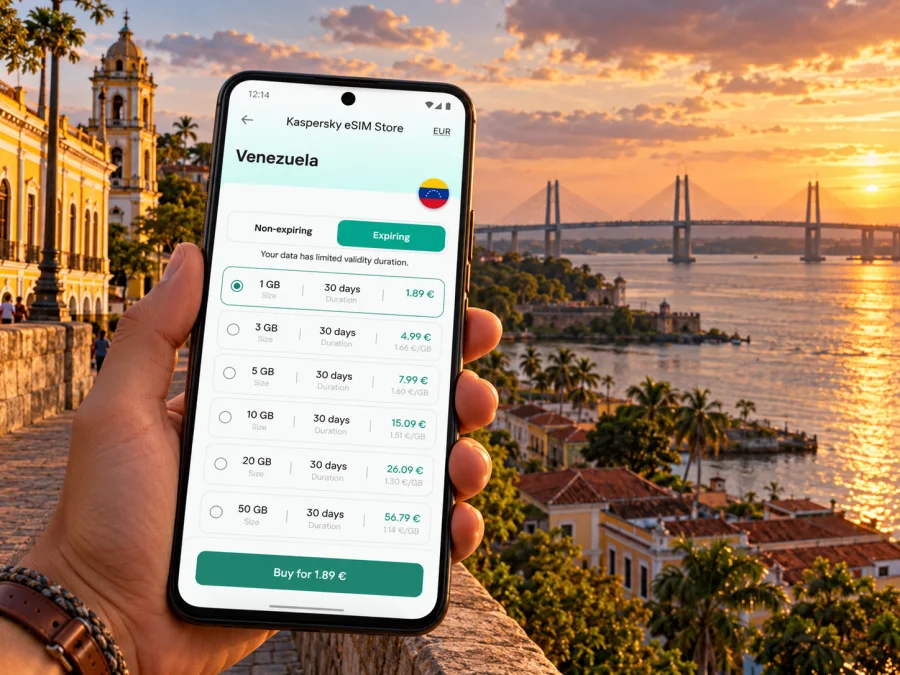
Kaspersky eSIM Store is an app and website where you can select, arrange and activate an eSIM with a suitable plan for mobile internet on an international trip. The plan terms, rather than the city name in a search, determine destination eligibility and data conditions. You can review the available Venezuela plan options and check their current details before deciding. The page currently names MOVISTAR as the local telecommunications provider for the displayed plans. That is plan-specific information: it does not establish signal at a particular address in Ciudad Bolívar or show that every listed option uses the same provider. This country page is for browsing current options, not a guarantee of coverage or service in every part of the city.
Use this short comparison when checking plan details:
| What to check | Why it matters for a Ciudad Bolívar trip |
|---|---|
| Venezuela is included | A city is served through a country or regional plan, not a separate city tariff unless a plan explicitly says so |
| Data allowance | Maps, messaging, email and photo uploads use different amounts of data |
| Validity period | Check when validity starts and whether it covers the full itinerary |
| Activation trigger | Installation and first use may have different effects on validity |
| Tethering or hotspot terms | Useful only if the plan allows it and you need to connect another device |
| Network selection instructions | Important if the plan specifies automatic selection or manual steps |
| Calls and SMS | Travel data plans may not include a regular local phone number or conventional voice service |
| Top-up or expiry conditions | Confirm what happens when data runs out or the validity period ends |
Choose for your actual usage, not a generic “per day” estimate. A traveller who mainly checks messages and directions may need less data than someone who uploads video, joins frequent calls or shares a connection with other devices. When uncertain, estimate from your normal phone use and check how the plan handles additional data. Avoid assuming a larger allowance solves an area with limited network availability.
Device and regional variant checks
eSIM support is not guaranteed across every phone sold under the same model name. The country or region variant, carrier lock, software version and manufacturer configuration can matter. Before purchase, check the exact model number in the manufacturer’s specifications and your device settings. Also confirm that the phone is unlocked for use with another provider. A general product-family name or a friend’s similar-looking phone is not enough to confirm compatibility.
Check whether your device supports eSIM and verify the exact regional variant. If the compatibility result is unclear, check with the device maker or the seller before relying on the phone for travel data. On a dual-SIM phone, learn how to select the eSIM as the data line while keeping your main line available for any calls or messages you still need. The setup screens differ by operating system and manufacturer.
Keep in mind that an eSIM data plan is not automatically a replacement for your usual number. Unless the selected terms say otherwise, plan for internet-based messaging and calls through apps, and retain another way to receive important messages. If you need a local number, voice calls or SMS for a booking or work requirement, verify those requirements separately before travelling.
Install and activate before you need directions
Where the plan permits, install the eSIM on a stable internet connection and allow time to follow the instructions. Some plans require installation before arrival; others advise waiting. Follow the selected plan’s directions: removing a profile can make it difficult or impossible to use again. Do not share activation details publicly.
The general sequence is:
- Confirm the destination, data allowance, validity and activation rule in the plan details.
- Connect to reliable Wi‑Fi and make sure your phone has sufficient battery.
- Open the device’s mobile or cellular settings and choose the option to add an eSIM.
- Follow the on-screen steps or the plan’s QR-code instructions.
- Label the line clearly, for example “Venezuela data,” so you can distinguish it from your primary SIM.
- Set the intended line for mobile data and review roaming settings exactly as the plan instructs.
- After arrival, allow the device to register and check the plan’s troubleshooting guidance if it does not connect.
Use the detailed Android eSIM installation instructions or iPhone eSIM installation instructions for the relevant device flow. Menu labels can vary by version. Do not delete the profile as a first troubleshooting step; first verify the plan status, data-line selection and installation instructions.
If you prefer not to install before departure, store the installation information securely and ensure you can access it without relying on the same connection you are trying to set up. For a single-device traveller, a saved QR code on that same phone may not be convenient to scan; follow the plan’s alternate manual setup method if one is provided. Ask support before deleting or reinstalling a profile if you are unsure whether it can be installed again.
Match the connection plan to the kind of visit
A brief stop in the center. Save the accommodation address, arrival details and one offline map. A modest data plan may be enough if you use the phone mainly for messaging and directions, but estimate from your own habits and verify the plan’s validity dates.
A work visit. Check whether your meetings rely on video, file transfers or hotspot sharing. Those activities can use data quickly, and not every plan permits tethering. Download documents in advance, test your work apps before departure and keep a backup way to contact colleagues.
A heritage walk. Download map tiles before setting out, save the names of the historic places in Spanish, and plan a return route. A stable signal should not be assumed inside older buildings or at every riverside point. Use a companion’s meeting point if you separate from your group.
A visit that crosses the Orinoco. Confirm the destination, transport and return options in advance. Keep the exact meeting point and the person’s contact details offline. A connection can help with coordination, while a confirmed local plan handles the parts that depend on transport and conditions.
A longer regional itinerary. Check whether a Venezuela plan remains suitable for every country or territory on the route. A country plan may stop applying after a border crossing. Review each destination and any regional option carefully, rather than assuming one plan covers an entire South American itinerary.
Common connection questions
Does an eSIM guarantee mobile internet throughout Ciudad Bolívar?
No. An eSIM is a digital SIM profile, and a travel plan depends on its stated destination and network arrangements. Signal can vary by neighborhood, building, route, device and local network conditions. Check the current plan terms and treat offline maps as a normal backup.
Will my phone support eSIM because it supports two SIMs?
Not necessarily. Some dual-SIM phones use two physical SIMs, and support can differ between regional variants. Verify the exact model number, manufacturer information, carrier lock status and the compatibility checker before purchase.
What should I do if the eSIM does not connect?
Check that Venezuela is included, the validity period has begun, the correct line is selected for mobile data and the plan’s activation steps are complete. Restarting the phone may help in some cases, but follow the plan guidance first. If service still does not start, contact the plan’s support channel while keeping your profile installed.
A compact checklist before you leave
- [ ] Confirm your itinerary and arrival arrangements with the transport provider.
- [ ] Save your lodging address, host contact and maps for offline use.
- [ ] Confirm the plan includes Venezuela and covers your travel dates.
- [ ] Review the data allowance, validity, activation and network terms.
- [ ] Verify eSIM support for your exact device variant and carrier-lock status.
- [ ] Set the data line correctly and agree on a backup contact method.
The useful rule for Ciudad Bolívar is simple: prepare the digital essentials before you leave, and verify each plan and journey against current local information. A data connection can make arrivals, messages and navigation easier, but a saved address, confirmed pickup and offline backup make the plan more resilient.
Prepare mobile internet for your trip
Before travelling, check that your phone supports eSIM, confirm the selected plan’s Venezuela coverage and validity, and install it at the time its instructions recommend. Kaspersky eSIM Store lets you choose, arrange and activate an eSIM plan for mobile internet abroad through its app or website. Review the current options for a trip to Venezuela, compare the terms with your itinerary and keep your essential addresses available offline. That gives you a clearer starting point for staying connected as you explore Ciudad Bolívar and the Orinoco riverfront.


