Travel connectivity guide
Ciudad del Este eSIM for Mobile Data | Paraguay
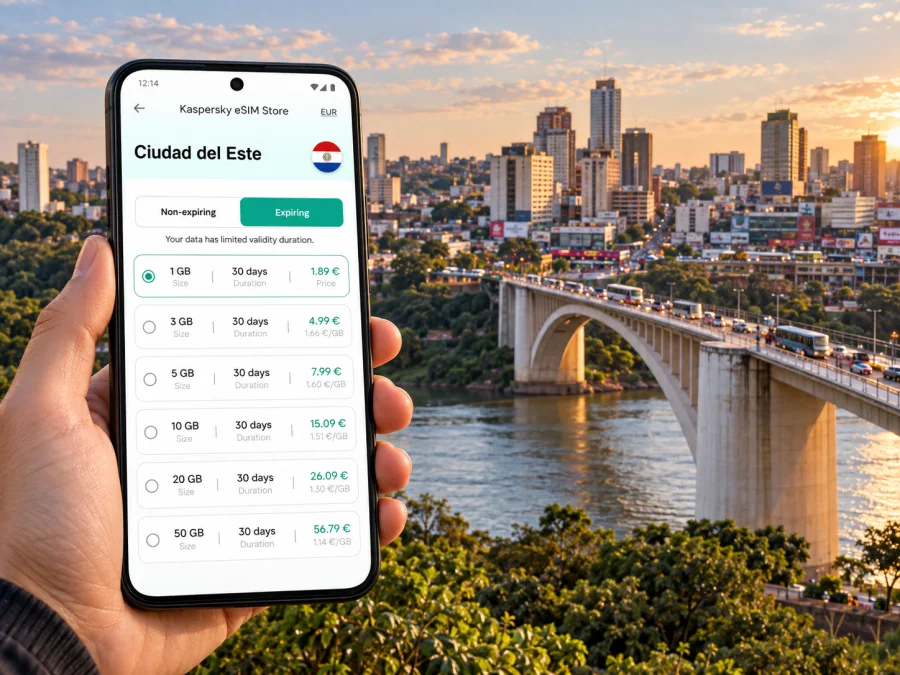
Ciudad del Este eSIM: mobile connection and internet for your trip
Ciudad del Este is a practical base for a border-region trip, a shopping visit, a work stop, or an excursion to Itaipu and the Monday Falls. Its position beside the Paraná River also makes it a place where a route can cross an international border in the middle of an ordinary day. Mobile internet helps with the small decisions that shape the visit: confirming a hotel address, checking a transfer, finding the right entrance, messaging a colleague, or reopening a map when plans change.
An eSIM can give you a separate mobile data connection for your stay in Paraguay without swapping the physical SIM in your phone. It is useful when you want maps and travel apps available as soon as your chosen plan is active. Coverage and performance depend on the local network, your device, and the place you are using it, so keep key addresses and plans available offline as well.
Start with the shape of your trip
Ciudad del Este is often part of a wider itinerary rather than an isolated city break. You may arrive from elsewhere in Paraguay, cross from Foz do Iguaçu in Brazil, or use the city as a starting point for nearby sights. Each pattern puts different demands on your phone.
| Trip pattern | Where mobile data helps most | What to prepare in advance |
|---|---|---|
| Arrival by air | Confirming a pickup and sharing your arrival details | Airport name, hotel address, driver contact, and a saved map area |
| Arrival from Foz do Iguaçu | Coordinating the crossing and finding your next stop | Passport or other required travel document, destination address, and a backup route |
| Shopping or business visit | Locating a store or meeting point and exchanging updates | Exact building name, meeting time, and a written contact number |
| Regional sightseeing | Comparing routes to Itaipu or the Monday Falls | Opening and booking details checked shortly before departure |
| Overnight stop | Finding food, transport, and the return route to your hotel | Hotel pin, check-in information, and an offline map |
Save a place name as well as its map pin. A precise entrance or nearby landmark can prevent confusion when several businesses share a large complex.
Arriving in the city
The main local airport is Guaraní International Airport, in the district of Minga Guazú, outside the central commercial area. Before travelling, confirm how you will reach your accommodation: ask whether the hotel can arrange a pickup, save the transfer contact, and agree on the meeting point. Do not assume that an airport name alone tells a driver where you are going; send the full destination and keep it visible on your screen.
If you arrive by intercity bus, save the terminal and arrange your next leg before leaving, especially with luggage or a meeting to make.
Many visitors approach from Brazil via Foz do Iguaçu and the Friendship Bridge. It is an international crossing, so allow flexibility for traffic and border formalities. The time needed can vary substantially; avoid scheduling a close connection on the assumption that the bridge will be clear. Carry the travel documents required for your nationality, and check current entry rules with the relevant authorities before the trip. If you are going back and forth during the day, confirm what documents and procedures apply to your own itinerary.
Mobile service may change at the border. Check which countries your plan covers and keep routes, hotel details, and a contact number available offline.
Make the center easier to navigate
The central commercial district is dense, active, and built around shopping, services, and everyday business. A map is valuable here because a broad street address may not identify a particular mall, store entrance, office, or pickup point. Ask a host or business for a precise pin and a recognizable landmark nearby. If you are meeting someone, agree on a specific entrance rather than simply saying “the mall” or “downtown.”
Do not assume every short distance is an easy walk: weather, traffic, and pavement conditions matter. Check the route first, and confirm the exact destination with a driver when using a taxi or local transport.
Before setting out, confirm the pin and entrance with your host, save an offline map, and share your destination with anyone expecting you. Live traffic and border queues can change routes, so follow local signs and recheck the destination before a crossing.
Choose a place to stay around your plans
For shopping, meetings, or bus travel, a central stay may reduce transfers. A quieter location may suit a regional outing or a longer stay; compare your schedule and transport, not distance alone.
Before booking, confirm the full address and pin, check-in hours, transfer options, pickup entrance, Wi-Fi availability, and distance to your actual meeting or departure point.
Hotel Wi-Fi can suit large downloads and video calls, while mobile data helps between locations. Keep work files and meeting details available offline in case either connection is unavailable.
Plan nearby outings from Ciudad del Este
Ciudad del Este is a base for excursions around Alto Paraná, though sights lie beyond the commercial center. Itaipu Binacional offers visitor experiences whose details and availability can change. The Monday Falls are in neighboring Presidente Franco; plan transport rather than assuming they are walkable from a central hotel.
For either outing, check visitor information and return transport, ask whether a transfer needs advance booking, and save the pickup point and return destination.
For a full day that also includes Foz do Iguaçu or another Brazilian destination, think of the border as a distinct leg of the journey. It can add waiting time, and your phone may connect to a different country’s network after crossing. A Paraguay-only plan should not be assumed to cover Brazil. Review the plan’s destination and validity, and arrange another suitable option if your itinerary needs data on both sides. Keep your confirmation, hotel address, and essential travel details available without relying on a live connection.
Prepare mobile internet for Ciudad del Este
Kaspersky eSIM Store is an app and website where you can choose, arrange, and activate an eSIM with a suitable data plan for an international trip. Before selecting a plan, consider how long you will stay in Ciudad del Este, whether your route continues elsewhere in Paraguay, and whether you will cross into Brazil. Compare the included data, validity period, destination, and price shown for each option. The right amount depends on your own use: navigation and messages need less data than frequent video calls, photo uploads, or streaming.
If Paraguay is the relevant destination for your stay, you can compare eSIM data plans for a trip to Paraguay. Review the plan details before purchase, including when validity starts and any activation instructions. A regional itinerary may require a plan that explicitly includes each country you will visit.
A practical setup sequence
- Check the device. Confirm that your phone supports eSIM and is not restricted from using another carrier’s eSIM. Check whether your device is compatible before you choose a plan.
- Choose a plan for the route. Select Paraguay for a stay in Ciudad del Este, and verify any additional country coverage for cross-border travel. Match the data allowance and validity to your own itinerary.
- Arrange installation. Follow the on-screen instructions and keep access to a stable internet connection during setup. Depending on the device and plan, you may use an in-app flow or a QR code. Keep the installation details until the eSIM is active.
- Label your lines. Give the travel eSIM a clear name such as “Paraguay data.” Keep your usual SIM available for calls or messages if you need it, and check which line is selected for mobile data.
- Set up before departure when possible. You can install in advance if the plan’s instructions allow it. Read when validity begins; installation and first connection do not always mean the same thing.
- Confirm the connection after arrival. Turn on the travel line, select it for mobile data, and enable data roaming for that eSIM if the plan instructions require it. Check the displayed network and test a simple page or message.
Use the step-by-step Android eSIM installation instructions or iOS eSIM installation instructions for your device. Menu names can differ by operating system version. Avoid deleting an installed eSIM while troubleshooting unless the provider’s instructions tell you to do so; some profiles cannot simply be installed again.
An eSIM data plan is intended for mobile internet. It may not include a conventional phone number, voice calls, or SMS unless those features are specifically listed in the plan terms. For calls and messages, you can use internet-based apps, or keep your regular SIM active for services it supports. Check which line will handle calls and which line will use data to avoid confusion or unexpected charges from your home operator.
Use less data without losing useful access
Maps, translation, email, messaging, and ride coordination are common travel tasks, but background syncing can consume data quietly. Before leaving home, download an offline map for the areas you expect to visit and review which apps can refresh in the background. Save tickets, hotel details, and key addresses on your phone. These steps reduce dependence on a constant connection without making mobile data less useful when you need it.
For a busy day, use mobile data for maps, messages, and essential updates. Use hotel Wi-Fi for large uploads or system updates, and consider pausing automatic photo backup and streaming. If you are working, check Wi-Fi and power arrangements at your location, download documents in advance, and test the connection before a video call.
Common travel situations
You arrive late and need to find your hotel. Save the address and pin before landing, confirm your pickup method, and send your arrival update over whichever connection is available. If you cannot get online immediately, use the saved details and ask airport staff or your accommodation for help.
You have one meeting in the commercial center. Ask the host for the precise building and entrance. Allow time for local traffic, keep the contact details available offline, and use a map to confirm the last part of the route.
You are crossing from Foz do Iguaçu for the day. Check the current border requirements and leave room for queues. Confirm whether your mobile plan covers Paraguay, Brazil, or both, and save the return directions before setting out.
You want to visit Itaipu or the Monday Falls. Verify visitor arrangements close to the date, agree transport and pickup points in advance, and keep the route and return plan accessible offline.
In each case, use data to adjust plans while keeping essentials stored offline.
Before you leave: a compact checklist
- [ ] Confirm your phone supports eSIM and can use another carrier’s profile.
- [ ] Compare destination, data allowance, validity, and activation terms.
- [ ] Decide whether your route includes Brazil as well as Paraguay.
- [ ] Save the airport, hotel, terminal, meeting, and pickup locations.
- [ ] Download an offline map and keep important bookings on your device.
- [ ] Check which SIM line is set for data and whether roaming is needed for the travel eSIM.
- [ ] Keep your usual number available if you need calls, SMS, or account verification.
- [ ] Check current visitor details and transport for regional excursions.
Frequently asked questions
Is an eSIM useful for a short visit?
It can provide data for maps and messages without changing your physical SIM. Match the plan’s validity and allowance to your visit.
Will a Paraguay plan work in Foz do Iguaçu?
Foz do Iguaçu is in Brazil. Check that both countries are listed if your trip crosses the border.
Can I make ordinary phone calls with an eSIM?
A data plan may not include a phone number, voice calls, or SMS. Check its terms; internet calling apps use data.
Should I install the eSIM before arriving?
Preparing it before departure can make setup easier. Check whether validity starts on installation, activation, or first connection.
What if mobile data does not work on arrival?
Check that the eSIM is enabled and selected for data, then follow the plan’s roaming and network instructions. Wi-Fi and offline maps can help while you contact support if the issue continues.
Keep the trip moving
For Ciudad del Este, a little preparation makes mobile internet more useful: save your hotel and meeting pins, plan around the Friendship Bridge if you are crossing from Brazil, and verify transport for visits beyond the city center. Choose a data plan that matches the countries and days in your itinerary, then install and activate the eSIM according to its instructions.
When you are ready, choose an eSIM data plan for your trip to Paraguay in Kaspersky eSIM Store, the app and website for selecting, arranging, and activating an eSIM for travel. Keep essential addresses and travel details available offline so you can stay organized even when a connection is temporarily unavailable.


