
Travel connectivity guide
Clarence Town eSIM for Bahamas Travel
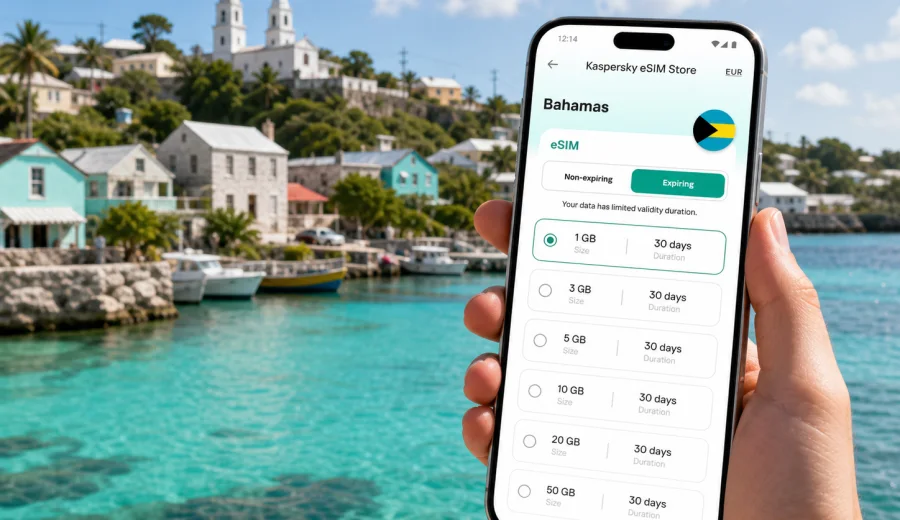
Clarence Town eSIM: mobile connection and internet for a Bahamas trip
Clarence Town is a practical base for exploring Long Island in the Bahamas. You may arrive by air, meet a driver, check a marina schedule, navigate coastal roads, or plan a day around beaches, blue holes, churches, and quiet settlements. Mobile connection matters because your phone becomes your map, booking folder, message center, and travel organizer.
An eSIM can make that preparation simpler. Instead of looking for a physical SIM card after arrival, you can set up a digital SIM profile on a compatible phone and use a prepaid data plan. For Clarence Town, the key is having a practical way to get online while moving between the airport, harbor, accommodations, restaurants, beaches, and day-trip routes across Long Island.
This guide explains how to plan mobile internet for Clarence Town: when eSIM is useful, how to estimate data needs, what to check before buying, and how to use your phone efficiently.
Why mobile internet is useful in Clarence Town
Clarence Town rewards travelers who prepare. Distances on Long Island can feel longer than they look on a map, and many useful services are easier to manage when your phone is online. Even if your hotel or rental property has Wi-Fi, you may need mobile data before check-in, during transfers, or while exploring areas away from the property.
Common Clarence Town scenarios where eSIM mobile internet can help:
- confirming a pickup time after landing;
- opening maps before driving south or north on Long Island;
- messaging a host when you are close to your accommodation;
- checking restaurant opening hours before leaving;
- using taxi or private transfer contacts;
- managing weather updates for boat trips or beach plans;
- accessing booking confirmations without depending on public Wi-Fi;
- using messengers for calls if your eSIM plan is data-only.
The benefit is control. You can prepare the plan before the trip, see the data amount and validity period, install the eSIM on a compatible device, and use mobile data when local network conditions allow.
Arrival: from airport plans to the first drive
Many visitors reach Long Island through Deadman's Cay Airport, then continue by car or transfer toward Clarence Town, nearby settlements, rental villas, small hotels, or marina areas. The first hour can be the moment when internet access is most valuable. You may need to tell someone you have arrived, check a route, look up a reservation, or confirm where to collect a rental vehicle.
If your phone already has an eSIM profile installed, you can switch mobile data to that profile after arrival and avoid searching for a store before you understand the area. It is still wise to save key details offline, because rural island travel can include coverage changes. Keep your accommodation address, host phone number, reservation reference, and a simple map screenshot available without data.
For stopovers or short stays, the same logic applies. Clarence Town can be part of a boating itinerary, a family visit, a small business trip, or a quiet beach route. A short plan may be enough for maps and messages, while a longer stay may call for more data.
Local movement around Clarence Town
Clarence Town is best understood as a local hub rather than a dense urban center. You may move between the harbor, churches, small restaurants, accommodations, beaches, and roads that connect the wider island. Mobile internet supports that movement, but it should be paired with realistic planning.
Before leaving your accommodation, check that:
- the route is saved in your maps app;
- you have the exact address or a location pin;
- your battery is high enough for navigation;
- the eSIM profile is selected for mobile data;
- data roaming is enabled for the eSIM profile if required;
- your primary SIM is still selected for calls or messages, if you need it.
This setup is useful if you are driving. Navigation, fuel stops, restaurant searches, and plan changes are easier when you are not relying only on Wi-Fi at the start and end of the day.
How much data do you need for Clarence Town?
Your ideal data amount depends on how you travel. A guest who mainly uses maps and messages will need much less than someone who joins video calls, uploads many photos, or uses the phone as a hotspot for a laptop.
| Trip style in Clarence Town | Typical data use | Planning note |
|---|---|---|
| Weekend stopover | Low | Maps, messages, bookings, and light browsing. |
| One-week beach trip | Medium | Add room for navigation, restaurant searches, photos, and weather checks. |
| Remote work stay | High | Calls and tethering can use data quickly. |
| Island exploration by car | Medium | Navigation and location sharing may be frequent. |
As a practical rule, use Wi-Fi for heavy updates, cloud backups, long video streaming, and large file downloads when you trust the network and the connection is stable. Use mobile data for tasks that matter while moving: maps, messaging, confirmations, local searches, and travel changes.
Choosing an eSIM plan for Clarence Town
For a city article, the plan is usually selected by country rather than by city. Clarence Town is in the Bahamas, so you should look for an eSIM plan that covers the Bahamas and matches your route. If you are combining Long Island with Nassau, Exuma, Eleuthera, or another island, check that the plan terms still fit the whole trip.
When comparing options, focus on five points:
1. Destination: the plan should include the Bahamas or a relevant regional option.
2. Data amount: choose enough for navigation, messaging, bookings, and expected work or media use.
3. Validity period: the plan should cover the full time you need mobile internet.
4. Activation rules: check when the validity period starts and how to activate the eSIM.
5. Device support: your phone or tablet must support eSIM and must not be locked in a way that prevents using it.
Kaspersky eSIM Store is an app and website where you can choose, set up, and activate an eSIM with a suitable data plan for travel. It helps you review the destination, data amount, validity period, and plan conditions before you travel, which is useful in a smaller destination like Clarence Town.
A practical data plan checklist
Use this checklist before you confirm a plan:
- Your destination is set to Bahamas, not a different Caribbean country.
- The validity period covers arrival day and departure day.
- Your expected data use matches the package size.
- You understand whether the plan is data-only.
- You know whether hotspot or tethering is allowed if you plan to use a laptop.
- You have confirmed that your phone supports eSIM.
- You have saved installation details before leaving home.
If your plan is data-only, ordinary phone calls and SMS may not be included unless the terms say otherwise. You can still use internet-based calling apps through mobile data when the connection is available.
Preparing before you leave for the Bahamas
The simplest setup is to prepare your eSIM while you still have a stable connection at home. That gives you time to read the instructions, check compatibility, and save activation details before a late or rushed arrival.
Before departure:
1. Check that your phone supports eSIM and is not carrier-locked.
2. Choose a Bahamas plan with a suitable data amount and validity period.
3. Install the eSIM profile while connected to reliable Wi-Fi.
4. Keep your primary SIM active if you need regular calls or SMS.
5. Label the eSIM clearly, for example "Bahamas travel".
6. Download offline maps for Long Island.
7. Save accommodation, driver, and booking details offline.
If you are ready to compare options for the country that covers Clarence Town, you can choose a travel eSIM plan for the Bahamas before your trip and keep the setup steps ready for arrival.
Installing and activating your eSIM
Installation and activation are related, but they are not always the same moment. Installation adds the eSIM profile to your device. Activation starts or prepares the service according to the plan rules, so read the validity conditions before you travel.
For setup guidance, use the relevant device instructions: Android installation guide or iOS installation guide. Keep a stable internet connection during installation.
After installation, review these settings:
- The eSIM profile is installed and named clearly.
- Mobile data is assigned to the eSIM when you want to use the travel plan.
- Data roaming is enabled for the eSIM profile if required by the device or plan.
- Your primary SIM remains available for calls or SMS if you need it.
- data saver settings match your usage style.
Do not delete an eSIM profile unless you are sure you no longer need it. Reinstallation and transfer rules depend on the plan.
Device compatibility matters
Before buying a plan, confirm that your phone or tablet supports eSIM. The same model family may have different versions by market, carrier, or region, and carrier locks can affect whether another SIM profile can be used.
You should check your device compatibility before you rely on eSIM for Clarence Town, especially with an older device, a carrier-purchased phone, or a work device.
If your device does not support eSIM, you will need another option, such as roaming on your existing SIM, Wi-Fi at your accommodation, or a local physical SIM where available.
Using maps, transport, and local directions
Clarence Town and the surrounding Long Island roads are easier to navigate when you combine online tools with offline preparation. Mobile data can help with live route searches and contact details, but offline maps are still useful because island coverage and signal strength can vary by location.
For driving days:
- Open the route on Wi-Fi before leaving.
- Save your destination as a pin.
- Keep your charging cable in the car.
- Avoid starting large app updates on mobile data.
- Share your approximate arrival time while you still have a strong signal.
If you are arranging taxis, private transfers, boat movements, or rental car pickup, keep confirmation messages available offline. That way mobile internet improves the journey without becoming your only source of essential information.
Hotels, villas, and guesthouses
Many Clarence Town stays are centered on small hotels, villas, vacation rentals, or quiet properties. Wi-Fi quality may vary by building, room, weather, router placement, or the number of guests using it. An eSIM can act as a practical backup for work, booking checks, or messages to a host.
For heavy work, keep a backup plan: property Wi-Fi, a better signal spot, or a scheduled call time when the connection is most stable. Use Wi-Fi for large downloads and streaming when it is available and trusted, and use eSIM mobile data for movement, confirmations, messaging, maps, and backup access.
Business trips, stopovers, and longer routes
Clarence Town can be a calm base for remote work, but it needs more planning than a major business district. If you need calls, email, cloud documents, or laptop tethering, choose a data amount that fits work rather than only maps. Download key files on Wi-Fi, pause laptop updates on hotspot, and test the connection before an important meeting.
If Clarence Town is one stop on a wider Bahamas route, match the plan to the full trip. A short package may be enough for maps and confirmations; a longer plan may fit better if you are moving between Long Island, Nassau, Exuma, or another island. Avoid common mistakes: buying for the wrong destination, skipping compatibility checks, deleting the eSIM profile too early, leaving mobile data on the wrong SIM, or assuming that voice calls and SMS are included.
Quick answers about eSIM in Clarence Town
Is eSIM useful for Clarence Town?
Yes. It is useful for maps, messages, bookings, transfer coordination, and day trips around Long Island, especially before you reach hotel Wi-Fi.
Do I need a city-specific eSIM for Clarence Town?
Usually no. Choose a plan that covers the Bahamas and fits your travel dates.
Can I install the eSIM before I fly?
In many cases, yes. Install it on reliable Wi-Fi, then activate or use it according to the plan instructions.
Will an eSIM include a local phone number?
Many travel eSIM plans are data-only. If calls and SMS matter, read the plan details before buying.
Can I use eSIM data for a laptop?
Sometimes, if hotspot or tethering is allowed by the plan and your phone settings. Laptop use can consume data quickly.
Final preparation checklist
Before your Clarence Town trip, make sure you have:
- a compatible, unlocked eSIM device;
- a Bahamas data plan with enough validity for the trip;
- installation instructions saved or reviewed;
- offline maps for Long Island;
- hotel, driver, and booking details available without internet;
- cloud backups and app updates limited on mobile data;
- a clear idea of which SIM profile handles mobile data.
Clarence Town is easier to enjoy when your phone is ready before you need it. With eSIM, you can keep maps, messages, bookings, and travel updates available without relying only on Wi-Fi or a physical SIM card search after arrival.
Choose an eSIM plan for your trip to Clarence Town
If you are preparing for Clarence Town, set up mobile internet before travel day. In Kaspersky eSIM Store, you can review options, choose a suitable data amount and validity period, and activate the eSIM on a compatible device. Start by checking the Bahamas destination page and prepare an eSIM plan for your Clarence Town trip so your phone is ready for maps, messages, and trip changes when you arrive.