
Travel connectivity guide
Colombia eSIM: mobile internet for travel
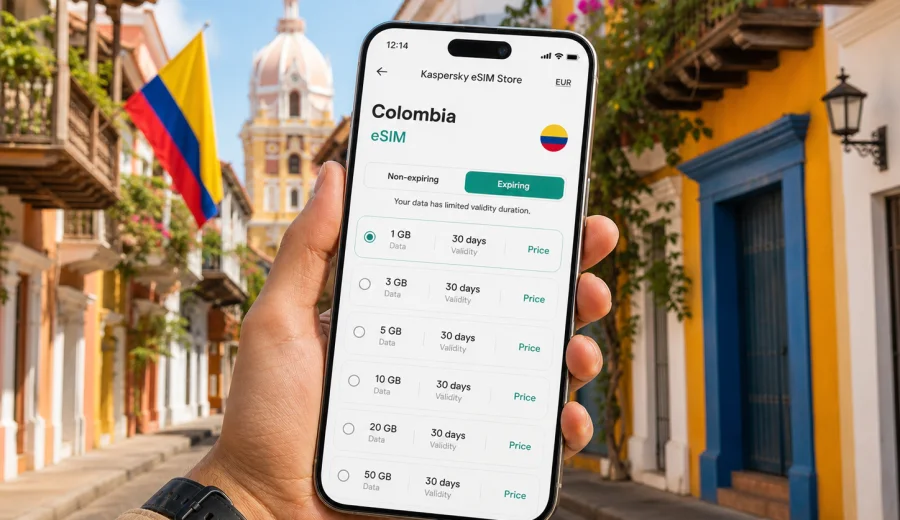
eSIM in Colombia: mobile connection and internet for your trip
Colombia is a country where mobile internet quickly becomes part of the travel plan. You may land in Bogota and need a ride to your hotel, walk through Cartagena with maps open, move between Medellin and the Coffee Region, or check a domestic flight to Santa Marta while your luggage is still in hand. In all these moments, a stable data connection is more than a convenience. It helps you navigate, translate, confirm bookings, contact drivers, and stay in touch with people at home.
An eSIM is a practical way to prepare mobile internet for Colombia without looking for a physical SIM card after arrival. Instead of inserting a plastic card, you install a digital SIM profile on a compatible phone, select it for mobile data, and use a prepaid data plan according to its conditions. For many travelers, this is simpler than waiting until the airport, comparing local offers in a shop, or depending on hotel Wi-Fi between cities.
This guide explains how to think about eSIM for Colombia: when it is useful, how much data you may need, what to check before you travel, and how Kaspersky eSIM Store can help you choose, arrange, and activate an eSIM with a suitable mobile internet plan for the trip.
Why mobile internet matters in Colombia
Colombia rewards flexible travel. A single itinerary can include a large capital city, Caribbean coast, mountain roads, coffee farms, beaches, museums, restaurants, and domestic transfers. The more varied the route, the more often you need internet outside your hotel.
Common online tasks during a Colombia trip include:
- opening maps in Bogota, Medellin, Cartagena, Cali, Pereira, Santa Marta, or Barranquilla;
- messaging hosts, guides, drivers, and airline support;
- using ride-hailing and delivery apps in major cities;
- translating menus, signs, and short conversations;
- checking domestic flight changes and airport transfers;
- sharing photos when Wi-Fi is slow or unavailable;
- using mobile banking, travel insurance apps, and booking platforms;
- confirming museum, restaurant, tour, or bus reservations.
What an eSIM does for a Colombia trip
An eSIM is a digital SIM profile built into a compatible device. For travel, it is usually used for mobile data. You install the eSIM profile, choose the correct line for cellular data, and use the traffic included in the selected plan. The exact amount of data, validity period, price, and supported destination depend on the plan you choose.
For Colombia, an eSIM can be useful if you want to:
- avoid searching for a SIM card immediately after landing;
- compare data volume and validity before the trip;
- keep your physical SIM in the phone for your usual number;
- use mobile internet for maps, messages, bookings, and travel apps;
- prepare a data option before moving between cities;
- reduce dependence on public Wi-Fi in hotels, cafes, airports, and stations.
It is important to set expectations correctly. A travel eSIM for mobile internet is not usually a full replacement for a local phone subscription. Voice calls and SMS are not included unless the selected plan clearly says so. For calls and messages, many travelers use internet-based apps. If you need a local phone number for a specific service, check the service requirements before relying only on a data eSIM.
Colombia travel scenarios where eSIM is especially useful
The value of an eSIM becomes clearer when you look at real travel moments.
At El Dorado International Airport in Bogota, mobile data helps with ride apps, hotel messages, and flight updates before you find reliable Wi-Fi. In Cartagena, it supports walking routes, restaurant bookings, tour confirmations, and transport back to your hotel. In Medellin, it is useful for metro routes, cable car planning, day trips, and messaging local hosts.
For the Coffee Region, where routes may include Pereira, Armenia, Manizales, Salento, and rural accommodation, save key details offline and use mobile data for live updates. For business visits, choose data volume based on email, calendars, document previews, and internet-based calls, not only navigation.
No mobile solution can remove every travel variable. Signal quality can depend on location, building density, terrain, device settings, and the underlying local network. Still, having a prepared eSIM reduces one common friction point: you are not starting the trip by solving mobile internet from scratch.
eSIM, roaming, local SIM, and Wi-Fi: practical comparison
There is no single best option for every traveler. Roaming is simple if your home operator’s terms are acceptable. A local SIM can suit longer stays or local-number needs, but it takes time and a physical card slot. Public Wi-Fi is useful for large downloads, but it does not help during transfers, city walks, or day trips. A travel eSIM fits the middle ground: you can prepare mobile data before arrival, keep your usual SIM in the phone, and use trusted Wi-Fi for heavier tasks.
Many travelers combine options. For example, you can keep your home SIM active for calls or banking messages, use an eSIM for Colombia mobile data, and connect to trusted Wi-Fi for app updates and media uploads. The point is not to use mobile data for everything. The point is to have internet when you are between Wi-Fi zones and need to make decisions quickly.
Before you choose an eSIM plan for Colombia
Preparation takes only a few minutes, but it can prevent avoidable problems. Use this checklist before arranging your mobile internet for Colombia.
- Check that your phone supports eSIM.
- Make sure the device is not locked to a mobile operator.
- Confirm that your phone has free space for an additional eSIM profile.
- Decide whether you will install the eSIM before departure or after arrival.
- Review the plan’s data amount, validity period, destination, and activation rules.
- Keep the installation details available on another screen or device if a QR code is used.
- Download offline maps for key areas as a backup.
- Update your phone operating system before the trip if you have postponed updates.
Device compatibility matters because eSIM is a hardware and software feature, not just an app setting. Before choosing a plan, check your device and confirm that your specific model can use eSIM. Some phones have different capabilities depending on region, model number, or operator lock status, so it is better to verify before paying for a plan.
How much data you may need in Colombia
Data use depends more on behavior than on destination. A traveler who uses maps and messaging can use much less than someone who streams video, uploads large files, or works from a laptop through a mobile hotspot. Use the table below as a planning framework rather than a promise.
| Travel style | Typical mobile data pattern | Planning tip |
|---|---|---|
| Light use | Messaging, maps, occasional searches, transport apps | A smaller plan may be enough if you use hotel Wi-Fi for updates and media |
| Standard city travel | Maps, photos, translation, bookings, social media, ride apps | Choose a plan that covers every travel day, not only arrival day |
| Remote work or business | Email, cloud files, calendar, calls through internet apps | Pick more data and avoid large downloads on mobile data |
| Content-heavy travel | Frequent photo and video uploads, reels, streaming, hotspot use | Consider a larger data allowance and monitor usage daily |
| Multi-city route | Bogota plus Cartagena, Medellin, Coffee Region, coast, or islands | Match validity period to the full route, including transfer days |
Two habits save data without making travel inconvenient. First, download offline maps, playlists, documents, and entertainment on Wi-Fi. Second, turn off automatic cloud backup and app updates over mobile data. These settings are especially useful when you want your eSIM data to last through the whole Colombia itinerary.
Choosing a Colombia eSIM plan with Kaspersky eSIM Store
Kaspersky eSIM Store is an app and website where you can quickly choose, arrange, and activate an eSIM with a suitable mobile data plan for a trip abroad. For Colombia, the main decision is not just the price. You should compare the amount of data, validity period, destination coverage, and how the plan fits your route.
If you already know your travel dates and expected data use, you can prepare an eSIM plan for Colombia before you leave. This is often the most comfortable moment to handle setup: you have stable Wi-Fi, time to read the plan conditions, and access to another device if you need to display installation details.
When comparing plans, ask yourself:
- How many days will I need mobile data in Colombia?
- Will I stay mostly in one city or travel between regions?
- Do I need data mainly for maps and messages, or also for work?
- Will I share internet with a laptop or another device?
- Do I want a smaller plan for essentials or a larger allowance for flexibility?
- When does the plan validity start, and how is activation handled?
Choose the plan that fits the actual trip, not the most optimistic version of the trip. Transfer days, delayed check-ins, long taxi rides, and spontaneous route changes often use more mobile data than expected.
How to install and activate eSIM
The exact installation flow depends on your phone and the selected plan, but the general process is straightforward. You usually add the eSIM profile to your device, label it so you can recognize it, and choose it for cellular data when you are ready to use it.
Typical steps:
1. Choose Colombia as the destination and select a suitable data plan.
2. Complete the plan arrangement through the app or website.
3. Open the installation details and add the eSIM profile to your phone.
4. Label the line, for example “Colombia data”.
5. Set the eSIM as the mobile data line when the trip begins.
6. Enable data roaming for the eSIM if the installation instructions or device settings require it.
7. Keep your primary SIM settings as you prefer for calls, SMS, or messaging apps.
For device-specific setup, use the Android installation guide or the iOS installation guide. Install the eSIM only when you are ready to follow the plan’s activation rules, because validity and data usage conditions depend on the selected plan.
One practical detail: avoid deleting an eSIM profile unless you are sure you no longer need it. In many cases, an activated eSIM cannot simply be moved to another phone. If you change devices during a trip, check the plan rules and support options before removing anything.
Data-saving checklist for Colombia
Use these settings before you rely on your eSIM as the main data line:
- download Google Maps or another map app for Bogota, Cartagena, Medellin, and your route;
- save hotel addresses, booking confirmations, and passport scans offline;
- turn off automatic app updates over mobile data;
- pause automatic photo and video cloud backup;
- reduce video quality in streaming and social apps;
- disable background data for apps you will not use on the trip;
- use trusted Wi-Fi for operating system updates and large file transfers;
- check mobile data usage every few days during a longer route;
- keep battery saver available, because navigation and mobile data can drain power quickly.
If you travel with other people, agree on who needs constant data and who can rely on occasional hotspot sharing. Hotspot use can consume data quickly, especially when a laptop starts syncing files or downloading updates in the background.
Quick answers about eSIM for Colombia
Can I install an eSIM before flying to Colombia?
In many cases, yes. You can usually install the eSIM profile while you still have stable Wi-Fi. Activation timing depends on the selected plan, so read the conditions before you start using mobile data.
Does an eSIM for Colombia give me a Colombian phone number?
Travel eSIM plans are usually focused on mobile data. They normally do not include a regular local phone number, voice calls, or SMS unless this is clearly stated in the plan conditions.
Can I keep my usual SIM active?
On many compatible phones, yes. You can keep your primary SIM for your usual number and use the eSIM for mobile data. The exact options depend on your phone model and settings.
Will eSIM mobile internet replace Wi-Fi?
It can cover many travel tasks, but Wi-Fi is still useful for large downloads, backups, video calls, and streaming. A sensible approach is to use eSIM for mobility and trusted Wi-Fi for heavy data tasks.
When should I arrange the eSIM?
The most convenient time is often before departure, when you have stable Wi-Fi and can read the plan details calmly. If you prefer to wait until arrival, make sure you will have internet access to complete setup.
Final preparation before departure
Before your Colombia trip, take ten minutes to make mobile internet part of your travel checklist. Confirm device compatibility, choose the data volume and validity period that match your itinerary, install the eSIM according to the instructions, and save important travel details offline. This gives you a cleaner arrival and fewer decisions to make when you are tired, carrying luggage, or moving between airport and hotel.
If Colombia is your next destination, you can choose an eSIM plan for your Colombia trip through Kaspersky eSIM Store and prepare mobile data before you travel. Review the plan conditions, follow the installation steps for your device, and use the eSIM as a practical internet option for maps, messages, bookings, and everyday travel tasks across the country.