
Travel connectivity guide
Concepcion eSIM for Mobile Internet in Chile
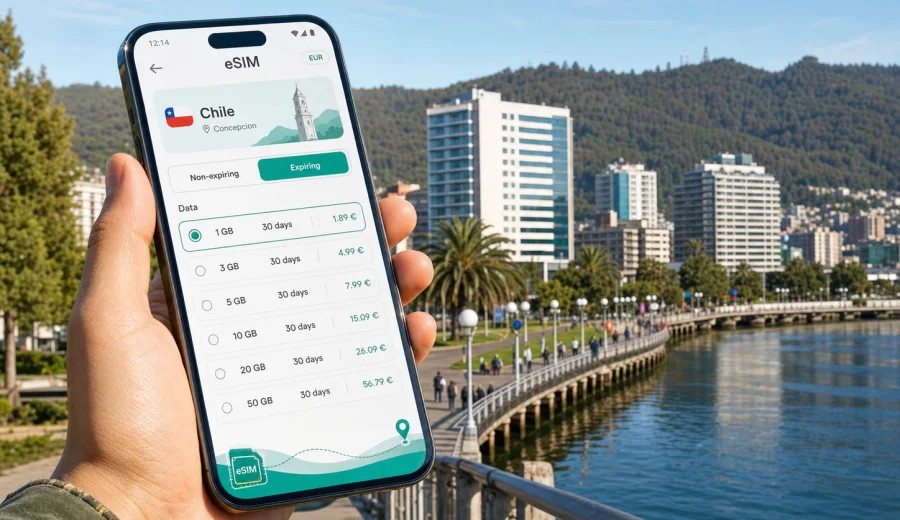
Concepcion eSIM: mobile connection and internet for a trip to Chile's Bio Bio hub
Concepcion is one of Chile's most practical arrival points for the south: a university city, a business base, a gateway to Talcahuano and San Pedro de la Paz, and a useful stop before trips toward the Bio Bio coast, Lota, Chillan, or the lakes and volcanoes farther south. In this kind of trip, mobile internet is not just a convenience. It helps you confirm transfers after landing, use maps across a wide urban area, keep hotel and meeting details close, and stay in touch while moving between districts.
An eSIM can make that first day easier because you do not need to look for a physical SIM card before you can open a map or message your host. With Kaspersky eSIM Store, you can choose a suitable eSIM tariff for mobile internet in Chile, check the data amount and validity period, install it on a compatible phone, and activate it when the trip requires it.
This guide focuses on Concepcion, not Chile in general. It is written for travelers who will arrive through Carriel Sur Airport, connect through Santiago, stay near the city center or the university area, visit Talcahuano, cross the Bio Bio River, work from hotels or coworking spaces, or use Concepcion as a base for short regional trips.
Why mobile internet matters in Concepcion
Concepcion is compact in some moments and spread out in others. The central streets around Plaza de la Independencia are walkable, but many useful places sit outside a single tourist core: the airport is in the Talcahuano area, San Pedro de la Paz is across the river, university and cultural areas have their own rhythm, and coastal or industrial visits can take you beyond the city center.
Mobile internet helps most when plans change in small ways:
- your flight lands late and you need to update a hotel or driver;
- you want to compare a ride-hailing route with a public transport option;
- you need walking navigation between the center, the University of Concepcion area, and nearby restaurants;
- you are meeting colleagues in Talcahuano, Hualpen, or San Pedro de la Paz;
- you want to check weather before a waterfront walk, a park visit, or a day trip;
- you need messaging apps for calls because many travel eSIM tariffs focus on data, not a local phone number.
Public Wi-Fi can be useful at the airport, a hotel, or a cafe, but it is not always available when you are between places. A prepared eSIM gives you a more controlled way to use maps, bookings, email, and translation tools without depending on the next Wi-Fi network.
Arrival scenarios: airport, transfer, and the first hour online
Most international visitors reach Concepcion after a connection through Santiago, then land at Carriel Sur Airport. The airport is close to Talcahuano and a short drive from central Concepcion when traffic is calm. That first hour often includes several tasks that are easier with mobile data:
| Moment | What you may need internet for | Why an eSIM helps |
|---|---|---|
| After landing | Messages, arrival updates, ride apps, hotel address | You can get online before looking for a local SIM shop |
| Transfer to the city | Map route, traffic check, fare comparison | You can confirm the driver, destination, and route |
| Hotel check-in | Reservation email, passport details, payment confirmation | Documents stay accessible even if Wi-Fi is not ready |
| First walk | Restaurant search, map pins, opening hours | You can move around without returning to the hotel for Wi-Fi |
If you install the eSIM before departure, keep your main SIM active for your usual number and use the eSIM for mobile data in Chile. On many phones, you can choose which SIM handles mobile data and which SIM remains available for calls or messages. The exact settings depend on the device, so check your phone menus before the trip.
Where eSIM is useful around the city
Concepcion is a working city as much as a travel destination. That means your internet use may come from practical tasks rather than sightseeing alone.
City center. Around Plaza de la Independencia, Catedral de la Santisima Concepcion, shops, offices, restaurants, and banks, mobile data helps with walking routes, payment confirmations, and last-minute changes to appointments.
University area. The University of Concepcion district is a common stop for visitors, students, conferences, and cultural events. If you move between campus, hotels, cafes, and meeting points, a stable data plan helps keep maps and messages available.
Talcahuano and Hualpen. Many airport, port, industrial, and business trips involve this side of the metro area. Mobile internet is useful for rides, maps, and coordination because addresses and meeting points may be less familiar to visitors.
San Pedro de la Paz. Crossing the Bio Bio River can add travel time. If you stay or meet people there, data helps you monitor traffic, confirm routes, and avoid relying only on hotel Wi-Fi.
Parks and day trips. For Nonguen National Park, Lota, the coast, or a trip toward Chillan, check maps and transport details before leaving the city. Coverage and speed depend on the local network and selected tariff, so download key maps or confirmations in advance when you expect to leave the urban area.
How much data to plan for Concepcion
The right amount depends on how you travel. Concepcion trips can be short and business-focused, or they can be part of a longer Chile route. Use the table below as a planning frame rather than a promise of exact consumption.
| Trip style | Typical online behavior | Practical data approach |
|---|---|---|
| 1-2 day stopover | Maps, messaging, hotel and flight checks | A smaller package may be enough if you avoid video streaming |
| 3-5 day city trip | Navigation, ride apps, social sharing, restaurant search | Choose enough data for daily map use and photos in messaging apps |
| Business visit | Email, video calls, files, calendar, ride apps | Pick a higher allowance and keep hotel Wi-Fi as backup for large files |
| Regional base | Concepcion plus Talcahuano, Lota, Chillan, or the coast | Consider a tariff with enough validity for the full Chile route |
| Remote work | Hotspot use, calls, cloud documents | Check whether tethering is allowed in the tariff conditions |
Video, cloud backups, app updates, and hotspot use can consume data quickly. Before departure, download offline maps, update apps on home Wi-Fi, save hotel addresses, and keep important booking PDFs available offline. That makes your eSIM data more useful for travel tasks rather than background updates.
Choosing an eSIM tariff for Concepcion
For a city article, the important detail is simple: Concepcion is in Chile, so the relevant destination is Chile. If your route stays within Chile, choose a Chile tariff that matches your travel dates and data needs. If your trip continues to another country in South America, compare whether a regional option is more practical for the full route.
When you compare tariffs, look at these details:
1. Destination. Confirm that the tariff covers Chile for a Concepcion trip.
2. Data amount. Match the package to your expected use: maps and messaging need less than video calls and hotspot work.
3. Validity period. Choose a period that covers your full stay, including arrival and departure days.
4. Activation rules. Check when the validity starts and whether the eSIM should be activated before travel or after arrival.
5. Device support. Make sure your phone supports eSIM and is not locked to one operator.
6. Calls and SMS. Many travel eSIM tariffs are data-focused and do not include a regular phone number unless the tariff conditions say otherwise.
Kaspersky eSIM Store is useful here because it gives you a place to choose the destination, review the data amount and validity period, and prepare an eSIM for the trip. If you want to arrange mobile internet before you land, you can choose an eSIM tariff for your trip to Concepcion in Chile and keep the details ready before departure.
A practical setup checklist before departure
Prepare the eSIM while you still have reliable home internet. This reduces airport stress and gives you time to check device settings calmly.
- Confirm that your phone supports eSIM and is not carrier-locked.
- Check your passport, boarding pass, hotel address, and meeting details are saved offline.
- Update maps, ride-hailing apps, airline apps, and messaging apps on Wi-Fi.
- Choose a Chile eSIM tariff with enough data and validity for the Concepcion part of the trip.
- Install the eSIM profile according to the instructions, but follow the tariff guidance on when to activate it.
- Name the profile clearly, for example "Chile travel data", so you can select it quickly.
- Keep your primary SIM for your usual number if you need banking codes or regular calls.
- Turn off background app updates and heavy cloud sync before travel.
Before buying, use the device check if you are not sure whether your phone is ready: Check your device. Compatibility matters because an eSIM can be installed only on supported devices, and some phones may also be restricted by an operator lock.
Installing and activating eSIM on your phone
The exact steps differ by device, but the usual process is straightforward: choose a tariff, install the eSIM profile, select it for mobile data, and activate it according to the tariff instructions. If your trip involves a long connection in Santiago before the domestic flight to Concepcion, avoid activating too early unless the tariff conditions make that appropriate.
For setup steps, use the relevant guide:
After installation, check these settings before you rely on the eSIM in Concepcion:
| Setting | What to check |
|---|---|
| Mobile data line | The travel eSIM should be selected for data when you want to use it |
| Data roaming | Some travel eSIM profiles require data roaming to be enabled for that eSIM |
| Default voice line | Keep your home SIM selected if you still need your regular number |
| Low data mode | Turn it on if you want to reduce background data use |
| Hotspot | Use it only if the selected tariff conditions allow tethering |
City movement: maps, rides, buses, and walking routes
Concepcion is easier when you can use live navigation. A short ride can become longer during busy periods, and moving between Concepcion, Talcahuano, and San Pedro de la Paz often requires checking the route rather than assuming distance alone.
Use mobile data for:
- confirming the airport transfer route after landing;
- checking traffic before crossing the Bio Bio River;
- saving the hotel location before leaving for dinner;
- sending live location to colleagues or family;
- comparing walking and ride options in the center;
- translating short messages or address details when needed.
For buses or local transit, keep a screenshot of the destination and the nearest landmark. If your Spanish is limited, offline notes can help even when the signal is weak or your battery is low. An eSIM is useful, but basic offline preparation still improves the trip.
Business trips and remote work in Concepcion
Concepcion has a strong business and academic profile, so many visitors arrive for meetings, site visits, conferences, university events, or project work. In these cases, mobile data is often a backup for professional continuity.
For business travel, think about three layers:
1. Hotel or office Wi-Fi for heavy tasks. Use it for large downloads, long video calls, and system updates when it is stable.
2. eSIM data for movement. Use it for calendar updates, ride coordination, maps, messaging, and urgent email while you are between locations.
3. Offline copies for critical files. Save documents, addresses, and meeting details before leaving the hotel.
If you expect to use a laptop through your phone, check the tariff conditions for hotspot use. Also set video apps to lower data use when you are on mobile data. A short video call can be reasonable; a full day of remote work on hotspot can consume a package quickly.
Hotels, apartments, and public Wi-Fi
Many hotels and apartments in Concepcion offer Wi-Fi, but arrival timing and login rules vary. You may need a booking number, a room number, or a password that is given only after check-in. If you arrive before the room is ready, mobile internet helps you continue planning without waiting in the lobby.
Keep hotel Wi-Fi for large files, streaming, app updates, photo backup, and long video calls. Keep eSIM data for maps, rides, messaging, booking checks, mobile payments, and translation while you are away from the hotel. This split keeps mobile data available for the moments when you actually need it.
Short trips from Concepcion
Concepcion often works as a regional base. You might visit Talcahuano, walk near the Bio Bio River, go toward Lota, plan a coastal stop, or continue inland toward Chillan. These routes are still part of a Chile trip, but your data use can change outside the city.
Before leaving the urban area:
- save the return route and destination address;
- download offline maps for the route;
- charge your phone and carry a power bank for longer days;
- tell someone your plan if you are heading to less central areas;
- check whether your tariff validity covers the full trip period;
- avoid spending mobile data on large uploads until you are back on Wi-Fi.
Do not assume that every road, park, or coastal point will have the same mobile experience as central Concepcion. A travel eSIM helps with access to mobile data where local network conditions allow it, but it is still smart to keep key information offline.
Quick comparison: eSIM, roaming, and local SIM in Concepcion
Different travelers need different setups. The best option depends on your phone, route, budget, and how quickly you need to be online.
| Option | Strength | What to watch |
|---|---|---|
| Travel eSIM | Can be prepared before arrival and used without a physical SIM card | Requires an eSIM-compatible, unlocked device |
| Home roaming | Keeps your usual SIM and number active | Costs and data limits depend on your home operator |
| Local physical SIM | May suit longer stays or local calling needs | Requires time to find, buy, and set up a physical SIM |
| Public Wi-Fi | Useful in hotels, cafes, and airport areas | Not always available between locations and may require logins |
For many short or medium trips, a travel eSIM is a practical middle path: you keep your usual SIM in the phone, use mobile data for Chile through the eSIM, and avoid spending the first hour of the trip looking for a physical card.
Common mistakes to avoid
- Buying a data package without checking whether the phone supports eSIM.
- Activating the tariff too early and using validity days before the trip begins.
- Forgetting to select the eSIM as the mobile data line after landing.
- Leaving cloud backup, app updates, and video autoplay active on mobile data.
- Assuming a data-only eSIM includes a local phone number, voice calls, or SMS.
- Depending on public Wi-Fi for airport transfer details or late-night arrival logistics.
- Using hotspot heavily without checking whether tethering is included in the tariff conditions.
These mistakes are easy to avoid if you prepare the eSIM before departure and check the main phone settings once you arrive.
FAQ: eSIM and mobile internet in Concepcion
Can I use an eSIM for a trip to Concepcion?
Yes, if your device supports eSIM, is not operator-locked, and you choose a tariff that covers Chile. Concepcion is in Chile, so the country destination is the key filter.
Should I install the eSIM before flying?
You can usually install the eSIM before travel while you have stable Wi-Fi. Activation timing depends on the tariff rules, so read the instructions before turning it on.
Will an eSIM give me a Chilean phone number?
Many travel eSIM tariffs focus on mobile data and do not include a standard phone number, voice calls, or SMS unless this is stated in the tariff conditions. Use internet-based calls and messaging apps when appropriate.
Is eSIM useful for a Santiago connection before Concepcion?
It can be useful if your Chile tariff is already active and you need data during the connection. Check validity timing so you do not start using the tariff earlier than planned.
Can I use the same Chile eSIM outside Concepcion?
If the tariff covers Chile, it is intended for the selected destination rather than one city only. Local experience depends on network conditions, device settings, and the tariff terms.
Final preparation before you travel
For Concepcion, the best mobile internet plan is the one that fits your real route: airport arrival, city center movement, Talcahuano or San Pedro de la Paz visits, hotel Wi-Fi use, and any regional trips from the city. Choose enough data for maps, messaging, transport, and work tasks, but keep large downloads and streaming for Wi-Fi when possible.
Before departure, check device compatibility, install the eSIM on a stable connection, save key addresses offline, and confirm when the tariff validity starts. Then, when you land in Chile, you can focus on reaching Concepcion, finding your hotel, meeting people, and moving around the city with mobile data ready when you need it.
To prepare your trip, open Kaspersky eSIM Store and select an eSIM tariff for mobile internet in Chile that matches your Concepcion itinerary, data needs, and travel dates.