
Travel connectivity guide
Copacabana eSIM for mobile internet in Bolivia
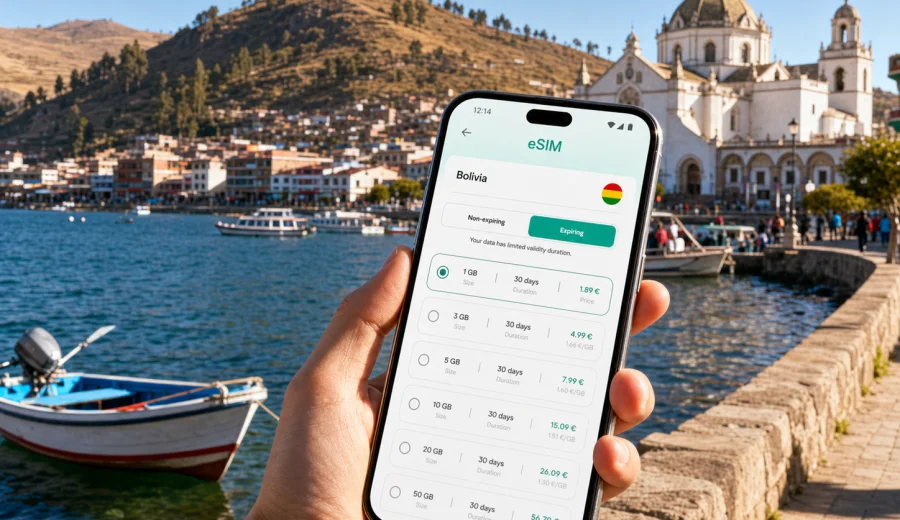
Copacabana eSIM: mobile connection and internet for a Lake Titicaca trip
Copacabana is a small lakeside city with a big role in many Bolivia itineraries. It sits on the Bolivian shore of Lake Titicaca, close to the Peru border, and it is often the place where travelers pause between La Paz, Isla del Sol, Puno, or a longer Andean route. That makes mobile internet more than a convenience: you may need it for bus times, hotel messages, boat departures, maps around the waterfront, and keeping in touch while plans change.
An eSIM can make that first day easier because you do not need to look for a physical SIM card after a long ride or border crossing. With a compatible phone, you can prepare a digital SIM profile before the trip, choose a data package for Bolivia, and use mobile data for navigation, bookings, messaging, and travel apps once the eSIM is active. Kaspersky eSIM Store helps you choose, arrange, and activate an eSIM with a suitable data plan for mobile internet during an international trip.
This guide focuses on Copacabana city scenarios: arrival, local movement, hotel check-in, lakeside walks, day trips to Isla del Sol, business or remote-work needs, and onward travel from the town. It is not a general Bolivia guide, although the right plan should match the country where Copacabana is located.
Why mobile internet matters in Copacabana
Copacabana is compact, but travel around it can be fluid. Buses may arrive from La Paz at different times, boat schedules can vary with demand and weather, and many travelers make decisions on the same day: stay another night, take an early boat, continue toward Peru, or return to La Paz. A stable plan for mobile data helps you keep those small decisions under control.
Common moments when internet access is useful:
- confirming your hotel or guesthouse check-in time before you arrive;
- checking the route from the bus stop to your accommodation;
- messaging a tour contact or boat operator about Isla del Sol departures;
- using maps near the Basilica, waterfront, market streets, and viewpoints;
- translating short Spanish phrases when arranging transport or meals;
- receiving banking, card, or booking confirmations;
- sharing your location with family during a high-altitude route;
- checking weather before walking up Cerro Calvario or taking a boat.
Public Wi-Fi can help in cafes and hotels, but it is not always available exactly when you need it. An eSIM is useful when the important moment happens outside: at the bus stop, on the waterfront, near the pier, or while walking between streets with luggage.
Arrival: from La Paz, the border, or another lake town
Many visitors reach Copacabana by road. If you arrive from La Paz, the trip can include a lake crossing at the Strait of Tiquina before continuing toward town. If you are coming from Peru, Copacabana may be your first stop in Bolivia. In both cases, your first useful tasks are usually simple: identify where you are, find your accommodation, tell someone you arrived, and check the next local departure.
With mobile internet ready, you can handle the first hour without depending on a kiosk, a local SIM counter, or a hotel lobby connection. This is especially helpful if you arrive late in the afternoon, when you want to check in quickly and avoid wandering with bags.
Practical arrival checklist
- Save your hotel address and booking reference offline before travel.
- Install your eSIM profile before the trip if your device supports it.
- Keep your primary SIM active for calls if you need your usual number.
- After arrival, select the eSIM for mobile data in your phone settings.
- Test maps, messaging, and your booking app before leaving the arrival area.
- Keep a small offline note with your accommodation name, street, and contact.
If your route includes the Bolivia-Peru border, remember that a country plan for Bolivia is for the Bolivian part of the trip. If you also continue to Peru, check whether you need a separate plan or a regional option that matches your full route.
Local movement: waterfront, Basilica, markets, and viewpoints
Copacabana is walkable, but maps are still useful. The waterfront area, boat pier, Basilica of Our Lady of Copacabana, market streets, bus departure points, and hillside viewpoints are close enough to explore on foot, yet travelers often move between them with limited time. Mobile data helps you keep orientation without stopping repeatedly to ask for directions.
The main city scenarios are practical:
| City moment | Why internet helps | What to prepare |
|---|---|---|
| Walking from the bus stop | Find the fastest route to your hotel | Offline address plus live maps |
| Visiting the Basilica | Coordinate meeting points in the center | Messaging app and saved pin |
| Booking a boat | Check departure time and contact details | Screenshot of reservation |
| Going to Cerro Calvario | Check weather and daylight | Map, battery, water reminder |
| Eating near the lake | Read reviews or translate menus | Light data plan may be enough |
| Moving onward | Confirm bus or border details | Booking app and email access |
For a short visit, you may not need a large data allowance. For a longer stay, remote work, frequent photo sharing, video calls, or route planning across Bolivia, choose more data and a validity period that covers the whole trip.
How much data to plan for Copacabana
The right eSIM plan depends on behavior, not only on the number of days. A traveler who uses maps, messaging, and booking apps needs far less data than someone who uploads videos from Lake Titicaca every evening.
Use this simple estimate:
- Light use: maps, messaging, email, ride or bus details, occasional web checks.
- Medium use: all light tasks plus photo sharing, cloud notes, translation, and frequent browsing.
- Heavy use: video calls, hotspot use, large uploads, streaming, or remote work.
For Copacabana specifically, think about your route. A one-night stop before Isla del Sol may need a smaller package. A week that includes La Paz, Copacabana, Isla del Sol, and onward planning may need a longer validity period. If you use your phone as a hotspot for a laptop, check whether tethering is allowed in the selected plan conditions and choose data accordingly.
Do not rely only on the plan name. Compare these details before you pay:
- data volume;
- validity period;
- destination or region covered;
- whether calls and SMS are included, if you need them;
- activation rules and when the validity period starts;
- top-up or additional-plan options;
- device compatibility and carrier-lock status.
Choosing an eSIM plan for a Copacabana trip
For a city article, the correct destination is the country where the city is located. Copacabana is in Bolivia, so your main eSIM choice should be a Bolivia plan unless your itinerary clearly needs a broader route. If you are arriving from Peru or continuing there, check whether you need another destination plan for the next country.
Before you leave, you can use Kaspersky eSIM Store to choose a mobile internet plan for Bolivia and compare the data amount, duration, destination, and price shown for available options. This keeps the decision tied to your real route: a short lake stop, a longer Bolivia trip, or a multi-city itinerary that starts or ends in Copacabana.
A practical selection process looks like this:
1. Choose Bolivia as the destination for the Copacabana part of your trip.
2. Match the validity period to your full time in Bolivia, not just the nights in Copacabana.
3. Estimate your data use by task: maps, messaging, bookings, translation, photos, calls.
4. Check whether your phone supports eSIM and is not locked to one carrier.
5. Install the eSIM profile while you still have a reliable connection.
6. Activate mobile data for the eSIM when you are ready to use it.
This approach is especially useful if Copacabana is a stop between larger cities. You avoid buying a plan that expires before the end of your Bolivia segment, and you avoid paying for more data than your actual travel style requires.
Installing eSIM before you reach Copacabana
The best time to install an eSIM is often before you need it. You can install the eSIM profile at home, in a hotel, or anywhere with a reliable Wi-Fi connection, then activate mobile data for the eSIM according to the plan rules when you arrive or when you are ready to start using it. The exact steps depend on your phone and operating system.
For setup, follow the official installation flow for your device: Android installation guide or iOS installation guide. Keep your phone charged, do not delete the eSIM profile after installation unless instructed, and read the plan terms before activation.
The usual setup path is straightforward:
1. Select the destination and plan in Kaspersky eSIM Store.
2. Complete the purchase process for the chosen plan.
3. Install the eSIM profile using the app instructions or QR code.
4. Name the line clearly, for example “Bolivia data”.
5. Keep your main SIM for calls if you still need your regular number.
6. Set the eSIM as the mobile data line when you want to use it.
7. Turn on data roaming for the eSIM if the plan instructions require it.
An eSIM for travel mobile internet usually focuses on data. It may not include a local phone number, voice calls, or SMS unless the selected plan states otherwise. For calls, many travelers use messaging apps over mobile data.
Device compatibility: check before you pay
Not every phone supports eSIM, and some devices are locked to a carrier. Before buying a plan, use the compatibility step in the store or check your device. This is important for Copacabana because replacing the setup plan after arrival can be inconvenient, especially if you are already moving between the waterfront, hotel, pier, and bus departure points.
Check three things:
- your phone model supports eSIM;
- the device is not carrier-locked;
- you have a stable internet connection for installation.
If you travel with two phones, install the eSIM on the device you will actually carry during the day. After activation, an eSIM profile may not be transferable to another device, depending on profile and plan conditions. Treat the installation device as the main travel phone for the route.
Copacabana scenarios where eSIM helps
One-night stopover. You arrive from La Paz, check in, walk along the lake, visit the Basilica, and leave the next morning for Isla del Sol or Peru. Mobile data is mainly for maps, booking messages, and transport details. A modest data package may be enough.
Lake Titicaca weekend. You stay two or three nights, take a boat, explore viewpoints, and share photos. You may need more data for uploads, weather checks, maps, and restaurant searches. A plan with a little spare capacity is more comfortable than calculating every megabyte.
Remote work break. You plan to answer emails, join calls, or work from a hotel or cafe. Do not assume hotel Wi-Fi will handle every task. Use eSIM data as a backup for messages, authentication codes, or urgent documents, but avoid heavy cloud syncing unless your plan has enough data.
Cross-border route. Copacabana can sit between Bolivia and Peru in a longer itinerary. Make sure your mobile data plan matches each country segment. If a plan is valid only in Bolivia, prepare the next option before crossing the border.
Family or group trip. Messaging matters when people split up between the pier, market, hotel, and viewpoints. Agree on a meeting point, share live location only when needed, and keep offline copies of tickets and addresses in case one phone loses battery.
Transport, hotels, and local planning
Copacabana does not require complicated city transport, but connectivity supports the small details that make a trip smoother. Bus departures, boat trips, check-in instructions, and route changes are often handled by message, email, or a booking app. If you have mobile internet, you can respond without waiting to return to your room.
For hotels and guesthouses, mobile data helps when:
- your arrival time changes after a slow road segment;
- you need to send a message about late check-in;
- the address is written differently across booking platforms;
- you want to compare walking routes with luggage;
- you need to call or message reception through an internet app.
For local movement, keep the setup simple. Download offline maps, save key pins, and then use mobile data for live details. This reduces data use and helps if network conditions vary near hills, buildings, or on the lake.
Trips from Copacabana: Isla del Sol and onward routes
Isla del Sol is one of the most common trips from Copacabana. Boats usually leave from the waterfront, and travelers often check times, prices, weather, and return options close to departure. Mobile data can help with last-minute coordination, but lake routes may have variable connectivity. Save essential details before boarding and avoid depending on a live connection for the only copy of your ticket or accommodation address.
For onward routes, prepare before you leave town:
- save bus or transfer details to La Paz, Puno, or the border;
- keep copies of hotel bookings for the next stop;
- download maps for the next city;
- confirm whether your eSIM plan still covers the next destination;
- check remaining data before a long travel day;
- keep the QR code or installation email saved, but do not reinstall unnecessarily.
If your Bolivia plan continues after Copacabana, it can support the next stage of the trip, such as La Paz, Uyuni planning, or travel admin. If you cross into another country, review your plan coverage before relying on the same mobile data line.
Data-saving tips for Lake Titicaca travel
High-altitude travel often means long days, changing light, and many photos. Data can disappear quickly if cloud backup, social media, or video calls run automatically. A few settings can make your plan last longer.
Use this checklist before leaving your hotel:
- disable automatic app updates on mobile data;
- pause cloud photo and video backup;
- download music, maps, tickets, and translation packs on Wi-Fi;
- set messaging apps to download media manually;
- use low-data mode for video calls when possible;
- close hotspot sharing when you no longer need it;
- check your data balance after heavy navigation or uploads.
For most city tasks, text messages, maps, email, and booking apps use limited data. Large uploads, short-form videos, and laptop hotspot sessions are the main reasons to choose a bigger package.
Quick comparison: eSIM, roaming, local SIM, and Wi-Fi
| Option | Good for | Watch out for |
|---|---|---|
| eSIM travel plan | Preparing mobile data before or during the trip | Device must support eSIM; plan terms vary |
| Home roaming | Keeping your usual number active | Costs and data limits depend on your carrier |
| Local physical SIM | Longer stays or local phone needs | Requires a physical SIM slot and local purchase time |
| Public Wi-Fi | Hotel work, large downloads, casual browsing | Not available everywhere; quality can vary |
Many travelers combine options. For example, they keep their home SIM for banking SMS or calls, use eSIM for mobile data, and use hotel Wi-Fi for large downloads. The right mix depends on your phone, route, budget, and need for a regular phone number.
FAQ: eSIM for Copacabana
Is an eSIM useful if Copacabana is only a short stop?
Yes, if you want mobile data for arrival, maps, hotel messages, boat details, and onward travel. For a very short stop, choose a plan that matches the number of days and expected data use.
Should I choose a Copacabana plan or a Bolivia plan?
Choose the destination that matches the country. Copacabana is in Bolivia, so a Bolivia plan is the relevant country option for the city part of the trip.
Can I install eSIM after I arrive?
You can install it after arrival if you have a reliable internet connection for setup. Installing before the trip is often easier because you can complete the setup calmly on Wi-Fi.
Does eSIM include calls and SMS?
Travel eSIM plans often focus on mobile data. Voice calls, SMS, or a local number are included only if the selected plan states this. Check the plan details before relying on those services.
Will eSIM replace hotel Wi-Fi?
Not completely. eSIM is useful when you are out in the city or moving between places. Hotel Wi-Fi can still be better for large downloads, backups, and long work sessions.
What if I continue from Copacabana to Peru?
Check the plan destination. A Bolivia plan is for Bolivia. If you continue to Peru, prepare a plan that covers Peru or a suitable regional route before crossing.
Prepare mobile internet before you arrive in Copacabana
Copacabana rewards flexible planning: a later bus, a changed boat time, a new hotel message, or a decision to stay another day can all happen quickly. Preparing mobile internet with eSIM gives you a practical backup for those moments, without searching for a physical SIM card as soon as you reach town.
Before your trip, check that your device supports eSIM, decide how much data you need, install the profile while you have stable Wi-Fi, and keep the Bolivia data line ready for the Copacabana part of your route. When you are ready to compare options, use Kaspersky eSIM Store to prepare an eSIM plan for your Bolivia trip and choose the data amount and validity period that fit your travel style.