
Travel connectivity guide
Cordoba eSIM: mobile internet for your trip
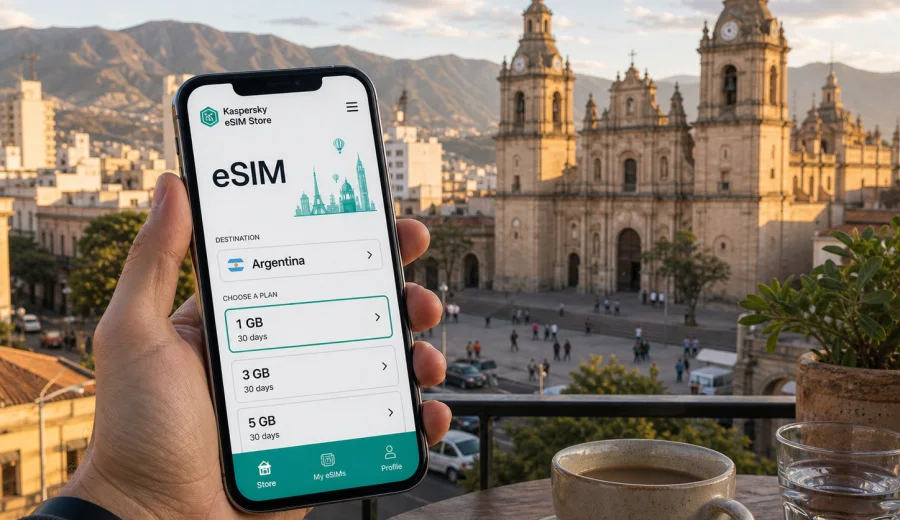
Cordoba eSIM: mobile connection and internet for your trip
Cordoba is easier to explore when mobile internet is ready from the first hour. You may land at the airport, head to a hotel in Nueva Cordoba, meet colleagues near the center, or use the city as a base for the Sierras. In each case, an eSIM can help you avoid looking for a physical SIM card before checking maps, ride options, hotel messages, or work notifications.
This guide focuses on arrival, transport, neighborhoods, business trips, and day trips from Cordoba. It explains how to prepare mobile connection and internet with an eSIM for Argentina before you choose a plan.
Why mobile internet matters in Cordoba
Cordoba is large enough that you will probably use your phone many times a day, even on a short visit. The historic center is walkable, but hotels, universities, business areas, restaurants, bus terminals, and residential neighborhoods are spread across the city. If you continue to Alta Gracia, Villa Carlos Paz, La Cumbrecita, or other places in the province, mobile data becomes part of route planning.
Reliable travel internet is useful for:
- opening maps after landing and checking the route from the airport;
- messaging your hotel or apartment host about arrival time;
- comparing taxi, transfer, and ride-hailing options;
- using translation, banking, and booking apps;
- finding restaurants, pharmacies, cafes, and coworking spaces;
- staying in touch during business meetings or family travel;
- checking weather before trips into the Sierras.
Public Wi-Fi can help in hotels, cafes, or offices, but it is not a full travel plan. You may need internet before you reach a Wi-Fi network, while walking between districts, or when your hotel connection is slow. An eSIM gives you a way to prepare a mobile data option before the trip, then use it on a compatible device when you arrive.
Arrival in Cordoba: the first connected hour
The first hour after arrival is often when mobile internet is most useful. At Cordoba airport, you may need to message a driver, check whether your room is ready, follow a route into the city, or coordinate with someone waiting elsewhere in the terminal.
With eSIM, much of the preparation can happen before the flight. You choose a plan for Argentina, install the eSIM profile on a compatible smartphone, and keep it ready for mobile data. Read the validity rules carefully, because activation and data use depend on the selected plan conditions.
For airport transfers, mobile data helps you:
| Situation | Why internet helps |
|---|---|
| Taxi or transfer | Confirm pickup details and share your location. |
| Ride app | Compare route, price, and pickup point without airport Wi-Fi. |
| Bus | Check stops, travel time, and the closest point to your hotel. |
| Meeting someone | Message if baggage or traffic changes your timing. |
Even with a fixed transfer, navigation is useful when your accommodation is in a dense district such as Nueva Cordoba, Guemes, Centro, General Paz, or Cerro de las Rosas.
City movement: maps, districts, and daily routes
Cordoba is not only the historic center around Plaza San Martin. Visitors often move between Nueva Cordoba for hotels and restaurants, Guemes for evening plans and markets, Centro for practical errands and older architecture, and districts such as General Paz, Alta Cordoba, or Cerro de las Rosas for business, family, or longer stays.
City movement is rarely linear. Mobile data supports small decisions such as:
- route changes when a street is busy;
- walking directions in the historic center;
- messaging a host, colleague, guide, or driver;
- checking opening hours before crossing town;
- sharing your location with friends or family.
To reduce data use, download offline maps before the trip, then use eSIM data for live details, messages, payments, and searches that change during the day.
Choosing an eSIM plan for a Cordoba trip
For a city trip, the right eSIM plan depends on real behavior. Cordoba can be a two-day stop, a week of meetings, a study visit, a family trip, or the first stage of a longer Argentina route. Before choosing, estimate how many days you need mobile data and how intensively you use your phone.
Use this quick planning table:
| Trip style | Typical mobile data needs | What to check |
|---|---|---|
| Short stopover | Maps, messages, ride apps | A smaller allowance may be enough with hotel Wi-Fi. |
| City break | Navigation, restaurant searches, photos sent in messengers | Choose enough data for several active days outside Wi-Fi. |
| Business trip | Email, calendar, calls in messenger apps, hotspot in emergencies | Check data volume, validity, and whether tethering is allowed by the plan. |
| Province route | Maps, bookings, weather | Consider a plan for the Argentina part of the route. |
| Long stay | Daily messaging, banking, remote work backup | Check validity and top-up options if available. |
Compare destination, data volume, validity period, price, and plan conditions. If your trip includes Cordoba and nearby destinations in Argentina, choose an Argentina plan. If your route continues to another country, compare whether a regional or global option fits better.
What eSIM does and does not replace
An eSIM for travel is a digital SIM profile used for mobile data on a compatible device. In the Kaspersky eSIM Store context, the focus is travel mobile internet: choosing, arranging, installing, and activating an eSIM with a suitable data plan for your destination.
It is also important to understand the limits:
- standard voice calls and SMS are not included unless the selected plan explicitly says so;
- messenger calls and messages can work over mobile data;
- coverage and speed depend on local networks, location, device, and selected plan conditions;
- some devices need data roaming enabled for the eSIM line to use mobile data abroad.
This matters in Cordoba because many travel tasks are app-based: maps, taxis, messaging, email, hotel platforms, airline apps, and banking. If you need traditional calling or SMS, check whether your primary SIM or selected travel plan covers that need.
When to prepare your eSIM for Cordoba
The most comfortable moment to prepare eSIM is before departure, while you have stable internet. You can choose the destination, review data allowance and validity, install the profile, and keep instructions available.
A practical sequence looks like this:
1. Confirm that your phone supports eSIM and is not operator-locked.
2. Choose Argentina as the destination for a Cordoba trip.
3. Compare data volume and validity against your dates.
4. Install the eSIM profile with a reliable internet connection.
5. On arrival, select the eSIM line for mobile data and check roaming settings for that line.
If you want to prepare a plan before you travel, you can choose an eSIM plan for your trip to Cordoba in Argentina and review the data options for the country. Match the allowance and validity period to your real route, not only the number of hotel nights.
Device compatibility before you buy
Before choosing any eSIM plan, check the device itself. Not every smartphone supports eSIM, and some models vary by region or sales channel. A phone can also be locked by an operator.
Check these points:
- your device supports eSIM;
- the device is not locked to a single mobile operator;
- you have internet access for installation;
- you understand which SIM line will be used for mobile data.
If you are not sure, use the compatibility check before choosing a plan: check your device. It prevents the frustrating scenario of arranging a travel data plan and then discovering that the phone cannot install it.
How to install and activate eSIM for the trip
Installation means adding the eSIM profile to your device. Activation and the start of plan validity depend on the selected plan conditions, so read the details before deciding whether to finish setup before departure or after arrival.
For device-specific steps, use the official setup pages: Android installation guide and iOS installation guide. Menu names can differ by phone model and operating system version.
Typical setup flow:
1. Open the eSIM setup instructions from your profile or email.
2. Add the profile by QR code or manual details, depending on what is provided.
3. Name the line clearly, for example Travel data or Argentina.
4. Select the eSIM line for mobile data when you are ready to use it.
5. Enable data roaming for the eSIM line if the plan or device requires it.
Do not install in a rush while boarding, switching airports, or entering a meeting. A quiet moment with reliable Wi-Fi is better.
Cordoba scenarios where eSIM is especially useful
A weekend in Nueva Cordoba and Guemes
For a weekend, your phone will probably handle maps, restaurant searches, museum information, ride apps, and messages. Nueva Cordoba and Guemes are close enough for walking, but live navigation is still useful at night or when plans change between a hotel, a market, and a dinner booking.
A business trip with meetings across the city
Business travel in Cordoba often involves time pressure. You may need calendar updates, driver messages, translation, email, maps, and messenger calls. If you use your phone as a backup for laptop connectivity, check whether tethering is permitted by the selected plan and choose more data than you would for a sightseeing trip.
A stop before the Sierras
Many travelers use Cordoba city as a gateway to the surrounding province. If you continue to Villa Carlos Paz, Alta Gracia, La Cumbrecita, Capilla del Monte, or other towns, your mobile data needs may extend beyond the city. Plan for maps, route checks, accommodation messages, and weather updates, and download key details in advance.
A family visit or longer stay
For family trips or longer stays, mobile internet becomes part of daily logistics: messaging, deliveries, banking, appointments, and transport. Look closely at validity, data volume, and top-up possibilities shown for the plan you choose.
Data habits and daily checks
A few habits help your plan last longer in Cordoba:
- download offline maps for the city and province before departure;
- save hotel addresses, booking confirmations, and flight details offline;
- use Wi-Fi for system updates, cloud backups, and large files;
- turn off automatic photo uploads on mobile data;
- keep ride, booking, banking, and messaging apps signed in.
Before leaving your hotel, check that the eSIM line is selected for mobile data, data roaming is enabled for that line if required, your phone is charged, and your primary SIM settings still fit any banking or SMS needs.
Common mistakes to avoid
Do not choose only by price without checking data volume and validity. Do not wait until arrival to confirm eSIM support. Do not delete an eSIM profile too early, because some profiles cannot be reinstalled or moved after activation. And do not expect a travel data plan to replace every mobile service: if you need ordinary calls, SMS, or your home number for two-factor authentication, keep your primary SIM settings in mind.
FAQ: eSIM and mobile internet in Cordoba
Is there a separate Cordoba eSIM plan?
For Cordoba, choose an Argentina eSIM plan and check whether its conditions match your route, dates, and data needs.
Can I install eSIM before flying to Argentina?
Yes. You can usually install the eSIM profile before departure if your device supports eSIM and you have stable internet. Check the plan conditions to understand when validity and data use start.
Will eSIM give me a local phone number in Cordoba?
Not usually. Travel eSIM plans in this context focus on mobile data. Ordinary calls and SMS are not included unless the selected plan explicitly says so.
Do I need to turn on data roaming?
On some devices, data roaming must be enabled for the eSIM line. This does not mean you should enable roaming for every SIM line. Check that the travel eSIM is selected for mobile data.
Can I use eSIM for trips from Cordoba?
Yes, if the selected plan covers Argentina and your device connects to a local network where service is available. For provincial routes, download offline maps and important details in advance.
Before you choose a plan
Use this short decision guide:
| Question | Better choice |
|---|---|
| Are you staying only in Cordoba? | Choose an Argentina plan sized for your city days. |
| Are you continuing around Argentina? | Choose enough validity and data for the wider route. |
| Are you working remotely? | Allow extra data and check tethering conditions. |
| Are you mostly sightseeing? | Prioritize maps, messaging, bookings, and photo sharing. |
| Are you unsure about your phone? | Check eSIM compatibility before purchase. |
The best plan is the one that fits your dates and habits. A traveler who only checks maps and messages needs a different data allowance from someone who joins video calls, shares a hotspot, or travels through the province for a week.
Prepare mobile internet for Cordoba
Cordoba is easier to manage when your phone is ready before the first route, message, or booking change. With Kaspersky eSIM Store, you can use the site or app to choose, arrange, install, and activate an eSIM with a suitable plan for mobile internet during a trip abroad. Check device compatibility, read the plan conditions, and keep installation instructions available before you travel.
If Cordoba is your destination, choose an eSIM plan for Argentina and prepare mobile data for the city, airport arrival, hotel check-in, local movement, business meetings, and trips into the province.