Travel connectivity guide
Coro eSIM: Mobile Internet in Venezuela
Coro eSIM for mobile connection and internet
A visit to Coro often combines a walk through its historic center with practical trips across Falcón state. A working mobile connection helps you check directions, confirm a pickup, contact your accommodation and keep bookings at hand. An eSIM can provide mobile data without removing your home SIM, provided your device supports it and the selected plan covers Venezuela.
Coro is in western Venezuela, in Falcón state, between the Sierra de San Luis and Médanos de Coro National Park. The UNESCO-listed property “Coro and its Port” covers two historic urban areas: Coro and La Vela. The city’s earthen buildings and street layout make the historic center distinctive, but they also make a visit easier when you know where you are going before setting off. Save your hotel address, key map areas and onward transport details before leaving a reliable Wi-Fi connection.
When mobile internet helps in Coro
Coro is best approached as a compact city visit with a few separate travel decisions: how you arrive, how you move between your accommodation and the historic center, and whether your itinerary continues to La Vela or another part of Falcón. Mobile data is useful at each point, though it should support a plan rather than replace one. Keep addresses and booking details available offline in case a signal is weak or a service is temporarily unavailable.
Arrival and the first transfer
Check the airport or bus terminal shown on your ticket, then confirm the arrival time and pickup arrangement directly with your carrier or host. Do not assume that a route shown in an old search result is operating today. If someone is meeting you, send a message before boarding and agree on a recognizable meeting point. If you are arranging a car after arrival, share the destination address in writing as well as on a map; street names and nearby landmarks can help clarify a pin.
Before travelling, save:
- the full name and address of your accommodation;
- a map area covering the arrival point and your first destination;
- the telephone or messaging details of your host or driver;
- your onward booking and any check-in instructions;
- an alternative meeting point in case plans change.
Keep your phone charged and your eSIM details accessible. If activation requires an internet connection, install the profile while you still have dependable Wi-Fi. A downloaded map is a useful backup, but it may not show live traffic, closures or recent changes.
Walking around the historic center
The historic core is a natural focus for a first visit. UNESCO describes Coro and La Vela as a World Heritage property known for earthen construction and a distinctive urban landscape. In practice, navigation is most useful when it helps you move between a specific address, a plaza, a church or a museum, rather than when you rely on a single broad pin for the whole center.
Use a map to set a walking route before you leave, then keep the screen dim or lock it between turns to conserve battery. Pin the entrance of a place you intend to visit, not just its name: similarly named points or map markers can be imprecise. Historic streets may not follow the neat grid you expect, and an app’s shortest route is not necessarily the most comfortable one. Follow local signs and advice when a path or access point is unclear.
A practical routine is simple:
- Search for the next stop while you are connected.
- Check its address and opening information with the venue if the visit depends on a schedule.
- Save the point or download the relevant map area.
- Carry water and take a pause in shade before checking the next leg.
- Message your accommodation if your return time changes.
Excursions beyond the center
Médanos de Coro National Park is a separate outing from a walk through the colonial streets. Build the excursion around the transport you have actually arranged, confirm where the driver will collect you and save the return contact details. Mobile internet can help with coordination, but do not rely on an app alone for a pickup in an exposed or less familiar area. Agree on a meeting point and a time, and keep enough battery for the return journey.
La Vela is also part of the UNESCO property, but it is a separate urban area from Coro. Treat the transfer as its own leg: check how you will get there and back, share the plan with your host, and save both destination points. If your trip continues elsewhere in Venezuela, verify the next departure and connection with the transport provider rather than estimating transfer time from a map.
Choosing an eSIM plan for Coro
A city name in a search query does not necessarily mean there is a separate Coro-specific mobile plan. For a trip to Coro, check whether the plan is valid in Venezuela, how much data it includes, when its validity begins, and how long it remains usable. If you will travel onward within the country, confirm that the plan’s stated coverage includes the other destinations too. Country-level availability does not promise identical reception on every street or along every road.
Estimate your data needs by the tasks you will do, not just by the number of days. Messaging and map searches use less data than repeated video calls, large uploads or streaming. Download maps and travel documents over Wi-Fi, disable automatic cloud backups on mobile data if you do not need them, and check which SIM is selected for cellular data. Keep your home line available for calls or messages if your device supports dual SIM, while taking care not to enable expensive roaming on that line unintentionally.
| Trip pattern | Useful preparation | What to confirm in the plan |
|---|---|---|
| Short city stay | Save the center map and accommodation address before arrival | Venezuela is included; validity dates suit the visit |
| City plus La Vela or the dunes | Arrange transport and save meeting points | Coverage applies to the whole itinerary, not only the city |
| Work trip | Download files in advance and identify Wi-Fi at your workplace or hotel | Data allowance, hotspot terms and validity |
| Longer Venezuela route | Keep transport details and maps available offline | Country scope and the plan’s stated limits |
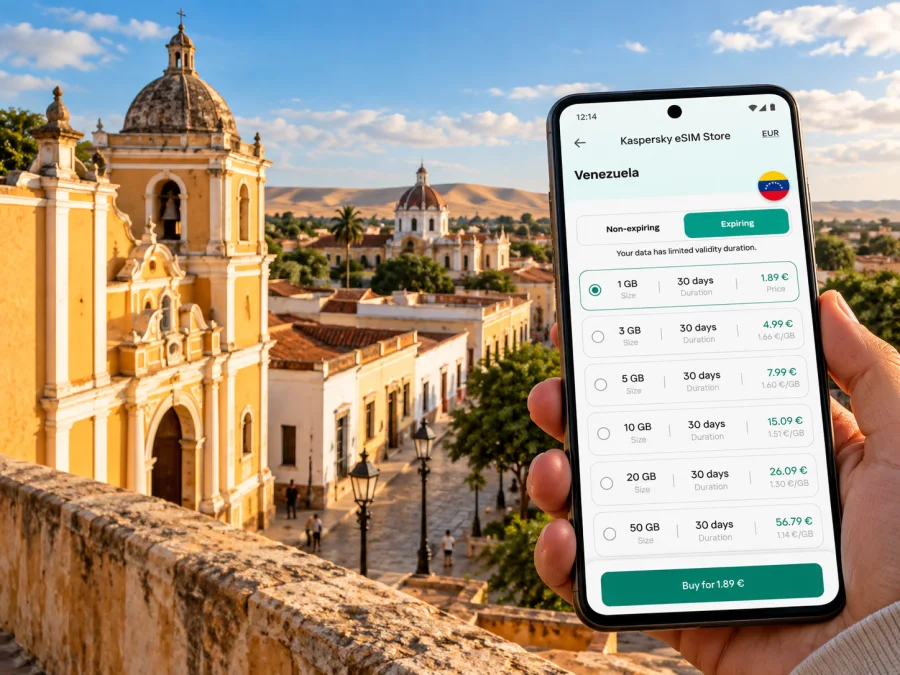
If you want to compare available options for the destination, review eSIM plans for travel in Venezuela in Kaspersky eSIM Store. The app and website help you choose, arrange and activate an eSIM plan for mobile data abroad. Check the conditions shown for the specific plan before completing your choice.
A travel eSIM and a Venezuelan operator line are different
The word “eSIM” describes a digital SIM profile, not one universal service. A travel data eSIM selected for a visit to Venezuela and a local subscriber line from a Venezuelan mobile operator can have different registration rules, network arrangements, features and support channels. Do not assume a travel data plan includes a Venezuelan telephone number, local voice calls or SMS; read its terms for the included service.
This distinction matters in the Venezuelan operator market. Digitel’s official information describes its own eSIM service for Digitel lines and sets out device checks and identity validation for its customer process. That information does not establish which local network a separate travel plan uses, whether it supports a local number, or whether that plan has the same requirements. For a travel eSIM, use the plan details provided at purchase and contact its service support about activation or network selection. For a Digitel line, check Digitel’s current requirements directly. Neither service should be treated as a substitute for verifying the other.
Reception depends on the network used, local infrastructure, building materials, terrain, congestion and your handset. A signal in central Coro does not guarantee the same result indoors, around the dunes or on a route outside the city. If constant availability is important, keep essential details offline and make a backup communication arrangement with your travel companion or host.
Check the device before travelling
An eSIM-capable name in a product family is not enough to confirm compatibility. Support can vary by model number, sales region and carrier lock status; two phones with the same retail name may not have the same SIM configuration. Apple, for example, documents differences among iPhone models sold for different markets. Check the exact device variant in the manufacturer’s settings or specifications, and make sure the phone is unlocked for use with another provider.
Before ordering, check whether your device supports eSIM. Confirm that the selected plan supports the device and that the operating system is up to date. If you have a model purchased in mainland China, Hong Kong, Macao or another market with a different hardware configuration, verify its exact model number with the manufacturer instead of relying on a general list of compatible models.
Install and activate before the trip
Where possible, set up the eSIM while you have stable Wi-Fi and enough time to follow the on-screen steps. Keep the QR code or activation details on another screen if the installation method requires scanning it. Do not delete an installed eSIM profile just to troubleshoot unless the plan’s instructions tell you to; some profiles cannot simply be installed again.
A careful setup sequence:
- Check compatibility, carrier lock status and the plan’s supported destination.
- Purchase the plan and read the activation and validity conditions.
- Connect to Wi-Fi, add the eSIM profile using the supplied method, and label it clearly, such as “Venezuela travel”.
- Leave your home SIM settings as intended and select the travel eSIM for mobile data when appropriate.
- Follow the plan’s instructions for data roaming and activation timing. The exact setting and when validity starts depend on the plan.
- Test the profile before departure if the provider’s instructions allow it, then avoid changing settings without a reason.
For detailed steps, use the Android eSIM installation instructions or the iPhone eSIM installation instructions. Menu names may differ by phone model and operating-system version. If the eSIM is installed but does not connect, first check the selected data line, plan validity, network selection settings and the provider’s troubleshooting guidance. A successful installation alone does not mean that the plan’s validity has started or that a local network is available at that moment.
Make data last through the visit
Coro’s most useful mobile-data habits are ordinary ones: prepare information in advance, use live data for updates that matter, and preserve battery for navigation and coordination. You do not need to keep every app online continuously.
Before leaving your accommodation
- Download the map area for the center and any planned excursion.
- Save reservation details, host contacts and transport arrangements.
- Check the weather and the day’s schedule using a current source.
- Charge your phone and carry a power bank if you expect a long day.
While out
- Use mobile data for messages, route updates and essential searches.
- Turn off automatic photo and video uploads if data is limited.
- Avoid relying on public Wi-Fi for time-sensitive directions unless you can confirm it is the venue’s network.
- Keep your phone secure and out of direct sun when you are not using it.
At the end of the day
- Save the next day’s route and confirm pickup details.
- Review data use and validity in the app or device settings.
- Keep your eSIM profile installed if you still need it; removal can make reinstallation difficult.
Common travel scenarios
You arrive late
Send the host your arrival details before departure and reconfirm the pickup point. Keep the full address in a note so you can show it even if the map takes time to load. If you need to arrange a ride, use the contact or service you have verified and agree on the fare and destination before setting off.
Your group splits up
Agree on a specific meeting point and a check-in time before separating. Share location only if everyone is comfortable with it, and keep a written address as a backup. Mobile messaging is useful when it works, but it should not be the only way your group knows how to reunite.
You need to work remotely
Download documents in advance, ask your hotel or workplace about its Wi-Fi, and keep a mobile connection as a fallback for basic coordination. Test any video-call or hotspot requirement before depending on it; performance depends on the plan, device and available network. Choose a data allowance with your work pattern in mind and review the plan’s hotspot terms.
You are making a day trip
Save the outward and return points, check the agreed transport details, and tell someone where you expect to be. A route outside the city may have different reception from the historic center. Keep essential numbers, directions and booking references available offline rather than expecting continuous data service.
Questions travelers ask
Will one eSIM work everywhere in Coro?
No plan or device can promise uninterrupted reception everywhere. Check the plan’s stated destination and network conditions, and expect local coverage to vary indoors and outside the city. Keep important information offline.
Does a travel eSIM give me a Venezuelan phone number?
Not necessarily. Many travel eSIM plans are designed for data. Review the exact plan terms for calls, SMS and numbering before purchase; do not infer these features from the word eSIM.
Can I keep my regular SIM active?
Many dual-SIM phones allow a physical SIM and an eSIM to be available together, but the options depend on the device variant. Choose the travel eSIM for data if that is what you intend, and check roaming settings for your home line to avoid unexpected charges.
Should I install the eSIM before or after arrival?
If the provider allows it, installation over dependable Wi-Fi before departure gives you time to resolve setup questions. Follow the plan’s own activation timing so you do not start validity earlier than intended.
What if the phone says the eSIM is not supported?
Check the exact model number, country or region variant, carrier lock status and software version. Then compare them with the manufacturer and plan requirements. Do not rely on the model name alone.
A simple Coro connectivity checklist
- Confirm your arrival terminal and transport from current ticket information.
- Save your accommodation address, host contact and planned meeting points.
- Download map areas for Coro, La Vela and any excursion before leaving Wi-Fi.
- Verify that the eSIM plan includes Venezuela and matches the dates and route.
- Check the exact handset variant, eSIM capability and carrier unlock status.
- Install the profile using the provider’s instructions and keep the activation details.
- Set the intended SIM for mobile data and understand when plan validity begins.
- Keep key travel information available offline and preserve battery for the return.
A little preparation makes it easier to use maps, coordinate transfers and stay in touch while you explore Coro’s historic center and the surrounding Falcón itinerary. Compare the plan conditions with your route, then choose an eSIM plan for your Venezuela trip in Kaspersky eSIM Store and follow the supplied installation steps before you travel.


