
Travel connectivity guide
Costa Rica eSIM: mobile internet guide
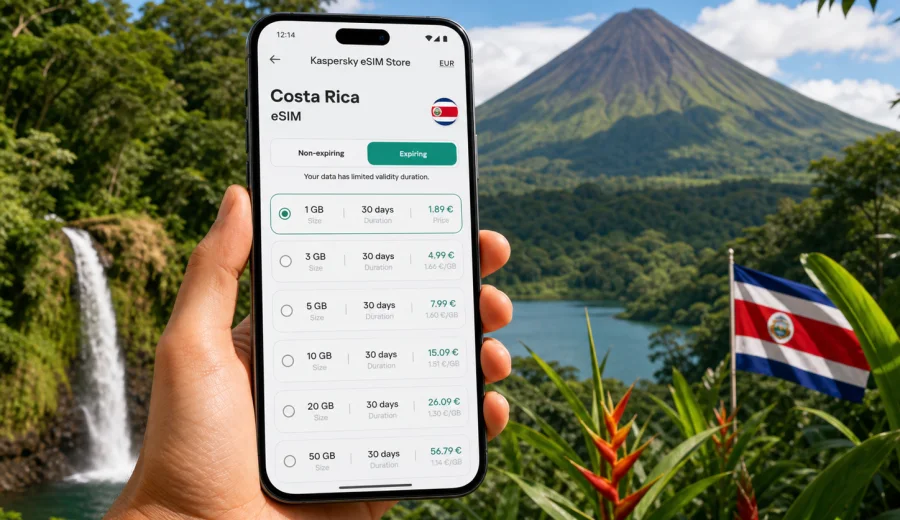
eSIM in Costa Rica: mobile connection and internet for your trip
Costa Rica is a country where mobile internet matters from the first hour of the trip. You may need maps after landing near San Jose, a messenger to coordinate a shuttle to La Fortuna, a booking app on the way to Monteverde, or a translation tool while checking in at a small hotel on the Pacific coast. An eSIM can help you prepare mobile data before you arrive, without searching for a physical SIM card after a long flight.
This guide explains how to use an eSIM for Costa Rica, what to check before choosing a data plan, how much traffic different travel scenarios may need, and how to install the eSIM on a compatible device. The focus is practical: staying online for navigation, transport, reservations, messaging, work, and everyday travel tasks.
Why eSIM is useful for Costa Rica
Costa Rica is compact on the map, but trips often involve several very different places: San Jose and the Central Valley, volcano routes, cloud forests, national parks, surf towns, beaches, and rural roads. A mobile data connection helps you keep these parts of the journey connected.
An eSIM is a digital SIM profile installed on a compatible smartphone or tablet. For travel, it is usually used for mobile data rather than a traditional phone number. That means you can keep your main SIM for calls or banking messages, while the eSIM handles internet access for maps, apps, email, and messengers.
Common Costa Rica situations where mobile data is useful:
- checking transport details after arrival at Juan Santamaria International Airport or Liberia airport;
- opening maps on mountain roads, beach routes, and national park approaches;
- messaging hotels, guides, drivers, and travel companions;
- using ride-hailing, car rental, parking, or ferry information;
- confirming tour times for volcano, rainforest, coffee, surf, or wildlife trips;
- keeping boarding passes, insurance documents, and reservations available;
- sharing location with family or colleagues when plans change.
Public Wi-Fi can be useful in hotels, cafes, and airports, but it is not something you should rely on for every step of the route. Mobile internet gives you more flexibility when you leave a lobby, join a transfer, stop on the road, or arrive at a place where Wi-Fi details are not immediately available.
What an eSIM gives you, and what it does not
For a Costa Rica trip, an eSIM is best understood as a travel data tool. It can make it easier to connect to mobile internet without changing a plastic SIM card, but it is not magic coverage and it is not a replacement for every service from a local mobile operator. Most travel eSIM tariffs focus on data for maps, messengers, bookings, email, and browser access. If you need regular phone calls or SMS, review the conditions of the selected tariff before purchase.
Costa Rica travel scenarios and data use
The right eSIM data amount depends less on the country name and more on how you travel. A short city-and-beach trip needs a different setup from a remote-work stay or a road trip that crosses several regions.
Light trip: maps, messages, bookings
This suits travelers who mainly need directions, occasional browser searches, ride or transfer coordination, email checks, and messaging. If you use hotel Wi-Fi for large updates and video, a modest data allowance may be enough.
Typical uses:
- checking maps several times a day;
- messaging hotels and drivers;
- opening restaurant, tour, and ticket confirmations;
- uploading a few photos when Wi-Fi is not available;
- reading email and travel updates.
Active trip: navigation, tours, daily sharing
This is common for Costa Rica. You might drive between San Jose, La Fortuna, Monteverde, Manuel Antonio, Tamarindo, Puerto Viejo, or smaller beach towns. You may open maps often, coordinate tours, use translation tools, and share photos or short videos during the day.
Typical uses:
- navigation during intercity drives;
- messaging several providers or guides;
- using cloud storage for selected photos;
- checking weather and route conditions;
- using transport and booking apps daily.
Work or long stay: calls, hotspot, cloud tools
If you plan to work remotely, use video calls, share a laptop hotspot, or stay for several weeks, choose data more carefully. Video meetings and tethering can consume data quickly. Before relying on mobile data for work, check whether hotspot use is allowed by the selected tariff and keep a backup plan such as hotel Wi-Fi.
Practical rule: reserve mobile data for the moments when mobility matters, and use trusted Wi-Fi for heavy downloads, system updates, and long video calls when possible.
Before you choose an eSIM tariff for Costa Rica
Do the preparation before purchase. It takes a few minutes and can prevent the most common eSIM problems.
Checklist:
- Your phone supports eSIM.
- Your phone is not locked to one mobile operator.
- Your device has internet access for installation.
- You understand when the tariff validity period starts.
- The data allowance fits your trip length and expected use.
- The tariff covers Costa Rica, or your wider route if you cross borders.
- You know whether calls, SMS, hotspot, and top-ups are included or excluded.
- You have saved installation instructions before leaving home.
If you are not sure whether your phone can use a digital SIM, use the compatibility check before buying: check your device. Compatibility can depend on the exact model, region, and operator lock status, so do not rely only on the marketing name of the phone.
How to choose mobile internet for Costa Rica
Start with your route. Costa Rica trips often include both urban and nature-focused stops, and the best tariff is the one that matches your actual plan rather than a generic travel average.
Ask yourself five questions:
1. How many days will you need mobile data?
2. Will you drive or use transfers where maps are important?
3. Will you upload media while outside Wi-Fi?
4. Will you use mobile hotspot for a laptop or another device?
5. Are you visiting only Costa Rica, or also Panama, Nicaragua, Mexico, the United States, or another country?
For a Costa Rica-only trip, a country tariff is usually the simplest starting point. If your itinerary includes several countries, compare the country option with a regional or wider tariff if available for your route. The right choice depends on the destinations, validity period, data volume, and price shown for the selected option.
When you are ready to compare options, you can use Kaspersky eSIM Store to choose an eSIM tariff for your Costa Rica trip and review the data amount, validity period, and other conditions before installing it on a compatible device.
When to install and activate the eSIM
Many travelers prefer to install the eSIM before departure while they still have stable home Wi-Fi. This can reduce stress after landing, especially if you arrive late, need to find a transfer, or have a tight connection. Activation rules vary by tariff, so read when the validity period begins. Some eSIM profiles start counting after activation, while others may start under different conditions described in the offer.
A practical approach:
1. Choose the tariff before the trip.
2. Install the eSIM while connected to reliable Wi-Fi.
3. Keep your main SIM active if you need calls or bank messages.
4. After arrival, select the eSIM for mobile data.
5. Enable data roaming for the eSIM if the instructions for your device or tariff require it.
6. Open a browser or map app to confirm that data works.
For detailed setup steps, use the relevant installation guide: Android eSIM instructions or iOS eSIM instructions. The exact menus can differ by device model and operating system version, so follow the steps shown on your phone as well.
Practical data planning for Costa Rica
The table below is not a guarantee of exact consumption. It is a planning tool to help you think through your trip before choosing a tariff.
| Trip style | Likely data needs | Notes |
|---|---|---|
| Weekend or short stop | Low to moderate | Best for maps, messaging, confirmations, and light browsing |
| One-week vacation | Moderate | Useful for daily maps, tour coordination, social apps, and some uploads |
| Road trip across regions | Moderate to high | Navigation and route changes can increase daily use |
| Remote work stay | High | Video calls, hotspot, and cloud tools require a larger allowance |
| Family or group travel | Varies | Each traveler may need their own device setup or hotspot plan |
Ways to control data use:
- download offline maps for key regions before leaving Wi-Fi;
- turn off automatic cloud backup on mobile data;
- disable app updates over cellular data;
- reduce video streaming quality;
- send compressed media in messengers;
- use hotel Wi-Fi for large uploads;
- monitor data use in your phone settings and in the eSIM app or profile where available.
Costa Rica is a visual destination, so photos and videos are tempting. If you plan to upload many clips from beaches, waterfalls, zipline parks, or wildlife tours, choose more data than a minimal messaging-only trip would require. Coverage can vary in remote valleys, dense forest, mountainous roads, and some coastal areas, so keep hotel addresses, route screenshots, and booking confirmations available offline.
eSIM compared with roaming, public Wi-Fi, and local SIM cards
There is no single best option for every traveler. Roaming can be simple if your home operator offers suitable conditions. Public Wi-Fi can help in hotels and cafes, but it is less convenient on roads, beaches, and transfer routes. A local physical SIM may suit a long stay, but it usually requires a store visit and a physical SIM slot. For many Costa Rica visitors, an eSIM is attractive because it reduces the number of tasks after arrival: you can prepare mobile data in advance, keep your main SIM available for regular services, and avoid swapping cards at the airport.
Read the tariff conditions carefully and avoid deleting an installed eSIM profile unless you know it can be restored.
Step-by-step preparation plan
Use this plan a few days before departure.
1. Confirm your phone model supports eSIM and is not operator-locked.
2. Estimate your data use based on route, length of stay, hotspot needs, and media habits.
3. Compare available eSIM tariff options for Costa Rica.
4. Read the validity, data allowance, activation, hotspot, calls, SMS, and top-up conditions.
5. Install the eSIM using stable Wi-Fi.
6. Save offline maps for San Jose, your arrival airport, and the regions you will visit.
7. Keep reservation numbers, addresses, and emergency contacts available offline.
8. After arrival, set the eSIM as the mobile data line and test internet access.
This preparation is especially helpful if your first day includes a transfer to La Fortuna, Monteverde, Manuel Antonio, Tamarindo, Puerto Viejo, or another destination outside the capital area.
FAQ about eSIM and internet in Costa Rica
Can I use eSIM for calls in Costa Rica?
Most travel eSIM tariffs are designed for mobile data. Traditional voice calls and SMS are not usually included unless the selected tariff explicitly says so. You can often use internet-based calling and messaging apps over mobile data.
Should I install the eSIM before flying?
Installing before departure is often convenient because you can use reliable Wi-Fi and avoid rushing at the airport. Before activation, read the tariff conditions so you understand when the validity period starts.
Will eSIM work in every part of Costa Rica?
Mobile coverage depends on local network conditions, geography, and the selected tariff. Cities and tourist corridors may differ from mountains, rainforests, beaches, and remote roads. Save essential information offline for areas where signal may be limited.
Is public Wi-Fi enough for Costa Rica?
It can help in hotels, cafes, and airports, but it is less convenient while driving, walking between places, changing plans, or coordinating transfers. Mobile data gives you more independence outside fixed Wi-Fi locations.
How much data do I need?
For messaging, maps, and booking apps, a smaller allowance may be enough. For daily photo uploads, frequent navigation, video calls, or hotspot use, choose a larger allowance. Your own habits matter more than a generic country estimate.
Can I use hotspot with a travel eSIM?
This depends on the selected tariff and device settings. Check the conditions before relying on hotspot for work, group travel, or laptop access.
Final checklist before you go online in Costa Rica
Before you leave home:
- install the eSIM on compatible hardware;
- save installation instructions and important documents;
- download offline maps for your first route;
- confirm whether the tariff is data-only;
- check the validity period and data allowance;
- understand how to contact support if needed.
After arrival:
- set the eSIM as the mobile data line;
- enable data roaming for the eSIM if required;
- test a browser or map app;
- keep an eye on data use during the first day;
- use Wi-Fi for heavy downloads and backups.
With a little preparation, eSIM can make mobile connection and internet access in Costa Rica more predictable. You can handle maps, transfers, bookings, and everyday communication without waiting for a physical SIM card. To prepare before your route begins, open Kaspersky eSIM Store and select an eSIM tariff for Costa Rica that matches your trip length, data needs, and device compatibility.