
Travel connectivity guide
Crocus Hill eSIM: Mobile Internet in Anguilla
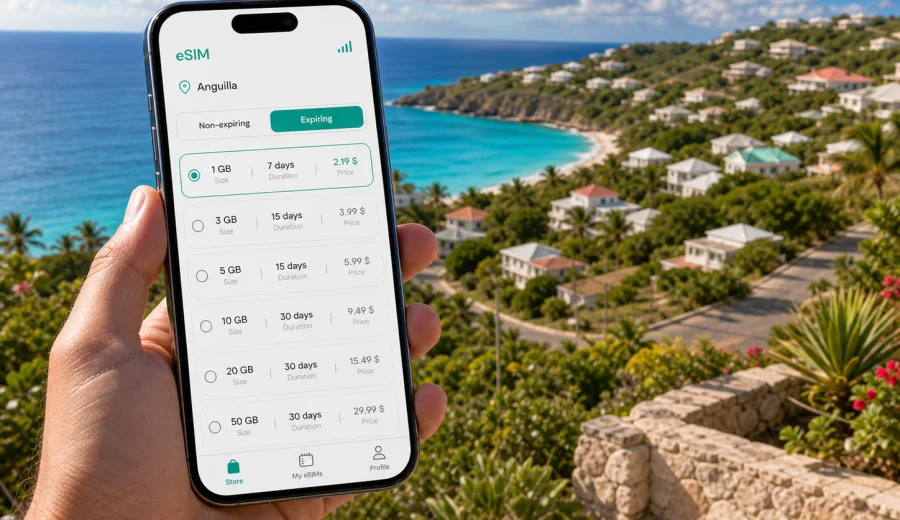
Crocus Hill eSIM: mobile connection and internet for an Anguilla trip
Crocus Hill is a small, elevated part of Anguilla where a traveler can quickly move between quiet residential roads, sea views, nearby beaches, government offices in The Valley, and short drives toward restaurants, guesthouses, marinas, and ferry connections. That compact geography makes mobile internet especially useful: you may not travel long distances, but you will often depend on maps, ride coordination, hotel messages, restaurant reservations, and weather updates.
An eSIM can help you prepare mobile data before you arrive in Anguilla or soon after landing, without looking for a physical SIM card. For a stay in Crocus Hill, the practical question is not only “Will I have internet?” but “Will I be able to use it when I need it: during arrival, on hill roads, near the coast, at a rental villa, and when making day plans across the island?”
This guide focuses on Crocus Hill as a real travel base, not as a general country overview. It covers airport arrival, local movement, hotels and villas, business trips, beach routes, short stopovers, and the checks you should make before choosing an eSIM plan for mobile data in Anguilla.
Why mobile data matters in Crocus Hill
Crocus Hill is not a dense city with a subway system, big shopping districts, or long urban corridors. Its travel pattern is more local and practical: short car rides, walking between viewpoints and accommodations, quick trips toward The Valley, and routes down to beaches and coastal restaurants. In this kind of destination, mobile data helps with small decisions that happen many times per day.
Common Crocus Hill scenarios include:
- checking the route from Clayton J. Lloyd International Airport to your accommodation;
- messaging a host before arrival at a villa or guesthouse;
- using maps when roads are quiet or signs are limited;
- coordinating taxis, car rental pickup, or a transfer from the ferry terminal;
- confirming restaurant opening times and booking details;
- sharing a live location with family or colleagues;
- using mobile banking, email, and travel documents;
- checking weather before beach plans or boat trips.
Public Wi-Fi can be useful in hotels, cafes, and offices, but it may not cover the moments between places. If your first task after arrival is to reach Crocus Hill, meet a host, or confirm a rental car, mobile data on your own device is often simpler than waiting for Wi-Fi.
Arrival: airport, ferry, and the first route to Crocus Hill
Most visitors reach Anguilla either by air or by ferry from nearby Saint Martin/Sint Maarten. If Crocus Hill is your base, your first travel task is usually short but time-sensitive: confirm your ride, find the right address, and send a message if your arrival time changes.
If you arrive by air
Clayton J. Lloyd International Airport is close enough that many trips to Crocus Hill are short. That does not make mobile data less useful. It means the first 30 minutes matter: you may need to open a map, contact the accommodation, pull up a reservation, or check whether your driver is waiting outside the terminal.
Before boarding your flight, download key documents and save your accommodation address offline. Then use mobile data for live tasks after landing: current route, messages, local search, and any last-minute changes.
If you arrive by ferry
Travelers who enter Anguilla by ferry may need to coordinate several moving parts: ferry schedule, arrival formalities, taxi pickup, luggage, and the final drive to Crocus Hill. An eSIM for mobile data helps you keep the transfer simple, especially if the ferry timing shifts or your host asks for an updated arrival time.
For ferry days, keep these items easy to open:
| Need | Why it matters on the way to Crocus Hill |
|---|---|
| Accommodation address | Drivers may know the area, but exact villa names and road details help |
| Host or hotel contact | Useful if check-in is flexible or self-service |
| Offline map | A backup if mobile signal is weak for a few minutes |
| Booking confirmation | Speeds up check-in or identity checks at the property |
| Mobile data | Lets you coordinate the parts that change in real time |
Local movement around Crocus Hill
In Crocus Hill, mobile internet is most useful when you are moving between small, practical points: accommodation, grocery stops, viewpoints, beaches, offices, and restaurants. Anguilla is compact, but travel can still involve unfamiliar roads, private drives, and addresses that are easier to find with a map pin than with a street description.
Use mobile data for:
1. navigation from Crocus Hill to The Valley;
2. route checks toward Crocus Bay and nearby coastal areas;
3. taxi coordination after dinner or beach visits;
4. checking fuel, grocery, pharmacy, or ATM locations;
5. confirming whether a restaurant or activity is open;
6. using messaging apps when local voice calls are not part of your eSIM plan.
An eSIM plan selected through Kaspersky eSIM Store is intended for mobile internet. It normally does not include a local phone number, regular voice calls, or SMS unless a specific plan states otherwise. For many Crocus Hill trips, that is enough because guests mainly use maps, email, hotel apps, banking apps, and messengers over data.
What kind of traveler benefits most
An eSIM is useful for many Anguilla trips, but the value is clearest when your schedule depends on small, mobile decisions.
| Traveler type | How mobile data helps in Crocus Hill |
|---|---|
| Villa guest | Coordinate check-in, find the driveway, message the host, manage grocery runs |
| Hotel guest | Use maps between the hotel, beaches, restaurants, and airport or ferry pickup |
| Business traveler | Keep email, calendars, calls over apps, and document access available between meetings |
| Stopover visitor | Use time efficiently without searching for local SIM shops or reliable Wi-Fi |
| Family traveler | Share locations, manage bookings, and keep children’s devices or hotspot needs under control |
| Remote worker | Maintain backup data for calls, file access, and two-factor authentication |
The smaller the place, the more important the “in-between” moments become. A missed message from a driver or a map that will not load can be more disruptive than a long commute.
How much data to plan for Crocus Hill
Data use depends on your habits, not only the destination. A traveler who mainly uses maps and messages will need much less data than someone who uploads beach videos, joins video calls, or uses the phone as a hotspot for a laptop.
Use this practical estimate:
| Trip style | Typical data needs |
|---|---|
| Light use | Maps, messages, email, ride coordination, restaurant searches |
| Moderate use | Social media, photo uploads, cloud documents, regular browsing |
| Heavy use | Video calls, hotspot for work, streaming, large cloud backups |
For Crocus Hill, many travelers can reduce data pressure by downloading offline maps, saving booking documents, and using accommodation Wi-Fi for large updates. Keep mobile data for things that need to work away from the property: navigation, messages, payment confirmation, and urgent travel changes.
Choosing an eSIM plan for Crocus Hill
When you choose an eSIM for Crocus Hill, choose the country or regional plan that includes Anguilla, then match the data volume and validity period to your stay. A three-day stopover, a week in a villa, and a month of remote work are different use cases.
Before you select a plan, answer four questions:
- How many days will you stay in Anguilla?
- Will you use mobile data mainly on your phone, or also as a hotspot?
- Will you make video calls or upload large files?
- Will your route include nearby islands or only Anguilla?
If Crocus Hill is your main base, you can review options and choose an eSIM plan for an Anguilla trip before you travel. This is the main country page to use for a Crocus Hill city article because the plan is selected for Anguilla, not for a separate city tariff.
Kaspersky eSIM Store helps you choose, arrange, and activate an eSIM with a suitable mobile data plan for travel. The plan terms, including data allowance, validity period, supported destination, and price, should be checked before payment. Coverage and connection quality depend on the local mobile network and conditions in the area.
A practical setup checklist
Use this checklist before your trip, especially if you want mobile data available soon after arrival:
- Check that your phone supports eSIM.
- Make sure the device is not locked to a specific carrier.
- Update your operating system if a pending update affects mobile settings.
- Save your accommodation address and arrival instructions offline.
- Choose a data allowance that matches your trip length and usage style.
- Install the eSIM while you still have stable Wi-Fi, if the plan instructions allow it.
- Keep your primary SIM active if you need banking SMS or your usual number.
- Learn where to switch mobile data between SIM profiles.
If you are unsure whether your device can use eSIM, use the internal compatibility check before selecting a plan: check your device. This matters because some phone models vary by region, and a device locked by a carrier may not accept another mobile profile.
How to install and activate eSIM for the trip
The exact steps depend on your phone model, but the general flow is straightforward. You choose a plan for the destination, add the eSIM profile to your compatible device, and select it for mobile data when you are ready to use it.
For detailed setup steps, use the official installation guides: Android instructions and iOS instructions.
A simple preparation sequence:
1. Choose the destination and plan that match Anguilla and your trip length.
2. Complete the purchase flow and open the eSIM details in your profile or app.
3. Add the eSIM to your device using the available instructions or QR code.
4. Give the line a clear label, such as “Anguilla data”.
5. Keep your usual SIM for calls or SMS if you need it.
6. Select the eSIM line for mobile data when you arrive or when the plan should start.
7. If the instructions for the selected plan require it, enable data roaming for the eSIM line.
Do not delete the eSIM profile after installation unless you are sure you no longer need it. Some eSIM profiles cannot be transferred to another device after activation, and reinstalling may not be possible under the plan conditions.
Crocus Hill travel scenarios where eSIM helps
Villa check-in
Many travelers stay in villas, apartments, or small guesthouses rather than large resort towers. If check-in depends on a lockbox, host message, gate code, or exact location pin, mobile data reduces friction. You can message from the road, confirm that you found the right entrance, and open arrival instructions without waiting for Wi-Fi.
Business visit
Crocus Hill and nearby The Valley can be a practical base for meetings, administration, or remote work. Mobile data helps with calendars, email, authentication apps, and navigation between offices or accommodation. If you use video calls, plan a larger data allowance or rely on fixed Wi-Fi for long sessions.
Beach and restaurant plans
From Crocus Hill, travelers often move toward beaches, bays, and restaurants. Mobile internet helps you check routes, weather, opening hours, and bookings. It is also useful when a group splits up and needs to share locations or coordinate pickup after sunset.
Short stopover
If you are in Anguilla briefly, you may not want to spend time looking for a physical SIM card. Preparing eSIM data can be a cleaner option for a one-day or two-day schedule, especially when you mainly need maps, messages, and booking access.
Family trip
Families often use more data than expected because several people rely on one organizer’s phone. Keep travel documents, tickets, and addresses downloaded, then use mobile data for live navigation and messages. If you plan to use hotspot for other devices, choose a plan with enough data and confirm whether hotspot use is allowed under the selected plan terms.
eSIM, roaming, local SIM, and Wi-Fi: what fits Crocus Hill?
There is no single best option for every traveler. The right setup depends on trip length, device compatibility, and how much control you want before arrival.
| Option | Useful when | Watch out for |
|---|---|---|
| eSIM travel data | You want to prepare mobile internet before or soon after arrival | Device must support eSIM and plan terms must fit Anguilla |
| Home roaming | You need your usual number and simple continuity | Costs and data limits may be higher depending on your operator |
| Local physical SIM | You are staying longer and want a local arrangement | Requires time, store access, and a compatible unlocked device |
| Public or hotel Wi-Fi | You mostly work from one property | Coverage stops between places and public networks may be less convenient |
For many Crocus Hill visitors, the best setup is mixed: keep your home SIM available for your usual number, use eSIM for travel mobile data, and use trusted Wi-Fi for large downloads or long video calls.
Mobile data habits that save traffic
You can make a smaller plan last longer if you set up your phone before leaving:
- download offline maps for Anguilla;
- turn off automatic cloud photo backup on mobile data;
- disable app updates over mobile data;
- save boarding passes, ferry details, and hotel instructions offline;
- use lower quality for video calls when mobile signal is limited;
- restrict background data for apps you do not need during the trip;
- use Wi-Fi for system updates and large file uploads.
These steps are especially useful in Crocus Hill because much of the trip involves short local movement. You want mobile data ready for real-time tasks, not spent on background updates while the phone is in your bag.
What to check when you arrive
After arrival in Anguilla, take two minutes to confirm the eSIM line is set correctly:
1. Open mobile network settings.
2. Confirm the eSIM line is enabled.
3. Select the eSIM line for mobile data.
4. Enable data roaming for the eSIM line if the plan instructions require it.
5. Open a map or browser page to confirm data works.
6. Keep your accommodation Wi-Fi details for larger tasks later.
If mobile data does not start immediately, do not repeatedly delete and reinstall the eSIM. Check the selected line, roaming data setting, signal strength, and plan instructions first. Connection may take a few minutes and depends on device settings and the local mobile network.
FAQ: eSIM for Crocus Hill
Is there a separate eSIM plan just for Crocus Hill?
Usually, you choose a plan for Anguilla or a broader region that includes Anguilla. Crocus Hill is the city or local destination in your trip, but the mobile data plan is selected by country or supported coverage area.
Can I use eSIM for normal phone calls in Crocus Hill?
Not unless the specific plan says voice calls or SMS are included. Travel eSIM plans selected through Kaspersky eSIM Store are intended for mobile internet. For calls and messages, many travelers use internet-based apps.
Should I install eSIM before landing in Anguilla?
It is often convenient to install it while you still have stable Wi-Fi, then activate or select it for mobile data according to the plan instructions. Always check the plan rules, because validity can depend on activation or first network connection.
Is eSIM enough for remote work from Crocus Hill?
It can help as backup data for email, chat, authentication, and urgent calls. For long video meetings, large uploads, and daily laptop hotspot use, check the data allowance carefully and use reliable property Wi-Fi when available.
What if my phone does not support eSIM?
Use another connectivity option such as home roaming, a local SIM, or Wi-Fi. Do not choose an eSIM plan until you confirm that your device supports eSIM and is not carrier-locked.
Final preparation before Crocus Hill
Crocus Hill is a quiet, practical base for an Anguilla trip, but that does not mean you should leave mobile internet to chance. The most useful preparation is simple: confirm your device supports eSIM, save your key travel details offline, choose a plan that includes Anguilla, and understand when the plan starts and how much data it includes.
If you want mobile data ready for maps, hotel messages, ferry or airport transfer coordination, restaurant plans, and day trips from Crocus Hill, choose an eSIM plan for Anguilla in Kaspersky eSIM Store before you travel or when you have stable Wi-Fi after arrival. This gives you a clear setup path for staying online during the parts of the trip where public Wi-Fi is not enough.