Travel connectivity guide
Curepipe eSIM: Mobile Internet in Mauritius
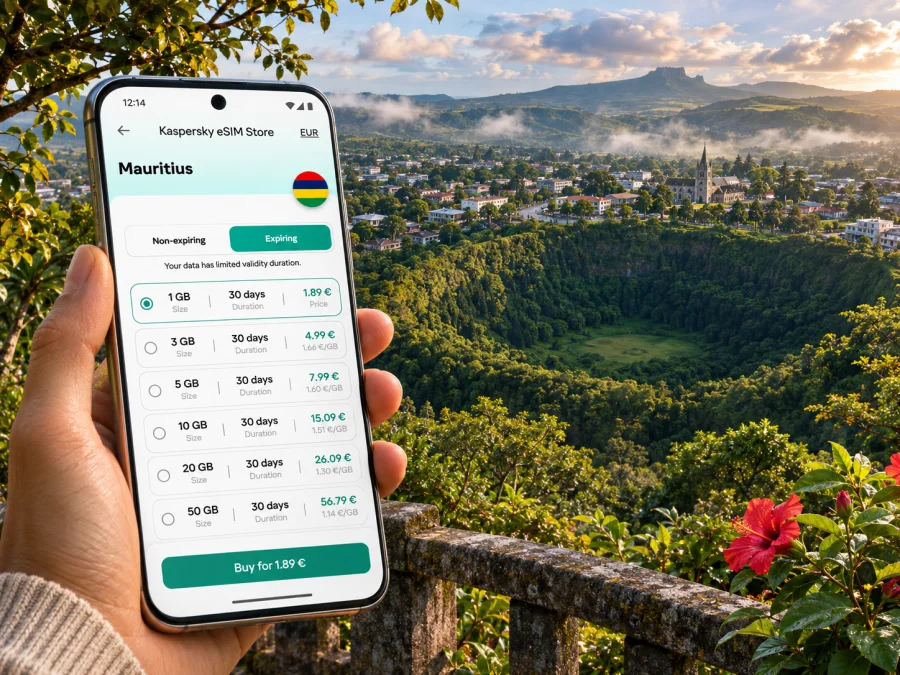
Curepipe eSIM: Mobile Connection and Internet for Your Mauritius Trip
Curepipe offers a different first impression of Mauritius from the beach resorts: it is an inland town on the island’s central plateau, with leafy streets, local shops, changing cloud, and access to viewpoints and gardens. If you are staying here, passing through on the way south, or combining a town visit with a crater walk, mobile internet can help with the practical details: finding your accommodation, checking a bus departure, arranging a taxi, and keeping maps available when plans change.
An eSIM can be useful when you want a separate mobile data connection for travel without removing your regular SIM. It is a digital profile installed on a compatible, unlocked device. The exact network, coverage, data allowance, validity, and activation rules depend on the selected plan and its local network partners. Check those details for Mauritius before purchase; a city name in a travel plan does not guarantee a separate Curepipe-specific network or coverage promise.
Where Curepipe fits into a Mauritius itinerary
Curepipe is in the Plaines Wilhems district, away from the coast and near the island’s central highlands. The town is often used as a base for exploring the central plateau, or as a stop on a wider trip between the airport, Port Louis, and the south. The landscape and weather can feel different from the coast: Mauritius has a warm, humid summer and a cooler, drier winter, while the Central Plateau generally receives less bright sunshine than coastal areas in winter. Bring a light layer and keep directions available if mist or rain arrives.
The town’s better-known places include Trou aux Cerfs, a dormant volcanic crater with views across the island, and the Curepipe botanical garden. These are not interchangeable with a beach day: they work well as a half-day outing or as a stop between other inland destinations. Before setting off, confirm access, opening arrangements, and transport locally. Conditions, visitor access, and operating hours can change.
For a visit focused on town life, allow time for the centre, a meal or coffee, and a walk through the local shopping streets. Curepipe is a working town as well as a visitor destination, so weekday traffic and business hours shape the pace. If you are using it as an overnight base, save your lodging address and directions before leaving the airport; a precise pin is more useful than searching for a hotel name after arrival.
Arriving from the airport
Sir Seewoosagur Ramgoolam International Airport is in the southeast of Mauritius. The airport authority lists public bus 09 between Mahébourg Bus Station and Curepipe Jan Palach South Bus Station via the airport. Its published information says the service runs daily every 10 minutes and that the journey takes about 70 minutes. These are useful planning details, not a guarantee for a particular day: check the current timetable, service notices, and the last departure before relying on the bus, especially after a late flight or on a public holiday.
Airport taxis are another option when you have luggage, arrive outside convenient bus hours, or need to reach a specific address. The Airport Taxi Owners Association’s current fare list includes Curepipe as a destination, but fares and arrangements can change. Confirm the fare with the driver or official taxi desk before starting the ride. For a pre-booked transfer, share your flight number, arrival time, and accommodation pin with the provider.
| Arrival situation | Practical option | What to check |
|---|---|---|
| You land during bus operating hours and travel light | Check bus 09 to Curepipe | Current timetable, stop location, fare, and final stop |
| You arrive late or carry several bags | Arrange a licensed taxi or transfer | Fare, pickup point, destination spelling, and payment method |
| You are continuing to another town | Compare the direct route with a connection | Whether your onward service runs at that time |
| You do not yet have mobile data | Save offline directions and the lodging address | That the map area and booking details are stored on the phone |
Airport staff and posted signs can help you locate the bus stop, which the airport authority places in the car park. Keep some battery for the journey: navigation, translation, ride messages, and camera use can drain a phone quickly. A power bank is particularly useful if you plan to continue exploring after check-in.
Getting around town and beyond
Curepipe’s centre is manageable for short walks, but a day that includes Trou aux Cerfs, the botanical garden, or a rural guesthouse may require a bus or taxi. Distances that look modest on a map can take longer when roads are busy or weather is wet. Use live directions as a guide, then confirm the last part of a route with your host, driver, or local staff. Street names, entrances, and map pins do not always make the correct drop-off obvious.
Metro Express serves the island’s urban corridor, and its official network information includes Curepipe North and Curepipe Central as stations. It can be useful for trips along the route, but do not assume every leg or connection is operating on your travel date. Check the operator’s live service information and timetable before planning an airport connection or a timed appointment around it. Metro and bus may be convenient for different parts of the itinerary; the best option depends on your origin, destination, and departure time.
A small amount of preparation makes navigation easier:
- Save the exact lodging address, phone number, and map pin.
- Download an offline map covering Curepipe and the places you expect to visit.
- Screenshot bus or train details if your route depends on a specific departure.
- Keep the names Trou aux Cerfs and Curepipe Botanical Garden available to show a driver.
- Check whether a return bus or taxi is available before walking away from the centre.
- Share your planned arrival time with your host if you expect to reach the accommodation late.
Mobile data is especially useful when a route changes, but it should not be the only copy of essential information. Offline maps and screenshots provide a fallback if coverage is temporarily weak, the phone battery runs down, or a plan’s data allowance is exhausted.
Picking a data plan for Curepipe
Most visitors use Curepipe as one stop in a Mauritius itinerary rather than as a separate mobile destination. Choose a plan that explicitly covers Mauritius and suits the entire route, including any coastal stays, airport transfer, and day trips. If your itinerary crosses borders or includes another island, verify that each destination is included; a Mauritius plan should not be assumed to work elsewhere.
Estimate your usage by activity, not by a generic “light” or “heavy” label. Turn-by-turn maps and messaging usually use less data than extended video calls, streaming, cloud photo uploads, or hotspot use. If you expect to work remotely, check whether tethering is allowed, whether the plan has a fair-use limit, and what happens after the high-speed allowance is used. The plan’s own terms take precedence over general expectations.
Kaspersky eSIM Store is an app and website where you can choose, purchase, and activate an eSIM with a suitable plan for mobile internet on an overseas trip. The available destination, network partner, allowance, validity period, price, and activation conditions are shown with the individual plan and can change. Review those terms for Mauritius and choose a data plan for your trip to Mauritius before you travel. This destination page is for checking current options; it is not a claim that a particular tariff or local network is available in Curepipe.
Use this quick comparison when deciding how much data to prepare:
| Your travel pattern | Plan detail to prioritise | Helpful habit |
|---|---|---|
| A short stop with occasional maps and messages | Small allowance and validity that covers your stay | Use offline maps and disable automatic media downloads |
| Several days of sightseeing around the island | Enough data for navigation, bookings, and regular messages | Check remaining data midway through the trip |
| Remote work or frequent video calls | Higher allowance, hotspot rules, and speed conditions | Test a call before relying on it for a meeting |
| Photos and video backed up while travelling | Upload limits and any fair-use conditions | Set backups to Wi-Fi only when possible |
| A route across multiple countries | Explicit country or regional coverage | Check each destination in the plan details |
Compare total allowance, validity, and the date the plan becomes active. Some plans begin validity at installation, while others begin at first network connection or under another condition. Confirm the rule before installing if you plan to set up the eSIM well ahead of departure. Also check whether top-ups are available and whether an unused plan can be refunded under its terms; do not assume either option.
Device compatibility and dual-SIM setup
Before choosing a plan, confirm that your exact phone variant supports eSIM and is not locked to your home carrier. Support can vary between regional versions of the same model, so a product family name alone may not be enough. Check the manufacturer’s specifications for the precise model number, the device settings for an option such as “Add eSIM,” and your carrier’s unlocking status. Check whether your device supports eSIM before purchase.
Your regular SIM can often remain active for calls or messages while the travel eSIM handles mobile data, but how dual SIM works depends on the device. Decide which line should provide mobile data, and review roaming settings for both lines. To avoid accidental charges, turn off data roaming on your home SIM if you do not intend to use its roaming service. Enable data roaming on the travel eSIM only if its setup instructions require it.
If you need a conventional local phone number, voice calls, or SMS, check the selected plan carefully. Many travel eSIM plans are data-only. App-based calls and messages can work over data, but they do not replace emergency calling or guarantee access to a local number. Keep your usual line available for important verification codes if your home carrier and plan allow it, and understand any roaming charges before travelling.
Install before departure, activate with care
Install the eSIM while you have a reliable internet connection and enough time to follow the instructions. Keep the QR code or activation details accessible on another screen or in a saved document, as the phone may not be able to scan a code displayed on itself. Avoid deleting an eSIM profile to troubleshoot unless the provider’s instructions tell you to; some profiles cannot be installed again after removal.
A practical setup sequence is:
- Confirm the phone is eSIM-compatible, unlocked, charged, and connected to Wi-Fi.
- Read the selected plan’s installation and activation instructions, including when validity begins.
- Add the eSIM in your phone’s mobile-network settings or follow its QR-code flow.
- Label the new line “Mauritius” or “Travel” so you can identify it easily.
- Choose the travel eSIM for mobile data when you are ready to use it.
- Follow the plan’s instructions for data roaming and network selection.
- After arrival, allow time for the profile to register, then test a simple webpage or message.
Use the step-by-step Android eSIM installation guide or iPhone eSIM installation guide for the relevant device. Menu names differ by operating-system version and manufacturer. If the eSIM does not connect, check that the correct line is selected for data, that the plan is active, that roaming is set as instructed, and that airplane mode is off. Restarting the device may help; if it does not, contact the plan’s support channel with the device model and the error message.
If you prefer to wait until you arrive, first confirm whether installation can be completed without mobile service and whether plan validity starts at installation or first use. Airport Wi-Fi may help, but it is sensible to have the QR code, instructions, and accommodation details available offline. Do not start an installation while rushing between a bus stop and a taxi pickup.
Coverage, weather, and sensible expectations
A plan’s coverage depends on its underlying local network and the places it serves. A signal that works in central Curepipe may differ on a forested road, inside a building, or farther from town. Buildings, terrain, congestion, device bands, and weather-related disruptions can all affect the experience. No city guide can guarantee a particular speed or uninterrupted service at every address.
For dependable travel communication, combine tools: mobile data for live updates, offline maps for gaps, and a written or saved address for the driver. If a key booking or transfer depends on a message, send it before leaving a stable connection rather than waiting until the last moment.
Three useful Curepipe scenarios
A morning arrival from the airport
Check the airport authority’s current bus 09 timetable before flying. If the bus timing fits, save the Jan Palach South stop and the final route to your lodging. If the service does not fit your arrival, arrange a taxi or transfer and confirm the address and fare. Set up the travel eSIM in advance if its activation terms allow it, then use mobile data for the last-mile directions after landing.
A half-day visit to Trou aux Cerfs
Save the crater’s map pin and your return destination before leaving the town centre. Check local access and weather on the day. If you use a taxi, agree where and when to meet for the return journey; do not assume a car will be immediately available at the viewpoint. A modest data plan may be enough for maps and messaging, but keep an offline route as backup.
A workday in Curepipe followed by onward travel
Download any meeting files and route information while connected to Wi-Fi. Check the plan’s hotspot and video-call conditions if you will work from a laptop. Before leaving, confirm the next bus or Metro Express connection from official live information, and keep your accommodation or meeting address saved in case network access drops during the journey.
Before you set off
- [ ] The plan details name Mauritius and fit the dates of your stay.
- [ ] Your exact device variant supports eSIM and is carrier-unlocked.
- [ ] You know when the plan activates and when its validity ends.
- [ ] You know which SIM is selected for mobile data and how roaming is set.
- [ ] Your accommodation address, airport route, and key map areas are saved.
- [ ] You have checked the latest bus or train information for your travel date.
- [ ] You know how to contact the plan provider if installation or connection fails.
- [ ] You have a backup for essential details and enough battery for navigation.
Frequently asked questions
Is Curepipe a coastal resort?
No. Curepipe is an inland town on Mauritius’s central plateau. It can be a useful base or stop for town visits and nearby highland attractions, while beach destinations require a separate journey.
Can I use one eSIM throughout Curepipe and the rest of Mauritius?
A Mauritius-wide plan may be suitable if its terms include your destinations and the underlying network has service where you go. Coverage varies by location and provider. Check the current plan details and do not interpret “Mauritius” as a guarantee for every indoor or remote location.
Does a travel eSIM give me a local phone number?
Not necessarily. Many travel eSIM plans provide mobile data only. Check the plan description for calls, SMS, and local-number support. Internet calling apps can be used over data where available, but emergency calling and SMS are separate requirements.
Should I install the eSIM before travelling?
Often it is convenient to install before departure while connected to reliable Wi-Fi. First check whether validity begins at installation, activation, or first use, and follow the exact plan instructions. If you wait until Mauritius, keep the installation details available offline.
What if my phone does not support eSIM?
Use your regular SIM with a roaming arrangement you understand, or check local physical-SIM options on arrival. Confirm registration requirements, price, and what services are included with the seller. Do not buy an eSIM plan until you know your device can install it.
Is mobile data guaranteed at Trou aux Cerfs or in my hotel?
No guide can guarantee a signal at a particular point. Coverage depends on the provider’s network, terrain, building materials, congestion, and device. Save directions offline and ask your accommodation about connectivity if you need it for work.
Get ready for your Curepipe stay
Before departure, confirm that your phone is compatible, review the plan’s coverage and activation terms for Mauritius, and save the route from the airport to your accommodation. Kaspersky eSIM Store lets you review and activate an eSIM plan for an overseas trip through its app or website. Check the current Mauritius options and choose a plan for your itinerary, then install it using the instructions for your device. Keep an offline map as a backup and enjoy exploring Curepipe at your own pace.


