Travel connectivity guide
Da Lat eSIM: Mobile Internet in Vietnam
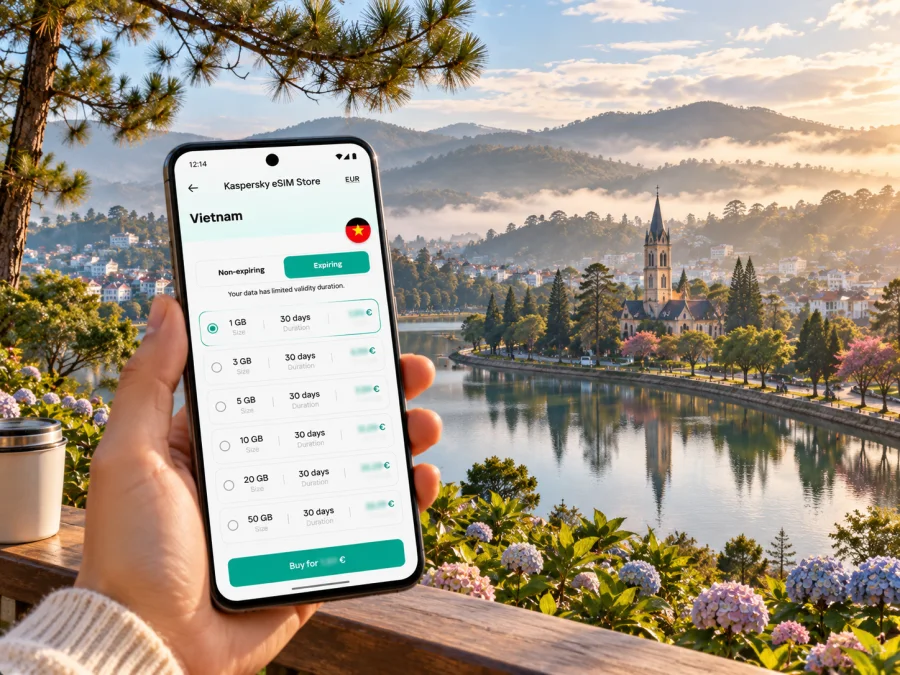
Da Lat eSIM for a reliable mobile connection and internet on your trip
Da Lat is a highland destination where a phone is useful well beyond checking messages. You may need a map for a winding lane, a ride-hailing pickup point, a translation for a menu, or a route from the central lake to a hillside café. Planning mobile data before arrival makes these small decisions easier, especially when you do not yet know the city or its road layout.
Da Lat is the familiar name travelers use for this Central Highlands destination. Since 2025, the former city-level unit has been reorganized into wards and surrounding communes. Listings may show newer ward names, so verify the current address and map pin when booking.
This guide covers arrival, city navigation, accommodation, remote work, and highland day trips, with practical eSIM preparation and compatibility checks.
What mobile data helps you do in Da Lat
Da Lat spreads across hills, with attractions and accommodation beyond the compact centre. Mobile data can help you:
- compare a route before leaving the hotel and keep a map available while walking or riding;
- share a precise pickup location with a driver when a street name is unfamiliar;
- check opening hours, weather updates, bookings, and messages as plans change;
- translate signs or food descriptions and contact a host if you arrive late;
- coordinate a day trip with a guide or let someone know when you expect to return.
Da Lat’s layout and the places where you may use your phone
Xuan Huong Lake is a central landmark and a useful orientation point. The central market is nearby, while cafés, hotels, and small streets extend uphill in several directions. Outside the core, the city becomes less uniform: viewpoints, gardens, farms, waterfalls, and lakes can sit along separate roads, and a trip that looks short on a map may involve steep turns or slower traffic.
| Part of a Da Lat visit | When mobile data is useful | A practical backup |
|---|---|---|
| Xuan Huong Lake and the central market | Walking directions, meeting points, opening information, and messages | Save your lodging pin and a map of the centre |
| A hotel or homestay on a hillside | Finding the correct lane and sharing a pickup point | Keep the property’s written address and phone number |
| Cafés and work sessions | Checking bookings, sending files, and joining calls | Ask whether the venue offers Wi-Fi and keep work offline-ready |
| Gardens, viewpoints, and nearby nature stops | Navigation, weather checks, and coordinating with a driver | Download maps and confirm the return arrangement beforehand |
| A day trip beyond the centre | Route changes and communication with your guide | Agree on a meeting time and location before leaving |
Arriving via Lien Khuong Airport
Lien Khuong Airport is the airport serving Da Lat, roughly 30 kilometres from the destination’s central area. The drive is not simply a city-centre transfer: the road descends from the highlands toward the airport, and timing may depend on traffic, weather, and your exact drop-off point. Arrange the first leg before you land if you are arriving late, travelling with children, or carrying bulky luggage.
Before departure, save your accommodation’s full address in a form you can show a driver, along with its map pin and contact details. After landing, confirm the pickup point in the app or with the transport provider instead of relying on a verbal description alone. If you book a ride online, keep enough battery and data for identity checks, driver messages, and changes to the pickup location.
Plan mobile data around a Da Lat day
A simple day in Da Lat can combine a walk around Xuan Huong Lake, a stop at the central market, and a ride to a café or garden farther uphill. Before leaving your accommodation, check the order of stops and decide where you will meet a driver if the group splits up. In a compact centre, walking may be convenient for one leg, while a steep return route or rain can make a ride more practical. Use live navigation to confirm each leg, but keep the address of your next stop available offline.
For an early start or a late arrival, save confirmations before you leave Wi-Fi. Screenshots are useful when an app asks you to sign in again or a mobile connection briefly drops. Keep enough battery for both navigation and arranging the ride back; reduce screen brightness or carry a power bank rather than relying on finding a charging point outdoors. If you change plans after a café or market visit, send the new meeting point clearly and verify that everyone has the same pin.
Choosing an eSIM plan for a Da Lat itinerary
Kaspersky eSIM Store is an app and website where travelers can choose, arrange, and activate an eSIM plan for mobile internet abroad. The local network, plan conditions, and device determine the service; the Store is not the mobile operator.
Before selecting a plan, think about how you will use data rather than choosing only by the largest allowance:
- Estimate trip length. Include arrival and departure days, and check the plan’s validity period and when that period starts.
- List your regular tasks. Maps, messages, translation, and ride bookings usually need less data than video calls, cloud backups, or streaming.
- Check plan coverage and conditions. Read the current Vietnam plan details for the included data, validity, supported network, hotspot rules if relevant, and any stated speed limits or fair-use terms.
- Decide whether you need a phone number. Many travel data plans are intended for internet access and may not include a local voice number or SMS. Keep your usual number active if you need calls or one-time codes, subject to your home plan’s roaming costs.
- Allow for a day outside town. If your itinerary includes remote roads or nature areas, do not assume that a plan’s national coverage description means identical reception at every stop.
To review current destination options, compare eSIM plans for a trip to Vietnam. This is a country-level page, not a Da Lat coverage map or a guarantee for a particular location.
Compatibility and regional device versions
An eSIM plan can only be installed on a device with eSIM capability, and support can differ between model families, regional variants, and carrier-locked versions. A device name alone is not enough to confirm compatibility. Check the exact model number and the manufacturer’s specifications for the version sold in your market, then confirm that the phone is unlocked for use with another provider.
You can also look in your phone’s cellular or SIM settings for an option to add an eSIM. This is a useful check, but the final answer should come from the device maker or the provider’s current compatibility information. Before choosing a plan, check whether your device supports eSIM. If the phone does not support eSIM, consider a physical local SIM from an authorized seller or ask your home provider about roaming options.
With dual SIM, confirm which line handles data, calls, and messages. Disable roaming on your home line if you do not intend to use it, and check the charges if you need it for calls or verification.
Install and activate before the busy part of the trip
Set up over Wi-Fi and follow the instructions supplied for your plan and device. Screens differ by operating-system version.
- Confirm the device is compatible, unlocked, charged, and connected to Wi-Fi.
- Add the profile from your plan’s installation flow and label it “Vietnam travel”. Keep the QR code and activation details private.
- Select the travel eSIM for data when ready. Enable data roaming only if the plan instructions require it; configure your home line for calls or texts only if needed.
- Check the connection status. If it fails, use the provider’s troubleshooting steps before considering removal.
For details, see the Android eSIM installation instructions or iPhone eSIM installation instructions. Keep confirmation and support details accessible offline.
Keeping navigation useful without using data constantly
Da Lat’s scenery invites detours, so save an offline map, hotel and activity pins, and pickup details before setting out. Carry a power bank and check the weather for outdoor routes. Offline maps may not show closures, traffic, or current opening hours; refresh them when you have data and confirm an uncertain pin with your host or driver.
Mobile data for work and longer stays
Remote work in Da Lat often means moving between a hotel, a café, and an activity rather than staying at one desk. Before booking accommodation, ask about the actual room connection, any restrictions on video calls, and whether there is a quiet workspace. A café’s Wi-Fi can be suitable for light tasks but may not be private, stable, or appropriate for confidential work.
For a longer stay, match the plan’s validity and allowance to your schedule. Check usage in your phone settings and limit background photo sync or app updates if needed.
Taking a day trip beyond the city centre
Highland excursions to lakes, farms, waterfalls, or mountain areas can take you onto rural roads where travel time and reception vary. Confirm current conditions with your guide or accommodation. Before leaving, save the route and lodging address, agree on a pickup point and return time, and decide where to meet if contact drops.
| Your plan | Before you leave Da Lat | If mobile data becomes unavailable |
|---|---|---|
| Short ride to a nearby attraction | Confirm the pickup and return pin | Use the saved address and contact the driver when signal returns |
| Guided countryside trip | Save the guide’s details and meeting time | Follow the guide’s agreed rendezvous instructions |
| Independent walk or ride | Download maps and check weather | Turn back to a known road or staffed venue if unsure |
| Work call from a hotel | Test the connection and keep a backup venue | Switch to audio or reschedule if the signal is unstable |
A country-level eSIM plan does not guarantee coverage on every mountain road. Ask the tour provider about the route and carry offline directions. For safety, do not stop in traffic or ride while looking at your screen; set navigation before moving and pull over safely if you need to change it.
A pre-trip checklist
Before departure
- [ ] Confirm eSIM support for your exact phone variant and check that the device is unlocked.
- [ ] Compare the Vietnam plan’s data allowance, validity, network information, and activation terms.
- [ ] Install the profile over stable Wi-Fi if the plan permits pre-installation.
- [ ] Save the hotel address, airport transfer details, map pins, and booking confirmations offline.
- [ ] Decide whether you need the home SIM active for calls or verification texts.
On arrival
- [ ] Check that the travel eSIM is selected for mobile data.
- [ ] Follow the plan’s instructions for activation and roaming settings.
- [ ] Confirm your driver’s pickup point and share the correct accommodation pin.
- [ ] Keep the phone charged before the drive from Lien Khuong Airport.
Before a day trip
- [ ] Download the route and agree on pickup, return time, and a backup meeting point.
- [ ] Check current weather and confirm arrangements with your host or guide.
- [ ] Take a power bank and keep your lodging address available offline.
Common questions about eSIM and internet in Da Lat
Is Da Lat a city or a region?
Da Lat is the well-known name of a destination in Vietnam’s Central Highlands. Administrative units changed in 2025, and the former city-level unit was divided into new wards and surrounding communes. Travel websites may still use “Da Lat” as a destination label. For a current address, check the exact ward and pin shown by your hotel or transport provider.
Will mobile reception be continuous around Da Lat?
No plan should be treated as a guarantee of uninterrupted service. Reception depends on the underlying local network, your device, terrain, buildings, and the specific plan. Check the current plan information and prepare offline maps for rural roads and outdoor excursions.
Will a travel eSIM include calls and text messages?
Not necessarily. Some travel plans provide mobile data only. Read the plan details carefully if you need a local number, voice calls, or SMS, and keep your usual number available for important messages if you can do so without unwanted roaming charges.
What should I do if the eSIM does not connect after landing?
Check that the eSIM line is enabled and selected for data, then follow the plan’s setup instructions for network selection and roaming. Restarting the phone can help in some cases. Keep Wi-Fi available where possible and contact the plan provider if the documented steps do not resolve the issue. Avoid deleting the profile unless support tells you how to reinstall it.
Make your Da Lat connection plan before you travel
Before departure, prepare the eSIM, save offline directions, and confirm your airport transfer and lodging pin. Device support, activation rules, data limits, and reception vary.
Use Kaspersky eSIM Store to review and arrange a plan, then follow the provider’s setup instructions. Explore current eSIM options for Vietnam and choose one that fits your Da Lat visit.


