Travel connectivity guide
Da Nang eSIM for Mobile Internet | Vietnam Travel
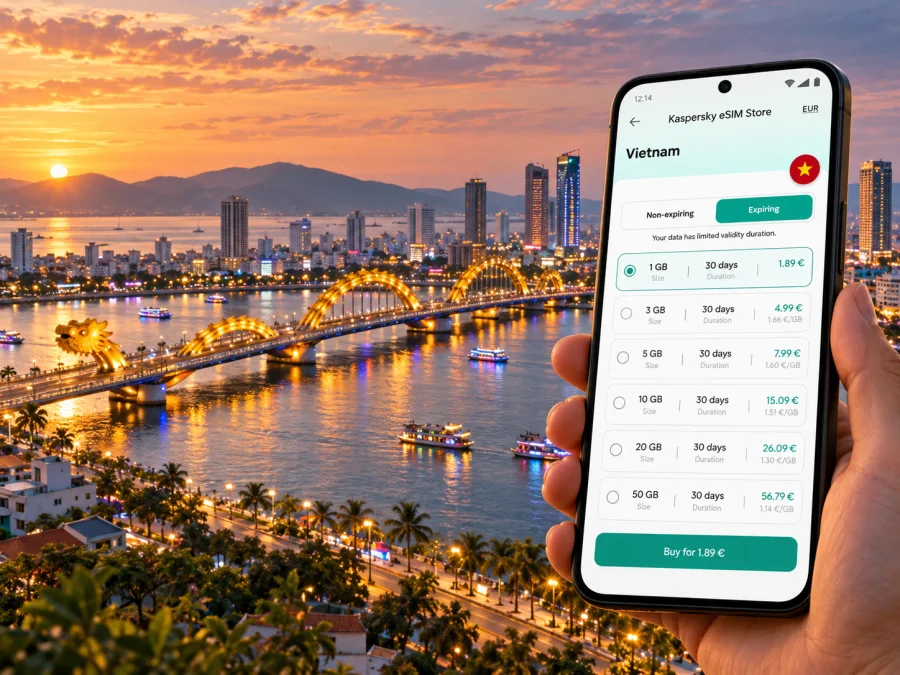
Da Nang eSIM: mobile connection and internet for your trip
Da Nang is a city where a short ride can take you from the Han River waterfront to a beach, a market, a hotel meeting room or the airport. A working mobile data connection helps make those transitions easier: you can check a route, confirm a pickup point, message your host and retrieve a booking without looking for a Wi-Fi network each time. An eSIM is a digital SIM profile that can provide mobile data on a compatible, unlocked device, without replacing the physical SIM already in your phone.
For a visit to Da Nang, plan around your actual route and the terms of the selected plan. The city is the destination; Vietnam is the country whose network market and country plan apply. A city name on your itinerary does not create a separate local mobile plan, and coverage in a specific street or building cannot be guaranteed by a city guide. Treat your eSIM as one part of arrival planning, alongside offline directions, transport details and a way to reach your accommodation.
Why mobile data is useful in Da Nang
The first few hours after landing often involve several small decisions. You may need to find the right terminal exit, check whether your hotel has sent an updated pickup note, compare a route into town or let someone know that your flight has arrived. With data available on your phone, these tasks can be handled while you are moving instead of waiting until you reach a café or hotel network.
Da Nang International Airport has separate domestic and international terminals. Before leaving the arrivals area, confirm which terminal your flight uses and where your driver or transfer is meeting you. If you booked a car through an app, check the vehicle and pickup point in the app, then follow the airport signs. A connected map is useful, but save the hotel address and the driver’s contact details before departure as a backup.
The airport’s official transport information lists taxis, app-based rides and bus options, including the city Route 12. Routes and operating details can change, so check current information when you travel rather than relying on an old screenshot or a remembered fare. For a first visit, a clear pickup pin and the exact name of the terminal are often more helpful than a long description of the journey.
Common arrival tasks
- Open your accommodation confirmation and verify the address in Vietnamese or English.
- Share your flight arrival status with the person meeting you.
- Use a map to compare the route to the city centre, the riverfront or the coastal hotel area.
- Check the transport app’s pickup instructions and match the car details before boarding.
- Keep a screenshot of the booking and address in case your battery or data connection becomes unavailable.
Build a city plan around the way you will travel
Da Nang is not a single compact attraction zone. Your daily pattern matters when estimating data use and choosing a plan duration. A traveller staying near the river and taking occasional rides has different needs from someone working remotely, uploading video or using navigation throughout the day. Think about where you will sleep, which activities are already booked and whether your trip includes nearby destinations.
| Da Nang scenario | Where mobile data helps | Practical preparation |
|---|---|---|
| Airport to hotel | Pickup messages, maps and ride booking | Save terminal, hotel address and driver details |
| Han River and central streets | Walking directions, opening hours and messages | Download an offline map area as a backup |
| Beach stay | Ride requests, restaurant searches and booking updates | Save the hotel pin before heading out |
| Meetings or remote work | Email, calendar, document access and calls in apps | Check video-call data needs and keep a Wi-Fi fallback |
| Day trip outside the centre | Route checks, tickets and meeting-point updates | Confirm that your plan’s country or regional scope fits the full route |
| Short stopover | Arrival coordination and onward travel | Prioritize essential apps and avoid large automatic downloads |
The Han River divides the urban core into east and west banks and is crossed by several bridges. That makes a bridge, not just a district name, a useful reference when coordinating a meeting or choosing a route. If a driver asks which side you are on, sharing a map pin is usually clearer than describing a nearby landmark. At busy times, allow for a route to change and avoid assuming that the shortest line on a map will be the quickest ride.
Da Nang can also be a base for journeys to places such as Hoi An or Hue. Those are separate destinations, even when they fit into one itinerary. Check the selected eSIM plan’s service area against every country or region on your route, and look at the plan’s validity conditions before departure. A Vietnam country plan may be relevant to a domestic itinerary, while a regional trip that crosses a border calls for checking the additional destination explicitly. Do not assume that one city-focused search term means the plan is restricted to the city or that every nearby territory is included.
Choose an eSIM plan for your dates and usage
Start with the calendar, not the data allowance. Count the days from the moment you expect the plan to begin until the end of your trip, and read the provider’s activation and validity rules. Some plans begin validity on installation or activation; others may start when the eSIM first connects to a supported network. The product details determine which rule applies. If you install before flying, make sure you understand whether installation alone starts the plan.
Next estimate how you use your phone. Navigation, text messages, email and checking reservations generally consume less data than frequent video calls, streaming, cloud backups or sharing large files. If you expect to work from Da Nang, include video meetings and tethering only if the plan terms permit them. Your phone’s data-use settings can give a useful baseline from a normal week; remember that travel often adds more map searches, photos and app updates.
A simple planning method:
- Write down arrival and departure dates, including any overnight flight that changes the calendar day.
- List the places where you expect to use data: airport, hotel, work, local trips and any onward destination.
- Decide which tasks need a mobile connection and which can use hotel or café Wi-Fi.
- Check the plan’s country or region, allowance, validity, supported network conditions and any hotspot terms.
- Leave room for unexpected use, but avoid selecting a larger allowance solely because a number sounds safer.
Kaspersky eSIM Store is an app and website where you can choose, arrange and activate an eSIM with a suitable plan for mobile internet on an international trip. To compare options for this itinerary, review eSIM plan options for Vietnam, then read each plan’s allowance, validity and coverage details before you decide. Those details are specific to the plan and its provider; they should guide your choice more than broad promises about speed or availability.
Match the plan to the trip
| Your likely use | Before choosing |
|---|---|
| Maps, messaging and bookings | Check trip duration and the plan’s minimum allowance options |
| Social posts and photo uploads | Consider upload habits and disable automatic backup over mobile data if desired |
| Remote work | Review video-call use, hotspot rules and a backup Wi-Fi option |
| Multi-city Vietnam itinerary | Confirm the plan applies throughout the country and remains valid for all dates |
| Vietnam plus another country | Verify that each destination is included; compare a regional option only if its terms fit |
Use the plan details to answer specific questions: where it works, how much data it includes, how long it remains valid, when its validity begins, and whether tethering is allowed. Check whether the plan is data-only. A travel eSIM intended for mobile data may not provide a local phone number, standard voice calls or SMS. You can often use internet-based messaging and calling apps, but they require data or Wi-Fi and may depend on the other person using the same service.
The Vietnam network market and what it means for visitors
Vietnam has domestic mobile operators, including Viettel, VNPT/VinaPhone and MobiFone. Their retail offers, eSIM registration processes and network conditions are not interchangeable. A travel eSIM plan may use a partner network under its own terms; the operator shown in a phone’s status bar is not evidence that every plan in the market uses that operator. Check the specific plan information and any network name it identifies, and treat network selection as a plan detail rather than a guarantee of service in every location.
Do not confuse a local operator’s domestic eSIM offer with an international travel eSIM profile. A local operator may require a local registration or account process and may sell a phone-number service. A travel plan may be configured for data use and may follow different activation, identity and support rules. This guide does not promise a particular Vietnamese operator, a particular radio technology or uninterrupted service in Da Nang. Buildings, terrain, congestion, device bands and provider arrangements can all affect the experience.
The exact device version matters too. eSIM support is not determined by the product family name alone: phones sold for different markets can have different SIM hardware or activation restrictions. For example, an iPhone model intended for mainland China can have different eSIM capabilities from an otherwise similarly named model sold elsewhere. That example concerns the device’s sales region, not a restriction that turns Da Nang into a different mobile market. If your phone was purchased in mainland China, Hong Kong or Macao, or is a carrier-customized import, check the exact model number and manufacturer guidance before buying a travel plan. Also confirm that the phone is unlocked and can add a travel profile.
For Android devices, menu labels and support can vary by manufacturer, model and country version. Look for an option to add a mobile plan or eSIM in the cellular or SIM settings, but do not treat the menu alone as proof that the device is unlocked or supported by the selected plan. Check your model’s official specifications and the plan requirements. Check whether your device supports eSIM before completing your selection.
Install before you travel, activate with care
If possible, prepare the eSIM while you have reliable Wi-Fi and time to follow the installation steps. Read the provider’s instructions first and keep access to any QR code or activation details. Some devices need another screen to display a QR code while the phone scans it; others offer a manual installation route. Do not delete a profile to troubleshoot unless the plan’s instructions explain how to reinstall it, because a QR code or activation code may be single-use.
A practical sequence is:
- Confirm that your phone supports eSIM, is unlocked and has enough free profile capacity.
- Review the selected plan’s destination, data allowance, validity start and installation instructions.
- Connect to Wi-Fi, open the phone’s mobile or cellular settings and add the eSIM using the provider’s method.
- Give the new line a clear label such as “Vietnam data” so it is easy to identify beside your home SIM.
- Keep your home line configured for calls or messages if you need it, and select the travel eSIM for mobile data when the plan should begin.
- Follow the provider’s directions on data roaming for that profile; requirements vary by plan.
- Once in Vietnam, allow the phone to register and test a basic web page or map. If it does not connect, review the plan instructions and device settings before changing multiple options at once.
Read the Android eSIM installation instructions or the iOS eSIM installation instructions for the steps that match your phone. The exact labels can vary by operating-system version. Keep the original QR code and order details accessible until you have confirmed that the profile is working and understand how support handles reinstallation.
Keep your primary number available
Using data around the city without wasting it
Da Nang’s daily rhythm may include a mix of navigation, photos, ride booking and messaging. Small settings changes can keep usage predictable without making the phone difficult to use. Turn off automatic app updates over cellular data if you prefer, download offline maps for the areas you expect to visit, and let large photo backups wait for trusted Wi-Fi. Keep location access available to the map or transport app you are actively using, rather than leaving every app to refresh in the background.
If you are working from a hotel or café, use Wi-Fi for large transfers when it is available and appropriate. A personal hotspot can be useful for a laptop, but it can use data quickly and may be excluded or limited by the plan. Confirm hotspot support before relying on it for a presentation or a full workday. Keep a local copy of critical files and meeting details so that a temporary connection issue does not stop your work.
A short stopover checklist
For a stopover of only a few hours, the priority is reliable access to your onward booking and a clear return route to the correct terminal. Check your remaining time after immigration, baggage and transport. Keep the airport name, terminal, departure time and airline details in saved form. If you plan to leave the airport, verify the current traffic and allow enough time to return; the trip outward is only half the journey.
Common problems and sensible fixes
The eSIM is installed but has no data. Check that the profile is enabled and selected for mobile data. Confirm that the plan is active, that you are in its covered destination and that any required data-roaming setting is enabled for that profile. Restarting the phone may help it register again. Follow the plan’s support instructions if the issue continues.
Data is running out sooner than expected. Review the phone’s cellular data-use screen to find the apps consuming most data. Pause background photo sync and video playback over mobile data, and use Wi-Fi for large downloads where suitable. If you need more data, check the plan provider’s top-up or replacement rules; do not assume every plan can be extended.
Questions travellers ask
Is an eSIM for Da Nang different from an eSIM for Vietnam?
Da Nang is a city within Vietnam, so the relevant country destination is Vietnam unless a plan explicitly describes a different regional scope. A city search helps you find trip-specific advice, but the plan itself should be checked for its covered country or countries.
Usually you can prepare a profile before travel if your device and plan support it. The plan may begin validity at a specific activation event, so read its terms before installation. You can install over Wi-Fi at home and leave the data line inactive until the plan’s instructions say to use it.
Will the same eSIM work throughout my whole route?
That depends on the plan’s destination list and validity. Check all stops, including any cross-border travel, and do not infer coverage from geographic proximity. Network performance can also vary with location, indoor conditions and local demand.
Does a travel eSIM give me a Vietnamese phone number?
Not necessarily. Many travel eSIM plans are designed for data only. Check the plan description for voice, SMS and number details. Messaging or calling apps can use data, but ordinary cellular calls and texts may continue to use your primary SIM and its roaming terms.
Airport Wi-Fi can be a helpful backup for checking a message or booking, and the airport provides information about Wi-Fi access. Availability, sign-in steps and signal quality can vary. A travel eSIM can give you another way to use data after arrival, while saved details and offline maps provide a further fallback.
Check the exact model number, eSIM support for that sales region, carrier lock status and the selected plan’s requirements. Regional variants can differ even when the retail name looks almost identical. If there is any uncertainty, consult the phone maker or seller before purchase rather than assuming compatibility from the model family name.
Before you leave for Da Nang
Use this final review to make the first connection predictable:
- The selected plan covers Vietnam and is valid for the dates of your trip.
- The plan’s data allowance, start rule, hotspot conditions and data-only status are clear.
- Your specific phone variant supports eSIM and is not locked to a carrier.
- The eSIM is installed according to its instructions, and you know which line will handle mobile data.
- Your airport terminal, accommodation address, pickup instructions and essential bookings are saved offline.
- You know how to reach plan support and how to restore your primary SIM settings.
Get ready for your trip
Choose a plan for your dates, destinations and expected data use, then follow its setup instructions before departure if that is convenient. In Kaspersky eSIM Store, you can choose an eSIM plan for a trip to Vietnam and review the available details before completing your selection. Install the profile on a compatible, unlocked device and keep your arrival information available offline as a backup.


