
Travel connectivity guide
Dahab eSIM for Mobile Internet in Egypt
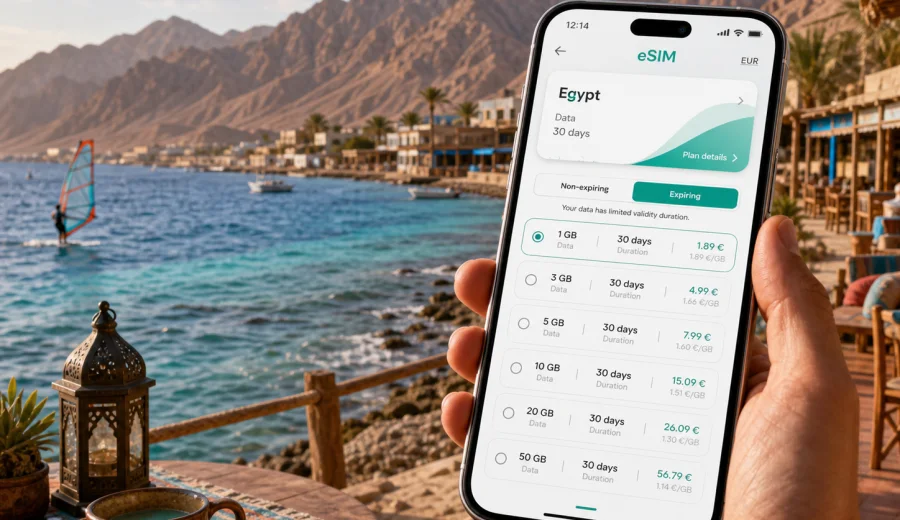
Dahab eSIM: mobile connection and internet for your trip
Dahab is a compact Red Sea town, but it is not a place where you want to improvise your mobile internet only after you need it. Travelers usually arrive after a flight to Sharm el-Sheikh, continue by road through South Sinai, check in near the waterfront, and then move between beaches, dive centers, cafes, hotels, camps, and day-trip meeting points. A working eSIM can make those first hours simpler: maps load, your driver can reach you, hotel messages arrive, and you can confirm plans without looking for a shop that sells physical SIM cards.
This guide is about using an eSIM for Dahab, Egypt, with a practical city focus. It covers arrival, local movement, navigation, hotels, diving days, remote work, business trips, stopovers, and side trips from Dahab. It also explains what to check before choosing an eSIM tariff for Egypt, how to estimate data needs, and how to prepare your phone before you travel.
Why mobile internet matters in Dahab
Dahab is relaxed, walkable in many areas, and less hectic than big resort cities. That is part of its appeal. It also means that many everyday travel tasks happen through your phone: arranging a transfer, finding a cafe, messaging a dive school, checking wind conditions, confirming a hotel location, translating menu items, or sharing your live location with a driver.
Mobile internet is useful in Dahab for very ordinary moments:
- leaving Sharm el-Sheikh International Airport and finding your transfer;
- checking the route from the highway to your hotel or guesthouse;
- navigating between Masbat, Lighthouse, Assalah, Eel Garden, and Laguna;
- coordinating dive, snorkeling, kitesurfing, or desert-trip pickup times;
- using messenger calls when a normal phone number is not part of the tariff;
- opening booking confirmations at a reception desk;
- checking tide, weather, and wind information before water activities;
- using maps during day trips to the Blue Hole, Abu Galum, or the Blue Lagoon;
- working from a cafe or hotel when Wi-Fi is busy or unstable.
An eSIM is not magic and it does not replace every local communication option. It is a practical way to prepare mobile data for Egypt before or during your trip, without inserting a physical SIM card.
Arrival: from airport to the Red Sea town
Most international visitors do not land directly in Dahab. A common route is to fly into Sharm el-Sheikh and take a transfer or bus north to Dahab. The trip is not complicated, but the first hour after landing is exactly when many travelers need data: the airport is busy, pickup points can be confusing, and messages from hotels or drivers often arrive at the last moment.
If your eSIM is already installed on a compatible phone, you can switch mobile data to the eSIM profile when you are ready to use it. Depending on your chosen tariff and the local network, connection can take a few minutes. Before leaving the airport, check that maps, messenger apps, and your booking emails open normally.
For a smoother arrival, prepare these items offline as well:
- hotel name and address in English;
- your booking confirmation or voucher;
- the driver or agency phone number;
- a screenshot of the meeting-point instructions;
- the approximate transfer price or prepaid confirmation;
- your passport and travel documents in an accessible place;
- a saved map area for Sharm el-Sheikh and Dahab.
Offline backups matter because any mobile connection depends on device settings, tariff conditions, and local network availability. The point of eSIM is to reduce friction, not to remove the need for sensible trip preparation.
Dahab areas where eSIM is especially useful
Dahab is easier to understand when you think in small local zones. You may walk along the waterfront, take short taxi rides, or move between activity points during the day. Data helps because pickup locations, beaches, cafes, and camps are often described by local landmarks rather than formal street addresses.
| Area or scenario | Why mobile data helps |
|---|---|
| Masbat and the promenade | Restaurant searches, walking routes, hotel messages, ride coordination, payments and booking apps. |
| Lighthouse area | Dive-center schedules, meeting points, map pins, weather checks, and cafe-based work sessions. |
| Assalah and Eel Garden | Navigation through quieter streets, guesthouse check-ins, food delivery messages, and local taxi coordination. |
| Laguna | Kitesurfing or beach-day plans, wind updates, route checks, and sharing location with friends. |
| Blue Hole and nearby sites | Day-trip coordination, photo backups when signal is available, and messaging before leaving town. |
| Desert or coastal excursions | Pickup confirmation, emergency contact readiness, and offline map support before the route starts. |
The practical rule is simple: if your plan depends on someone meeting you at a specific time and place, mobile internet is useful. Dahab is friendly and manageable, but a missed message can still turn a calm travel day into unnecessary waiting.
How to estimate data for a Dahab trip
Your best eSIM tariff depends on trip length and habits. A traveler who mostly uses maps and messengers needs much less data than someone who uploads dive videos, joins video calls, or works from a laptop using hotspot mode.
Use this quick planning guide:
| Trip style | Typical data behavior | What to consider |
|---|---|---|
| Short beach break, 2-4 days | Maps, messengers, bookings, light browsing | A smaller data package may be enough if hotel Wi-Fi is reliable. |
| One-week diving or kitesurfing trip | Daily messaging, weather checks, photos, route planning | Choose enough data for frequent app use and backup navigation. |
| Remote-work stay | Email, chat, cloud documents, hotspot, occasional calls | Prioritize a larger package and check whether hotspot use fits the tariff conditions. |
| Multi-city Egypt route | Dahab plus Sharm el-Sheikh, Cairo, Luxor, or other stops | Choose a tariff for Egypt or a regional option if your route crosses borders. |
| Family or group trip | Shared plans, location sharing, entertainment, ride coordination | Each traveler should understand whether they need their own eSIM or can rely on Wi-Fi and sharing. |
Video is the biggest variable. Streaming, cloud backups, video calls, and automatic photo sync can use data quickly. Before you leave, disable automatic backups on mobile data if you want the tariff to last longer.
Choosing an eSIM tariff for Dahab
For Dahab, choose an eSIM tariff that covers Egypt, because Dahab is in Egypt. Do not look for a separate Dahab-only product unless the service specifically offers city-level plans; for city articles, the relevant landing page is usually the country page. The important questions are coverage destination, data volume, validity period, and how the tariff starts counting usage.
Before you pick a tariff, compare:
- destination: Egypt, regional Middle East, Africa, or global option if your route needs it;
- data volume: enough for maps, messaging, travel apps, and your media habits;
- validity period: aligned with the full stay, including arrival and departure days;
- activation rules: when the validity period begins and what action starts usage;
- hotspot support: important for laptops, tablets, or shared devices;
- top-up options: useful if you extend the trip or use more data than expected;
- device support: your phone must support eSIM and must not be locked to one carrier.
If you want to prepare before departure, you can use Kaspersky eSIM Store to choose an eSIM tariff for your trip to Dahab in Egypt after you have checked your device and estimated your data needs. The page is for Egypt, which is the correct country destination for Dahab.
What to check before purchase
The most important check is device compatibility. eSIM works only on supported smartphones, tablets, or other devices, and some devices may be locked by a carrier. Before choosing a tariff, check your device and confirm that it can add an eSIM profile.
Also check these details:
1. Your phone supports eSIM in the country where it was sold.
2. The device is not carrier-locked.
3. You have a stable internet connection for installation.
4. You understand when the tariff validity period starts.
5. You know whether ordinary voice calls and SMS are included; many travel eSIM tariffs are data-only unless stated otherwise.
6. You know whether data roaming must be enabled for the eSIM profile.
7. You have saved the installation email or QR code, if provided.
If the tariff is data-only, you can still use internet-based calls and messages through apps, provided they work over mobile data and your account is configured correctly. Keep your primary SIM active only if you need to receive bank messages, airline alerts, or calls on your regular number. Watch roaming settings on the primary SIM so it does not use data unexpectedly.
Installing eSIM before Dahab or after arrival
Many travelers prefer to install the eSIM before leaving home and activate it when they reach Egypt, but the right timing depends on the tariff instructions. Read the conditions carefully because some tariffs start their validity period at installation, while others start when the eSIM first connects to a supported network.
A simple setup flow looks like this:
1. Check that your device supports eSIM and is unlocked.
2. Choose the destination and data package.
3. Complete the order and open the eSIM details in your account, app, or email.
4. Install the eSIM profile using the on-screen steps or QR code.
5. Name the profile clearly, for example Egypt Data.
6. When you are ready to use it, select the eSIM as the mobile data line.
7. Enable data roaming for the eSIM profile if the instructions require it.
8. Test maps and messaging before you leave the airport or hotel.
For setup details, use the official Android installation instructions or iOS installation instructions. Do not delete an installed eSIM profile unless the instructions or support team advise it, because some eSIM profiles cannot simply be moved or restored after deletion.
Practical Dahab scenarios
First evening in town
You arrive after a flight, the transfer takes you to Dahab, and the driver stops near the promenade or a side street close to your hotel. With mobile data ready, you can message the reception, open a map pin, check whether the entrance is on the beach side or street side, and tell family that you arrived. This is a small convenience, but it is exactly the kind that matters when you are tired after travel.
Diving and snorkeling days
Dahab is known for water activities, and schedules can shift with weather, group size, equipment, or route plans. Mobile internet helps you confirm start times, receive updated meeting points, and share photos when you are back in town. At remote sites, signal can vary, so save essential details before departure and do not rely on live maps alone.
Working from Dahab
Some travelers stay in Dahab for remote work because the town has cafes, guesthouses, and a slower rhythm. An eSIM can serve as a backup when Wi-Fi is crowded or unstable. For work, plan data more carefully: email and chat are light, cloud sync can be heavy, and video calls can consume a large package quickly. If you expect to use hotspot mode, confirm that the selected tariff allows it.
Family travel
For families, one connected phone can help with navigation and bookings, but it is not always enough. If people split up between a beach, a cafe, and a hotel, each adult may need independent data. Decide this before the trip so you do not depend on one person carrying the only connected phone.
Short stop in Dahab
If Dahab is part of a larger Egypt itinerary, an eSIM can stay useful beyond the town. You may need data again in Sharm el-Sheikh, Cairo, Luxor, or during domestic transfers. In that case, choose the tariff around your full route, not only the nights you spend by the Red Sea.
Data-saving tips for Dahab
You can make a modest data package last longer with a few settings:
- download offline maps for South Sinai and any other Egyptian cities on your route;
- turn off automatic cloud photo and video uploads on mobile data;
- use hotel or cafe Wi-Fi for large app updates;
- set video apps to lower quality or Wi-Fi only;
- disable background data for apps you do not need on the trip;
- keep messenger auto-downloads limited to Wi-Fi;
- check your data balance every day if the app or account shows it;
- use hotspot mode only when necessary.
These habits are useful because travel data is best spent on tasks that keep the trip moving: navigation, messages, bookings, translation, and essential work.
eSIM, roaming, local SIM, and Wi-Fi in Dahab
Different connection options suit different travelers. eSIM is convenient because it avoids the physical SIM process, but it is not the only way to get online.
| Option | Best for | Trade-offs |
|---|---|---|
| Travel eSIM | Preparing mobile data before or during the trip without a physical SIM card | Requires compatible unlocked device and careful tariff selection. |
| Standard roaming | Keeping your usual operator plan active with minimal setup | Costs and allowances depend on your home operator and may be higher. |
| Local physical SIM | Longer stays or travelers who specifically want a local mobile setup | Requires buying and installing a physical SIM and may take extra time. |
| Public or hotel Wi-Fi | Large downloads, casual browsing in fixed locations | Availability, speed, and security vary; it does not help much during transfers. |
For many Dahab visitors, the best approach is mixed: use eSIM for movement and essential tasks, then use trusted Wi-Fi for heavy downloads at the hotel or a familiar cafe.
Common mistakes to avoid
Do not wait until the transfer leaves Sharm el-Sheikh to solve your internet setup. Road journeys are not the best time to read installation instructions, scan QR codes, or troubleshoot account access.
Avoid these mistakes:
- choosing a tariff for the wrong country or region;
- installing eSIM on a phone that does not support it;
- deleting the eSIM profile after installation;
- leaving mobile data on your primary SIM by accident;
- assuming that every eSIM tariff includes voice calls or SMS;
- using video streaming before checking the package size;
- relying only on live maps for remote trips;
- forgetting that activation rules differ by tariff.
A calm setup before the trip is usually faster than urgent troubleshooting in an airport, taxi, or hotel lobby.
Quick checklist before you leave for Dahab
- Confirm your phone supports eSIM and is not carrier-locked.
- Choose an Egypt-compatible tariff with enough data for the whole stay.
- Read when the validity period starts.
- Install the eSIM while you have reliable Wi-Fi, if the tariff instructions allow it.
- Save installation instructions and QR code access.
- Download offline maps for Dahab and Sharm el-Sheikh.
- Save your hotel address, transfer details, and emergency contacts.
- Decide which SIM profile handles mobile data and which handles calls or SMS.
- Turn off unnecessary mobile-data backups and app updates.
- Test maps and messaging when the eSIM connects in Egypt.
FAQ: eSIM for Dahab
Is there a special eSIM for Dahab?
Usually you choose a tariff for Egypt, not a separate city-only tariff. Dahab is the city focus of your trip, but the mobile data destination should match the country where you will use it.
Can I install eSIM before flying to Egypt?
In many cases, yes, but follow the specific tariff instructions. Check whether validity starts at installation or when the eSIM first connects to a supported network.
Do eSIM tariffs include calls and SMS?
Many travel eSIM tariffs are focused on mobile data. Ordinary voice calls and SMS are not included unless the tariff conditions clearly say otherwise. Internet-based calls and messaging apps can work over mobile data.
Will eSIM work at dive sites outside Dahab?
Connection depends on local network availability and conditions. Before going to remote coastal or desert areas, save maps, meeting points, and key messages offline.
Can I use eSIM as a backup for hotel Wi-Fi?
Yes, that is one of the practical uses. For remote work or video calls, choose enough data and check whether hotspot use is allowed by the tariff.
Should I keep my regular SIM active?
Keep it active if you need your usual number for calls, bank messages, or airline alerts. Set mobile data carefully so your primary SIM does not use roaming data unexpectedly.
Prepare mobile internet before Dahab
Dahab is easiest when your phone is ready before the trip becomes busy. Install maps, save addresses, check your device, and choose a tariff that fits the whole Egypt route, not only the first beach day. With eSIM prepared, you can handle arrival, transfers, hotel messages, dive plans, cafe work, and day trips with less dependence on public Wi-Fi or physical SIM errands.
If Dahab is your main destination, use Kaspersky eSIM Store to prepare an eSIM tariff for Egypt before your trip, then follow the installation steps for your device and activate mobile data according to the tariff instructions.