
Travel connectivity guide
Darwin eSIM: mobile internet for your trip
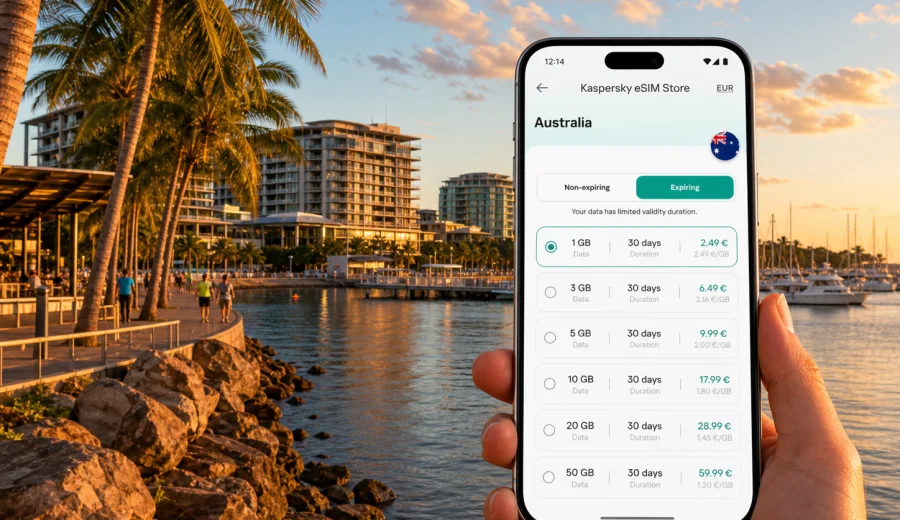
Darwin eSIM guide: mobile connection and internet for your trip
Darwin is a compact city, but a trip there can depend heavily on mobile internet. You may land late at Darwin International Airport, take a rideshare to the Waterfront Precinct, check into a hotel near the Esplanade, join a business meeting in the CBD, or start a day trip toward Litchfield National Park. In each of these moments, maps, booking apps, messaging, translation, banking, and weather alerts are easier when your phone is already prepared.
An eSIM can help you use mobile data in Australia without looking for a physical SIM card after arrival. For Darwin, that matters because the city is both a destination and a starting point: many visitors stay in the centre for a few days, move between waterfront restaurants and museums, then leave for national parks, cruise terminals, remote work sites, or onward flights. A suitable eSIM plan keeps the planning simple: choose the destination, check the data allowance and validity period, install the eSIM on a compatible device, and use it for mobile internet during the trip.
This guide focuses on Darwin city travel rather than a general Australia overview. It covers airport arrival, local movement, hotels, business scenarios, stopovers, waterfront days, and trips from Darwin.
Why mobile internet matters in Darwin
Darwin is easy to navigate, yet it is not a city where every travel step happens within one metro system or one walkable tourist strip. The airport is outside the central waterfront area, attractions are spread between the CBD, Cullen Bay, Mindil Beach, East Point, museums, markets, and marina zones, and many visitors book tours or rental cars for places beyond the city.
Mobile internet is useful in Darwin for:
- opening the exact hotel address after landing;
- checking rideshare, taxi, shuttle, and rental car details;
- navigating between the Waterfront Precinct, Smith Street Mall, the Esplanade, Cullen Bay, and Mindil Beach;
- receiving updates from tour operators before day trips;
- using messaging apps with family, colleagues, hosts, and drivers;
- checking weather, heat, storm, and wet-season updates;
- confirming restaurant bookings, ferry times, and museum opening hours;
- managing mobile boarding passes for domestic or international flights.
Darwin also changes with the season. The dry season brings outdoor markets, sunset events, and busy tour schedules. The wet season can bring sudden rain and different travel timings. A working data connection helps you adapt without relying only on hotel Wi-Fi.
Arrival at Darwin International Airport
Darwin International Airport is the usual entry point for travellers arriving from other Australian cities and from nearby international routes. The first useful online tasks often happen before you leave the terminal: checking the address of your accommodation, opening a map, confirming a rideshare pickup, finding a taxi rank, or messaging the hotel about a late check-in.
If you use eSIM, install it before departure when you still have stable Wi-Fi. You can then switch the eSIM on after landing and choose it for mobile data. Activation and network registration can take a few minutes depending on the device and local network conditions, so it is better to prepare the profile before the moment you need a car or map.
For a smooth airport scenario:
1. Check that your phone supports eSIM and is not locked to a carrier.
2. Install the eSIM profile before the flight, but keep your primary line unchanged if you need it for calls.
3. After landing, enable the eSIM for mobile data.
4. Turn on data roaming for the eSIM if the plan instructions require it.
5. Test a simple page or map search before leaving the terminal.
This setup is especially helpful on late arrivals. Darwin's central area is not far from the airport, but you do not want to troubleshoot connectivity while locating transport.
Moving around Darwin with maps and transport apps
Darwin's main visitor zones are close enough for short taxi or rideshare trips, but not every route is comfortable to walk, especially in heat or heavy rain. Mobile data helps you compare options and avoid guessing:
| Situation in Darwin | Why mobile internet helps |
|---|---|
| Airport to CBD or Waterfront | Open the pickup point, hotel address, and fare estimate. |
| CBD to Mindil Beach | Check route timing, sunset plans, and return transport. |
| Waterfront to Cullen Bay | Use maps for marina restaurants, ferry areas, and walking routes. |
| Business meetings | Share live location, message contacts, and open calendar changes. |
| Wet-season rain | Replan walking routes and transport without waiting for Wi-Fi. |
| Day tours | Receive pickup updates and operator messages before departure. |
If you plan to rent a car, data becomes even more important. You may use navigation for suburban accommodation, fuel stops, parking, supermarkets, and the first leg out of Darwin. Downloading offline maps before the trip is wise, but live data still helps with route changes, temporary closures, and messages from accommodation or tour providers.
Darwin districts where eSIM is useful
Darwin does not need a complicated connectivity plan, but different areas create different data needs.
CBD and Smith Street Mall
The CBD is the practical base for many visitors. You may use mobile data for maps, payment apps, restaurant bookings, coworking directions, and messages between meetings.
Waterfront Precinct
The Waterfront Precinct is convenient for hotels, restaurants, swimming areas, events, and family trips. Mobile data helps with navigation, digital tickets, ride pickup points, and quick searches for opening hours.
Esplanade and Bicentennial Park
The Esplanade is common for walks, harbour views, and sunset photos. A working connection helps you share location, call transport, check weather, and use maps after dark.
Mindil Beach and markets
Mindil Beach is strongly connected with sunset visits and market evenings. Crowds can make coordination harder, and mobile data is useful for meeting points, payments, transport, and event details.
Cullen Bay and marina areas
Cullen Bay can involve restaurant bookings, marina walks, ferries, and scenic trips. eSIM data is useful for confirming times and directions.
How much data to plan for Darwin
The right data allowance depends less on the city and more on your habits. Darwin trips often combine city days with transport planning and outdoor excursions, so it is worth estimating data before choosing a plan.
| Trip style | Typical mobile data use | Practical planning note |
|---|---|---|
| Short stopover, 1-2 days | Low | Maps, messaging, rides, boarding passes, light browsing. |
| City break, 3-5 days | Moderate | Add restaurant searches, tour messages, photo sharing, local research. |
| Business trip | Moderate to high | Email, calendar changes, documents, hotspot use if allowed by the plan. |
| Darwin plus day trips | Moderate | Navigation, weather, pickup updates, offline maps plus live checks. |
| Heavy video and cloud backup | High | Use hotel Wi-Fi when possible to protect your data allowance. |
As a simple rule, keep mobile data for tasks that matter while moving: maps, messaging, bookings, banking, tickets, weather, and transport. Save video streaming, large app updates, and full-resolution photo backup for trusted Wi-Fi.
Choosing an eSIM plan for Darwin, Australia
For a city article, the correct destination is the country that contains the city. Darwin is in Australia, so choose an eSIM plan that covers Australia rather than looking for a city-only plan. The city focus still matters because your data use is shaped by Darwin's airport, waterfront, local transport, hotels, business districts, and trips into the Northern Territory.
Before choosing a plan, check four things:
- Destination coverage: make sure the plan is for Australia or a region that includes Australia.
- Data allowance: match it to your maps, messaging, work, and media habits.
- Validity period: choose a duration that covers the full trip, including arrival and departure days.
- Plan conditions: check whether tethering, top-ups, activation timing, and roaming-data settings meet your needs.
If you want to prepare before you fly, you can use Kaspersky eSIM Store to choose an eSIM plan for your trip to Darwin and review the available Australia options. The service is an app and website where you can choose, arrange, and activate an eSIM with a suitable mobile data plan for travel; it is not a mobile network operator, and plan conditions depend on the selected option.
Compatibility check before you pay
An eSIM only works on devices that support eSIM and are not restricted by a carrier lock. Some phone models also vary by region of sale, so it is not enough to rely only on the model name. Check the device settings and the seller or carrier information if you are unsure.
Before buying a plan, check your device and confirm:
- the phone or tablet supports eSIM;
- the device is not locked to a carrier;
- the operating system is reasonably up to date;
- you have a stable internet connection for installation;
- you understand which SIM profile will be used for mobile data;
- you know whether the eSIM plan requires data roaming to be enabled.
If you travel with a dual-SIM phone, you can usually keep your primary SIM active for calls or messages while using the eSIM for mobile data. Settings differ by device, so check the mobile data line carefully after installation.
How to install and activate eSIM for a Darwin trip
Install the eSIM while you still have reliable Wi-Fi, ideally before leaving for the airport. After the plan is available in your profile or email, follow the instructions for your device. If you need a detailed setup path, use the Android installation guide or the iOS installation guide.
The usual flow is:
1. Choose the destination and plan for Australia.
2. Complete the order and open the eSIM details.
3. Add the eSIM to your phone using the QR code or the on-screen setup flow.
4. Name the line clearly, for example "Australia data".
5. Keep your regular SIM for calls if needed.
6. Select the eSIM for mobile data after arrival or when the plan instructions say to activate it.
7. Enable data roaming for the eSIM if the instructions require it.
8. Test maps or messaging before you leave the airport or hotel.
Do not delete the eSIM profile unless you are sure you no longer need it. Some eSIM profiles cannot be moved or reinstalled after activation, depending on the plan conditions.
Business trips and remote work in Darwin
Darwin is a practical base for government, resources, defence, tourism, education, and regional project work. Business travellers often need connectivity in more places than a hotel lobby: airport pickup zones, meeting venues, coworking spaces, taxis, restaurants, and client sites.
For work trips, plan data more carefully:
- check whether your plan allows hotspot use if you expect to connect a laptop;
- keep large file transfers for hotel or office Wi-Fi when possible;
- download documents, tickets, and maps before travel days;
- protect your main phone number by keeping your regular SIM active if you need two-factor authentication;
- carry a power bank, because navigation and hotspot use drain battery quickly in warm weather.
An eSIM is useful here because it separates travel mobile data from the rest of your setup. You can prepare it before departure, see the data allowance and validity period, and use it when you are moving between meetings or waiting for transport.
Stopovers and short stays
Some travellers pass through Darwin for a short stop, a cruise connection, a regional flight, or an overnight break before heading elsewhere in Australia. In a short stay, you may not want to spend time finding a local SIM card. You need enough mobile data for practical tasks: maps, transport, hotel messaging, boarding passes, and a few searches.
For a Darwin stopover, keep the setup simple:
- install the eSIM before the trip;
- choose a validity period that includes both arrival and departure;
- save your hotel address offline;
- keep booking references in your wallet or email app;
- use mobile data for transport and messaging first, entertainment second.
This is where eSIM can be especially convenient: the value is not only the data itself, but the reduced friction during a short window in the city.
Trips from Darwin: when city data becomes route data
Darwin is a launch point for experiences outside the city, including Litchfield National Park, wildlife cruises, wetlands, road trips, and longer Northern Territory itineraries. Mobile data can support planning and communication before and after these trips, but you should not assume continuous coverage in remote areas.
Use eSIM data for:
- checking pickup times before a tour;
- opening meeting points in the city;
- confirming weather and road information before departure;
- messaging accommodation or tour operators;
- navigating in and around Darwin before the route becomes remote;
- downloading offline maps before leaving strong coverage areas.
For remote or park travel, prepare offline maps and follow local safety guidance from your tour operator or accommodation. eSIM is useful where network access is available, but remote areas may have limited service.
Practical data-saving checklist
Use this checklist before and during your Darwin trip:
- Download offline maps for Darwin and any planned day-trip areas.
- Save hotel, tour, and flight details for offline access.
- Disable automatic app updates over mobile data.
- Pause full-resolution cloud photo backup until Wi-Fi is available.
- Use messaging apps instead of video calls when data is limited.
- Check whether your plan supports hotspot before relying on it.
- Keep a charging cable or power bank in your day bag.
- Review the validity period so the plan covers your final airport day.
These steps help keep your plan focused on high-value travel tasks instead of background app activity.
Common mistakes to avoid
The most common eSIM problems in city travel are usually preventable:
| Mistake | Better approach |
|---|---|
| Buying before checking compatibility | Confirm eSIM support and carrier-lock status first. |
| Waiting until the airport exit to install | Install on Wi-Fi before you need mobile data. |
| Choosing a plan too short for the trip | Include arrival, day trips, and departure day. |
| Using mobile data for large uploads | Save cloud backups and updates for trusted Wi-Fi. |
| Deleting the eSIM after a test | Keep the profile until the trip is fully over. |
| Expecting voice calls and SMS | Check plan conditions; many travel eSIM plans focus on mobile data. |
If something does not work immediately, check the selected mobile data line, data roaming setting for the eSIM, airplane mode, and whether the eSIM profile is active. A restart can also help the device register on the local network.
FAQ: eSIM and mobile internet in Darwin
Is eSIM useful for Darwin if my hotel has Wi-Fi?
Yes. Hotel Wi-Fi helps in your room, but mobile data is useful at the airport, in taxis, at markets, on the waterfront, between meetings, and during day-trip planning. eSIM is mainly about staying online while moving.
Should I choose a Darwin eSIM or an Australia eSIM?
Choose a plan that covers Australia. Darwin is the city context for your trip, but the mobile data plan should match the country or region where the service is available.
Can I use eSIM for ordinary phone calls and SMS?
Not unless this is included in the selected plan conditions. Many travel eSIM plans are designed for mobile internet. For calls and messages, you can use internet-based apps while connected to mobile data.
Can I install eSIM after I arrive in Darwin?
Yes, if your phone is compatible and you have internet access for setup. However, installing before departure on stable Wi-Fi is usually easier because you avoid troubleshooting during airport arrival.
Will eSIM work everywhere around Darwin and the Northern Territory?
Mobile network availability depends on local coverage and the selected plan. eSIM can be helpful in the city and many travel scenarios, but remote areas may have limited or no service. Download offline maps before leaving Darwin.
Do I need to turn on data roaming?
Some eSIM plans require data roaming to be enabled for the eSIM line. Follow the instructions for your plan and make sure your primary SIM is not unintentionally used for roaming data.
Choose your eSIM plan before travelling to Darwin
Darwin is a city where mobile internet supports the whole travel day: airport arrival, hotel check-in, waterfront walks, market evenings, business meetings, tour updates, and trips beyond the city. Preparing eSIM in advance helps you avoid searching for a physical SIM card when you would rather move straight to your accommodation or itinerary.
Before you go, check device compatibility, choose a data allowance that fits your trip length, install the eSIM on Wi-Fi, and keep the setup instructions available. When you are ready to prepare mobile internet for Australia, you can choose an eSIM plan for your Darwin trip in Kaspersky eSIM Store and activate it according to the selected plan's instructions.