Travel connectivity guide
David, Panama eSIM: Mobile Internet for Your Trip
David eSIM: mobile connection and internet for your trip
David is a practical base in western Panama: visitors arrive for business, continue toward the highlands, or use the city as a stop on a longer journey. In each case, mobile data can help with the first ride, checking a hotel address, messaging a host and keeping plans together while you move around. An eSIM lets you prepare a mobile data option without handling a physical SIM card. This guide focuses on how that can fit a visit to David and the surrounding Chiriquí region.
When an eSIM can help in David
The moments when you need a map or message often happen between planned activities. You may land at Enrique Malek International Airport, meet a driver, find your accommodation, or coordinate a change of plans after reaching the city. Having a data connection available can make those steps easier to manage.
David is a regional hub rather than a compact resort district. Your day may involve a hotel, a meeting, a bus terminal, a restaurant and another stop on the edge of town. Navigation helps you check the route and estimate where a pickup point is; messaging helps confirm the exact entrance or meeting place. If you are relying on a ride arranged by someone else, a quick message can resolve a misunderstanding before you get into the car.
A mobile connection is also useful for everyday travel tasks:
- Open a map while walking or riding between places, and save the accommodation address before leaving.
- Check booking details, opening information and confirmation messages when your plans change.
- Use messaging and internet calling apps to stay in touch with family or colleagues.
- Look up weather information before a trip toward the Chiriquí highlands or the Pacific coast.
- Keep access to work messages, calendar invitations and cloud documents during a business visit.
The city can serve as a starting point for trips to places such as Boquete, Volcán, the Gulf of Chiriquí or the beaches farther south. A regional excursion brings more planning than a short walk through central David: confirm transport with the provider, note the departure and return arrangements, and download key details in case you are temporarily offline. An eSIM does not replace those checks, but mobile data can make it easier to refer to your itinerary as you go.
First hours after arrival
Before you leave the airport, check that you can reach your accommodation and that you know how you will get there. Save the address in the map app, keep a screenshot of the booking and make sure the driver or host has your current contact details. If you have not activated your travel eSIM yet, airport Wi-Fi may be useful for completing setup, depending on the instructions for your plan and device.
At the pickup point, compare the vehicle and meeting details with what you arranged. Do not rely on a pin alone: a named entrance, hotel reception or other clear landmark can help both sides find one another. Once you are on the way, you can follow the route and message the accommodation if your arrival time changes.
Moving around David and choosing where to stay
David's central areas are useful for errands, meals and practical services, while accommodation may also be spread along major roads and toward the outskirts. Instead of assuming every destination is walkable, check the route from your lodging to the places on your schedule. Heat, rain, luggage, time of day and the type of road can all affect whether walking is comfortable. For a longer distance, arrange a ride or use local transport that suits the route and your plans.
A map is most helpful when you use it as a planning aid, not as the only source of directions. Verify a pickup location with the driver or hotel, and allow extra time if you have an appointment or connection to make. Street names, building entrances and business listings can be shown differently across apps, so compare the destination name and nearby landmark if a pin appears uncertain.
| Travel situation | What to prepare | How mobile data helps |
|---|---|---|
| Airport to accommodation | Address, pickup instructions and a contact number or message thread | Check the route and contact your host if plans shift |
| Meeting across town | Exact venue name, entrance and appointment time | Recheck directions and send an arrival update |
| Hotel change | New booking confirmation and check-in details | Open the reservation and share your updated location |
| Bus or day trip | Departure point, operator details and return plan | Refer to saved messages and coordinate a pickup |
| Walking between nearby stops | Destination names and a backup landmark | Confirm turns and adjust the route as needed |
Planning day trips from David
Before setting out, prepare a compact travel folder on your phone:
- Save the accommodation address and a contact method.
- Keep booking confirmations and pickup instructions available offline, such as in a screenshot.
- Note the meeting point and expected return arrangement.
- Charge your phone and carry a power bank if you have one.
- Check that the eSIM line is selected for data and that the plan has enough validity for the excursion.
- Tell someone your broad itinerary if you will be away for much of the day.
Mobile data can help you view maps, send an update or check a changed arrangement, but a remote part of a route may have variable coverage. Save essential directions and confirmations before leaving David. If the day trip crosses an area with limited signal, an offline map and a clear meeting plan are sensible backups.
Choosing an eSIM tariff for a David trip
Start with the route rather than a guessed data amount. A stay entirely in David has different needs from a week that includes video calls, navigation-heavy day trips and time in other parts of Panama. Think about how long you will travel, whether you will use hotel Wi-Fi, and which apps you expect to use away from it. Video, photo uploads and cloud backups can use more data than maps and text messages.
Before selecting a plan, compare these points:
- Coverage area: Confirm that the tariff includes Panama and check its stated service area against your complete itinerary.
- Validity: Choose a duration that covers your arrival, days in David and onward travel. Consider the plan's start or activation conditions.
- Data allowance: Estimate usage for navigation, messaging, email, browsing and media. Select a quantity that fits your habits, with a margin for unexpected changes.
- Tethering and plan conditions: If you expect to connect a laptop or another device, check whether sharing data is supported and read the plan details.
- Device support: Verify that your phone supports eSIM and is not restricted from using another provider's eSIM.
- Existing line: Decide which line handles calls and SMS and which one uses data. Understand possible charges from your home operator.
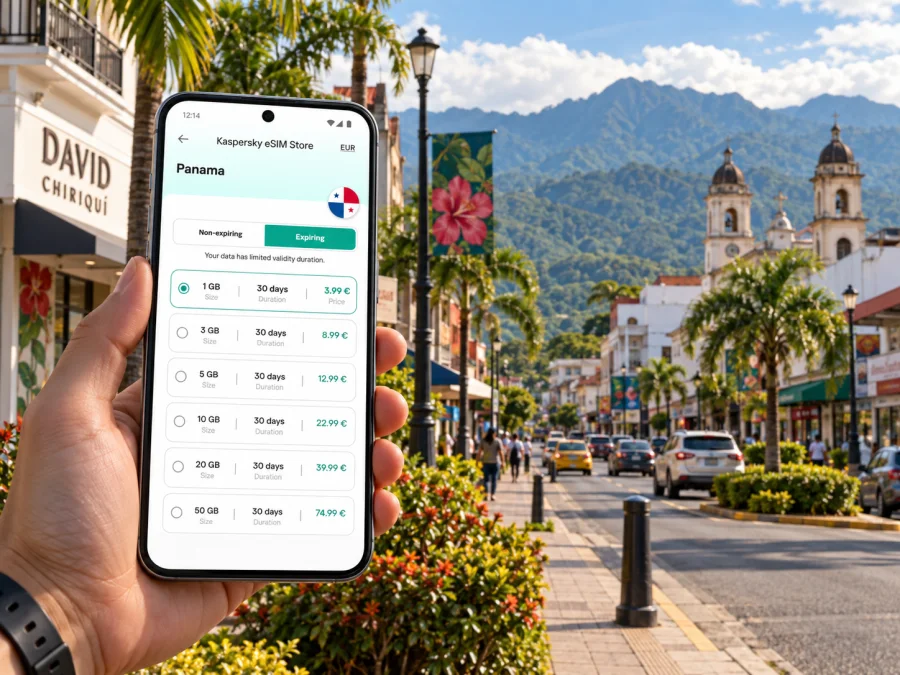
Kaspersky eSIM Store is an app and website where you can choose, arrange and activate an eSIM with a suitable tariff for mobile internet while travelling abroad. Review the destination, data amount, validity and plan conditions before completing an order. To compare options for the country where David is located, choose an eSIM tariff for your trip to Panama.
Estimate data by activity
| Your travel pattern | Likely data priorities | Preparation tip |
|---|---|---|
| One or two nights in David | Maps, messages, booking details | Save the address and confirmations before arrival |
| Several days with local errands | Navigation, browsing, ride coordination and chat | Check the plan validity against the whole stay |
| Business visit | Email, calendar, documents and possible calls | Use venue Wi-Fi where appropriate and monitor data use |
| David plus regional excursions | Maps, messages and schedule updates | Save offline details for areas where signal may vary |
| Multi-country itinerary | Data across each destination | Verify every country in the tariff coverage information |
Install and activate before travel or after arrival
If possible, set up the eSIM before leaving home while you have a stable internet connection. Read the plan's installation and activation instructions first; some plans have specific timing or steps. Keep the QR code or setup details available on another screen or in a format your phone can access during installation. Follow the on-screen prompts and avoid deleting an installed eSIM unless the plan instructions say to do so.
For step-by-step help, use the Android eSIM installation instructions or the iOS eSIM installation instructions. Menu names differ between phone models and software versions, so follow the instructions that match your device.
A straightforward setup sequence is:
- Check that your phone supports eSIM and is available for use with another provider's eSIM.
- Connect to Wi-Fi and open the installation details supplied with your eSIM.
- Add the eSIM by following the prompts for your device.
- Label the line clearly, for example “Panama travel”, so it is easy to identify later.
- Set the travel eSIM as the mobile data line when you are ready to use it.
- Apply the plan's activation and data roaming instructions, then allow the phone time to register.
- Confirm that mobile data works before relying on it for a transfer or appointment.
If you prefer to install after landing, connect to airport or hotel Wi-Fi first if available. Keep setup information accessible and leave time to troubleshoot before setting off. Activation timing can depend on the plan, so read its terms rather than assuming that installation and the start of validity are always the same event.
What to check before you buy
The most frustrating setup problem is discovering a device limitation at the airport. Check your phone's specifications and settings in advance, and make sure it is not carrier-locked in a way that prevents adding the travel eSIM. Some devices support eSIM only in certain regional versions. If you are unsure, check whether your device is compatible before choosing a tariff.
Also review the plan details and your own usage settings:
- Confirm the destination and coverage area match your plans in and around David.
- Check validity, data allowance, activation conditions and any applicable use restrictions.
- Keep your primary number available if you expect calls or SMS on that line; eSIM data does not automatically replace a phone number or calling service.
- Set the preferred line for mobile data and check which line is allowed to use data roaming.
- Disable automatic app updates and large backups over mobile data if you want to manage usage.
- Keep the installation instructions and account access available in case you need them later.
Kaspersky eSIM Store helps you select, arrange and activate a travel eSIM. The local mobile network provides the connection, and the experience can vary with the network, device and surroundings. A tariff's coverage description and conditions are the right place to check what is included for your particular route.
Frequently asked questions
Will an eSIM work throughout David?
Coverage depends on the local network available to the tariff, your phone and the area you visit. Check the plan's stated coverage and expect service to vary between central streets, buildings, roads and outlying destinations. Save essential details offline for trips beyond the city.
Can I keep my usual number active?
Many phones let you keep more than one line available, but the exact options depend on the device and plan. You can generally choose which line is used for mobile data. Review your home operator's roaming terms and select settings carefully if you want to avoid unintended data use on that line.
Does a travel eSIM include ordinary calls and SMS?
Do not assume that it does. The eSIM tariff's product details explain what it includes. A data-only plan can support internet-based messaging and calls through compatible apps, while ordinary calls and SMS may continue to use your primary number and its usual terms.
Should I install the eSIM before flying?
Installing before departure can make arrival easier, provided you follow the plan's instructions and activation timing. If you install after landing, you will need an internet connection for setup. In either case, check that the eSIM is added and that you know how to select it for data.
How much data should I choose for a short visit?
It depends on your use. Consider how often you will navigate, message, browse, work online or stream media, and how much Wi-Fi you expect to use. Check your typical phone usage as a guide, and review plan validity alongside the data allowance.
Can I use one plan for a trip outside David?
Possibly, if the tariff covers the places on your route. David is in Panama, but coverage should be confirmed for each destination and country in your itinerary. Review the plan conditions before you travel onward.
A simple connection plan for David
Before travelling, check device support, compare the tariff's coverage and validity with your dates, and install the eSIM using the instructions for your phone. Save the airport pickup details, accommodation address and any excursion confirmations offline. After arrival, select the travel line for data and verify the connection before relying on it for navigation.
When you are ready to prepare your mobile internet for David and the rest of your route in Panama, choose a suitable eSIM tariff for Panama through Kaspersky eSIM Store. Review the plan terms, complete setup on a compatible device and keep a backup of the information you need while travelling.


