
Travel connectivity guide
Delhi eSIM for mobile internet travel
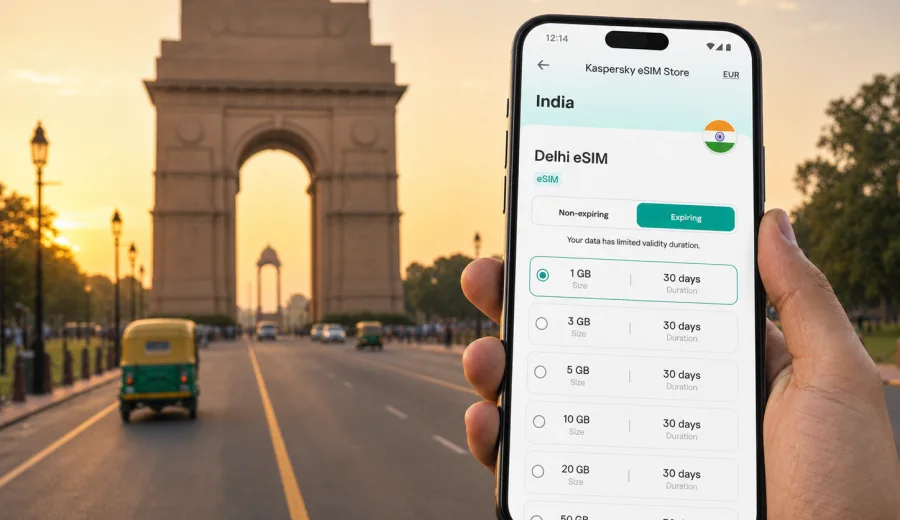
Delhi eSIM: mobile connection and internet for a smoother city trip
Delhi is a city where mobile internet quickly becomes part of the travel plan. You may need it before you even leave Indira Gandhi International Airport: to call a cab, check the address of your hotel in Aerocity or Connaught Place, follow the Airport Express route, message a host, or share your arrival time with colleagues. Later, it helps with metro transfers, map searches in Old Delhi, restaurant bookings, ride-hailing, train tickets, and day trips toward Agra or Jaipur.
An eSIM is useful because it lets you prepare mobile data before the trip without handling a physical SIM card after landing. For Delhi, that matters. The city is large, districts can feel far apart, and a short delay in getting online can turn a simple transfer into a confusing start. With a compatible phone, you can add an eSIM profile, choose it for mobile data, and keep your primary SIM available for calls or banking messages if your device settings allow it.
This guide focuses on Delhi as a city experience: airport arrival, local transport, business districts, hotels, sightseeing routes, stopovers, and trips from the capital. India is the destination used for choosing the correct eSIM tariff, but the practical decisions are local: where you land, how you move, and how much data you need while crossing the city.
Why mobile internet matters in Delhi
Delhi travel often involves several transport layers in one day. You might start at the airport, take the metro to New Delhi, switch to a ride-hailing car for a hotel in South Delhi, and then use maps again to reach a meeting in Gurugram or Noida. Each step is easier when your phone is already connected.
Common moments when data helps:
- leaving Indira Gandhi International Airport and confirming a pickup point;
- checking live route options between metro, taxi, and walking;
- opening hotel booking details when reception asks for them;
- translating short messages or addresses;
- finding the correct gate or platform at a rail station;
- coordinating with colleagues during a business trip;
- checking traffic before moving between Central Delhi, South Delhi, and NCR areas;
- using messaging apps for calls when your eSIM tariff is data-only.
Delhi is not only a sightseeing destination. It is also a business, government, education, healthcare, and transit hub. That mix makes mobile data valuable for very different travelers: first-time tourists, executives on a two-day schedule, families visiting relatives, students, conference guests, and passengers with a long stopover.
Delhi arrival: where an eSIM helps first
Most international travelers arrive through Indira Gandhi International Airport. The first online tasks are usually practical rather than scenic: checking immigration-related messages, confirming baggage updates, opening your hotel address, and deciding how to leave the airport. Airport Wi-Fi can be useful, but relying on it for every step is not ideal. You may need data after you leave the terminal, while standing at a pickup zone, or when a driver asks you to share a live location.
If your eSIM is installed before departure, your arrival flow can be calmer:
1. Turn off mobile data on your home SIM if you want to avoid roaming charges.
2. Select the eSIM profile for mobile data.
3. Enable data roaming for the eSIM profile if the selected tariff instructions require it.
4. Wait a few minutes for the phone to register on a local network.
5. Test maps and messaging before leaving the terminal.
For travelers staying in Aerocity, the first trip may be short. For Connaught Place, Karol Bagh, Paharganj, South Delhi, or Gurugram, it can be much longer, especially at busy hours. Mobile internet helps you compare the Airport Express, taxis, app-based rides, and hotel transfers without making decisions from memory.
Choosing data for different Delhi travel styles
The right data amount depends on how you use your phone. Delhi can consume more data than expected because navigation, ride apps, translation, and messaging are used repeatedly across the day. Video streaming and cloud backups are the main reasons a small package disappears quickly.
| Traveler type | Typical data use in Delhi | Practical approach |
|---|---|---|
| Stopover visitor | Maps, messaging, ride-hailing, flight updates | Choose a short-validity tariff with enough data for one active day |
| Weekend tourist | Navigation, photos, restaurant searches, ticket checks | Choose a package that covers several full days of movement |
| Business traveler | Email, calendars, messaging calls, taxi apps | Leave a buffer for tethering or document access |
| Family trip | Multiple maps searches, messaging, child entertainment | Keep streaming on Wi-Fi and reserve mobile data for movement |
| India route traveler | Delhi plus Agra, Jaipur, Varanasi, Mumbai, or Goa | Choose based on the full India itinerary, not only Delhi |
If you use your phone mainly for maps and messaging, moderate data may be enough. If you plan to work from a laptop through hotspot, upload large files, or stream video during long car rides, choose a larger package. eSIM tariffs can differ by data volume, validity period, destination, price, and whether top-up is available, so check the details before purchase.
District-by-district mobile internet scenarios
Delhi is easier to plan by district than by distance alone. Traffic, metro changes, security zones, and walking conditions can change the day, so mobile data helps you adjust without returning to the hotel for Wi-Fi.
| Area | Why data helps |
|---|---|
| Connaught Place and Central Delhi | Finding blocks, gates, cafes, offices, metro exits, and short taxi routes |
| Old Delhi | Saving meeting points near Chandni Chowk, Jama Masjid, Red Fort, and busy markets |
| South Delhi | Moving between restaurants, galleries, hotels, and meeting venues that are not always walkable |
| Aerocity and the airport zone | Coordinating hotel shuttles, app cabs, flight changes, and early departures |
| Gurugram and Noida | Handling longer NCR transfers for meetings beyond Delhi's municipal core |
Before you buy: compatibility and setup checks
Not every phone supports eSIM, and some models vary by region of sale. Before choosing a tariff, check your device and confirm that it is not locked to a mobile operator. Also make sure you know where your QR code or installation instructions will be available after purchase.
A quick pre-trip checklist:
- Your phone supports eSIM and is not operator-locked.
- Your device has a stable internet connection for installation before departure.
- You know which SIM will handle mobile data after landing.
- You have saved your hotel address offline as a backup.
- You have checked whether the eSIM tariff includes only data or also other services.
- You understand when the validity period starts for the selected tariff.
- You have kept your primary SIM active if you need bank messages or calls.
Kaspersky eSIM Store is an app and website where you can choose, arrange, install, and activate an eSIM with a suitable tariff for mobile internet in an overseas trip. It is not a mobile operator and does not own the network. The tariff conditions, data allowance, validity period, destination coverage, and activation details depend on the option you select.
A practical Delhi data plan by trip length
For one day in Delhi, mobile data is mostly about arrival, navigation, and communication. For three or four days, you will likely use it across several neighborhoods. For a longer India trip, Delhi may only be the first city, so the tariff should fit the whole route.
Use this planning method:
1. Count active travel days, not hotel nights.
2. Add airport days because they usually require maps, messages, and transport apps.
3. Add regional travel days if you plan Agra, Jaipur, Mathura, Rishikesh, or another city.
4. Decide whether you need hotspot for a laptop.
5. Leave a data buffer for delays, rerouting, and video calls.
For many travelers, the best moment to choose the tariff is before departure, when you can compare conditions calmly. If Delhi is your entry point to India, you can prepare an eSIM tariff for your trip to Delhi and India before you fly, then focus on installation and activation steps rather than searching for mobile data after arrival.
How to install and activate an eSIM for Delhi
Install the eSIM while you still have a reliable internet connection, ideally before the trip or at your hotel. The exact steps depend on your phone model and operating system. Kaspersky eSIM Store provides installation guidance, and you can also use the Android installation instructions or the iOS installation instructions when setting up your device.
General setup flow:
1. Choose India as the destination and select a tariff that fits your Delhi itinerary.
2. Complete the purchase and open the eSIM details in your profile, app, or email.
3. Add the eSIM to your phone using the QR code or manual details if provided.
4. Name the line clearly, for example "India data" or "Delhi trip".
5. Keep your primary SIM for calls if needed and select the eSIM for mobile data.
6. Follow the tariff instructions for activation timing and data roaming settings.
7. Test the connection after arrival before starting a long transfer.
Do not delete the eSIM profile after activation unless you are sure you no longer need it. Some eSIM profiles cannot be reinstalled or moved to another device after activation, depending on their conditions.
Delhi transport and navigation: where data saves time
Delhi Metro is often the simplest way to avoid road traffic, especially for airport access, Central Delhi, and many South Delhi routes. Taxis and app-based rides are useful for late arrivals, luggage, hotel transfers, and places that are not close to a station. Auto-rickshaws and walking can work for short local movements, but navigation helps you avoid unnecessary detours.
Mobile internet is especially useful for:
- checking the nearest metro station and exit gate;
- comparing metro travel time with taxi travel time;
- sharing a live location with a driver or colleague;
- checking traffic before crossing from South Delhi to Gurugram or Noida;
- opening train or flight booking details;
- finding hotel entrances in large complexes;
- translating local address notes or delivery instructions.
For Old Delhi, save your destination and a backup meeting point before entering a crowded area. For late-night arrivals, keep enough battery and data to coordinate transport until you reach the hotel. For business trips, add calendar locations in advance and verify whether the meeting is in Delhi, Gurugram, Noida, Faridabad, or Ghaziabad.
Data-saving habits for Delhi
You do not need to ration every megabyte, but a few habits help keep the eSIM tariff useful across the whole trip.
| Habit | Why it helps |
|---|---|
| Download offline maps for Delhi before departure | Reduces repeated map loading during long transfers |
| Disable automatic cloud photo uploads on mobile data | Prevents background use from consuming the package |
| Update apps on Wi-Fi only | Keeps data for travel tasks |
| Use hotel Wi-Fi for video streaming | Leaves mobile data for movement around the city |
| Close hotspot when you stop using it | Avoids laptop background sync |
| Save hotel and meeting addresses in notes | Gives you a backup if coverage is weak in a building |
Dense buildings, underground stations, elevators, conference centers, and hotel basements can affect any mobile connection. If data slows down indoors, move closer to a window or step outside before assuming something is wrong with the eSIM profile.
Business trips, events, and hotel stays
Delhi business travel often runs on a tight schedule: airport, hotel, meeting, dinner, and a late return. In that scenario, mobile data is less about browsing and more about continuity: calendar updates, driver coordination, email, document access, and messaging calls.
For business travelers, install the eSIM before the flight, choose a tariff with a buffer for hotspot use, save meeting addresses offline, and check whether corporate apps still need SMS verification on your primary SIM. Hotel Wi-Fi helps, but it does not cover the airport pickup zone, the taxi ride, or the minutes before check-in.
Stopovers and short stays in Delhi
Delhi stopovers require careful timing. If you have only a few hours outside the airport, mobile internet helps you decide quickly whether to stay near Aerocity, visit India Gate, take the Airport Express, or keep the plan simple and return early.
Prepare a realistic route, activate mobile data before leaving the terminal, and keep a backup plan if traffic or airport queues take longer than expected. Save streaming for Wi-Fi and reserve mobile data for maps, transport apps, flight updates, and messaging.
Trips from Delhi: plan data beyond the city
Many travelers use Delhi as the start of a wider India route: Agra, Jaipur, Rishikesh, Haridwar, or domestic flights to other cities. If your trip continues beyond Delhi, choose a tariff for India that fits the full route, not only the first hotel transfer.
Intercity days often use more data because you rely on maps, train or flight updates, driver coordination, and messaging from unfamiliar places. Before leaving Delhi, save offline maps for your next destination and confirm accommodation details.
What eSIM can and cannot do
An eSIM tariff for travel is mainly a way to use mobile internet on a compatible device. It is not the same as a local phone contract and may not include a local phone number, standard voice calls, or SMS unless those features are stated in the selected tariff details.
Keep your primary SIM available if you need banking messages, check tariff validity before activation, and do not delete the eSIM profile while you still need it. Kaspersky eSIM Store helps with the selection and activation journey, while mobile service conditions depend on the selected tariff and local network availability.
FAQ: eSIM and mobile internet in Delhi
Is eSIM useful for a trip to Delhi?
Yes. It is useful for airport arrival, maps, taxi apps, metro planning, hotel check-in, business messages, and trips from Delhi without looking for a physical SIM card after landing.
Should I install the eSIM before flying to India?
In most cases, yes. Install it while you have a stable connection, then follow the activation instructions for the selected tariff and check when validity starts.
Can I use an eSIM for calls in Delhi?
Usually, travel eSIM tariffs focus on mobile data. Standard phone calls and SMS are not included unless the selected tariff says otherwise, but you can use messaging apps over data.
Is airport Wi-Fi enough?
Airport Wi-Fi can help inside the terminal, but it does not cover the pickup zone, taxi, metro station, hotel transfer, or meeting venue.
What if Delhi is only one stop in India?
Choose your tariff based on the entire India itinerary. A plan that is enough for a Delhi stopover may be too small for Delhi plus Agra, Jaipur, Varanasi, or several domestic flights.
Final checklist before you leave for Delhi
Before departure, make sure the essentials are ready:
- eSIM support checked on your phone;
- India tariff chosen for the full itinerary;
- eSIM installed or installation details saved;
- primary SIM settings reviewed to avoid unwanted roaming;
- hotel, airport, and meeting addresses saved offline;
- offline map area downloaded;
- charger or power bank packed;
- app updates and large downloads completed on Wi-Fi.
Delhi rewards preparation. When mobile internet is ready, arrival feels less improvised: you can leave the airport with maps working, move through the city with better route choices, and handle hotels, meetings, restaurants, and onward travel from one device. For a calmer start, choose an eSIM tariff for your trip to India through Kaspersky eSIM Store before you go, then use Delhi for what you came for rather than spending your first hour solving connectivity.