
Travel connectivity guide
DR Congo eSIM: Mobile Internet for Travel
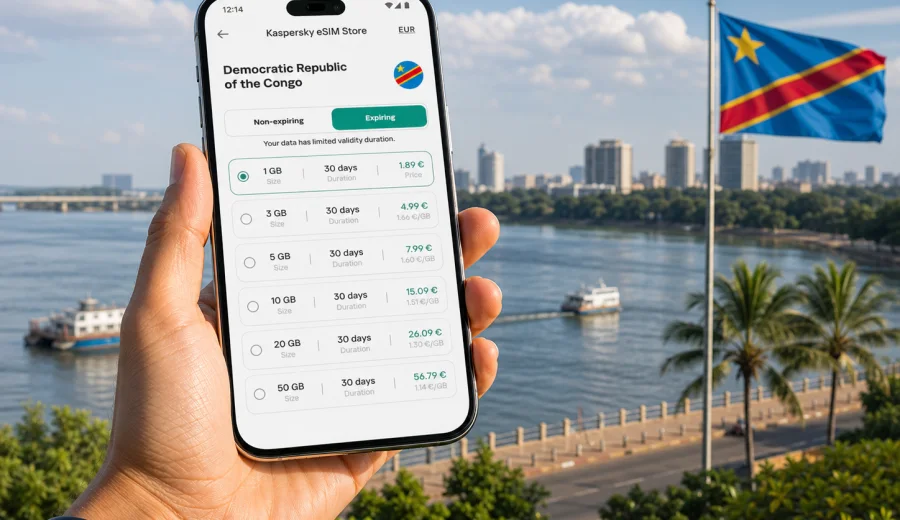
eSIM in the Democratic Republic of the Congo: mobile connection and internet for your trip
The Democratic Republic of the Congo is a destination where a prepared mobile connection can make the first day much easier. You may need mobile internet to message a driver, open a hotel address, check a domestic flight, translate a phrase, share your location, or send work documents while moving between appointments. If you arrive without a connection plan, even a simple task can take longer than expected.
An eSIM helps you prepare data access before the trip. It is a digital SIM profile installed on a compatible phone, so you do not need to swap a physical SIM card when you land. For a trip to Kinshasa, Lubumbashi, Goma, Kisangani, Matadi, Kolwezi, or a route that combines several areas, this can reduce stress and give you a clear way to get online.
Kaspersky eSIM Store is an app and website where you can choose, arrange, and activate an eSIM with a suitable data plan for mobile internet abroad. It helps you compare the country, data allowance, validity period, and setup flow before you travel, then install the eSIM on a compatible device when the plan conditions allow it.
Why mobile internet planning matters in the Democratic Republic of the Congo
The Democratic Republic of the Congo is large, diverse, and logistically complex. A short business visit to Kinshasa is very different from a project route across several provinces. Mobile coverage and speed may vary by city, district, building density, terrain, congestion, weather, and the distance from major transport routes.
That is why mobile internet should be part of your preparation, not an afterthought. A travel eSIM can be used as a dedicated data line, while your main SIM may remain available for important messages or account verification, depending on your phone and home operator settings.
Common tasks that depend on mobile data include:
- checking pickup details after arrival;
- opening maps and saved locations;
- messaging hotels, drivers, colleagues, relatives, or guides;
- reading booking confirmations and travel documents;
- using translation apps;
- checking weather before transfers;
- sharing your location with a group;
- using mobile banking or expense apps;
- sending scans, photos, and short work updates.
The goal is not to promise identical service in every location. No mobile data option can do that. The goal is to arrive with a prepared, understandable data setup that you can use when local conditions allow it.
What an eSIM does for travel
An eSIM is a digital SIM profile stored on a supported device. In most travel scenarios, it is used for mobile data. You install it through a QR code or app-based setup flow, then choose it as the data line in your phone settings.
For travelers, the main benefit is separation. Your main number can remain in the phone, while the eSIM handles internet access for the trip. This is useful if you need messages on your primary SIM but do not want to rely only on roaming for data.
Before choosing any plan, check these points:
| Point to check | Why it matters |
|---|---|
| Device compatibility | Your phone must support eSIM and must not be locked to one operator. |
| Data allowance | The package should match maps, messaging, browsing, and work needs. |
| Validity period | The plan should cover the full time you need internet in the country. |
| Activation timing | Some plans start at installation, others when they connect; read the conditions. |
| Calls and SMS | Travel eSIM plans usually focus on data unless stated otherwise. |
| Hotspot use | Tethering depends on the selected plan and device settings. |
Before purchase, check your device. This is the simplest way to avoid choosing a plan for a phone that cannot install or activate an eSIM.
Who benefits most from an eSIM
Business travelers often need internet for messaging, email, document review, maps, and meeting coordination. If you mostly stay in Kinshasa or Lubumbashi and have trusted Wi-Fi at the hotel or office, a moderate data allowance may be enough. If your schedule includes site visits, transfers, or several cities, choose more data than the minimum.
Visitors traveling for family reasons may use mobile internet for messaging, internet-based calls, photos, local coordination, and maps. In this case, the biggest data risks are video calls and automatic photo backup. Set cloud backup to Wi-Fi only before departure.
Project teams, researchers, contractors, and NGO staff may need a larger allowance because they often work across a changing route. Maps, shared drives, messenger groups, and field updates can consume more data than a short city visit.
Tourists and first-time visitors may use less data overall, but they often depend on maps and messaging at the exact moments when Wi-Fi is unavailable. A prepared eSIM is useful because you do not have to spend the arrival window searching for a physical SIM option.
How much mobile data you may need
Your data use depends on app settings, media quality, background sync, and how often you connect to Wi-Fi. Use the table as a practical planning guide, not a guarantee.
| Trip style | Typical use | Practical approach |
|---|---|---|
| 2-3 days in one city | Messaging, maps, email, light browsing | A small or medium package may be enough. |
| 1 week of meetings | Email, documents, maps, messenger calls | Choose a medium package and control background data. |
| 10-14 days with transfers | Navigation, bookings, work apps, photos | Choose more data or check top-up options. |
| Field or project travel | Frequent updates, routes, file sharing | Use a larger allowance and keep offline backups. |
| Family travel | Messaging, photos, location sharing | Watch video calls and cloud backup carefully. |
To make mobile data last longer:
- download offline maps before departure;
- update apps over Wi-Fi;
- disable automatic cloud photo and video backup on mobile data;
- reduce video streaming quality;
- save travel documents offline;
- use Wi-Fi for large uploads and system updates;
- monitor data use in phone settings during the trip.
These habits are especially useful in a country where travel days can be long and Wi-Fi may not always be available when you need it.
eSIM, roaming, local SIM, and Wi-Fi
Each connection method has a role. Roaming can be convenient because it keeps your usual number and settings, but costs and conditions depend on your home operator. A local physical SIM may suit longer stays or local voice needs, but it requires time, a purchase process, and a free SIM slot. Public Wi-Fi is useful for larger downloads, yet availability and privacy conditions vary.
A travel eSIM sits between these options. It can be prepared before arrival and used as a dedicated mobile data line on a compatible device. Many travelers use a mix: eSIM for everyday mobile internet, trusted Wi-Fi for heavy files, and the home SIM for essential messages.
This mixed approach is practical in the Democratic Republic of the Congo because your connection needs may change from one day to the next. You may have good Wi-Fi in a hotel, then need mobile data during a transfer, then use offline maps in an area with weaker coverage.
You can choose an eSIM data plan for the Democratic Republic of the Congo in Kaspersky eSIM Store and review the available options before travel. This keeps the decision focused on the practical details: destination, data amount, validity period, and installation flow.
Prepare your phone before departure
Do the technical checks while you still have time and stable Wi-Fi. It is easier to fix settings at home than after landing.
Pre-trip checklist:
- confirm that your phone supports eSIM;
- make sure it is not locked to one mobile operator;
- update the operating system if an update is already pending;
- learn where the SIM, mobile data, and roaming settings are;
- save installation details where you can access them offline;
- decide which SIM will handle mobile data;
- turn off mobile data for apps that may use too much in the background;
- download maps, booking details, and key documents;
- carry a power bank for long transfers.
If you need setup guidance, use the Android installation instructions or the iOS installation instructions. Menu names may differ by device model and operating system version, but the basic flow is similar: add the eSIM, select it for mobile data, and check whether data roaming must be enabled for that eSIM line.
When to install and activate the eSIM
The right timing depends on the plan conditions. Some eSIM profiles can be installed before departure and start using data only after connecting in the destination. Other plans may start their validity period earlier. Read the details before installing.
A reliable sequence is:
1. Select the Democratic Republic of the Congo as the destination.
2. Compare data allowances and validity periods.
3. Check device compatibility and operator lock status.
4. Arrange the selected eSIM plan through the app or website.
5. Install the eSIM using the provided instructions.
6. Set the eSIM as the mobile data line when you are ready to use it.
7. Enable data roaming for the eSIM if the instructions or settings require it.
8. Test basic internet access after arrival.
If the eSIM does not connect immediately, do not delete the profile. First check the selected data line, roaming setting, signal level, and whether you are in an area with mobile coverage. Removing the profile can make troubleshooting harder, depending on the plan conditions.
Choosing an eSIM plan for the Democratic Republic of the Congo
The country name is only the starting point. The useful plan is the one that matches your route, duration, and real data habits.
Ask yourself:
- How many days will I need mobile internet in the country?
- Will I stay mostly in one city or travel between regions?
- Do I need data for work apps or mainly for messaging and maps?
- Will I use video calls on mobile data?
- Do I plan to share internet with a laptop or another phone?
- Will I have reliable Wi-Fi at my hotel, office, or accommodation?
- Do I prefer a smaller package with careful use or a larger buffer?
For a planned short trip, a moderate allowance may be enough. For a route with uncertain transfers, long workdays, or limited Wi-Fi, a larger allowance can help you avoid running out of data at an inconvenient moment.
Practical travel scenarios
Short business visit to Kinshasa
You arrive for meetings and move between the airport, hotel, office, and restaurant. Your main tasks are messaging, maps, email, ride coordination, and document access. Use trusted Wi-Fi for large files and keep the eSIM for mobile tasks between locations.
Useful settings:
- select the eSIM as the mobile data line;
- keep the main SIM available for important messages if needed;
- turn off cloud backup on mobile data;
- download documents before leaving the hotel;
- keep extra data for delays or route changes.
Multi-city work route
If you travel between Kinshasa, Lubumbashi, Goma, Kisangani, Kolwezi, or other locations, mobile internet becomes part of route coordination. Choose more data than you would for a single-city visit, prepare offline maps, and keep essential documents available without cloud access.
Family visit or personal travel
Messaging apps, photos, location sharing, and internet-based calls may be the main uses. Video calls and automatic uploads can consume data quickly, so set backup to Wi-Fi only and check your usage every few days.
First arrival after a long flight
Arrival is one of the most useful moments for a prepared eSIM. You may need to message a host, confirm a driver, open a map, or check an address. If the profile is installed and ready according to the plan conditions, you can spend less time solving connectivity and more time getting to the next step of the trip.
Quick recommendations by traveler type
| Traveler type | Recommended approach |
|---|---|
| Light user | Use eSIM for maps, messaging, and essential browsing. |
| Business traveler | Choose enough data for email, documents, and route coordination. |
| Project team member | Prepare a larger allowance and offline backups for field days. |
| Family visitor | Control photo backup and video calls on mobile data. |
| Frequent traveler | Keep the setup process familiar for future destinations. |
The best plan is not always the largest one. If you use maps and messaging only, a smaller package may be enough. If you work on the move or expect uncertain Wi-Fi, a larger buffer can be more practical.
Security and reliability habits
A good mobile internet setup is also about device habits. Before travel, save offline copies of your passport scan, itinerary, hotel address, insurance details, and key contacts. Make sure important apps are updated, and use a strong device passcode. If banking or work apps require account verification, check how you will receive those messages while abroad.
During the trip, avoid large downloads on mobile data unless they are necessary. Use trusted Wi-Fi for heavy uploads, monitor data use in phone settings, and restart the device if the data line does not connect after settings changes. Keep the eSIM profile installed while troubleshooting unless support instructions tell you otherwise.
Common mistakes to avoid
Avoid these problems before they affect the trip:
- buying a plan before checking eSIM compatibility;
- installing the eSIM on the wrong device;
- deleting the eSIM profile during troubleshooting;
- leaving the primary SIM selected for mobile data;
- forgetting to allow data roaming on the eSIM line when required;
- assuming that a data-only plan includes a local phone number;
- using video streaming or cloud backup without checking data use;
- choosing a validity period that ends before the trip does.
Most setup issues are easier to prevent than to fix after arrival. Read the plan conditions, save the instructions, and confirm your phone settings before you need the connection.
FAQ
Can I use an eSIM in the Democratic Republic of the Congo for calls and SMS?
Most travel eSIM plans are intended for mobile data. They usually do not include a standard local phone number, voice calls, or SMS unless the plan conditions clearly say otherwise. For calls and messages, many travelers use internet-based apps.
Should I install the eSIM before I leave or after I arrive?
Check the plan conditions. If installation before departure does not start the validity period too early, preparing in advance is convenient. If validity starts on installation, wait until closer to the trip.
Do I need to remove my physical SIM card?
Usually no. Many compatible phones can keep a physical SIM and an eSIM active together, with one line selected for mobile data. Check your device settings and home operator conditions.
Will mobile internet be the same everywhere in the country?
No. Conditions depend on local networks, terrain, buildings, congestion, and route. Keep offline maps and avoid relying on one connection method for critical information.
Can I use the eSIM as a hotspot?
Hotspot use depends on the selected plan and your device. If tethering matters, check the plan details before purchase and monitor data carefully.
What should I do if the eSIM does not connect?
Check that the eSIM is installed, selected for mobile data, and allowed to use data roaming if required. Restart the phone after changing settings. Do not delete the eSIM profile unless support instructions tell you to do so.
Final checklist before your trip
Before traveling to the Democratic Republic of the Congo, make sure you have:
- a compatible, unlocked device;
- an eSIM plan that matches your destination and trip length;
- installation instructions saved or easy to open;
- offline copies of documents and addresses;
- maps downloaded for the areas you expect to visit;
- background data and cloud backup settings under control;
- a plan for internet-based calls and messages if needed;
- a charger and power bank for long travel days.
Prepared mobile internet will not replace careful travel planning, but it gives you a stronger starting point. You arrive with a clear data option, know how to activate it, and avoid spending the first moments of the trip solving a connection problem.
Choose an eSIM plan for your trip
If the Democratic Republic of the Congo is on your route, prepare your mobile internet before departure. In Kaspersky eSIM Store, you can review eSIM options for the Democratic Republic of the Congo, choose a suitable data allowance and validity period, then install the eSIM on a compatible device for your trip.