
Travel connectivity guide
Denarau eSIM Guide for Mobile Internet
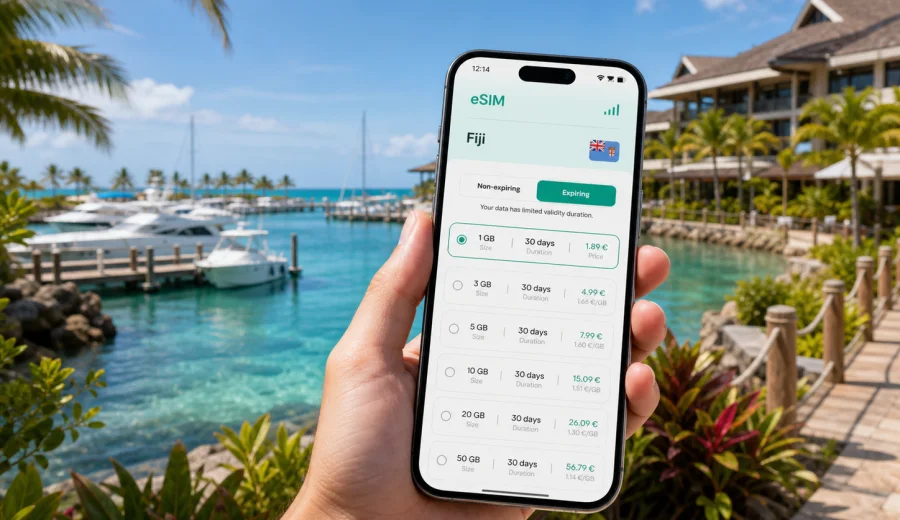
Denarau eSIM: mobile connection and internet for your trip to Fiji
Denarau is a compact but busy travel base. You may arrive from Nadi International Airport, check in at a resort, walk to Port Denarau Marina, confirm a ferry, message a driver, book dinner, or prepare for a day cruise before you have unpacked. Here, mobile internet is less about browsing for fun and more about keeping the small moving parts of the trip under control.
An eSIM can be useful because it lets you prepare a mobile data option before you travel. On a compatible phone, you can install the eSIM profile in advance and use it for internet access when the trip begins, according to the tariff conditions. That reduces dependence on airport Wi-Fi, hotel login pages, and physical SIM-card shopping after a long flight.
This guide focuses on Denarau as a city-style resort and marina hub: arrival, local movement, navigation, transport, hotels, business trips, stopovers, and trips from Denarau to other parts of Fiji.
Why mobile internet matters in Denarau
Denarau is small, but it connects many parts of a Fiji itinerary. Visitors use it after international flights, as a resort base near Nadi, a meeting point for events, and a launch point for the Mamanuca and Yasawa Islands. Many travel decisions happen between fixed locations: a hotel lobby, a marina counter, a restaurant, a tour desk, or a transfer vehicle.
Mobile data helps with practical moments:
- confirming airport pickup after baggage claim;
- opening hotel and ferry confirmations;
- checking a marina departure time;
- using maps between resorts, restaurants, and Port Denarau;
- messaging family, drivers, tour operators, or colleagues;
- managing mobile payments, email, and booking changes;
- sharing a hotspot when Wi-Fi is unavailable or unstable.
Arrival day can involve immigration, luggage, transfer coordination, resort check-in, and the next morning's boat plan. Having your own internet connection helps you move through that chain without searching for the next Wi-Fi password.
Arrival from Nadi International Airport
Most international travellers reach Denarau through Nadi International Airport. The transfer is usually short by Fiji standards, but the first hour still matters. You may need to tell a driver you have landed, find the hotel shuttle, or check if your first stop is the resort, Port Denarau Marina, or nearby Nadi.
Before you leave the airport, mobile data can help you message your transfer contact, reopen reservation details, share your location, check the route toward Denarau, and confirm a restaurant, tour desk, or marina booking for later that day.
If your home SIM has expensive roaming, you can often keep it available for calls or messages while using the eSIM as the mobile data line. Exact settings vary by phone, so check that your primary SIM is not using data roaming by accident.
Denarau as a resort and marina hub
Denarau is not only a beach stop. It is a practical base with resort hotels, Port Denarau Marina, restaurants, shops, spas, golf facilities, and transport links into Nadi. That means a traveller may stay in one place but still depend on live information several times a day.
| Denarau moment | Why internet helps |
|---|---|
| Airport transfer | Driver messages, arrival updates, hotel contact details |
| Resort check-in | Booking emails, app reservations, payment alerts |
| Marina departure | Ferry timing, operator messages, weather checks |
| Resort or business day | Activity planning, email, files, hotspot, restaurant bookings |
| Evening outing | Maps, ride coordination, group messages |
| Day trip return | Updated pickup time and delayed boat information |
Hotel Wi-Fi is useful, but it is tied to buildings. Mobile internet follows you between the lobby, marina, beach path, restaurant, vehicle, and dock. That is the difference that matters in Denarau.
Choosing data for your Denarau itinerary
The best data amount depends on the trip. A two-night stopover before the islands is different from a family resort week or a business retreat. Think about what you will actually do, not only how many days you will stay.
- Light use: maps, chat, email, boarding passes, ride coordination.
- Moderate use: light use plus photo sharing, restaurant searches, social apps, and route checks.
- Heavy use: hotspot, video calls, streaming, cloud backups, or large work files.
For a short Denarau stopover, a smaller package may be enough if you mainly need maps and messages. For a week with day trips, restaurant bookings, and family coordination, a larger allowance is more comfortable. For business travel, choose by work pattern: one video-heavy afternoon can use more data than several quiet resort days.
Check the tariff details before you decide: destination, data volume, validity period, price, activation rules, and whether top-ups are available. Conditions depend on the selected tariff, so match the option to your real Denarau plan.
Transport, maps, and local movement
Denarau is easier to understand than a large city, but transport still has details. You may use a hotel transfer, taxi, resort shuttle, private driver, tour pickup, boat transfer, or a short ride into Nadi. At night, similar resort entrances can be confusing if a driver asks for a precise lobby.
Use mobile data for:
- checking the distance from your resort to Port Denarau Marina;
- confirming whether pickup is at reception, a gate, or a marina counter;
- sending your live location to a driver or travel companion;
- checking routes toward Nadi town, Wailoaloa, the airport, or nearby attractions;
- updating a group chat if plans change.
Keep key details available offline too: hotel name, booking number, transfer contact, marina operator, and screenshots of vouchers. Mobile internet is the live layer on top of that preparation.
Port Denarau Marina: the place where timing matters
Port Denarau Marina is one of the main reasons to have internet ready. Many travellers pass through it for ferries, sailing trips, snorkelling tours, private charters, or island resort transfers. Even with a confirmed booking, the departure day can include luggage tags, check-in windows, weather-dependent updates, and return instructions.
Before a marina departure, check:
1. the check-in time, not only the boat departure time;
2. the operator name and exact meeting point;
3. luggage rules for your transfer or day cruise;
4. any message about weather or schedule changes;
5. the return pickup point if you come back to Denarau the same day.
If you travel with a group, decide who holds the booking and which messaging app everyone will use.
Resort Wi-Fi and eSIM data
Resort Wi-Fi can work well in rooms, restaurants, and lobbies, but it may be weaker by the pool, beach, driveway, marina, or conference area. It may also require repeated logins or limit the number of devices. An eSIM is useful because it covers the spaces between Wi-Fi zones.
Use Wi-Fi for heavier planned tasks such as cloud photo backups, app updates, offline maps, streaming, and large work folders. Use eSIM mobile data for time-sensitive tasks such as transfer messages, maps, booking changes, payment alerts, email, and quick hotspot sessions.
If you want to prepare before landing, Kaspersky eSIM Store can help you choose an eSIM tariff for a trip to Fiji and review mobile internet options for your route. Use Denarau as the practical focus when comparing tariffs: airport arrival, resort movement, marina departures, Nadi trips, and island connections.
Setup checklist before you travel
Do the technical preparation while you still have stable Wi-Fi at home or in your departure airport. It is much easier than trying to solve settings during a transfer.
- Make sure your phone is unlocked for eSIM use and not restricted to one carrier.
- Confirm that your device supports eSIM before choosing a tariff: check your device.
- Save hotel, transfer, ferry, and tour confirmations offline.
- Download offline map areas for Denarau, Nadi, and key meeting points.
- Turn off automatic app updates and cloud backups on mobile data.
- Learn where your phone lets you choose the mobile data line.
- Keep your regular SIM active only for the services you need.
Kaspersky eSIM Store is an app and website where you can choose, arrange, and activate an eSIM with a suitable mobile data tariff for a foreign trip. It is not a mobile network operator; coverage, speed, and availability depend on local network conditions and the selected tariff.
How to install an eSIM for Denarau
The exact process depends on your phone, but the travel workflow is usually simple. Install the eSIM profile when you have stable Wi-Fi, label it clearly, then activate mobile data according to the tariff rules. Check when validity starts before you travel.
Basic steps:
1. Choose Fiji as the destination and select a tariff that fits your Denarau itinerary.
2. Complete the order and open the installation details.
3. Install the eSIM profile on your compatible device.
4. Label it clearly, for example Fiji data or Travel data.
5. Set mobile data to the eSIM when you are ready to use it.
6. Keep your primary SIM settings under control, especially data roaming.
7. Test mobile data after activation and monitor usage during the trip.
For device-specific guidance, use the Android installation guide or the iOS installation guide. Follow the steps carefully and avoid deleting an activated eSIM profile unless you are sure the tariff conditions allow reinstallation.
Denarau scenarios by traveller type
Families often need data for coordination: one person handles bookings, another checks restaurants, and children may use messaging. Business travellers should plan for email, calendar changes, files, and possible hotspot use. A one-night stopover before the islands still needs airport coordination, hotel check-in, marina timing, and weather updates. A resort-focused stay may use fewer maps than a big-city trip but more messaging, photos, and activity bookings.
Managing data without stress
Data-saving checklist:
- Disable cloud photo backup on mobile data.
- Download maps, playlists, and travel documents on Wi-Fi.
- Use lower video quality for calls if the connection is unstable.
- Turn off background refresh for apps you do not need in Fiji.
- Check app-by-app usage after the first day.
- Use resort Wi-Fi for large uploads when it is reliable.
- Keep mobile data for navigation, messages, bookings, and urgent work.
If your tariff supports top-ups, check how they work before you need one. If it does not, choose enough data at the start. Extra allowance can be useful when a boat is delayed, a transfer changes, or a work call runs longer than expected.
Day trips from Denarau
Denarau is often the launch point for island transfers, snorkelling, sailing, cultural visits, markets, gardens, beaches, and Nadi-area outings. Mobile internet is especially useful before departure and after return, even if offshore or rural coverage varies.
Prepare for day trips like this:
1. Save booking confirmations and operator contacts offline.
2. Check the meeting point before leaving the resort.
3. Take screenshots of QR codes or vouchers.
4. Confirm return timing before boarding.
5. Keep enough battery for the ride back.
Do not assume the same connection quality everywhere outside Denarau. Islands, boats, beaches, and rural roads can behave differently from resort areas.
Common mistakes to avoid
Avoid these problems before your Denarau trip:
- choosing a tariff without checking the validity period;
- installing the eSIM on the wrong phone;
- forgetting that many travel eSIM tariffs are data-only;
- leaving your primary SIM's data roaming on accidentally;
- depending only on public Wi-Fi for arrival and transfer coordination;
- letting photo backup or app updates consume mobile data;
- deleting an eSIM profile after activation without checking whether it can be restored;
- choosing too little data for hotspot or video-call use.
An eSIM for mobile internet does not automatically include a local phone number, voice calls, or SMS unless the tariff details say so. For calls and messages, many travellers use internet-based apps while mobile data is active.
FAQ about eSIM in Denarau
Is an eSIM useful if my Denarau resort has Wi-Fi?
Yes. Resort Wi-Fi is useful inside the property, while mobile data helps during airport arrival, marina departures, walks between locations, day trips, and moments when Wi-Fi is unstable.
Should I activate the eSIM before flying to Fiji?
Install it before travel if the instructions allow it, but check when the validity period starts. Many travellers activate mobile data after arrival.
How much data do I need?
Maps and messaging need less data. Photo sharing, hotspot use, work files, video calls, and cloud backups need more. Choose by behaviour, not only by trip length.
Choose mobile internet for your Denarau trip
Denarau rewards simple preparation. Save your hotel and marina details offline, keep a power bank ready, know which line handles mobile data, and check your eSIM settings before you leave the airport. Once you are settled, use Wi-Fi for large downloads and mobile data for the moments when timing matters.
If Denarau is your first stop in Fiji, prepare mobile internet before the journey so you can handle arrival, transfers, resort check-in, marina plans, and day trips with fewer interruptions. You can choose an eSIM tariff for Fiji in Kaspersky eSIM Store and set up a data option that fits your Denarau itinerary.