
Travel connectivity guide
Denpasar eSIM for mobile internet in Bali
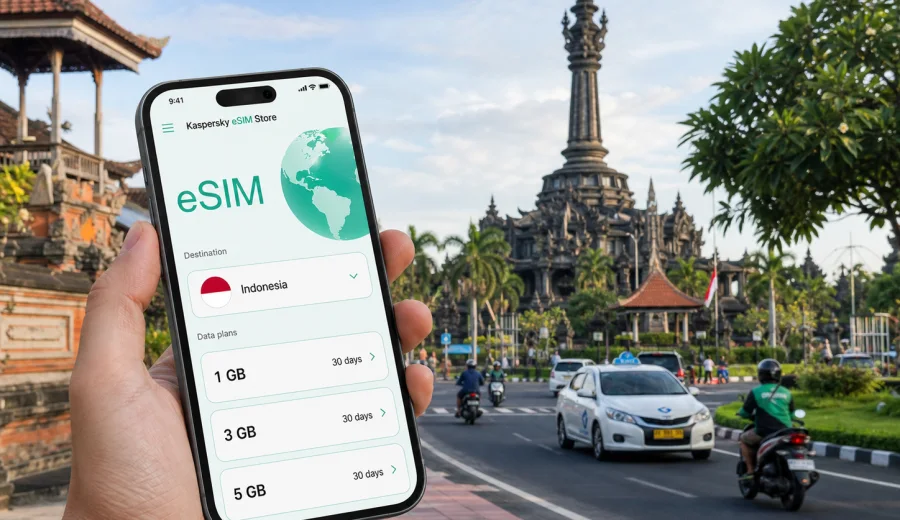
Denpasar eSIM: mobile connection and internet for a practical Bali trip
Denpasar is often the first serious test of your mobile internet setup in Bali. Even if your flight lands at I Gusti Ngurah Rai International Airport near Tuban rather than in the city center, the Denpasar travel scenario starts quickly: a ride to Sanur, a hotel check-in around Renon, a meeting near Gatot Subroto, a hospital appointment, a stop at Ubung Bus Terminal, or a transfer onward to Ubud, Canggu, Nusa Dua, or the east coast. In each case, you need maps, booking apps, messaging, payment confirmations, and transport updates before you have time to look for a local SIM counter.
An eSIM can make that first stage smoother because you prepare a digital SIM profile before departure or shortly after arrival and use mobile data without changing a physical SIM card. For Denpasar, the key is not just having “internet in Bali” in a general sense. It is choosing a data package that matches how you will move through the city: airport transfer, hotel Wi-Fi gaps, scooter navigation, taxi apps, coworking days, short stopovers, and day trips from Denpasar to other parts of Indonesia.
This guide focuses on how to use eSIM for mobile connection and internet during a trip to Denpasar, what to check before buying a tariff, how much data different city scenarios may need, and where Kaspersky eSIM Store fits into the preparation.
Why mobile internet matters in Denpasar
Denpasar is not a single compact tourist zone. It connects administrative offices, residential districts, markets, hospitals, ferry routes through Sanur, bus connections, shopping areas, and roads leading to the airport and beach towns. You may spend only one night in Denpasar, or you may use it as a base for business, medical visits, family travel, or a longer stay in Bali.
Reliable mobile data is useful because many routine travel tasks happen away from hotel Wi-Fi:
- checking your driver’s location after landing;
- confirming the address of a guesthouse or business venue;
- navigating one-way streets and busy intersections;
- receiving bank, airline, and booking notifications;
- translating short messages or menus;
- using ride-hailing and food delivery apps;
- sharing your live location with family or colleagues;
- checking ferry, bus, or domestic flight updates;
- working from a cafe, lobby, or coworking space when fixed Wi-Fi is unstable.
Public Wi-Fi can help in airports, hotels, malls, and cafes, but it is rarely enough for a whole Denpasar itinerary. You may need data while moving between Sanur and Renon, while waiting for transport near a clinic, or while trying to find the correct entrance to a hotel after dark. An eSIM gives you a separate mobile data option, so you are less dependent on asking for passwords or staying inside a building just to finish a booking.
Denpasar travel situations where eSIM helps
| Denpasar situation | Why mobile data helps | What to prepare |
|---|---|---|
| Arrival at Ngurah Rai airport | You may need a driver, hotel map, or family message before leaving the terminal area | Install the eSIM profile in advance, then activate data when appropriate |
| Transfer to Sanur or Renon | Traffic and pickup points can change quickly | Keep maps and messaging available during the ride |
| Business visit in Denpasar | Meetings may be spread across offices, hotels, and government areas | Choose a tariff with enough data for calls, email, maps, and documents |
| Stopover before a ferry or bus | You may need live schedule checks and digital tickets | Keep booking apps and notifications online |
| Medical or family travel | You may need navigation, calls via messengers, and document access | Avoid relying only on public Wi-Fi |
| Day trips from Denpasar | Routes to Ubud, Canggu, Uluwatu, or East Bali can be long | Pick a package for the country or wider route, not only one city moment |
How much data do you need for Denpasar?
There is no single correct amount of data for every traveler. Your choice depends on trip length, hotel Wi-Fi quality, whether you stream video, and how often you use maps or video calls. The safest approach is to separate essential travel use from entertainment use.
For a short Denpasar stopover, light data may be enough if you only need maps, messages, ride-hailing, and booking confirmations. For a longer Bali stay that starts in Denpasar, choose a larger allowance, especially if you expect to use mobile hotspot, cloud documents, or frequent video calls.
| Traveler profile | Typical city use | Data planning note |
|---|---|---|
| One-day arrival or stopover | Maps, taxi app, hotel messages, airline updates | A small package may be enough if you avoid streaming |
| 3-5 day Denpasar and Sanur stay | Navigation, restaurants, messaging, social updates, bookings | Choose enough data for daily outdoor use |
| Business trip | Email, documents, messengers, maps, occasional video calls | Plan extra data for calls and file access |
| Remote worker | Coworking backup, hotspot, calls, cloud tools | Pick a higher allowance and monitor balance |
| Family trip | Several devices, maps, delivery, entertainment for children | Consider who actually needs mobile data on their own device |
What to check before choosing an eSIM for Denpasar
Before you arrange an eSIM tariff, check the practical details that affect whether the setup will work smoothly.
- Your phone or tablet must support eSIM.
- The device should not be locked to one mobile operator.
- The tariff should cover Indonesia, because Denpasar is in Bali, Indonesia.
- The data allowance should match your trip length and expected usage.
- The validity period should cover arrival day, city stay, and onward travel.
- Check when the tariff becomes active and when validity starts.
- Understand whether calls and SMS are included; many travel eSIM data packages are for mobile internet only unless stated otherwise.
- Keep access to Wi-Fi during installation if the eSIM profile is not installed before departure.
If you are unsure whether your device can use eSIM, check your device before arranging a tariff. Compatibility is especially important for travelers using older phones, dual-SIM devices bought in different regions, or devices issued by an employer.
Denpasar arrival: the first hour online
The first hour after landing often decides whether your mobile connection feels organized or stressful. You may have baggage, immigration, a driver waiting outside, and a hotel asking for arrival time. If you land late in the evening, the need for working maps and messages becomes even more obvious.
A practical arrival flow looks like this:
1. Install the eSIM profile before the trip while you have stable Wi-Fi.
2. Keep your primary SIM active if you need bank confirmations or calls.
3. After landing, switch mobile data to the eSIM profile when the tariff conditions allow it.
4. Turn on data roaming for the eSIM profile if the tariff instructions require it.
5. Open maps, messaging, and booking apps before leaving the terminal.
6. Confirm your pickup point and hotel address.
7. Monitor data use during the first day so you understand your normal pace.
Do not wait until you are already in a moving car to solve installation. It is easier to install, label, and test the eSIM profile before the trip or while connected to stable Wi-Fi. After that, you can use it as a dedicated mobile data line during the Denpasar part of your journey.
Moving around Denpasar with mobile data
Denpasar traffic can make route planning more important than distance. A short ride on the map may take longer at school pickup time, during religious ceremonies, around markets, or near main roads connecting to Sanur, Kuta, and Gianyar. Mobile data helps you adapt instead of relying on a screenshot from the morning.
Common city movement tasks include:
- checking whether a driver is approaching the correct entrance;
- comparing routes to Sanur, Renon, Ubung, or Sesetan;
- finding parking or pickup points near malls and markets;
- translating short location notes for a driver;
- sharing your live location with a hotel or colleague;
- checking restaurant opening hours and reservation messages;
- keeping a map active during scooter or taxi rides.
For most travelers, maps are one of the best reasons to prepare eSIM before Denpasar. Offline maps are helpful, but they cannot always show live traffic, changed pickup points, or the latest route estimates. With mobile internet, you can keep navigation current while still using hotel Wi-Fi for heavier tasks.
Choosing an eSIM tariff for Denpasar and Indonesia
Because Denpasar is a city in Indonesia, the country tariff is the relevant starting point for most trips. This is important if your itinerary includes the airport, Denpasar, Sanur, Ubud, Canggu, Nusa Dua, or a domestic connection to another Indonesian island. A city article should stay focused on Denpasar, but your data package must still match the country where the city is located.
Kaspersky eSIM Store is an app and website where you can choose, arrange, and activate an eSIM with a suitable mobile internet tariff for an international trip. For Denpasar, you can prepare an eSIM tariff for your trip to Indonesia and compare the data amount, validity period, destination, and price before you travel.
When choosing, use this simple decision path:
1. Set the destination as Indonesia for a Denpasar trip.
2. Match validity to your whole stay, including arrival and departure days.
3. Estimate data for maps, messaging, work, and travel apps.
4. Choose a larger allowance if you expect hotspot use or video calls.
5. Read the tariff details before payment.
6. Install the eSIM on the device you will actually carry in Denpasar.
If Denpasar is only the first stop before a wider Bali route, do not choose based only on the first night. Include airport transfer, city errands, day trips, and the return journey in your data estimate. It is usually better to plan for the route you will really take than to treat each city moment separately.
Installation before departure or after arrival
You can usually install an eSIM profile before the trip or after arrival, but the better choice depends on your timing and access to Wi-Fi. Installing before departure gives you more control. You can read the instructions calmly, label the eSIM profile, keep your primary SIM for calls or bank messages, and avoid dealing with setup in a busy airport area.
The basic installation flow is:
1. Check that your device supports eSIM and is not operator-locked.
2. Choose the destination and tariff.
3. Complete the purchase flow for the selected tariff.
4. Open the installation instructions or QR code.
5. Add the eSIM profile to your phone.
6. Set the eSIM as the mobile data line when you are ready to use it.
7. Follow any tariff-specific instructions about data roaming for the eSIM profile.
For device-specific setup, use the Android installation guide or the iOS installation guide. The exact screens can vary by device model and operating system version, so follow the instructions shown for your phone.
Quick preparation checklist
Before you leave for Denpasar, run through this checklist:
- Confirm that your city and route are in Indonesia.
- Check that your phone supports eSIM.
- Make sure the phone is not locked to one operator.
- Choose a data amount for your real usage, not only for maps.
- Check the validity period and activation rules.
- Install the eSIM while you have stable Wi-Fi.
- Save installation instructions in case you need them again.
- Download offline maps as a backup.
- Keep important hotel and booking details accessible offline.
- Monitor data use during the first day.
This preparation takes only a short time, but it can save you from solving mobile internet problems during a busy arrival or transfer.
FAQ: eSIM for Denpasar
Is Denpasar covered by an Indonesia eSIM tariff?
For a Denpasar trip, choose a tariff that includes Indonesia. Denpasar is the capital city of Bali province, and most travel routes around the city remain within Indonesia. Always read the tariff destination and conditions before arranging it.
Does an eSIM give me a local phone number in Denpasar?
Many travel eSIM tariffs are designed for mobile internet and do not include a standard phone number, voice calls, or SMS unless this is stated in the specific tariff conditions. You can usually use internet-based messaging and calling apps through mobile data.
Should I install the eSIM before flying to Bali?
Installing before departure is usually more convenient because you can use stable Wi-Fi and avoid setup pressure after landing. Check the activation rules for your selected tariff so you know when data validity starts.
Choose mobile internet for your Denpasar trip
Denpasar rewards practical preparation. The city is busy, spread out, and closely connected to the rest of Bali, so mobile internet is useful from the airport transfer to the final ride back. With eSIM, you can prepare a digital SIM profile, choose a data package for Indonesia, and keep maps, messages, bookings, and travel apps available while moving through the city.
Kaspersky eSIM Store helps you choose, arrange, and activate an eSIM with a suitable tariff for mobile internet during an international trip. Before you go, check device compatibility, review the tariff details, and choose an eSIM option for your Denpasar and Indonesia itinerary.