Travel connectivity guide
Denver eSIM: Mobile Internet for Your City Trip
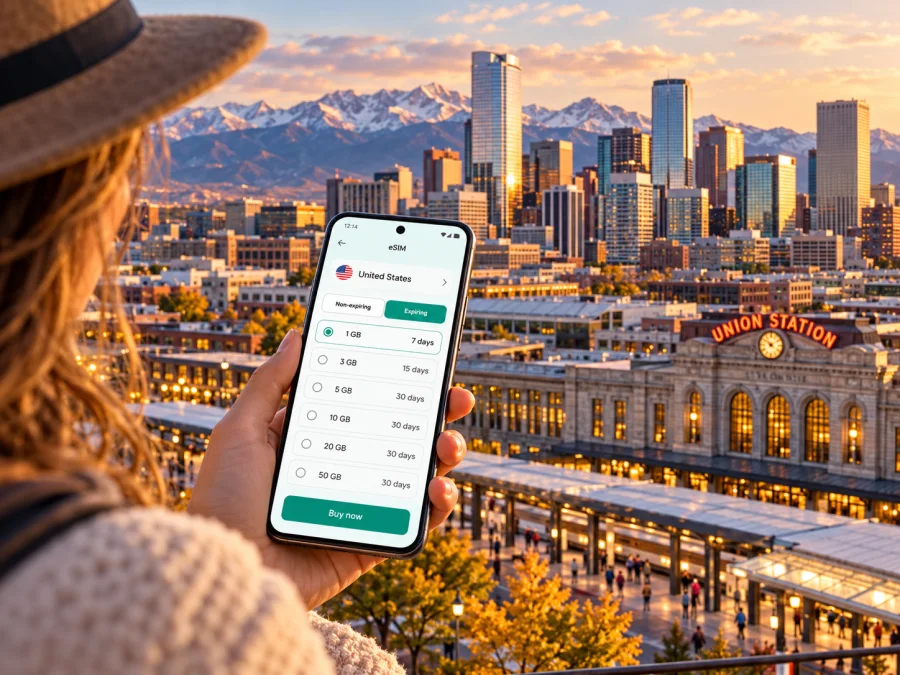
Denver eSIM: mobile connection and internet for your city trip
Denver is a city where a reliable map can make the first day much easier. You may land at Denver International Airport (DEN), ride the A Line toward Union Station, check in across town, and then move between downtown, museums, parks, and meeting places. An eSIM can give your phone a mobile data connection for maps, transit updates, messages, and bookings without replacing the physical SIM already in your phone.
The right setup depends on your device, itinerary, and the terms of the plan you choose. This guide focuses on Denver itself: arrival, getting around, picking a place to stay, planning a short visit, and deciding how much mobile internet you are likely to use. Coverage and service quality depend on the local network, your exact location, your phone, and the plan conditions; no mobile connection should be assumed to work identically in every building or neighborhood.
What an eSIM can do during a Denver visit
An eSIM is a digital SIM profile installed on a compatible device. A travel data plan can let you use online maps, rideshare apps, email, messaging, restaurant information, and transit tools while you are in the United States. You can keep your home SIM installed if your phone supports using both lines, then choose which line handles mobile data. Your home operator may still charge for calls, messages, or roaming on its line, so check its terms before departure.
A data-only travel eSIM should not be treated as a local phone number. Voice calls and SMS are not included unless the particular plan explicitly says that they are. Internet calling and messaging apps may work over data, but they still depend on the app, the recipient, and a functioning connection. If a hotel, employer, airline, or booking needs to reach you by ordinary phone call, keep a suitable voice option available.
In brief: choose a plan for the United States, check what its data allowance and validity period cover, install it on an eSIM-compatible phone, and use it for the online tasks you need in Denver. A city name in a guide is not a separate network area or a guarantee of coverage at a particular address.
Before you fly: prepare the phone and the plan
A little preparation saves time when you arrive tired or need to find a transfer. Check these points before you leave home:
- Confirm eSIM support. Support varies by device, model, sales region, and carrier lock status. A phone with the same marketing name can have different hardware or SIM capabilities in different markets. Check your exact model and regional variant in the device settings or manufacturer documentation, and make sure it is not locked in a way that prevents adding another provider’s profile. Check whether your device is compatible.
- Check the plan destination. Denver is in Colorado, United States. Select a United States plan that covers your trip, rather than assuming a plan for a nearby state or region includes it.
- Read the plan details. Compare data allowance, validity, supported network access if disclosed, activation rules, hotspot terms, and any restrictions. Confirm when validity begins: purchase, installation, first connection, or another event stated in the terms.
- Make sure you can install it. Follow the provider’s installation steps and keep access to the email, app, or account that contains the activation details. A QR code may need to be displayed on another screen or handled through an in-app flow; exact steps differ by device and provider.
- Save essentials offline. Download your hotel address, the route from the airport, reservation numbers, and a map area while you have a dependable connection. Offline copies are a useful backup if setup takes longer than expected.
- Keep account access. Store passwords and any one-time sign-in method you may need somewhere accessible. Do not rely on a text arriving to a line that will be switched off or unavailable.
If you use a dual-SIM phone, label the lines clearly before travel. For example, keep your home line available for calls if appropriate, and select the travel eSIM for cellular data after it has connected. Avoid deleting an eSIM profile just to troubleshoot unless the plan instructions say it can be installed again; some profiles cannot be transferred or reissued automatically.
Arriving at Denver International Airport
DEN is a large airport well away from central Denver. Plan the transfer before landing, especially if you have a late arrival, several bags, or a tight onward connection. Airport signage, your airline’s app, a map, and ground-transport updates may all be useful, but their information can change with construction, weather, or service interruptions.
RTD’s A Line commuter rail runs between Denver Airport Station and Denver Union Station in downtown Denver. The airport-to-downtown journey is about 37 minutes under normal service conditions, and the route includes intermediate stations. Union Station is a useful arrival point for downtown lodging and onward local travel, but it will not be the closest stop for every hotel or appointment. Check the current RTD schedule, station information, and fare rules on the day you travel; do not plan around an old timetable or assume trains run at the same frequency at all hours.
The airport rail station is reached through the airport’s transit center. Once you are there, use the posted signs and current directions to locate the platform. If the train is not suitable for your arrival time or destination, compare the airport’s current options such as bus, taxi, rideshare, rental car, or a prearranged pickup. The best choice depends on your group size, luggage, final address, time of day, and live traffic.
A simple airport-to-hotel sequence
- Before leaving the terminal, confirm your hotel’s full street address and whether it has a specific entrance or pickup point.
- Check that your phone has the correct date and time and that the travel eSIM is selected for data if it is ready to use.
- Open the current A Line information or another live route source. Confirm the direction, next departure, station, and fare before boarding.
- At Union Station or another stop, check the final leg to your accommodation. A short walk on a map can feel different with luggage, snow, heat, or an unfamiliar street layout.
- If data is unavailable, use your offline address and saved route, airport Wi-Fi where available, or the information desk and posted signage. Avoid entering a vehicle until you have confirmed the driver and pickup details through the relevant service.
A city eSIM is useful here because you can look up a platform change, share your arrival status, or confirm a pickup without searching for a local SIM shop. It remains a data connection whose availability depends on plan and network conditions; keep the offline backup even when setup appears successful.
Choosing a United States data plan for Denver
Estimate the way you will use your phone instead of choosing solely by the largest data allowance. A traveler using maps and occasional messages has a different need from someone who joins video calls, uploads large files, or streams on a phone during a work trip. Wi-Fi at your hotel or venue may reduce mobile data use, but it should not be your only plan for navigation between places.
Around the middle of trip planning, it can help to review the current United States eSIM plan options and compare the displayed terms with your itinerary. The destination page is for the country; it does not imply a Denver-only plan or guarantee a particular local network experience. Availability, terms, and plan details can change, so rely on the information shown when you make your selection.
| Your Denver use | What to consider when selecting a plan |
|---|---|
| A short city break | Maps, messaging, tickets, and occasional searches; estimate days of use and keep downloads on Wi-Fi where practical. |
| A work visit | Video meetings, file transfers, and tethering can use much more data. Check hotspot terms and whether your workplace or hotel has dependable Wi-Fi. |
| A road trip starting in Denver | Check that the plan covers the full United States route, not just the city itinerary, and consider that service can vary outside urban areas. |
| A brief airport connection | You may need only essential messaging and directions, but allow time to install and activate the eSIM before relying on it. |
A useful estimate starts with your normal daily habits. Navigation and text-based messaging are generally lighter activities than video streaming or long video calls, but actual use varies with app settings, image quality, background syncing, and how often you upload photos. If you are unsure, turn off automatic photo backup on cellular data, download entertainment before travel, and monitor the remaining allowance in the plan or device settings.
Questions to answer before paying
- Does the plan explicitly cover the United States for the dates you need?
- How much data is included, and is it a fixed allowance or another type of plan?
- When does validity begin, and how long does it last?
- Does the plan support hotspot use if you need to connect a laptop or tablet?
- Are voice calls and SMS included, or is it a data-only option?
- Can the profile be installed before departure, and when should it be activated?
- What happens if the phone cannot connect, the device is replaced, or the plan is not used?
These details are plan-specific. Do not infer an included feature from the word “eSIM” alone; read the conditions on the plan page and the installation instructions before completing your purchase.
Getting around Denver with mobile internet
Denver’s visitor routes often combine walking, rail, bus, and short rides. Union Station is a central transit hub, while the 16th Street area links key parts of downtown and offers a pedestrian-oriented route through the city center. RTD service and street conditions can change, so use current route information for each journey rather than treating a saved itinerary as live guidance.
The city’s districts are spread out. LoDo and Union Station are convenient for rail connections, downtown restaurants, and nearby attractions. RiNo, northeast of the center, is known for art, food, and former industrial buildings. Capitol Hill and the Golden Triangle put visitors near cultural institutions and parks. Cherry Creek is a separate shopping and dining district, and City Park offers green space and museums farther east. Those descriptions are orientation, not a promise that each place is walkable from the others; check distances and transit legs before booking a hotel.
| Area or landmark | How a phone connection helps |
|---|---|
| Union Station and LoDo | Confirm a train or bus connection, find a hotel entrance, check opening times, and coordinate a meeting point. |
| RiNo and Five Points | Navigate between murals, restaurants, and venues; check the route back after an evening out. |
| Civic Center and the Golden Triangle | Find museum entrances, verify hours, and plan a return trip from a visit or event. |
| City Park and nearby museums | Check a bus or rideshare route and keep directions available for the return journey. |
| Cherry Creek | Find a specific shop or restaurant and compare the trip back to your accommodation. |
For a day with several stops, save the names and addresses of each destination. A map pin can be more reliable than searching only by a business name, since businesses may have similar names or multiple locations. If you are walking, review the route before setting off and follow local pedestrian signals. Use mobile data for updates, but keep enough battery for the return trip; a compact power bank is useful on a full sightseeing day.
Installation and activation: a practical order
If your phone and plan are eligible, installing before travel can reduce the number of tasks after landing. Follow the exact provider instructions, because labels and menus differ between iOS and Android versions and the activation flow may depend on the plan. Kaspersky eSIM Store is an app and website that helps you select, arrange, and activate an eSIM with a suitable plan for mobile internet on an international trip.
A general preparation sequence is:
- Connect to a dependable Wi-Fi network and make sure the phone has enough battery.
- Open the order or app instructions and identify whether you should install now or wait until arrival. Do not guess when plan validity starts.
- Add the eSIM profile using the supplied in-app flow or QR code. Keep the instructions available while the phone switches settings.
- Label the new line clearly, such as “Travel data,” so you can distinguish it from your home SIM.
- Before departure, review the line’s data and roaming settings against the plan instructions. Enable only the settings the provider requires.
- After arriving, select the travel eSIM for cellular data if the instructions say it is ready to use. Keep your home line’s data roaming setting under control to avoid unexpected charges.
- Test with a simple page or message, then check the phone’s status and plan details if it does not connect.
For device-specific steps, follow the Android eSIM installation guide or the iPhone eSIM installation guide. Menu names and options vary by OS version and model, so use the instructions displayed for your device and plan.
If data does not work, check the basics in order: confirm the eSIM line is enabled; check that it is selected for mobile data; verify the plan destination and validity; review any required data-roaming setting; restart the phone if the instructions recommend it; and confirm that airplane mode is off. If the issue remains, use the support channel listed in your order or app. Avoid deleting the profile or resetting network settings unless support or the plan instructions advise it.
Quick checklist for the day you arrive
- [ ] Phone is charged, unlocked as needed, and confirmed to support eSIM.
- [ ] United States plan terms, validity, data amount, and any hotspot conditions are understood.
- [ ] eSIM installation and activation timing follow the instructions for the selected plan.
- [ ] Hotel address, booking details, and first route are saved offline.
- [ ] Current A Line or alternative airport transfer information has been checked.
- [ ] Travel eSIM is selected for data only when appropriate; home-line roaming settings are understood.
- [ ] A backup method is available if mobile data is delayed or unavailable.
Frequently asked questions
Is Denver an airport or a city?
Denver is a city in Colorado and the capital of the state. Denver International Airport, code DEN, is the airport serving the area and sits far from central Denver. It is not a terminal in the downtown district, so plan a separate ground-transport leg.
Is there a train from DEN to downtown Denver?
Yes. RTD’s A Line connects Denver Airport Station with Denver Union Station. The trip is about 37 minutes in normal conditions, but schedules and service can change. Check the current timetable and any notices before travel.
Will one eSIM work everywhere in Denver?
No plan should be assumed to work everywhere. Connection depends on the plan’s network arrangements, signal conditions, your device, and the location, including inside buildings. Read the plan’s coverage information and keep an offline backup for essential directions.
Does a travel eSIM include a phone number?
Not necessarily. Many travel eSIM options are intended for mobile data. Check the exact plan conditions for voice calls and SMS; use your home line or an internet calling app only after considering availability and charges.
Can I install the eSIM before I arrive?
Often an eSIM profile can be installed before travel, but the correct timing depends on the plan’s activation and validity rules. Read the instructions carefully so that you know whether installation or first network connection starts the validity period.
What should I do if my phone has no data after landing?
Confirm that the eSIM is enabled and selected for mobile data, review the plan’s activation and data-roaming instructions, and restart only if advised. Use airport Wi-Fi or offline directions as a temporary backup, then contact the support channel associated with the order if the connection still fails.
Prepare your Denver connection
Before departure, check device compatibility, compare the United States plan’s data and validity with your itinerary, and save your first route from DEN to your accommodation. Kaspersky eSIM Store provides an app and website where you can choose, arrange, and activate an eSIM plan for mobile internet during an international trip. When you are ready, review the United States options for your Denver visit and follow the terms shown for the plan you select.


