Travel connectivity guide
Dhigurah eSIM: Mobile Internet for Island Trips
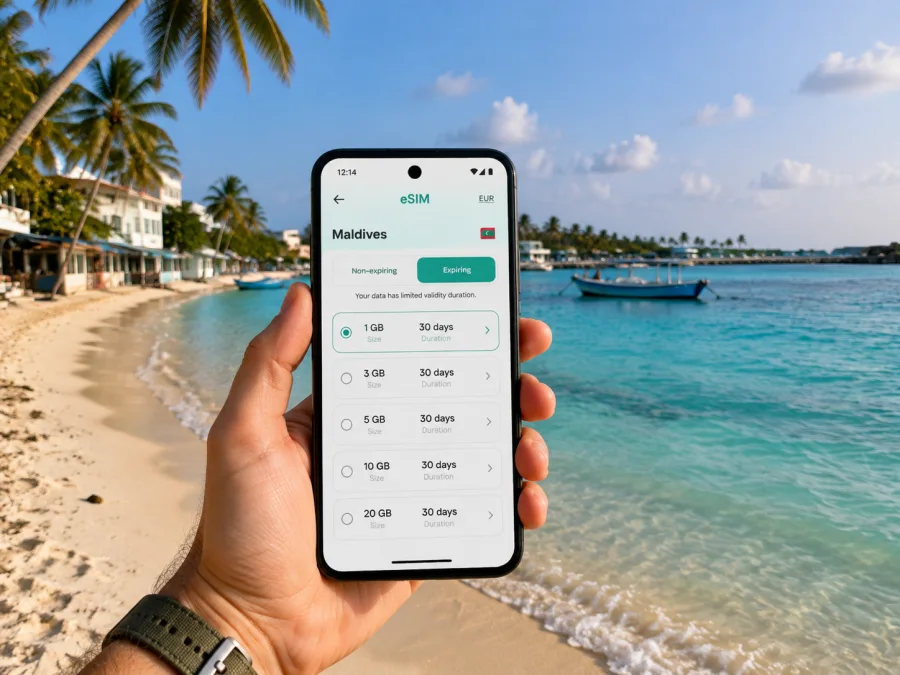
Dhigurah eSIM: mobile connection and internet for your island trip
Dhigurah is a local island in the Maldives’ South Ari Atoll, known for its long, narrow shape, guesthouses, sandy shoreline and boat trips on the surrounding reef. A visit here often combines a transfer from the capital area, a stay in a small hotel, walks between the harbour and beach, and excursions that depend on the sea and weather. Mobile internet can make the journey easier: confirm a pickup, open a map, message your host or check a booking without looking for a physical SIM card after landing.
An eSIM is a digital SIM card built into a compatible phone. For a trip to Dhigurah, it can be prepared before departure and used for mobile data in the Maldives, while your regular SIM remains available for other functions subject to your home operator’s settings and charges.
Why mobile internet matters on Dhigurah
Dhigurah is not a city with a dense urban transport network. It is a compact island community where the useful details are often very local: which side of the harbour your accommodation uses, when a boat leaves, where a meeting point is, or whether an excursion has moved because of conditions at sea. A working data connection helps you handle these small but important decisions as they arise.
The first hours after arrival
Most international visitors enter the Maldives through Velana International Airport near Malé and continue to their destination by a pre-arranged transfer. For Dhigurah, the onward journey may involve a direct speedboat, a domestic flight to a nearby airport followed by a boat, or another option selected by the accommodation or transfer company. Routes and departure times can change, so keep the details from your guesthouse accessible and confirm the meeting point before leaving the airport.
With mobile internet available, you can:
- send your arrival details to the guesthouse;
- read the latest transfer message instead of relying on a printed confirmation;
- contact the driver, boat representative or accommodation if your flight is delayed;
- use a map while moving between the airport, harbour and accommodation;
- check essential travel information and message people at home.
Moving around the island
Dhigurah’s main inhabited area, harbour and accommodation streets are generally explored on foot, while bicycles or an arranged vehicle may be useful when luggage, heat or rain makes walking less convenient. Do not assume that a map pin alone explains the route. Ask your accommodation for its preferred arrival point and follow local instructions, especially after dark or when carrying bags.
Data helps you check a walking route, share your location and message reception when you are ready for pickup. It also gives you an alternative to repeatedly opening public Wi-Fi networks.
Beaches, excursions and changing plans
Dhigurah is a base for snorkelling, diving and marine-life excursions in the wider South Ari Atoll area. Boat operators set meeting times and routes according to the excursion, season and conditions. A phone with mobile data lets you receive a last-minute meeting-point update, view a weather notice, share a photo with family or find your way back to the village after a beach walk.
Use the connection as a planning tool, not a substitute for local guidance. Keep accommodation and excursion contacts in your messages, and save key details for offline reading if the signal weakens on a boat.
Dhigurah scenarios where an eSIM is useful
The right amount of data depends on what you plan to do. Messages and maps create a different pattern from remote work, video calls or repeated uploads.
| Travel situation | Typical data tasks | What to plan for |
|---|---|---|
| Short stop on the island | Arrival messages, maps, bookings and occasional browsing | A modest data allowance may be enough if you avoid streaming |
| Diving or snorkelling schedule | Meeting-point updates, operator messages and digital confirmations | Leave room for changes to the day’s plan |
| Remote work stay | Email, cloud documents, calls and file transfers | Estimate work usage separately from holiday browsing |
| Multi-stop Maldives route | Transfer messages, maps and bookings across several islands | Check whether the plan’s country or regional coverage fits the full route |
These are planning categories, not promised package sizes. Before payment, compare the tariff’s traffic allowance, validity, activation conditions and supported destination. Video calls and photo uploads can use much more data than messages and map searches.
Choosing an eSIM tariff for a trip to Dhigurah
Dhigurah is in the Maldives, so start with a tariff whose destination includes the Maldives. If your itinerary also includes Malé, another Maldivian island or a stop in a neighbouring country, read the coverage description carefully rather than assuming that a city or island name automatically means the entire route is included.
Consider four questions:
- How many days will you need mobile data, including transfer days?
- Will you mainly send messages and use maps, or will you work, stream and upload media?
- Does the tariff cover only the Maldives or a wider region that matches your itinerary?
- When does the validity period begin, and what conditions apply to activation and use?
Match the allowance to your routine and turn off automatic updates or cloud backup if needed. A prepaid tariff shows its destination, traffic, validity and price before selection; compare those conditions with roaming or a local SIM rather than assuming one option is always cheaper. If installation before departure is permitted, prepare the profile at home; otherwise keep booking messages available offline and install with a reliable connection after arrival.
At the planning stage, you can choose an eSIM tariff for a trip to the Maldives and review the conditions for the destination, traffic and validity that suit your Dhigurah itinerary. Kaspersky eSIM Store is an app and website that helps you select, arrange and activate an eSIM with a suitable tariff for mobile internet while travelling abroad. The underlying network access and tariff conditions depend on the selected offer and local network arrangements.
Prepare your phone before leaving for Dhigurah
Preparation is easiest at home, with stable internet and time to read the conditions. Keep your regular SIM if you need its number, but check home-operator roaming charges. The travel eSIM is for mobile internet and does not automatically include a separate number, ordinary calls or SMS unless the tariff says so. Save the QR code, tariff destination and validity, guesthouse contact, transfer instructions and essential bookings offline.
Check device compatibility and operator lock
Your phone must support eSIM, and it must not be restricted to one operator. Support can vary by model, region of sale and software configuration. Before buying, open the mobile-network settings and look for an option such as adding an eSIM or mobile plan. If you cannot find it, consult the device documentation or your operator. You can also check whether your device supports eSIM before completing the purchase.
Compatibility is separate from network availability: a phone may support eSIM but still have an operator lock or configuration problem. Update the system, charge the phone and do not delete your existing SIM profile during setup.
How to install and activate an eSIM
Menu names differ by manufacturer, but the process is similar. Start with stable internet and the QR code or profile details. Follow the matching iOS eSIM installation instructions or Android eSIM installation instructions.
Step 1: Keep the required information ready
Open the purchase confirmation or profile and locate the QR code or details. If it is on the same phone, use another screen or a manual option if available. Do not begin on a moving boat or with a nearly empty battery.
Step 2: Add the mobile plan
Open mobile-network settings, choose adding an eSIM or mobile plan, then scan the QR code or enter details manually. Give the profile a clear label such as “Maldives travel”.
Step 3: Choose the data line
When asked which line should handle mobile data, select the travel eSIM. Keep your home line for calls or messages only when you understand roaming charges, and turn off automatic data switching if needed.
Step 4: Configure data roaming if required
If the tariff requires data roaming for the eSIM, enable it only for the travel line. Do not enable it on your home line without checking its terms.
Step 5: Activate at the right moment
Check when validity starts and whether the tariff allows installation in advance. Follow its activation window and traffic rules before turning on mobile data.
Step 6: Test the connection
After arrival, disable Wi-Fi briefly and load a simple webpage or send a message. If needed, wait a few minutes, confirm the data line and roaming settings, restart the phone, then contact support with the device and tariff details.
A practical connection checklist for Dhigurah
Before the flight
- Check eSIM support and the absence of an operator lock.
- Read the Maldives tariff’s destination, validity, traffic and activation conditions.
- Install the profile while you have stable internet, if the tariff permits it.
- Save the QR code and confirmation details securely.
- Save the guesthouse transfer instructions.
- Review your home line’s roaming settings.
At the airport or transfer point
- Confirm the meeting point and the latest transfer message.
- Keep the phone charged and the travel eSIM identifiable.
- Use mobile data for messages and maps if public Wi-Fi is unavailable or inconvenient.
- Avoid changing a working configuration in transit.
On Dhigurah
- Select the travel eSIM for mobile data.
- Test a message and a map before setting out from the accommodation.
- Ask the guesthouse for excursion and transfer meeting points.
- Save important contacts and booking information for offline access.
- Monitor traffic if you upload many photos or use video calls.
Hotels, guesthouses and remote work in Dhigurah
Accommodation on a local island can be the centre of your logistics. Your guesthouse may coordinate the airport transfer, tell you where to meet a boat, confirm excursion times and answer questions about local routes. Keep the reception contact easy to find, and send your arrival information as soon as you know it.
For a work trip or longer stay, ask about Wi-Fi, quiet working space and backup options before relying on video calls. Use the eSIM as a separate mobile-data route where the tariff and local network make that possible, but do not assume messaging performance will match a long video meeting. Download documents in advance and leave flexibility around transfers and weather.
A simple accommodation routine:
- Save the guesthouse contact and exact property name.
- Confirm harbour pickup and excursion meeting points.
- Ask what to do if the boat schedule changes.
- Keep a local map and confirmations offline.
These steps suit leisure, diving, photography or a short assignment. If Dhigurah is one stop in a longer Maldives route, confirm every destination and the final transfer day. Do not rely on an assumed ferry or speedboat timetable; services can change with weather. Ask the accommodation for the current arrangement and leave a margin before an international departure. The eSIM does not book transport; it keeps communication available between Dhigurah and the next stop.
Common questions about an eSIM in Dhigurah
Is an eSIM useful if I am staying only a few days?
Yes. It can help with arrival messages, maps, booking confirmations and excursion updates. Choose validity and traffic for the actual stay, including transfer days.
Can I install the eSIM before travelling?
Often, but activation and the start of validity depend on the selected tariff. Read its conditions and do not switch on the travel line before you intend to use it.
Will an eSIM give me a Maldivian phone number?
Not usually. In this context it is intended for mobile internet and does not include a separate number, voice calls or SMS unless the tariff expressly includes them. Use internet messaging apps when appropriate.
Why is the eSIM installed but not connecting?
Check that the profile is on and selected for mobile data, then review data roaming for the travel line, network selection and signal conditions. Restart the phone and allow a few minutes. If the issue remains, contact support with the device model and tariff details.
What if the boat transfer changes?
Contact the guesthouse or transfer provider and follow its current instructions. Keep your arrival details ready.
A calm way to plan your Dhigurah connection
Decide what you need the phone to do at each stage: confirm the airport transfer, navigate the island, message the guesthouse, coordinate a boat excursion and stay reachable between stops. Kaspersky eSIM Store helps you choose, arrange and activate an eSIM with a suitable tariff for mobile internet during an overseas journey. Check compatibility, read the conditions, install with stable internet and select the correct data line after arrival. Contact support with the device and tariff details if questions arise.
Plan your mobile internet for Dhigurah
When your route and device are ready, choose an eSIM tariff for your Maldives trip. Prepare the profile before the flight where permitted, keep the transfer details available, and arrive in Dhigurah with a clear plan for mobile data, navigation and communication.


