
Travel connectivity guide
Dickenson Bay eSIM: Mobile Internet Guide
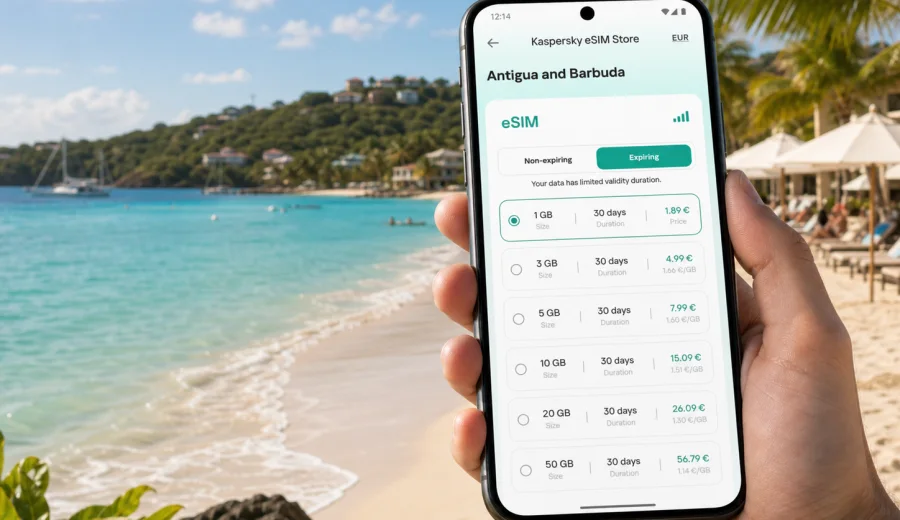
Dickenson Bay eSIM: mobile connection and internet for your Antigua trip
Dickenson Bay is one of the easiest places in Antigua to enjoy a beach-based trip: hotels sit close to the sand, taxis are used often, restaurants and beach bars are spread along the bay, and many visitors arrive with plans that include St. John's, Runaway Bay, English Harbour, Shirley Heights, or a day on the water. In that kind of trip, mobile internet is not just for posting photos. It helps you confirm airport transfers, message your hotel, open maps, check restaurant hours, manage bookings, and keep family or colleagues updated without depending only on hotel Wi-Fi.
An eSIM can make that first day simpler. Instead of looking for a physical SIM card after landing, you can prepare a digital SIM profile before departure or install it when you have Wi-Fi. Once it is active on a compatible phone, you can use mobile data for everyday travel tasks in Antigua and Barbuda. The key is to choose a tariff that matches your stay: a short beach break, a longer resort holiday, a business trip with calls over messaging apps, or a route that starts in Dickenson Bay and continues around the island.
This guide focuses on Dickenson Bay rather than Antigua in general. It looks at arrival, movement around the bay, hotel and beach routines, day trips, navigation, data planning, setup, and the checks worth doing before you buy an eSIM tariff.
Why mobile internet matters in Dickenson Bay
Dickenson Bay is compact compared with a large city, but it is not a place where every useful service is always within one walkable street. Your hotel may be close to the beach, while your dinner reservation, supermarket stop, tour pickup, marina transfer, or meeting point may be somewhere else. Mobile data gives you a practical layer of control.
Common situations where internet access helps:
- checking the address of your accommodation before the taxi leaves the airport;
- messaging a hotel or villa host if your flight is delayed;
- opening maps for the short route between Dickenson Bay, Runaway Bay, Cedar Grove, and St. John's;
- confirming boat tours, snorkeling trips, sunset cruises, or island excursions;
- using ride, taxi, or transfer messaging where available;
- checking weather updates before a beach or sailing plan;
- joining work calls from a hotel, cafe, lobby, or terrace;
- keeping digital tickets, booking confirmations, and travel documents accessible;
- sharing a live location with people you are meeting.
Public Wi-Fi may be available in hotels, restaurants, or cafes, but it can be inconsistent outside the building or along the beach. A prepaid eSIM tariff helps reduce that dependency. It does not replace every local service, and it does not usually include a local phone number, voice calls, or SMS unless the selected tariff says so. For most travelers, the value is steady access to mobile data for maps, messaging, email, and app-based calls.
Arrival: from the airport to the bay
Most international visitors arrive through V. C. Bird International Airport, then continue by taxi, private transfer, rental car, or hotel-arranged pickup. Dickenson Bay is on the northwest side of Antigua, near St. John's, so the transfer is usually straightforward, but the first hour still involves several small decisions.
Before leaving the airport, you may need to:
1. Tell your driver the exact hotel, villa, or beach-area entrance.
2. Message the accommodation if check-in timing changes.
3. Open a map to understand whether you are going to Dickenson Bay, Runaway Bay, or another nearby area.
4. Check payment details or transfer instructions.
5. Let someone know you have arrived.
If your eSIM is already installed and ready to activate, you can handle these tasks without waiting for hotel Wi-Fi. If you prefer to install after arrival, use a reliable Wi-Fi connection first, then switch mobile data to the eSIM profile when setup is complete. Keep your primary SIM available for calls or SMS if you still need banking codes or messages from home.
Local movement around Dickenson Bay
Dickenson Bay works well for a relaxed beach stay, but visitors often move between several nearby points rather than staying in one exact spot. You might walk along the sand, take a taxi to a restaurant, go into St. John's, arrange a tour pickup, or drive to a viewpoint. Mobile internet helps you keep those transitions smooth.
| Travel moment | Why data helps | Practical tip |
|---|---|---|
| Airport transfer | Confirm hotel name, address, and arrival time | Save the booking offline, but keep messaging available |
| Beach day | Check weather, meet friends, find restaurants | Avoid relying only on a single venue's Wi-Fi |
| Taxi or tour pickup | Share your location and confirm the meeting point | Use clear landmarks, not only a hotel name |
| St. John's visit | Navigate streets, shops, and the cruise area | Download an offline map as a backup |
| Evening plans | Check menus, opening times, and return transport | Keep enough data for maps after dark |
| Remote work | Join calls or send files from the hotel area | Test your connection before the meeting |
For a short stay, a modest data allowance may be enough if you mostly use maps and messaging. For a longer resort trip, remote work, frequent video calls, or heavy social media uploads, choose more data. Video, cloud backups, app updates, and streaming can use a lot of traffic quickly, so turn off automatic downloads if your plan is limited.
Choosing an eSIM tariff for Dickenson Bay
For a city or resort-area trip, the tariff is usually selected by country. Dickenson Bay is in Antigua and Barbuda, so you should choose a tariff that covers Antigua and Barbuda, or a broader regional tariff if your route includes several Caribbean destinations. Check the destination, data allowance, validity period, price, and any activation rules before purchase.
Think through your trip in three layers:
- Length of stay: a long weekend needs a different allowance from a two-week holiday.
- Daily usage: maps and messaging are light; video calls, streaming, and uploads are heavier.
- Route: staying only in Dickenson Bay is different from adding Barbuda, another island, or a cruise route.
For many travelers, the most useful approach is to estimate your normal mobile data use and then add a buffer. Beach trips often look light on paper, but data use rises when you share photos, look up dinner options, coordinate tours, or work from the hotel for a few hours. If your phone supports data tracking by SIM, check your current usage before departure and use it as a realistic guide.
Preparing before your flight
Preparation is the easiest way to avoid arrival stress. Do these checks while you still have stable internet at home:
- confirm that your phone supports eSIM;
- check that it is not locked to one mobile operator;
- update your operating system if needed;
- make sure you know which SIM profile will handle mobile data;
- save your hotel address and booking confirmation offline;
- download an offline map of Antigua as a backup;
- keep your primary SIM active if you need calls or SMS from your home number;
- review when your selected eSIM tariff starts counting validity and data use.
Before choosing a tariff, check your device to confirm eSIM support. Compatibility depends on the exact phone model, region, and carrier lock status. If a device is locked or does not support eSIM, installing a digital SIM profile may not be possible.
How to install an eSIM for the trip
The setup process is usually simple, but it is worth doing it calmly. After you choose a suitable tariff, the eSIM profile appears in your account or app, and you follow the installation flow for your device. You may install before travel while connected to Wi-Fi, then activate mobile data for the eSIM when you are ready to use it.
Basic sequence:
1. Choose Antigua and Barbuda as the destination, or select a regional option if your route needs it.
2. Review the data volume, validity period, and tariff conditions.
3. Install the eSIM on a compatible phone.
4. Keep your primary SIM for calls or SMS if you need it.
5. When you arrive or when the tariff conditions allow, set mobile data to the eSIM profile.
6. Enable data roaming for the eSIM profile if the instructions for your device or tariff require it.
7. Test maps, messaging, and browsing before leaving a reliable Wi-Fi area.
For device-specific setup, use the Android installation guide or the iOS installation guide. Do not delete the eSIM profile after installation unless you are certain you no longer need it; in many cases an eSIM profile cannot simply be moved to another device after activation.
When to buy and activate
There are two practical options for a Dickenson Bay trip. You can prepare the eSIM before departure, or you can install it after arrival when connected to Wi-Fi. Preparing before departure is usually more comfortable, especially if you land late, travel with children, or want to go straight from the airport to the hotel. Installing after arrival can also work if you have reliable airport, hotel, or transfer Wi-Fi and enough time to complete the steps.
The important part is not only when you buy the tariff, but when the validity period starts. Some tariffs begin after installation, some after connection to a supported network, and some may have other conditions. Read the selected tariff details before you activate it. If your trip is short, starting a 7-day or 30-day validity period too early can waste part of the allowance.
When you are ready to compare options, you can choose an eSIM tariff for Antigua and Barbuda through Kaspersky eSIM Store and review the available data volumes and validity periods for your route.
Dickenson Bay travel scenarios and eSIM use
Beach hotel stay
If your hotel is directly by Dickenson Bay, your day may revolve around the beach, restaurants, lobby, and short taxi rides. You may use hotel Wi-Fi indoors, but mobile data is useful when you leave the property, walk along the bay, meet a tour boat, or move between nearby beaches. Keep a small data buffer for the end of the day, when you may need maps or messaging to get back.
Business trip with a resort base
Some travelers use Antigua as a meeting, event, or workation destination. In that case, the main issue is reliability and planning. Test your eSIM connection before an important call, keep heavy file transfers for strong Wi-Fi when possible, and disable automatic cloud backups on mobile data. If your work depends on two-factor authentication by SMS, keep your primary SIM reachable.
Short stopover or quick beach break
For a quick stay, the first and last hours matter most. You may need data for airport pickup, check-in, restaurant search, and return transfer. A smaller tariff can be enough if you avoid streaming and large uploads. Save confirmations offline, because a low-data plan should not be your only copy of essential travel details.
Day trips from Dickenson Bay
Dickenson Bay is a convenient base for trips to St. John's, English Harbour, Nelson's Dockyard, Shirley Heights, beaches on the south and east coasts, or boat excursions. Mobile data helps with route changes and meeting points, but coverage quality can vary by location, building, terrain, and local network conditions. For longer drives or boat plans, download maps and keep key addresses in notes.
Multi-island or cruise travel
If Dickenson Bay is one stop in a wider Caribbean route, check the tariff coverage carefully. A country tariff may be right for Antigua and Barbuda only, while a regional tariff may fit a multi-destination itinerary better. Do not assume one tariff covers every island or every cruise port. Read the destination list and validity period before you activate.
What eSIM can and cannot do
An eSIM tariff for travel is mainly about mobile data. That distinction matters, because many travelers still expect a phone plan to include a traditional local number.
Usually, you can use mobile data for:
- maps and navigation;
- messaging apps;
- app-based voice and video calls;
- email and calendar updates;
- restaurant, hotel, and tour confirmations;
- browser searches;
- online banking apps, subject to your bank's own rules;
- mobile hotspot use, if the selected tariff allows it.
Do not assume the tariff includes:
- a local Antiguan phone number;
- standard voice calls;
- standard SMS;
- guaranteed service in every indoor or remote spot;
- unlimited data unless the tariff explicitly says so;
- transfer of the eSIM profile to another phone after activation.
This is why the best setup for many visitors is dual SIM use: keep your home SIM available for calls or SMS when needed, and use the eSIM profile for mobile data in Antigua and Barbuda.
Practical settings to check on your phone
Before you leave Wi-Fi, open your mobile network settings and confirm the basics:
- the eSIM profile is installed;
- mobile data is assigned to the eSIM profile;
- your primary SIM is still available if you need calls or SMS;
- data roaming is enabled for the eSIM profile if required;
- low data mode or data saver is configured the way you want;
- automatic app updates and cloud photo backups are restricted on mobile data;
- hotspot is off unless you intentionally need it;
- data usage alerts are enabled if your phone supports them.
If internet does not work immediately, wait a few minutes, restart the phone if the instructions recommend it, and confirm that the correct SIM profile is selected for data. If you still have problems, use Wi-Fi to contact support and include your destination, device model, tariff, and a screenshot of the relevant network settings.
Common mistakes to avoid
- Buying a tariff for the wrong country or region.
- Installing the eSIM on a phone that does not support eSIM.
- Deleting the eSIM profile after activation.
- Starting the validity period too early for a short stay.
- Forgetting to switch mobile data from the primary SIM to the travel eSIM.
- Leaving automatic backups, app updates, or video autoplay active on mobile data.
- Assuming app-based calls and standard phone calls work the same way.
- Depending only on Wi-Fi for airport transfers and evening movement.
The safest approach is simple: check compatibility, choose the correct destination, install while you have stable Wi-Fi, test the connection, and keep offline copies of essential travel details.
FAQ
Is an eSIM useful if my hotel in Dickenson Bay has Wi-Fi?
Yes, because hotel Wi-Fi mainly helps when you are on the property. Mobile data is useful on the beach, in taxis, during tours, at restaurants, and on the route between the airport, St. John's, and your accommodation.
Should I choose Dickenson Bay or Antigua and Barbuda as the destination?
Choose the country or region shown in the tariff selection. For Dickenson Bay, the relevant country is Antigua and Barbuda. If your trip includes several islands or countries, compare the country tariff with any regional option that matches your route.
Can I use eSIM for phone calls?
Travel eSIM tariffs are usually focused on mobile data. Standard voice calls and SMS are not included unless the selected tariff states otherwise. You can often use messaging apps for internet-based calls if you have enough data.
Can I install the eSIM before I travel?
In many cases, yes. Installing before departure can be convenient, especially if you want mobile data soon after landing. Always read the tariff details so you understand when the validity period and data use begin.
What if I travel from Dickenson Bay to Barbuda?
Check the selected tariff coverage before the trip. Antigua and Barbuda may be shown as one destination, but conditions depend on the tariff and available local network access. Download key details offline before any ferry, flight, or boat transfer.
Choose your eSIM tariff for Dickenson Bay
A good mobile connection plan makes a Dickenson Bay trip easier from the first airport message to the last transfer back. With Kaspersky eSIM Store, you can choose, arrange, and activate an eSIM with a suitable mobile internet tariff for Antigua and Barbuda, then manage the plan through the site or app.
Before you travel, check your device compatibility, choose the data volume and validity period that fit your stay, install the eSIM while you have stable Wi-Fi, and keep your primary SIM available if you need calls or SMS. If Dickenson Bay is part of a wider Caribbean route, review whether a country or regional option fits better.
You can prepare mobile internet for your Dickenson Bay trip in advance and arrive with one less task to solve at the airport or hotel.