Travel connectivity guide
Differdange eSIM: Mobile Internet for Your Trip
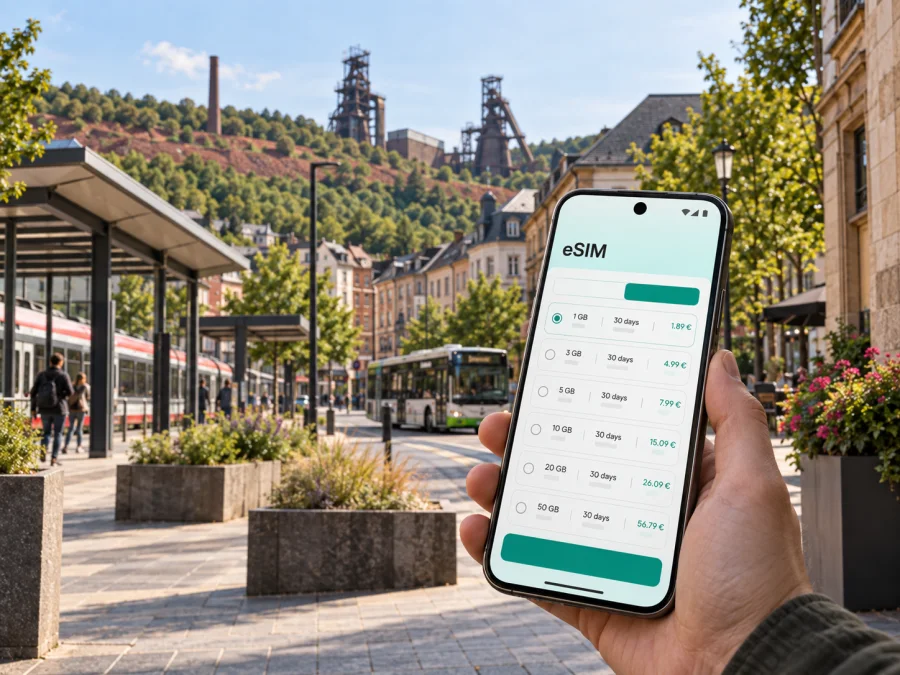
eSIM for Differdange: mobile connection and internet for your trip
Differdange is a practical base for exploring Luxembourg’s south: a compact city shaped by Minett’s industrial heritage, green hills and rail and bus connections. Whether you are arriving for a short stop, a business meeting or a longer stay, mobile internet helps with the first address, the right platform and a journey that changes during the day. An eSIM can prepare that connection without waiting for a physical SIM card after arrival.
Kaspersky eSIM Store is an app and website where you can choose, arrange and activate an eSIM with a suitable mobile-data plan for an international trip. For Differdange, consider how the plan fits your route: from the airport to the south of Luxembourg, between the railway station and your accommodation, through Niederkorn, Fousbann and Oberkorn, or onward to Esch-sur-Alzette and Luxembourg City.
Why mobile internet is useful in Differdange
Differdange rewards travellers who can adjust plans. You may arrive with a hotel address in one part of the municipality, meet someone near the centre, visit an industrial-heritage site, and then take a train or bus towards another town. A working data connection keeps each small step manageable.
During the first hours, mobile internet can help you:
- open a saved accommodation address and compare it with the stop or station shown in your journey plan;
- message a host, colleague or transfer contact as soon as you leave the airport or train;
- check a platform, departure time or temporary route change before crossing town;
- use walking directions in the centre, around the station area and on the way to a meeting;
- translate a short message or menu without relying on an unfamiliar public Wi-Fi network;
- confirm a booking or send a location when the day does not go to plan.
The city is small enough for short journeys to connect several kinds of transport, but that does not make navigation automatic. Differdange, Niederkorn and Oberkorn are distinct localities within the municipality, and an accommodation address can be closer to one station or bus corridor than another. A live map and current transport information are more useful than guessing from the city name alone.
A quick answer for travellers
An eSIM for a trip to Differdange is a digital SIM profile used for mobile data on a compatible, operator-unlocked device. You choose a plan for the country or region of your journey, install the profile, and select it for mobile data. The eSIM is not a replacement for a regular phone number: ordinary calls and SMS are not included unless the chosen plan explicitly says otherwise. You can use messaging and calling apps over mobile internet.
Arrival in Differdange: prepare the first connection
Most international visitors will plan their route through Luxembourg’s main airport or arrive from another city by rail. The final part of the journey is easier when the address, route and transport details are available before you leave a reliable connection. Downloading an offline map can be a useful backup, but it does not replace current departure information or the ability to send a message.
Before travelling, keep these details together:
- The full name and address of your hotel, apartment or meeting place.
- The nearest station or bus stop, checked against the map rather than inferred from the town name.
- A second route and a contact for your accommodation in case plans change.
If you arrive by train, the local rail corridor is especially relevant. CFL Line 60 links Luxembourg and Rodange and passes through Oberkorn, Differdange and Niederkorn. That makes the three station names worth checking when you book accommodation or plan a day trip. A map application can help you compare the walking portion from the station with the bus connection that follows.
Moving around the city: rail, buses and walking
Differdange has several layers of local transport. The CFL railway is useful for movement along the southbound corridor and for reaching larger connections. Regional buses and TICE routes link Differdange with neighbouring localities. The municipal Diffbus serves residential areas and public facilities, connecting Niederkorn, Fousbann and Oberkorn with the city centre.
The Diffbus is free and, according to the city’s published information, operates on working days between 06:00 and 19:00, with the localities connected about every half-hour. Treat that as a planning guide rather than a promise for every departure: check the current timetable, route and any temporary works on the day you travel. Mobile internet is useful here because route information, stop names and disruptions may be easier to verify at the moment you need them.
Use the following approach for a city journey:
| Situation | What to check before leaving | Why data helps |
|---|---|---|
| Station to hotel | Exact station name, walking route and check-in time | You can compare the fastest route with a bus or a short walk. |
| Centre to Oberkorn or Niederkorn | Direction, stop, platform and next departure | Locality names can look similar when you are reading quickly. |
For short distances, walking may be the simplest choice, particularly around the centre and station areas. Use a live map for the final turns, but keep your attention on traffic, crossings and the surroundings instead of staring at the screen continuously. If you are carrying luggage, compare the terrain and the walking time with a bus connection before setting off.
How to choose an eSIM plan for Differdange
Start with the geography of the trip. Differdange is in Luxembourg, so a plan for Luxembourg is the natural first option for a stay focused on the city. If you will continue to France, Belgium, Germany or another country, check whether the selected plan covers the whole route or whether you need a regional option. Do not choose by the city name alone: plans are generally organised by country, region, data allowance and validity.
Next, estimate how you will use data. A light user who mainly needs maps, messages and occasional booking checks needs a different allowance from someone who uploads work files, joins video meetings or shares a connection with another device. A useful estimate includes both active use and background activity from photos, cloud backups and automatic updates.
Consider these questions:
- How many days will you spend in Differdange and elsewhere in Luxembourg?
- Will mobile data be used mainly for maps and messages, or also for work calls and media?
- Will the itinerary include another country after Luxembourg?
- Does the plan start its validity on installation, activation or first use? Check the stated terms.
- Is the allowance sufficient for the whole trip, including background activity?
The best choice is the plan whose allowance and validity match your itinerary. Prices and available packages can change, so review the live conditions before payment. Kaspersky eSIM Store helps you select and activate the eSIM, while the network service and plan conditions are determined by the selected offer.
Choose an eSIM plan for a trip to Differdange after checking country coverage, validity and expected data use. The link leads to the Luxembourg page because Differdange is the city destination.
Install the eSIM before departure or after arrival
Installing before departure is often convenient because you can complete the setup while you have stable Wi-Fi and time to read the instructions. Some travellers prefer to install after arrival. Either way, keep the purchase details and QR code or in-app profile available, and check whether the plan starts its validity at a particular point.
Before you begin, check that the phone supports eSIM and is not locked to an operator. Some device versions differ by market, so use the compatibility check provided in the purchase flow instead of relying on the model name alone. You also need enough battery, access to the internet during installation and the correct account or QR code.
For detailed steps, use the Android eSIM installation instructions or the iOS eSIM installation instructions. The wording in your phone may vary by operating-system version, but the overall sequence is usually similar:
- Open the mobile-network settings.
- Choose the option to add a mobile plan or eSIM.
- Scan the QR code or follow the profile prompt in the app.
- Label the new line so you can recognise it during the trip.
- Select the eSIM as the line for mobile data and enable data roaming for it only if the plan requires it.
- Allow a few minutes for registration, then test a map page or a small message.
Do not delete a profile simply because it does not connect immediately. First check the selected data line, airplane mode, network selection and the plan’s activation conditions. If the issue continues, follow the relevant device instructions and contact support with the device model, operating system and the steps already completed.
Device compatibility and settings to check
Compatibility is a pre-purchase task, not an emergency fix at the station. A phone may support eSIM in one regional version and differ in another. It may also be operator-locked even when the hardware includes eSIM capability. Check your device compatibility before choosing a plan.
Use this short checklist:
- eSIM support is available on the exact device and regional version;
- the phone is unlocked for use with another mobile service;
- the operating system is ready for the installation method;
- you can access the purchase profile or QR code;
- the correct eSIM is selected for mobile data;
- data roaming is enabled for that eSIM only if the plan requires it;
- your original line will not unexpectedly use roaming data.
If you use two lines, name them clearly, for example “Home” and “Luxembourg data”. Turn off automatic switching between lines if your device has that option and you want predictable control. Keep the primary line available for incoming messages only if your operator’s roaming conditions make that appropriate. The eSIM is primarily a mobile-data solution; voice and SMS depend on the chosen plan and your regular line.
Differdange scenarios where an eSIM helps
A short stopover
You have only a few hours between connections. Before leaving the station, open the route to the centre, save the return journey and check whether the luggage storage or meeting point has changed. A modest plan may be enough for maps, messages and a booking confirmation. Keep the return connection visible so sightseeing does not turn into a rushed search for Wi-Fi.
A business visit or a stay near one of the localities
For a meeting at a company site, 1535° Creative Hub or another venue, data is useful for the building entrance, a colleague’s message and a last-minute time change. Download work documents before the meeting and keep mobile data for navigation and communication. If your address is in Niederkorn, Fousbann or Oberkorn, confirm the locality, station and bus stop in the same map view. Current route information matters because construction or timetable changes can affect a familiar journey.
For ordinary communication, remember that eSIM mobile data and a phone number are different things. Messaging applications, email and internet calls can work over the data connection. Regular calls and SMS may continue through your home line and may have roaming charges, or may not be included in the eSIM plan. Check the conditions before you travel and use the option that matches your needs.
FAQ about eSIM use in Differdange
Is an eSIM suitable for a short visit to Differdange?
Yes, if your device is compatible and the selected plan matches the length and geography of the trip. A short stopover usually needs less data than a work visit or a multi-city itinerary, so compare validity and allowance rather than selecting a package by habit.
Do I need a Luxembourg plan for Differdange?
Differdange is in Luxembourg, so a Luxembourg plan is the relevant starting point for a stay in the city. If your route continues across borders, check whether a regional plan is more suitable or whether the country plan ends at the border.
Can I keep my regular number active?
Usually, you can keep the primary line enabled for calls and messages while selecting the eSIM for mobile data, but the exact settings and any roaming charges depend on your phone and home operator. Check which line is selected for data before you start using maps and messaging.
Will an eSIM include calls and SMS?
Not necessarily. The plan should be treated as mobile data unless its conditions state otherwise. Internet-based messaging and calling applications can use that data, while ordinary calls and SMS remain a separate service.
What should I do if my phone does not support eSIM?
Use a compatible unlocked device or another connection method, and do not purchase a plan until compatibility is clear. Regional device variants can differ, so check the exact model rather than relying on a general product family name.
Differdange is easier to navigate when the practical details are ready before the first transfer. With the right country or regional plan, a compatible phone and clear data-line settings, you can use maps, messages, bookings and work tools throughout the trip without carrying a physical SIM card.
Choose your eSIM plan for Differdange
Review the destination, allowance and validity, then prepare the eSIM on your compatible device before you travel. Select an eSIM plan for Luxembourg and your Differdange trip and keep the installation instructions available for the journey.


