Travel connectivity guide
Djambala eSIM: Mobile Internet & Travel Connection
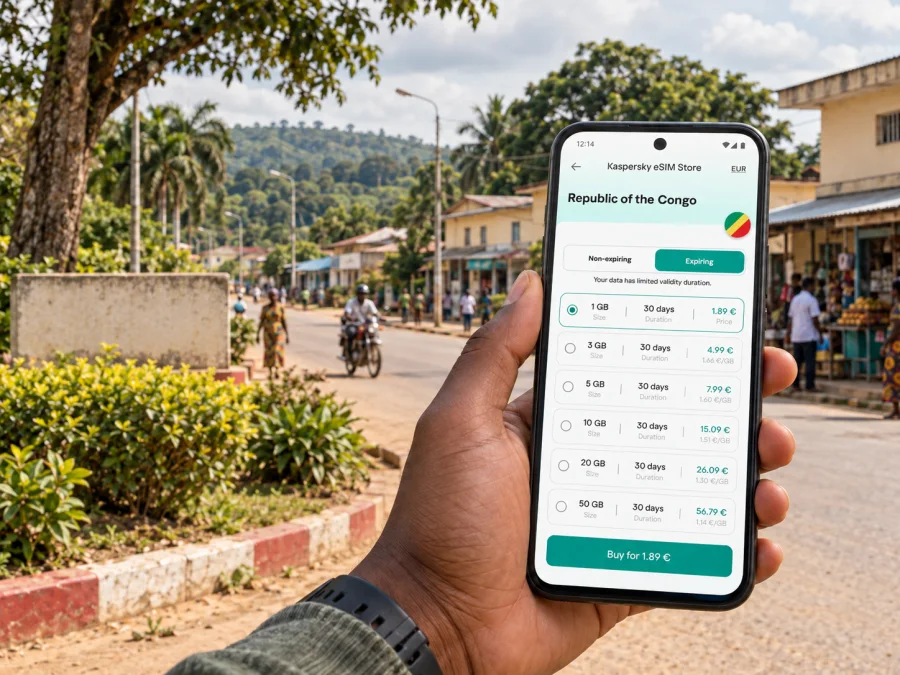
Djambala eSIM: Mobile Connection and Internet for Your Trip
Djambala is a practical destination for visitors travelling through the Plateaux Department of the Republic of the Congo. A mobile data connection can make the first hours easier: confirm a pickup, message your host, check the route to your accommodation and keep travel details at hand. An eSIM lets you prepare a digital SIM profile before departure, while keeping your usual number available on a compatible dual-SIM phone if your home plan and device allow it.
The useful question is not simply whether a phone shows signal in town. Before you travel, check that the plan is valid in the Republic of the Congo, understand when its validity begins, confirm your exact phone model supports eSIM, and prepare a backup for stretches where mobile service may be limited. This guide focuses on using mobile internet around Djambala and planning connections for a trip that starts or continues there.
Djambala in context
Djambala is a town and commune in the Republic of the Congo, and the departmental capital of Plateaux. It is not in the neighbouring Democratic Republic of the Congo, despite the similar country names. That distinction matters when selecting a destination: a plan for the Democratic Republic of the Congo is not automatically a plan for the Republic of the Congo. Check that the country shown in the plan details is the one on your itinerary.
The town lies on the Djambala plateau in the central part of the country. Government material describes the plateau setting at roughly 800 metres above sea level and identifies Djambala as the administrative centre of Plateaux. This is a different kind of trip from staying in the larger coastal or river cities: your arrangements may involve a road transfer, a local host, public offices, a work visit, or onward travel to communities elsewhere in the department.
Confirm your actual arrival point and onward transfer with your airline, organiser or accommodation. If your itinerary mentions an airport near Djambala, verify that the flight is operating and arrange a pickup; an airfield does not by itself confirm a scheduled passenger service. For an overland arrival, confirm the route and departure time with your driver or local contact.
What a phone connection helps you do
Mobile data can support practical arrangements in Djambala: message a driver or host, open maps, retrieve bookings, share a location, check in with family, or handle work messages when service is available. Map detail and live routing can vary, so download the area in advance if your app supports offline maps. Save the address as text and keep the pickup point in a screenshot; a location dot does not replace a confirmed meeting place.
Plan the connection around the journey
A city visit often has several separate connectivity needs: landing or reaching the town, moving between your accommodation and appointments, and travelling beyond the urban area. Plan for each one instead of estimating data from the number of days alone.
| Trip situation | What you may need online | Useful preparation |
|---|---|---|
| Arrival and pickup | Messages, booking details, a map pin | Exchange the driver’s number and meeting point before travelling; save both offline |
| First trip to your stay | Navigation and a way to contact your host | Download a map area and confirm the destination spelling and directions |
| Meetings in town | Email, calendars, messaging and document access | Download key files; check whether your workplace requires a separate secure connection |
| A short visit | Occasional messages and map checks | Estimate light use, but allow for updates and unexpected coordination |
| Several days with media or calls | Maps, video calls, uploads and cloud services | Choose data based on actual habits; large uploads and video can use data quickly |
| Travel outside Djambala | Route coordination and check-ins | Do not assume coverage continues along the full route; agree on check-in times and backup arrangements |
Estimate your data use
List the tasks you expect to do, then decide which can be handled offline. Text messages, email and map searches generally use less data than streaming video, video calls, photo backups or repeatedly uploading large files. Automatic app updates and cloud photo synchronisation can consume data in the background, so review those settings before leaving.
A simple planning method is to note trip length, identify essential tasks, download maps and documents over Wi-Fi, then compare the plan’s data, validity, country and hotspot terms. Leave a margin for itinerary changes. A short visit with offline maps may use less data than a work trip with frequent calls, but a larger allowance does not guarantee reception in every building or along every road.
Understand the local operator market and your plan
The Republic of the Congo has its own telecommunications market. The national regulator lists Airtel Congo and MTN Congo as public mobile operators. These names describe the country’s operator market; they do not establish which local network a particular travel eSIM uses in Djambala. That depends on the specific plan’s roaming arrangements and current availability. Check the plan information or ask the eSIM service’s support team if you need to know which network is used.
Do not assume that a plan for the Republic of the Congo includes the Democratic Republic of the Congo, Gabon or another country on a regional itinerary. The coverage country list is the deciding detail. Likewise, a plan that works in the country does not guarantee identical service indoors, on every street, or on the road to another town. Local conditions, handset bands, congestion, terrain and the network agreement can all affect performance.
For onward travel to Gamboma, Lékana, Mpouya or elsewhere, ask your transport contact about the route and possible service gaps. A country-level plan does not promise reception on every segment; save the next address offline and share your expected arrival time.
Confirm the exact plan details
Before purchase, read the plan page and note:
- Destination: It should explicitly include the Republic of the Congo. Do not rely on a similar country name or flag.
- Data allowance: Check the total included data and whether any fair-use or speed condition applies.
- Validity: Confirm how many days it lasts and what event starts the countdown, such as installation, activation or first network use.
- Network access: Review any listed network or roaming information, while remembering that a named operator does not promise coverage at every location.
- Tethering: If you plan to connect a laptop or another device through your phone, confirm that hotspot use is permitted by the plan.
- Voice and SMS: Many travel eSIM plans are data-focused. Do not assume they include a local phone number, conventional voice calls or SMS.
- Installation and activation: Check whether the profile can be installed before departure and whether it should be switched on only after you arrive.
- Refund and support conditions: Keep the confirmation and support route accessible in case the profile does not install as expected.
When you are ready to compare the currently listed options for this destination, review eSIM plans for travel in the Republic of the Congo. Read the individual plan details before selecting one: the destination, validity, data amount, activation conditions and any restrictions need to match your device and itinerary.
Kaspersky eSIM Store is an app and website where travellers can choose, purchase and activate an eSIM plan for mobile internet abroad. Service availability depends on the selected plan’s network arrangement, the device and local conditions.
Prepare your phone before leaving
First check whether the exact phone variant supports eSIM and is unlocked for use with another mobile plan. A product-family name alone is not enough. Hardware and eSIM support can differ by model number, sales region and carrier configuration; some regional variants of phones that look alike may have a physical SIM arrangement without eSIM support. Apple’s current guidance, for example, describes eSIM availability by specific iPhone model and region, while Samsung notes that eSIM availability can depend on region, carrier or model. Use the model number shown in your phone settings and the manufacturer’s current compatibility information.
Check whether your device is compatible before purchasing. On many phones, you can also look in the cellular or SIM settings for an option such as “Add eSIM” or “Add mobile plan”; its presence is a useful clue, not a substitute for confirming the exact model and carrier lock status. If the phone was bought through a carrier, ask that carrier whether it is unlocked.
Do not delete a profile to troubleshoot unless the instructions or support team advise it; reinstallation may require a new activation. Keep its setup details and support instructions accessible.
Installation steps
Install the profile while you have stable internet access, sufficient battery and a little time to follow the prompts. Depending on the plan, installation may be possible before the trip even if service begins later. Follow the specific plan instructions for the correct timing.
- Update your phone if needed and connect to reliable Wi-Fi.
- Open the eSIM plan in Kaspersky eSIM Store and follow its setup instructions.
- Add the mobile plan in the phone’s cellular settings, using the QR code or another supported activation method.
- Give the line a clear label, such as “Congo data,” so it is easy to distinguish from your home SIM.
- Keep your home number selected for calls and messages if that is what you want, and choose the travel eSIM for mobile data when appropriate.
- Enable data roaming for the travel eSIM only if the plan’s instructions require it; follow the provider’s guidance rather than changing roaming settings indiscriminately.
- When you reach Djambala and are ready to use the plan, check that the travel line is on and that mobile data is assigned to it.
Follow the step-by-step Android eSIM installation guide or iPhone eSIM installation guide, as appropriate to your device. Menu names can vary between operating-system versions and manufacturers, so use the guide together with the instructions for your chosen plan.
Using mobile data around Djambala
Arrival and the first hour
Before travelling, share your flight or arrival details with whoever is meeting you. Save their number with the country code, agree on a precise meeting point, and keep a screenshot of the arrangement. If mobile data is available when you arrive, use it to confirm that the pickup is still on schedule. If it is not, you will still have the essential details to proceed.
Install the profile before travel when possible, while respecting its validity rules. After arrival, follow the activation notes and allow time for registration. If there is no service, check the selected data line and instructions before changing settings repeatedly.
Getting around town
Combine online maps with directions confirmed by your host, driver or meeting contact. Ask for a nearby landmark and save both the location pin and written address. Confirm the destination before a ride; keep the arrangement available offline and send a check-in if delayed.
Work and longer stays
For work, download meeting materials before leaving Wi-Fi. If a call or large transfer is essential, confirm the setup with your host and keep an audio-only or dial-in alternative. A hotspot may not perform like a fixed office connection. On longer stays, monitor data use, pause unnecessary backups and updates, and remember a connected laptop can use data in the background.
Moving beyond Djambala
Road travel through Plateaux may have different service conditions from a town visit. Confirm the route and duration locally, charge your phone, share your itinerary and save destination details offline. Service can change between settlements; agree on realistic check-in times rather than expecting continuous updates.
A practical connection checklist
Before you buy
- [ ] Select the Republic of the Congo, not the Democratic Republic of the Congo.
- [ ] Check that the plan’s validity and data allowance suit your dates and expected use.
- [ ] Confirm the exact device variant supports eSIM and is not carrier-locked.
- [ ] Read the plan’s network, hotspot, voice, SMS and activation terms.
- [ ] Confirm how to contact support and keep the order details accessible.
Before you leave
- [ ] Install the profile at a convenient time using reliable internet, following the plan’s instructions.
- [ ] Keep the QR code or activation details available without exposing them publicly.
- [ ] Save your accommodation, pickup point, driver’s number and meeting details offline.
- [ ] Download maps and important documents; charge your phone and a power bank.
- [ ] Tell your contact when you expect to arrive and agree on a backup meeting plan.
After arrival
- [ ] Select the travel eSIM for mobile data if required by your plan.
- [ ] Check the line, roaming setting and activation conditions shown in the instructions.
- [ ] Test a simple message or webpage before relying on the connection for directions.
- [ ] If service does not start, check the plan status, settings and coverage information, then contact support.
- [ ] Keep the home SIM’s settings as intended so calls or messages do not unexpectedly use roaming.
Frequently asked questions
Is Djambala in the Republic of the Congo or the Democratic Republic of the Congo?
Djambala is in the Republic of the Congo, in Plateaux Department. The two countries are separate destinations with separate plan coverage. Select the country that matches your itinerary and verify it in the plan details.
Is there mobile coverage everywhere in Djambala?
No provider can be assumed to work at every address or at every moment. Coverage depends on the plan’s network arrangement, local conditions, handset and indoor or outdoor location. The available public sources identify the country’s operators but do not verify a guarantee of reception at each Djambala location. Confirm current plan details and keep offline information for essential arrangements.
Which local network will a travel eSIM use?
That depends on the specific plan and its roaming arrangements. Airtel Congo and MTN Congo are the operators listed by the Republic of the Congo regulator, but this alone does not establish which one a travel eSIM will access. Check the plan details or ask support for the network information relevant to your purchase.
Can I keep my regular number active?
Many compatible phones allow a physical SIM and an eSIM to be stored or used together, but the exact options depend on the phone variant and settings. You can often keep your usual line available for calls or messages and assign mobile data to the travel eSIM. Check your home operator’s roaming charges and make sure the right line is selected for data.
Will a phone that supports eSIM in one country support it in every regional version?
Not necessarily. Model number, sales region, carrier configuration and device lock status can affect eSIM support. Check the exact variant in the manufacturer’s documentation and use the compatibility checker before purchase. Do not rely only on a family name such as a phone series.
Does every travel eSIM include calls and SMS?
No. Some plans are designed for mobile data and do not provide a local number or conventional voice and SMS service. Check the selected plan’s inclusions. Internet messaging and calling apps may need data and the person you contact to have the relevant app and connection.
Can I install the eSIM before travelling?
Often, but the right timing depends on the plan. Some profiles can be installed in advance and begin their validity only after connecting in the destination; other plans may have different rules. Read the activation instructions before scanning the QR code, and avoid deleting the profile after installation.
What should I do if the eSIM is installed but there is no data?
Check that the profile is switched on, the travel line is selected for mobile data, and any roaming setting required by the plan is enabled. Confirm the plan is active and the phone is not locked to another carrier. Then consult the plan instructions or support. If you need directions immediately, use the offline map and contact information you saved before departure.
Choose a plan for Djambala
For a visit to Djambala, prepare the connection around your actual route: confirm you selected the Republic of the Congo, check the exact eSIM plan terms, verify your phone variant and save the information you may need offline. A digital plan can make it easier to get mobile internet set up for an international trip, while local availability still depends on the relevant network and conditions where you travel.
Use the Kaspersky eSIM Store app or website to compare available options and choose a plan whose destination, data allowance and validity suit your visit. Explore eSIM options for the Republic of the Congo and complete installation using the instructions for your device before you set out.


