Travel connectivity guide
Dnipro eSIM: Mobile Internet & Travel Guide
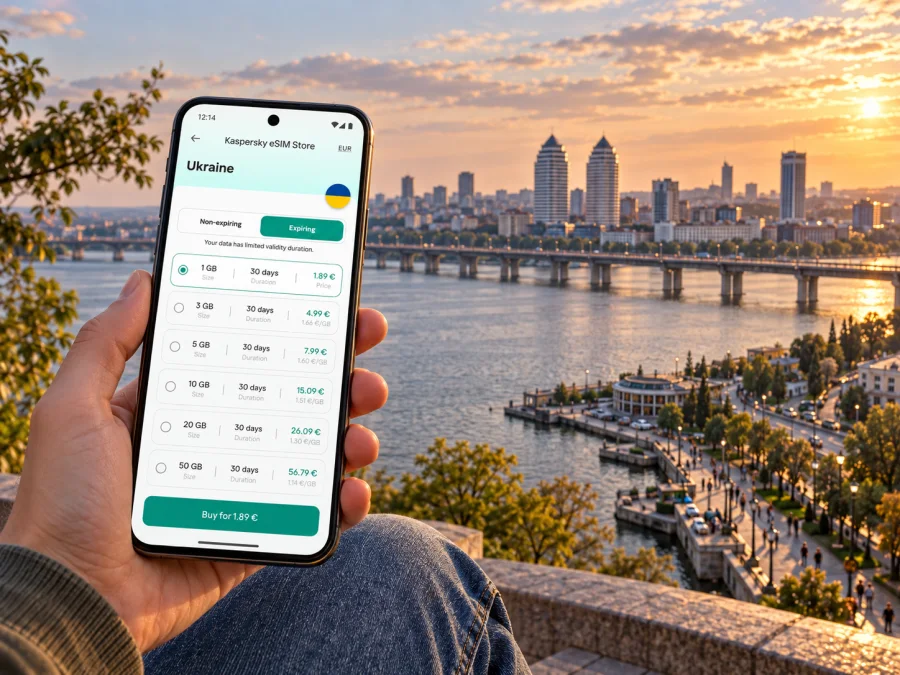
Dnipro eSIM for mobile connection and internet: a practical travel guide
Dnipro is a large city in central-eastern Ukraine, on the Dnipro River. A visit here calls for more than a data plan: travel conditions, transport and local services can change quickly. As of 16 October 2026, the UK Foreign, Commonwealth & Development Office advises against all travel to Dnipropetrovsk Oblast, and Ukraine’s airspace remains closed to civilian flights. Check your own government’s current advice and follow Ukrainian authorities before making plans. This guide is for connectivity preparation where travel is permitted or necessary; an eSIM is not a substitute for security updates or an emergency plan.
Mobile internet can still make essential tasks easier: confirming a train, finding an address, translating a message, contacting a host or checking alerts. A Ukraine eSIM is selected for the country, not for an individual city. Whether it connects in a particular part of Dnipro depends on the plan’s stated coverage, the local partner network, signal conditions, outages and any restrictions in force. Keep your itinerary and essential information available offline as well.
Before you travel: plan for changing conditions
Dnipro is the administrative centre of Dnipropetrovsk Oblast and sits on both sides of the Dnipro River. It is not a destination where a generic city-break checklist is enough. Military conditions, air alerts, curfews, transport restrictions and power interruptions can affect movement and communications. Recheck official advice shortly before departure and during your stay, and make decisions based on current local instructions.
A practical preparation order is:
- Confirm whether travel to the oblast is advised by your government and whether your itinerary is permitted.
- Check the latest Ukrainian rules, curfew hours and local alerts. These can vary by place and change at short notice.
- Confirm the actual route into Dnipro. Because Ukrainian airspace is closed, do not plan a civilian flight into the city; verify any rail or road journey directly with the relevant carrier and local authorities.
- Save accommodation details, tickets, emergency contacts, maps and essential translations for offline access.
- Prepare a charged power bank and a second way to reach important information. Mobile service and electricity can both be disrupted.
- Choose a Ukraine data plan only after checking the destination, allowance, validity period, activation conditions and supported network details shown for that plan.
What a Ukraine eSIM does in Dnipro
An eSIM is a digital SIM profile installed on a compatible device. A travel data plan can provide mobile internet without replacing the physical SIM already in your phone. This can be helpful for maps, messaging, email, train information and online translation while you keep your usual number available for calls or verification texts, subject to your home operator’s roaming settings.
A city does not have its own separate eSIM destination in the country plan. In Kaspersky eSIM Store, look for a plan for Ukraine and read its terms rather than assuming that a city name or national flag alone explains the service. The plan’s own details determine which territory and service are included. Local mobile operators such as Kyivstar, Vodafone Ukraine and lifecell have their own eSIM services for their customers; that fact does not tell you which partner network a separate travel eSIM uses. Do not infer the network, coverage, speed or support arrangements from the local operator names.
Before you choose, check the details that matter for your route:
| What to check | Why it matters in Dnipro |
|---|---|
| Country or regional scope | The plan should explicitly include Ukraine for the dates you need. A regional plan may have different coverage terms. |
| Data allowance | Maps, messages and email use less data than video calls, cloud backups or streaming. Estimate from your own habits. |
| Validity and start condition | Confirm when the validity period begins: for example, on installation, activation or first connection, as specified in the plan. |
| Network information | Review the provider and network details shown in the plan, if supplied. Do not assume all networks are included. |
| Tethering and restrictions | Check whether hotspot use, particular services or other conditions are specified. |
| Refund and transfer terms | eSIM profiles may be tied to one device or become non-transferable after installation; follow the terms shown for your purchase. |
Kaspersky eSIM Store is the app and website where you can choose, purchase and activate an eSIM plan for an international trip; mobile service itself depends on the selected plan and its network arrangements.
Arrival and the first hour in the city
Since civilian flights cannot currently use Ukrainian airspace, your arrival plan may involve a rail or road connection rather than landing in Dnipro. Check the route, departure point, ticket and any service changes before setting out. Ukrainian rail schedules and operational notices can change, so save your booking and station details and recheck them through the carrier’s current information channels. A data connection is convenient, but the essential parts of your trip should not depend on having one at the platform.
- Keep your ticket, passport details and host contact accessible offline.
- Check for current transport notices before leaving the station area.
- Confirm the destination address and spelling; Dnipro transliterations can differ between booking records and map apps.
- If your phone has no data, use the saved map, station signage or a prearranged contact method.
- Before crossing the city, check the latest alert status and any curfew requirements.
Getting around: river crossings, neighbourhoods and navigation
The Dnipro River is a defining feature of the city’s layout. Routes between the central areas and destinations on the opposite bank may depend on bridges and current transport conditions, so check the full crossing rather than judging distance from a map’s straight-line view. Bridge approaches can take longer than expected, and a route that looks short on screen may not be the simplest option with luggage or a tight schedule.
Think in terms of areas rather than assuming one walkable centre:
- Central Dnipro: Useful as a reference area for hotels, appointments, shops and many everyday services. Save the precise street and entrance, not just “the centre”.
- The riverfront and central embankment: The river offers a clear geographic reference, but riverside paths and access may be affected by local conditions. Check whether a destination is open and accessible before you go.
- Left-bank destinations: A trip across the river may involve a bridge and a longer journey than the map’s straight-line distance suggests. Leave extra time and recheck the route.
- Residential districts beyond the core: If a meeting or stay is outside the centre, store the full address and confirm the return journey and transport availability before the evening.
Once you have confirmed your route and the locations you need, review the eSIM options for Ukraine. Read the live details for your selected plan, including its coverage, validity and activation conditions; a country plan does not guarantee service at every Dnipro address.
Choosing a data allowance for your itinerary
The right amount of data depends on how you use your phone and whether you have reliable Wi-Fi at your accommodation. A short business visit with maps, email and messaging needs a different allowance from a stay involving frequent video calls or photo uploads. Avoid choosing by trip length alone: one hour of video can use more data than many days of text messages.
Estimate your likely use by listing the tasks you will do each day:
| Typical task | Data-planning note |
|---|---|
| Text messages and basic email | Usually modest use, although attachments can increase it. |
| Maps and route checks | Download offline maps in advance; use mobile data for updates and rerouting when available. |
| Web browsing and translation | Usage varies with image-heavy pages and repeated lookups. Save key phrases and documents offline. |
| Voice or video calls | Calls consume more data and can be unreliable on a weak or interrupted connection. Prefer audio if appropriate. |
| Photo and file uploads | Large transfers can use a substantial part of a small allowance. Pause automatic backups until you have a suitable connection. |
Device compatibility: check the exact model
eSIM support varies by manufacturer, model, country of sale and sometimes by carrier lock. Two phones with nearly identical product names can have different SIM capabilities in different markets. Check the exact model number and the device settings, and confirm that the phone is unlocked for use with another network. A device can support eSIM technology but still be unable to install a particular plan if it is locked or has a regional hardware variant without eSIM.
Before purchasing, check whether your device supports eSIM. Also confirm that your phone can keep the physical SIM and eSIM active in the configuration you need. If you rely on your regular number for calls or one-time codes, learn how your model handles dual SIM and choose the mobile-data line deliberately.
Install before travel, activate when appropriate
Install timing depends on the plan’s stated activation rules. Some plans start on installation, while others start when the eSIM first connects to a supported network. Read the specific conditions so that you do not use up validity earlier than intended. Installation usually requires an internet connection; preparing the profile before departure can make setup easier, but only follow the timing shown in your order details.
A reliable setup sequence is:
- Check device support, the exact regional model and carrier-unlock status.
- Read the plan’s destination, data allowance, validity and activation conditions.
- Use a stable internet connection to add the eSIM through your phone’s cellular settings or the method provided with the plan.
- Label the new line clearly, such as “Ukraine data”, so it is easy to identify beside your regular SIM.
- Set the travel eSIM as the mobile-data line when you want to use it. Keep voice and text settings for your regular number only if that fits your needs and home-operator charges.
- Enable data roaming for the eSIM only if the plan instructions require it. This setting may be needed for some travel eSIMs; check the plan guidance rather than changing every line indiscriminately.
- After arrival, allow the phone time to register and confirm the selected line and data settings. If it does not connect, use the troubleshooting steps supplied with the plan and contact support if needed.
For device-specific steps, follow the Android eSIM installation guide or the iPhone eSIM installation guide. Menu names vary by software version, and an installation screen can look different across phone brands. Avoid removing the profile or resetting network settings until you have checked the plan’s support instructions.
Work trips, short visits and onward journeys
For a short stop between trains, avoid building an itinerary around several distant points. Check the station’s current facilities and onward departure before leaving the area. Save the return route and ticket information offline, and keep enough battery for updates from the carrier. If a delay or alert changes the plan, prioritise safe instructions and confirmed onward travel over sightseeing.
An onward trip is a separate coverage decision. A Ukraine-only plan may not cover a neighbouring country or a border-crossing segment; check the plan’s destinations before departure. Do not assume that coverage continues simply because your phone still displays the eSIM profile. Keep train or road tickets and the address of your next stop available offline, and verify the current route with the carrier or authorities.
If mobile data does not connect
A connection problem may result from incomplete installation, a disabled data line, a plan that has not reached its activation condition, weak local signal, a network outage or a service restriction. Check these items in order:
- Confirm the eSIM appears in the phone’s SIM settings and is switched on.
- Make sure the eSIM is selected for mobile data, not just listed as an installed profile.
- Check the plan details for the coverage area, start condition and any required roaming setting.
- Toggle airplane mode once, then allow the phone time to search for service. Restart only if the plan’s troubleshooting steps recommend it.
- If manual network selection is part of the plan’s instructions, follow those instructions and use only the network options listed there.
- Check for a local outage or alert through a trusted source when you have another connection.
- If service still fails, contact the plan’s support channel with the order details and device model; do not share a QR code publicly.
Quick checklist for Dnipro
Before deciding to travel
- Review current government travel advice for Dnipropetrovsk Oblast and current Ukrainian rules.
- Confirm the route: Ukraine’s airspace is closed to civilian flights as of 16 October 2026, so check land or rail arrangements directly.
- Check curfew, air-alert and shelter information for your specific location.
Before buying an eSIM
- Confirm the plan is for Ukraine and covers the dates and places on your itinerary.
- Read the allowance, validity, activation, hotspot, network and refund conditions.
- Verify your exact device variant supports eSIM and is not carrier-locked.
Before leaving your accommodation
- Save the address, ticket, map area and key contacts offline.
- Charge the phone and power bank; keep a backup way to view essential details.
- Check current transport information and alert status before crossing the city.
Frequently asked questions
Is there a separate eSIM plan for Dnipro?
Usually, travel eSIM plans are selected by country or region rather than by city. Choose a plan whose terms include Ukraine, then review the network and coverage information shown for that specific plan. A national destination does not guarantee service at every address or during an outage.
Use the network information supplied with the exact plan. Kyivstar, Vodafone Ukraine and lifecell offer local eSIM products for their own customers, but their local services do not establish which network a separate travel eSIM uses. The selected plan’s details and actual network conditions apply.
Ukraine’s airspace remains closed to civilian flights as of 16 October 2026. Do not plan a civilian flight into Dnipro; verify any rail or road itinerary and current travel advice before departure.
Will an eSIM provide a local telephone number?
Not necessarily. Travel eSIM plans are often data-only. Check the plan conditions for calls and SMS; if these are not specifically included, use the eSIM for data and keep another suitable option for ordinary calls or verification texts.
Does every phone sold under the same model name support eSIM?
No. SIM capabilities may differ by regional variant, and a carrier-locked phone can prevent installation or use. Check the exact model number and the phone’s eSIM settings before purchase.
What should I do if a route or connection changes?
Follow local authority instructions first. Use your saved ticket, map and contact details, check the carrier’s current updates when possible, and conserve phone battery. A live map or eSIM is useful when available, but neither replaces current local information.
Stay prepared and choose your plan carefully
For Dnipro, connectivity planning begins with the live travel situation, then the route, device and plan terms. Save essential information offline, confirm where the selected Ukraine plan is intended to work and understand when its validity begins. Kaspersky eSIM Store lets you choose, purchase and activate an eSIM plan for an international trip through its app and website; the selected plan’s conditions determine how it is used.
If your journey is appropriate under current official advice, choose an eSIM plan for travel in Ukraine after reviewing its coverage details, data allowance, validity and activation instructions. Install it on a compatible, unlocked device according to the plan’s guidance, keep an offline backup of essential information and follow local updates throughout your stay.


