
Travel connectivity guide
Doba eSIM Guide for Mobile Internet
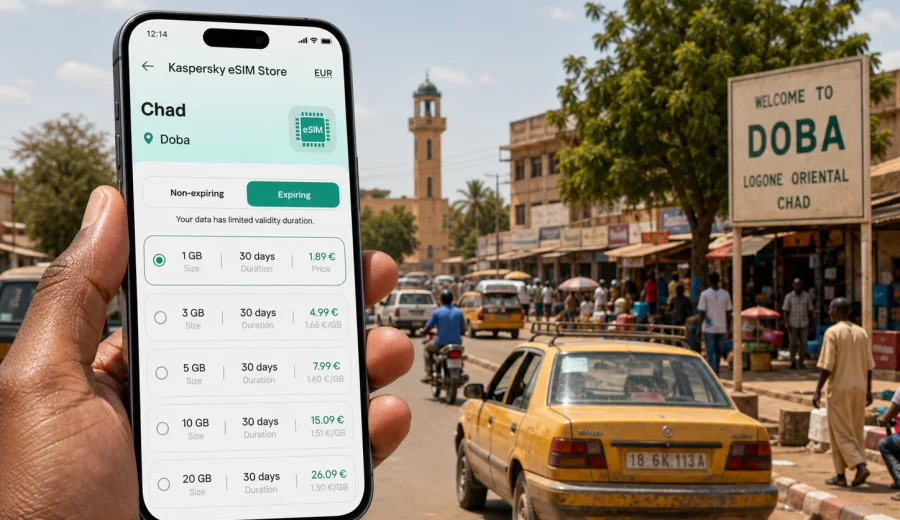
Doba eSIM Guide: Mobile Connection and Internet for Your Trip
Doba is not a city where you want to improvise your mobile internet at the last minute. It is the regional capital of Logone Oriental in southern Chad, a practical stop for business travel, field work, road journeys, and visits connected with the oil corridor around the area. Travelers often arrive with a tight schedule, a hotel address saved in a message, and several transfers to coordinate. In that situation, an eSIM can make the first hours in Doba much easier.
This guide focuses on how to prepare mobile connection and internet for Doba: airport arrival, road travel from N'Djamena or Moundou, local movement, hotel check-in, maps, messaging, business calls, and short trips from the city. It is not a general country overview. The goal is to help you decide what to check before departure, how much data you may need, and how to use an eSIM without confusing it with a regular local phone line.
Why mobile internet matters in Doba
Doba is a working city more than a classic tourist destination. You may need mobile data for tasks that feel ordinary in larger travel hubs but become more important when local routines are unfamiliar:
- confirming a pickup from Doba Airport or a road transfer;
- sharing your live location with a driver, colleague, or hotel contact;
- checking map pins when street names are not enough;
- translating short messages between English, French, Arabic, or local languages;
- keeping work chats, email, and cloud documents reachable;
- checking weather before a road trip in the rainy season;
- using messaging apps for calls when your eSIM data plan does not include voice minutes.
An eSIM is useful because you can prepare the mobile internet part before you are standing at a counter, looking for a physical SIM card, or relying on hotel Wi-Fi. You choose a suitable data plan for Chad, install the eSIM on a compatible device, and keep your primary SIM in the phone for your regular number if your device supports that setup.
Doba arrival scenarios where eSIM helps
Travel to Doba can happen in several ways. Some visitors use local air services when available, while many routes are planned overland through N'Djamena, Moundou, Sarh, or nearby project sites. Even if your itinerary is managed by an organization or employer, mobile data gives you more control over small decisions.
| Travel moment | What you may need online | Why an eSIM helps |
|---|---|---|
| Before departure | Save hotel details, maps, contacts, and trip documents | You can install the eSIM while you still have stable Wi-Fi |
| On arrival in Chad | Message a driver or host and confirm timing | You do not need to find a shop before sending updates |
| Road transfer to Doba | Share location, check route progress, update arrival time | Mobile data supports messaging during a long journey |
| First evening in Doba | Find the hotel, restaurant, office, or meeting point | Maps and messaging reduce confusion after dark |
| Business day | Use email, chat, documents, and video-light calls | A prepaid data plan helps separate trip data from roaming |
| Trip outside the city | Keep route notes and offline maps synced before leaving | You can prepare data use before coverage becomes variable |
The key point is preparation. In Doba, connection quality can vary by location, building, and route. eSIM does not change local network conditions, but it can reduce the amount of setup you need to do after arrival.
What to know before choosing an eSIM for Doba
Before buying any eSIM data plan for a trip to Doba, check three things: device support, trip length, and the role mobile internet will play in your itinerary.
First, make sure your smartphone or tablet supports eSIM and is not locked to one operator. If you are not sure, use the compatibility check before purchase: Check your device. This is especially important if you use an older device, a model bought through a mobile operator, or a dual-SIM setup that you have not tested abroad.
Second, choose data volume according to your real routine. A traveler who only needs maps, messaging, and email may use much less data than someone uploading site photos, joining calls, or sharing a hotspot with a laptop.
Third, remember that most travel eSIM data plans are for mobile internet. They usually do not include a local phone number, regular voice calls, or SMS unless that is clearly stated in the selected plan conditions. For calls, many travelers use internet-based messaging apps.
How much data do you need in Doba?
There is no universal answer, but you can estimate your use by scenario. Use the table as a planning tool rather than a guarantee, because app behavior, photo uploads, updates, and video quality can change data consumption quickly.
| Trip style in Doba | Typical online activity | Practical data approach |
|---|---|---|
| Short stopover, 1-2 days | Messaging, maps, hotel coordination, a few searches | A small data package may be enough |
| Business visit, 3-5 days | Email, chat, documents, ride coordination, light calls | Choose more data so you are not checking balance constantly |
| Field work or project visit | Photo sharing, cloud files, frequent location updates | Consider a larger package and keep offline backups |
| Multi-city Chad route | Doba plus N'Djamena, Moundou, or project sites | Pick a plan that fits the whole Chad itinerary |
| Hotel-based work | Laptop hotspot, work calls, file uploads | Use data carefully and check whether tethering is allowed |
For Doba, it is wise to download offline maps, key documents, and hotel addresses before you travel. Mobile internet is then used for live updates rather than everything from scratch.
Local movement: maps, drivers, and meeting points
Doba is easier to navigate when you treat your phone as a trip organizer, not only as a map. Save the names and phone numbers of your hotel, driver, local host, office, and emergency contact. Keep addresses in both written form and as map pins. When possible, ask contacts to send a location pin before you move.
Mobile data is useful for:
- confirming pickup points near the airport or hotel;
- sending a photo of a storefront or entrance when a location is hard to describe;
- checking whether a meeting has moved to another office or compound;
- sharing your route with a colleague during an evening transfer;
- translating short instructions for transport or check-in.
If your visit includes work around industrial or project areas near Doba, ask your host how reliable mobile connection is on each route. Prepare offline notes before leaving the city center. An eSIM can help you start connected, but remote roads and buildings may still have uneven signal.
When to set up your eSIM
The best time to install an eSIM is before you need it. For many travelers, that means installing it at home or at the hotel while connected to reliable Wi-Fi, then activating mobile data when the plan conditions say it is appropriate. Read the plan details carefully, because validity rules can differ.
If you install before flying, keep the QR code, confirmation email, and instructions accessible offline. If you wait until arrival, make sure you have a dependable Wi-Fi connection and enough time to complete the setup calmly.
For installation steps, follow the official device-specific instructions: Android installation guide or iOS installation guide. The exact screens vary by device model and operating system version, so do not rely only on memory from another phone.
A practical setup checklist before Doba
Use this checklist a day or two before departure:
- Confirm that your device supports eSIM and is unlocked.
- Update your phone operating system if you normally postpone updates.
- Save your passport scan, hotel address, and work invitation offline.
- Download offline maps for Doba and the wider Logone Oriental route.
- Save key contacts in your phone, not only in chat history.
- Check whether your main SIM must stay active for banking codes.
- Turn off automatic cloud backup on mobile data if your package is small.
- Decide which apps may use mobile data in the background.
- Keep your eSIM QR code or installation details available offline.
This preparation matters because your first connection task in Doba may be simple but urgent: "I have arrived", "the pickup point changed", or "please send the meeting location again".
Choosing a data plan for Chad and Doba
For a city article, the right destination is the country that contains the city. Doba belongs to Chad, so you should choose a Chad eSIM data plan rather than searching for a separate city product. After you have checked your device and estimated your data needs, you can choose an eSIM data plan for a trip to Doba in Chad through Kaspersky eSIM Store.
Kaspersky eSIM Store is an app and website where you can choose, arrange, and activate an eSIM with a suitable data plan for mobile internet in an international trip. Review the plan's data amount, validity period, destination, price, and activation rules before you pay. If you expect heavy laptop use or long video calls, choose a plan with more room than your minimum estimate.
Doba travel use cases: what to enable and what to limit
Mobile internet becomes more reliable as a travel tool when you control what uses it. Before your first full day in Doba, review app permissions and background activity.
| App or service | Recommended setting | Reason |
|---|---|---|
| Maps | Allow mobile data, download offline areas | You need live search but should not depend on full downloads |
| Messaging apps | Allow mobile data | Main channel for drivers, hotels, and colleagues |
| Cloud photos | Wi-Fi only | Photo backups can consume a small plan quickly |
| System updates | Wi-Fi only | Updates are rarely urgent during a trip |
| Allow mobile data, limit large attachments | Keeps work reachable without wasting data | |
| Video apps | Wi-Fi only or low quality | Streaming is one of the fastest ways to use data |
| Banking and authentication | Allow when needed | Useful for payments and account checks |
If you use your phone as a hotspot, check both your device settings and plan conditions. Hotspot use can be practical for a laptop at a hotel, but it can also drain data faster than expected.
Business trips to Doba
Many Doba visits are connected with administration, logistics, energy projects, development work, or regional operations. For business travelers, the main value of mobile internet is continuity. You can keep your calendar updated, receive document changes, coordinate transport, and stay reachable when hotel Wi-Fi is not enough.
For a business trip, prepare a simple connection plan:
1. Use Wi-Fi for large downloads before leaving the hotel.
2. Keep mobile data for messaging, maps, email, and urgent files.
3. Save meeting documents offline before driving to another site.
4. Carry a power bank, especially if you use maps and hotspot mode.
5. Ask local contacts which areas on your route have weaker signal.
Do not assume that every meeting location will have stable guest Wi-Fi. Even when Wi-Fi exists, you may need a code, a local contact, or time to connect. Mobile data helps cover those gaps.
Stopovers and short stays
For a short stay in Doba, the main risk is overcomplicating setup. You may only need mobile data for arrival, hotel check-in, one meeting, and a road transfer the next day. In that case, prioritize fast preparation and clear settings.
Keep the essentials ready:
- arrival contact and pickup instructions;
- hotel location saved offline;
- one messaging app confirmed and working;
- mobile data roaming setting checked for the eSIM if required by the plan;
- offline copy of your onward route.
If your stopover is part of a longer Chad route, select data based on the whole trip rather than the hours spent in Doba. A plan that is comfortable for one city may be too small if you continue to Moundou, N'Djamena, or field sites.
Trips from Doba
Doba can be a base for movement around Logone Oriental. Nearby regional travel may involve project areas, smaller towns, or longer road segments. Before leaving the city, download maps, confirm fuel and rest stops with your driver, and send your route to a trusted contact.
Use mobile internet for live updates, not as your only source of essential information. Save addresses, contact numbers, hotel confirmations, and route notes offline. If you travel with a team, agree on one primary messaging app and one backup method before departure.
For day trips, it is also useful to reduce background data use. Turn off automatic photo uploads and app updates. If you take many site photos, upload them later on Wi-Fi unless immediate sharing is required.
Hotel Wi-Fi versus eSIM in Doba
Hotel Wi-Fi can be useful, but it should not be your only plan. It may be strong in the lobby and weaker in rooms, require staff assistance, or slow down when many guests are online. An eSIM gives you a separate mobile data option for the moments when you need your own connection.
| Situation | Hotel Wi-Fi | eSIM mobile data |
|---|---|---|
| Large file download | Often better if stable | Possible, but may use data quickly |
| Taxi or driver coordination | Not useful once you leave | Useful while moving |
| Messaging from the room | Convenient | Good backup if Wi-Fi drops |
| Maps outside the hotel | Not available | Useful for route checks |
| Work call | Good if stable | Use with caution if data package is limited |
The strongest setup is usually mixed: Wi-Fi for heavy use, eSIM mobile data for movement, messaging, maps, and urgent tasks.
Common mistakes to avoid
Avoid these mistakes when preparing internet for Doba:
- Buying a data plan before checking whether your phone supports eSIM.
- Waiting until arrival to read installation instructions for the first time.
- Forgetting that an eSIM data plan may not include a regular phone number.
- Leaving cloud backups, app updates, and video autoplay on mobile data.
- Assuming hotel Wi-Fi will be enough for transport coordination.
- Using all data on streaming before the most important travel day.
- Deleting the eSIM profile without checking whether it can be reinstalled.
Most problems are preventable. The practical approach is to install carefully, test before travel when possible, and keep offline backups.
Quick answers about eSIM in Doba
Can I use eSIM for mobile internet in Doba?
You can use an eSIM if your device supports eSIM, is unlocked, and the selected Chad data plan matches your trip needs. Local connection quality still depends on available networks and your exact location.
Does eSIM give me a local Chad phone number?
Usually no. Travel eSIM data plans are generally for mobile internet. Regular calls and SMS are included only if the selected plan clearly says so. Use messaging apps for internet-based calls when appropriate.
Should I install the eSIM before arriving in Doba?
It is often easier to install it before departure or while you have reliable Wi-Fi. Check the activation and validity details before doing so, because rules vary by plan.
Is eSIM enough for a business trip?
For many business tasks, yes: email, messaging, maps, light document access, and coordination. For heavy uploads, long video calls, or laptop hotspot use, choose data carefully and keep Wi-Fi as part of your plan.
What if I travel beyond Doba?
Choose your data plan for the full Chad itinerary, not only the city. Download offline maps and route notes before leaving areas where you have stable connection.
Final preparation for your Doba trip
A good mobile connection plan for Doba is simple: check device compatibility, choose a Chad data plan that fits your trip length, install the eSIM with reliable Wi-Fi, control background data, and save key information offline. This gives you a practical way to handle arrival messages, hotel coordination, maps, work updates, and road travel without depending only on roaming, public Wi-Fi, or physical SIM shopping after arrival.
Before you leave, review the data amount, validity period, destination, and activation rules. Then prepare an eSIM data plan for your Doba trip in Kaspersky eSIM Store and keep the installation details available until your phone is fully set up.