
Travel connectivity guide
Dockyard eSIM for Bermuda travel
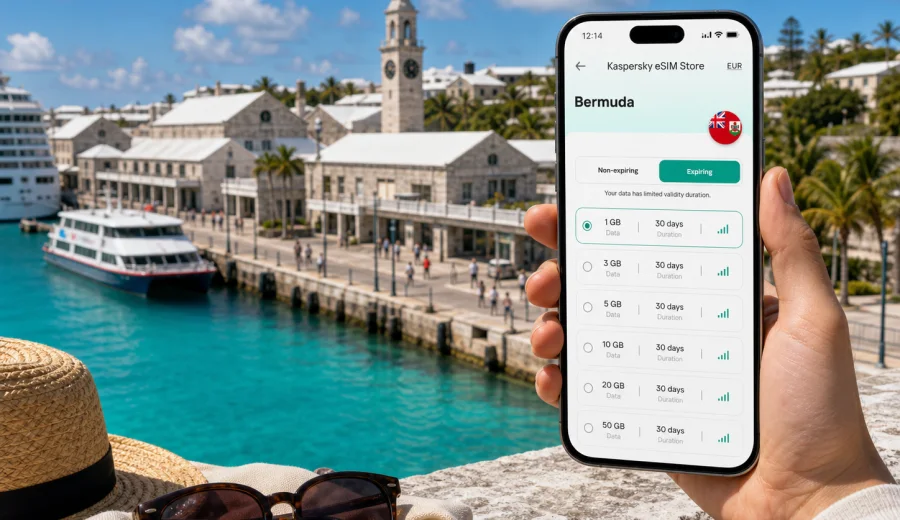
Dockyard eSIM: mobile connection and internet for Bermuda trips
Dockyard in Bermuda is a compact travel base with a specific rhythm. Many visitors arrive by cruise ship at King's Wharf or Heritage Wharf, walk into the Royal Naval Dockyard area, then use ferries, taxis, buses and maps to reach beaches, Hamilton, Somerset Village, St. George's or L.F. Wade International Airport. In that kind of trip, mobile internet helps you confirm bookings, find ferry times, message your group, open digital tickets, navigate back to the pier and handle work calls without depending on public Wi-Fi.
An eSIM can make this easier because you do not need to find a shop, swap a physical SIM card or wait until you are already confused by directions. You choose a data plan for Bermuda, install the eSIM on a compatible phone, and use mobile data for everyday travel tasks. Decide how long you will be in Bermuda, how much data you are likely to use around Dockyard, and whether your route stays near the cruise terminal or includes longer rides across the island.
Why Dockyard visitors often need mobile data early
Dockyard is easy to enjoy on foot, but it is not a place where every decision happens in one small square. The cruise piers, Clocktower Mall, the National Museum of Bermuda, Snorkel Park, restaurants, beaches, tour meeting points and ferry dock are close enough to walk between, yet the rest of Bermuda quickly becomes a transport question. A working data connection helps when plans change after arrival.
First-hour tasks include:
- checking the exact meeting point for a shore excursion;
- sending your location to friends who left the ship separately;
- opening maps for the walk between the pier, shops and waterfront;
- checking ferry departures to Hamilton;
- confirming a taxi pickup or hotel transfer;
- reading weather updates before a beach or boat trip;
- contacting a tour operator after a schedule change;
- using messaging apps when your regular mobile roaming is off.
Public Wi-Fi can be useful in a hotel, cafe or terminal area, but Dockyard travel often involves short windows: a ferry departure, an excursion check-in, a return-to-ship time, or a dinner reservation in another parish. Mobile data gives you more control between those fixed points.
Dockyard arrival scenarios: cruise, hotel, airport and stopover
Your best eSIM setup depends on how you reach Dockyard. A cruise passenger may only need data for a day or two, while a visitor staying in Somerset or Hamilton may use Dockyard as one part of a longer Bermuda itinerary.
| Arrival scenario | What usually matters | How eSIM helps |
|---|---|---|
| Cruise ship at King's Wharf or Heritage Wharf | Maps, excursion messages, return time | Use data right after disembarkation |
| Hotel stay near Dockyard or Somerset | Rides, bookings, weather, calls over internet | Keep one data profile active for the stay |
| Arrival via L.F. Wade International Airport | Transfer route, taxi coordination, check-in | Install before travel and activate when ready |
| Business visit or remote work | Email, calendar changes, hotspot if allowed | Choose data volume by work habits |
| Short stopover or shore day | Maps, tickets, group coordination | Use a smaller allowance if you will mostly be outside |
If you are arriving by cruise, the key question is often "When will I need internet?" The answer may be immediately: while leaving the ship, finding the tour operator, checking ferry options, or messaging someone already at the Clocktower Mall.
Where mobile internet is useful around Dockyard
Dockyard is part historic site, part cruise port, part shopping and excursion hub. The area is walkable, but a day there can include many small mobile moments: leaving the pier, visiting the National Museum of Bermuda, checking a menu, walking to Snorkel Park, then boarding a ferry to Hamilton.
Useful mobile data moments in Dockyard include:
1. opening a map before leaving the cruise terminal;
2. checking ferry or bus options before choosing a route;
3. sending live location to a travel companion;
4. reading ticket details for a boat tour or snorkel trip;
5. looking up opening times before walking to a museum or shop;
6. saving large photo and video uploads for Wi-Fi.
Use mobile data for decisions, directions and communication. Save large uploads, cloud backups and long video streaming for trusted Wi-Fi if your data allowance is limited.
Choosing a data plan for a Dockyard trip
For a Dockyard city article, the country matters because your eSIM data plan should match Bermuda, not a separate city-only destination. There is no need to search for a Dockyard-specific mobile plan. What matters is whether the chosen tariff covers Bermuda, how much data it includes, how long it remains valid, and whether it fits your travel pattern.
Use this quick planning table:
| Trip type | Typical data behavior | Practical plan direction |
|---|---|---|
| One cruise day in Dockyard | Maps, messaging, tickets, light browsing | Small data allowance can be enough if you avoid video |
| Two or three days in port | Maps, restaurant searches, beach weather, photo sharing | Medium allowance gives more comfort |
| Week in Bermuda with Dockyard visits | Daily navigation, bookings, work messages, social apps | Larger allowance and validity that covers the whole stay |
| Business trip | Email, cloud documents, calls over internet, hotspot if allowed | Choose by work use and check tethering conditions in the tariff |
| Family or group travel | Multiple people coordinating locations and tickets | Each traveler should plan separately unless one person will manage most data needs |
Data use can change quickly. Navigation and messaging are usually light. Video calls, reels, cloud photo backup and map downloads are heavier. If you expect to work or share connection with a laptop, check whether the selected eSIM tariff allows tethering and choose more data than you would for sightseeing.
A practical setup timeline
The easiest eSIM experience is the one you prepare before you are standing on a busy pier with a tour time approaching. Installing the eSIM profile in advance can remove one task from the first hour in Bermuda.
Before your trip:
- confirm that your phone supports eSIM and is not locked to one carrier;
- choose a tariff that covers Bermuda and matches your stay length;
- install the eSIM while you still have stable internet;
- keep your primary SIM active if you need calls or SMS on your usual number;
- review when the data validity period starts for the selected tariff;
- save important booking details offline as a backup.
On arrival in Dockyard:
- turn on the eSIM line for mobile data when you are ready to use it;
- enable data roaming for the eSIM if the instructions for your device or tariff require it;
- keep your regular SIM's data roaming off if you want to avoid accidental roaming charges;
- test maps and messaging before leaving the pier area;
- monitor your data balance during the trip.
If you are setting up eSIM for the first time, follow the official step-by-step guidance for Android installation or iOS installation. Before you choose a tariff, also check your device for eSIM support and carrier lock status.
How Kaspersky eSIM Store fits into the trip
Kaspersky eSIM Store is an app and website where you can choose, arrange and activate an eSIM with a suitable data tariff for mobile internet during an international trip. For Dockyard, choose Bermuda as the destination, compare data volume and validity options, install the eSIM on a compatible device, and activate it according to the tariff conditions.
If your travel plans are already set, you can use Kaspersky eSIM Store to choose a data tariff for your Bermuda trip before you leave home or while you still have reliable Wi-Fi. This is especially useful for cruise passengers, because the first hours in Dockyard often involve transport decisions and timed activities rather than quiet setup time.
Kaspersky eSIM Store should be treated as a preparation tool, not as a mobile network operator. Local service, coverage and speed depend on the selected tariff, device, location and network conditions. Check the tariff details before purchase, including calls, SMS, tethering and validity rules.
Dockyard transport and route examples
Dockyard rewards travelers who can check route options quickly. The ferry to Hamilton can be one of the most scenic and efficient ways to move across the water, while taxis and buses may be better for specific beaches, hotels or late returns. Mobile data helps you compare timing, route and meeting point without relying on a printed plan.
| Route from Dockyard | Typical mobile data need |
|---|---|
| Inside the Royal Naval Dockyard | Maps, museum details, lunch bookings, group messages |
| Dockyard to Hamilton | Ferry timing, walking directions, restaurant searches, return planning |
| Dockyard to beaches | Weather checks, taxi coordination, offline map backup |
| Dockyard during a full Bermuda stay | Airport transfer, hotel check-in, daily navigation and messages |
For transport days, save the name of your pier, hotel or meeting point in your notes, screenshot critical return times, and keep enough battery for the way back. Dockyard is walkable, but a wrong turn can cost time when you are meeting a tour or returning to the ship.
Hotels, apartments and business travel
Hotel Wi-Fi is useful when you are on the property, but mobile data fills the gaps between Dockyard, a ferry, a restaurant, a beach and a meeting point. For business trips, choose data by work habits rather than sightseeing time. Email and messaging are light; video calls, cloud documents and hotspot use can be heavier and may depend on the selected tariff conditions.
If you expect to work from Bermuda, check whether tethering is allowed, choose validity that covers arrival and departure days, and keep stable Wi-Fi for long video meetings where possible. Treat eSIM mobile data as continuity for movement and backup, not as a guarantee for every heavy work session.
Data-saving checklist for Dockyard
You can make a modest data allowance last longer with a few simple settings, especially on a cruise day or short stop.
- Download offline maps for Bermuda before departure.
- Turn off automatic cloud photo and video backup over mobile data.
- Disable app updates over mobile data.
- Use Wi-Fi for video streaming and large file transfers.
- Check data usage once a day during a longer stay.
- Keep your regular SIM's data roaming settings separate from the eSIM profile.
These settings help you spend data on the tasks that matter most: maps, messages, transport, bookings and urgent information.
What to check before buying an eSIM tariff
An eSIM is convenient only when the basics are correct. Before choosing a data tariff for Dockyard and Bermuda, confirm that your device supports eSIM, is not carrier-locked, and can install another mobile data profile. Check that the destination is Bermuda, the validity period covers your arrival and departure days, and the data volume fits your habits.
Also review calls, SMS and activation rules. Many travel eSIM tariffs focus on mobile data, not a local phone number. Some validity periods begin after installation, while others begin after first network connection, depending on tariff conditions. If you depend on regular phone calls or bank SMS messages, keep your primary SIM available and review roaming costs with your home operator.
Common mistakes to avoid in Dockyard
Do not wait until the pier to check compatibility, assume a data-only eSIM gives you a local phone number, or leave mobile data active on your regular SIM if you want to avoid roaming charges. Read when validity starts, enable data roaming for the eSIM if required, and choose by data volume, validity and route, not only by price. A working data connection is useful for changes, but it does not replace planning around cruise departure, ferry schedules, weather and traffic.
Short answers for Dockyard eSIM planning
Is an eSIM useful for a cruise stop in Dockyard?
Yes, especially for maps, tour messages, ferry planning and group coordination after leaving the ship. A short visit may not require much data unless you stream video or upload many files.
Do I need a Dockyard-specific tariff?
No. For a city trip, choose a data tariff for Bermuda. Dockyard is the route focus, but the mobile data destination is the country or region shown in the tariff details.
Can I install the eSIM before I travel?
In many cases, yes. Install while you have stable internet, then activate mobile data according to the selected tariff's instructions. Check the conditions so you understand when validity starts.
How much data should I choose?
For maps and messaging, a smaller allowance may be enough. For several days, work tasks, hotspot use or video calls, choose more data and validity that covers the full trip.
Final preparation for Dockyard
Before your Bermuda trip, prepare mobile internet the same way you prepare travel documents, reservations and transport plans. Check eSIM compatibility, choose the right destination and validity period, install while you have stable internet, and keep your primary SIM settings under control. In Dockyard, that preparation helps with practical travel: finding the ferry, meeting a tour, contacting your hotel, checking the route back to the pier and staying reachable.
When you are ready to organize mobile data for the trip, open Kaspersky eSIM Store and choose an eSIM tariff for Bermuda that matches your Dockyard plans, trip length and expected data use.