
Travel connectivity guide
eSIM for Dominica: mobile internet guide
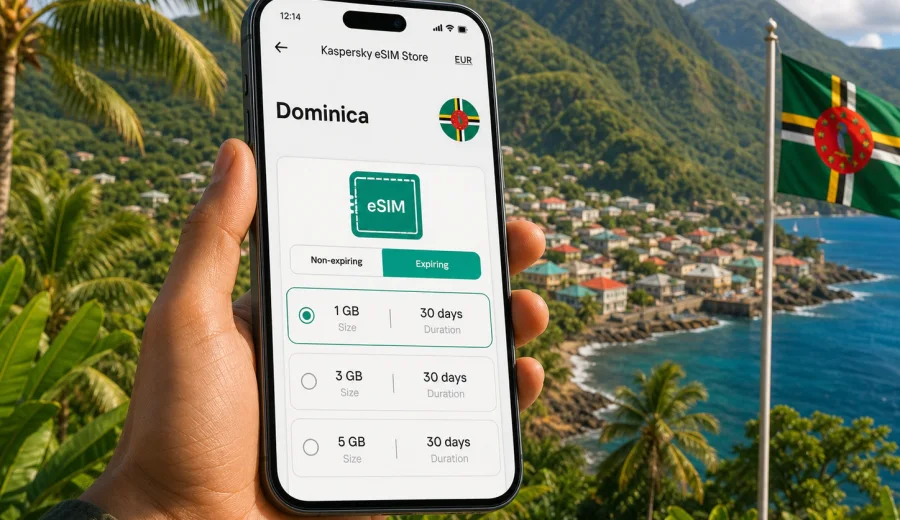
eSIM in Dominica: mobile connection and internet for your trip
Dominica is a country where mobile internet quickly becomes part of the travel plan. You may need maps after landing, hotel messages in Roseau, ferry updates in Portsmouth, photo backup after a rainforest hike, or a quick route check before driving into the mountains. An eSIM can help you prepare mobile connection before the trip without looking for a physical SIM card when you arrive.
This guide explains how to use eSIM for internet in Dominica, how to choose a data plan, what to check before buying, and how to avoid common setup mistakes. The focus is practical: a compatible phone, a suitable amount of data, clear validity dates, and a simple activation flow.
Dominica should not be confused with the Dominican Republic. They are different countries, and eSIM plans are normally tied to a specific destination or region. When you prepare for Dominica, check that the selected plan covers Dominica or a regional route that includes it.
Why eSIM is useful in Dominica
Dominica is known for mountain roads, rainforest trails, coastal towns, dive sites, waterfalls, and ferry connections. That mix makes mobile internet useful in several moments of the trip, not only at the airport.
You may want internet for:
- navigation from Douglas-Charles Airport or the ferry terminal;
- messaging your hotel, host, guide, or car rental desk;
- checking weather before a hike to Trafalgar Falls, Boiling Lake, Middleham Falls, or Morne Trois Pitons National Park;
- using maps around Roseau, Portsmouth, Soufriere, Scotts Head, and Calibishie;
- calling through messengers if your plan does not include regular voice calls;
- confirming tour times, ferry schedules, and restaurant bookings;
- sharing photos when Wi-Fi is weak or unavailable.
An eSIM is a digital SIM profile. Instead of inserting a plastic SIM card, you install the eSIM on a compatible device and use it for mobile data. For many travelers, this is convenient because the setup can be prepared before departure, while the physical SIM slot can stay free for a home SIM if the device supports dual SIM use.
The main benefit is control. You can compare plan size, validity period, destination, and price before choosing. That is especially useful for a trip where your data needs may change between city days, beach time, driving, and outdoor activities.
What mobile internet in Dominica is usually needed for
The right eSIM plan depends on how you travel. Dominica is not a country where every day looks the same: one day can be a short walk around Roseau, while another can involve a long drive, a hiking route, and limited access to hotel Wi-Fi.
| Travel scenario | Typical internet use | What to consider |
|---|---|---|
| Short stay, 2-4 days | Maps, messaging, taxi or transfer coordination | A smaller data package may be enough if you use hotel Wi-Fi for heavy uploads |
| One week holiday | Maps, social apps, bookings, weather, photo sharing | Choose more data if you plan to use navigation often |
| Hiking and nature routes | Offline maps plus live updates when signal is available | Download maps in advance and keep mobile data for route changes and messages |
| Remote work light use | Email, chats, document checks, hotspot in short sessions | Check whether tethering is allowed by the selected plan |
| Island-hopping route | Dominica plus nearby Caribbean destinations | Compare a country plan with a regional Caribbean plan if your route includes more countries |
The practical rule is simple: choose by behavior, not only by trip length. A traveler who streams video, backs up photos, and uses hotspot can use more data in two days than another traveler uses in a week.
eSIM, roaming, local SIM: what is different
For Dominica, travelers usually compare three options: international roaming from a home operator, a physical local SIM, or eSIM. Each can work, but they solve different problems.
| Option | Strengths | Possible limits |
|---|---|---|
| Home roaming | Keeps your usual SIM active; no new setup in some cases | Costs and data limits depend on your home operator |
| Physical local SIM | Can be useful for longer stays or local voice needs | Requires finding a point of sale, checking documents and conditions, and replacing or adding a SIM card |
| eSIM | Can be prepared before arrival; no plastic SIM; clear prepaid data package | Requires a compatible unlocked device and usually focuses on mobile data |
An eSIM plan for travel is usually best when your main need is mobile internet. It may not include a regular phone number, SMS, or traditional voice calls unless the selected plan clearly states that these services are included. For calls, many travelers use messengers over mobile data.
eSIM is also not a promise that signal will be strong in every valley, beach, or trail. Dominica has mountainous terrain, and mobile service can vary by location, weather, local network conditions, and device. Prepare offline maps and key booking details before remote hikes.
How to estimate data for Dominica
Before choosing a plan, think about the apps you actually use. Data use is easy to underestimate when you rely on maps, short videos, photo sync, and navigation at the same time.
Use this checklist:
- Maps and navigation: download offline maps before travel, then use mobile data for live searches and route changes.
- Messaging: text messages and voice notes are usually light, but video calls use much more data.
- Photos: upload over hotel Wi-Fi when possible if your package is small.
- Social media: limit autoplay video if you want the plan to last longer.
- Work apps: email and chat are moderate; video meetings and file sync can use data quickly.
- Hotspot: useful for a laptop or another device, but only if the selected plan and device settings allow it.
For many leisure trips, a medium data package offers more comfort than the smallest option. For a very short stay, a smaller plan may be enough if you only need maps and messages. For a longer stay, a road trip, or remote work, choose a larger allowance or check whether top-up is available for the selected plan.
What to check before you buy
The most important step is device compatibility. Not every smartphone supports eSIM, and some phones that support eSIM may be locked by an operator. Before you pay for a plan, check your device and confirm that it can use eSIM abroad.
Also check:
1. Destination: the plan must include Dominica or the correct region.
2. Validity period: make sure the plan covers your travel dates.
3. Data size: choose enough GB for maps, messaging, bookings, and planned media use.
4. Activation rules: some plans start when installed, while others start when they connect to a supported network.
5. Roaming data settings: some eSIM profiles may require data roaming to be enabled for that eSIM line.
6. Calls and SMS: do not assume they are included unless the plan conditions say so.
7. Transfer limits: an activated eSIM usually cannot be moved freely between devices.
This check takes only a few minutes and prevents the most common travel problem: buying a plan for a phone that cannot install or activate it.
Choosing an eSIM plan for Dominica
When you open a country plan page, do not choose only by the lowest number on the screen. A better plan is the one that fits your route, duration, and data behavior.
Ask yourself:
- How many days will I stay in Dominica?
- Will I also visit nearby islands before or after the trip?
- Will I rely on mobile maps for driving?
- Will I use hotel Wi-Fi for large uploads?
- Do I need hotspot for a laptop or second device?
- Do I want a buffer in case plans change?
For a single-country trip, a Dominica plan is usually the clearest option. For a Caribbean route with several islands, a regional plan may be more convenient if it includes all needed destinations. Always read the plan conditions before buying.
Kaspersky eSIM Store helps you compare available options for the destination, review data volume and validity, and prepare the eSIM through the site or app. If you are ready to compare data packages, you can choose an eSIM plan for your trip to Dominica and check which option matches your dates.
How to install and activate eSIM
The setup is usually straightforward, but it is better to do it while you still have a stable connection. After buying a plan, the eSIM appears in your profile or app, and you can install it using the instructions provided.
Basic steps:
1. Check that your phone supports eSIM and is not locked to one operator.
2. Choose Dominica as the destination and select a suitable data plan.
3. Complete the order and open the eSIM details.
4. Install the eSIM profile using the on-screen flow or QR code.
5. Give the eSIM line a clear label, such as "Dominica data".
6. Set mobile data to the eSIM line when you want to use it.
7. If required by the plan, enable data roaming for the eSIM profile.
8. Keep your home SIM active only if you need calls, SMS, or banking messages.
For detailed device steps, use the Android installation guide or the iOS installation guide. Follow the instructions for your device model and operating system version.
Do not delete the eSIM profile after installation unless you are sure you no longer need it. Depending on the plan and device, reinstalling or transferring an eSIM may not be available.
Before arrival: a practical preparation checklist
A little preparation makes the first hour in Dominica easier. Use this checklist before your flight or ferry.
- Install the eSIM while you have reliable Wi-Fi.
- Save your QR code or eSIM details in a place you can access offline.
- Download offline maps for Roseau, Portsmouth, your hotel area, and planned drives.
- Save hotel address, transfer instructions, and emergency contacts.
- Turn off automatic cloud photo backup on mobile data if your package is limited.
- Disable video autoplay in social apps.
- Check whether your banking app needs SMS from your home number.
- Confirm whether your phone can use two SIM lines at the same time.
- Charge a power bank before long hikes or day trips.
For mountain roads and nature routes, offline preparation matters. Even with a working eSIM, signal can vary in remote terrain. Offline maps and saved booking details are a practical backup, not a replacement for mobile internet.
During the trip: how to save data
Once the eSIM is active, small settings can help your data package last longer.
Recommended settings:
- Use mobile data for maps, messaging, bookings, and essential browsing.
- Use Wi-Fi for large app updates, system updates, and full photo backup.
- Turn off automatic downloads in messengers.
- Set video streaming quality to low or use Wi-Fi.
- Pause cloud sync for large files.
- Check data usage by app in your phone settings.
- Keep the eSIM line selected for mobile data, not for default voice calls unless your plan supports them.
If you use hotspot, monitor it carefully. Laptops can update systems, sync files, and load high-resolution media without warning. A few background tasks can use a large part of a small travel data package.
Useful travel cases in Dominica
Arrival at Douglas-Charles Airport. Mobile internet helps you message a driver, check the route to Roseau or Portsmouth, and confirm the address before leaving the airport. If you have installed the eSIM in advance, you can focus on transport instead of looking for a SIM card desk.
Staying in Roseau. In the capital, you may use internet for maps, restaurant reservations, ferry information, and messages with tour providers. eSIM is useful when hotel Wi-Fi is crowded or when you are moving between the waterfront, market area, and accommodation.
Driving across the island. Roads can be winding and travel times can feel longer than the distance suggests. Use offline maps for the main route, then mobile data for live search, updated directions, and messages.
Nature and hiking days. For areas around waterfalls, hot springs, and national parks, download trail information before you leave. Use mobile internet when available for weather, pickup coordination, and urgent messages.
Diving and coastal trips. Around Soufriere, Scotts Head, and other coastal points, data can help coordinate dive times, boat pickup, and photo sharing after the activity. Keep the phone protected from water and check signal before depending on live maps.
Common mistakes to avoid
The most common eSIM problems are not complicated technical failures. They usually come from skipped checks or unclear settings.
Avoid these mistakes:
- buying before checking eSIM support;
- confusing Dominica with the Dominican Republic;
- choosing a plan that is too small for navigation, hotspot, and photo uploads;
- installing the eSIM on the wrong device;
- deleting the eSIM profile after activation;
- expecting a travel data plan to include a local phone number;
- leaving your phone set to the home SIM for mobile data;
- forgetting to enable data roaming for the eSIM profile when the plan requires it;
- using video calls or streaming on a small package without monitoring data.
If something does not work after arrival, check the basics first: the eSIM line is enabled, mobile data is set to that line, airplane mode is off, data roaming is configured as required, and the destination matches the plan conditions.
Quick comparison: light, standard, and heavy data use
| User type | Apps and behavior | Plan approach |
|---|---|---|
| Light user | Maps, text messaging, booking checks, occasional browsing | Smaller package may work for a short stay |
| Standard traveler | Maps, social apps, photos, restaurant and tour searches | Medium package gives more flexibility |
| Heavy user | Hotspot, video calls, cloud backup, streaming, work tools | Larger package or top-up option is safer |
This is not a fixed rule. Your phone settings matter as much as the plan size. A light user with automatic photo backup enabled can become a heavy user without noticing.
FAQ about eSIM in Dominica
Can I install eSIM before I travel to Dominica?
In many cases, yes. It is often better to install the eSIM while you still have reliable Wi-Fi. Check the activation rules of the selected plan, because the validity period may start at installation or when the eSIM first connects to a supported network.
Does eSIM give me a Dominican phone number?
Usually, travel eSIM plans focus on mobile data. A regular phone number, SMS, and voice calls are not included unless the plan conditions clearly say so. You can use messengers and internet calling apps over mobile data.
Can I keep my home SIM active?
Many modern phones allow a physical SIM and an eSIM, or two eSIM profiles, but device behavior differs. You can keep your home SIM for calls or banking messages and set mobile data to the Dominica eSIM. Check your device settings before departure.
Is eSIM better than public Wi-Fi?
eSIM can reduce dependence on public Wi-Fi in airports, cafes, hotels, and transport areas. Public Wi-Fi can still be useful for large downloads, but mobile data gives you more control when you are moving around.
Will eSIM work in every part of Dominica?
No mobile solution should be described that way. Signal depends on local network conditions, terrain, device, and the selected plan. Dominica has mountains and remote natural areas, so download maps and key documents before hiking or driving far from towns.
Can I share the eSIM connection by hotspot?
It depends on the device and plan conditions. If hotspot is allowed, monitor data use carefully, especially with laptops and tablets.
What if I need more data?
Check whether top-up or another plan is available in your profile or app. If your trip is longer or your usage is high, it is often better to choose a plan with a comfortable data buffer from the start.
Short checklist for a smooth setup
Use this final checklist before you rely on the eSIM in Dominica:
- Your phone supports eSIM.
- The phone is not locked to a single operator.
- The selected plan covers Dominica.
- The validity period matches your trip.
- You understand when the plan starts.
- You installed the eSIM on the correct device.
- Mobile data is assigned to the eSIM line.
- Data roaming is enabled for the eSIM if required.
- Offline maps and hotel details are saved.
- Heavy uploads are set to Wi-Fi only.
Choose mobile internet for Dominica before you go
An eSIM is a practical way to prepare mobile internet for Dominica if your phone supports it and your main need is data for maps, messaging, bookings, and travel coordination. It can help you arrive with a clearer setup, avoid searching for a physical SIM card, and keep your data plan visible before you start using it.
Before buying, check compatibility, review the destination, choose a data allowance that matches your travel style, and read the activation rules. Then install the eSIM while you still have stable internet.
When you are ready to prepare your connection, open Kaspersky eSIM Store and select an eSIM plan for Dominica that fits your route, duration, and expected data use.