Travel connectivity guide
Dosso eSIM: mobile connection and internet in Niger
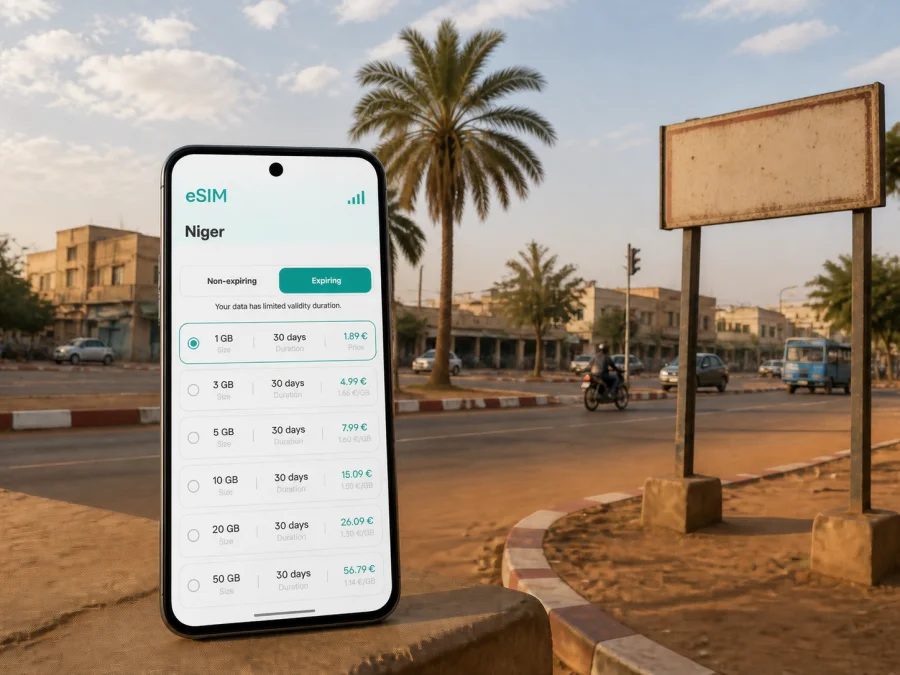
Dosso eSIM: mobile connection and internet for your trip to Niger
Dosso is a city in southwestern Niger and the capital of Dosso Region. It lies a little over 130 kilometres southeast of Niamey and on the RN1 road corridor, making it relevant to business travel, overland itineraries and journeys between the capital and destinations farther east or south. In Dosso, mobile internet can help with the first message after arrival, a meeting address, a route change, a transport call or a reservation.
An eSIM, or digital SIM, lets you prepare mobile data without removing the physical SIM already in your phone. Kaspersky eSIM Store is an app and website where you can choose, arrange and activate an eSIM with a suitable tariff for mobile internet during an international trip. Before departure, you can review the destination, data allowance, validity period and price, then install the profile on a compatible, unlocked device.
When mobile internet can help in Dosso
Your day in Dosso may combine an arrival point, accommodation, a meeting, an errand and a road transfer. A data connection is useful for practical tasks rather than constant browsing:
- checking a map and confirming a destination;
- messaging a driver, colleague, host or family member;
- opening a booking or meeting confirmation;
- using translation tools when a conversation needs extra clarity;
- sharing a location or sending a short arrival update;
- checking a revised departure detail before an onward journey;
- making an internet-messenger call when ordinary voice service is not part of the tariff.
The value is often in the sequence. After a long transfer you may need a map, a message and a confirmation within a few minutes. A field worker may need a route, a document and a short call. An eSIM gives you a way to plan that data use separately from your home line and to keep the primary physical SIM available for services that still depend on it.
The short answer
For Dosso, an eSIM can suit travellers who want mobile internet without replacing their main SIM. Check compatibility, select Niger as the destination, choose data volume and validity for the complete itinerary, install the profile while you have dependable internet access, and activate the travel eSIM for mobile data when you are ready. The exact conditions of the selected tariff always take priority.
Arriving in Dosso
Many international journeys to Dosso are planned through Niamey and then continued overland. The city is connected to Niamey by the RN1 corridor, which also forms part of longer routes through southern and eastern Niger. Departure points, road conditions and transport arrangements can change, so confirm the current details for your date of travel.
The arrival routine may involve locating a pickup point, sending a message, opening a saved address or contacting someone waiting for you. Airport, station or hotel Wi‑Fi may not be available at the moment you need it. An active travel eSIM can reduce dependence on finding a public network for those first tasks.
Save these details in more than one place before setting out:
- the accommodation name and address;
- the contact for your transfer, host or colleague;
- the office, project site or meeting venue;
- the next transport point and onward destination;
- a screenshot or offline copy of each important confirmation.
Offline copies are a fallback for a low battery, a temporary signal problem or a map that does not load. Use mobile data for current messages and changes, while keeping essential information locally available.
Arrival checklist
- Charge the phone before the transfer.
- Keep the QR code or installation details accessible in the account where they were provided.
- Keep the primary SIM in the phone if you need its number for calls, messages or verification.
- Decide which line will be used for mobile data before you start moving.
- Restrict automatic updates and background data if the allowance is limited.
- Send an arrival message after the eSIM is active and the connection is stable.
Transport, navigation and movement around the city
The right plan for Dosso depends on how you move. A short stop in one area has a different data pattern from a schedule with repeated road transfers, meetings and document exchange. Estimate connection moments across the day instead of treating every traveller as if they used the same amount of data.
| Dosso travel situation | Likely data tasks | Planning point |
|---|---|---|
| Short stopover | Messages, map checks, confirmation | Save maps and documents in advance; leave room for one route change |
| City visit | Navigation, messages, translation, searches | Allow for several destination checks and necessary photo uploads |
| Business stay | Email, files, messenger calls, possible hotspot | Estimate work traffic separately from personal use |
| Road itinerary | Route checks, location sharing, arrival updates | Choose validity for the whole route, not only the stay in Dosso |
| Longer regional journey | Daily communication and work | Consider whether a larger allowance avoids a mid-trip refill |
This is a planning framework, not a promise about a particular tariff. Review the current Niger options and match one to your dates and route. If you will cross a border or continue into another country, confirm that the selected country or regional tariff covers every part of the itinerary; do not assume that a Niger plan applies elsewhere.
Use maps carefully
Map apps can use more data when they refresh maps, load photographs or recalculate a route repeatedly. Before leaving a dependable connection:
- search for the accommodation, office and transport point;
- save addresses as text as well as map pins;
- use a simpler map view when detailed imagery is not needed;
- avoid video streaming during transfers;
- upload large files only when the task requires it;
- check whether photo backup is using mobile data;
- review the phone’s data-usage screen after the first day.
A short location message with a clear landmark and expected arrival time may be more useful than continuous live sharing. Keep the information specific and send it only when needed.
How to choose an eSIM tariff for Dosso
Kaspersky eSIM Store helps you choose, arrange and activate an eSIM with a tariff for mobile internet abroad. The selection should reflect what you will do in Dosso and whether the city is one stop in a longer route.
Count the full validity period
Include the travel days before arrival and after leaving the city. If a tariff has a fixed validity period, activating it too early may reduce the time available when you need it. Read the activation rule before purchase, especially if the schedule is uncertain.
Define the tariff scope
For a trip confined to Niger, a Niger destination may be the relevant choice. For an itinerary including a border crossing or several countries, choose a regional option only when its displayed scope matches the route. Dosso, Niamey and an onward destination should not be treated as one tariff area automatically.
Estimate real data use
Start with maps, messages, email and occasional messenger calls. Add work documents, photo uploads, video and hotspot traffic. A short stopover may need less data than remote work, but the right allowance depends on your habits and access to trusted Wi‑Fi.
Plan when to install
Installing before departure gives you time to read the settings and resolve questions while you have internet access. Installing after arrival may suit someone who wants the profile inactive until the trip begins. In either case, activation depends on the device, local network and tariff conditions; some phones may require data roaming for the travel eSIM.
When your route and dates are clear, you can choose an eSIM tariff for a trip to Niger and compare the displayed data volume, validity and price. Because tariff scope is tied to a country or region, Niger is the relevant destination to review when Dosso is part of your route.
Four common Dosso scenarios
One-night stop. Save the accommodation and onward-journey details, then reserve mobile data for a message, route checks and the next confirmation.
Several days of meetings. Choose validity for the complete visit and include email, document transfer and messenger calls. If you need a laptop hotspot, estimate that traffic separately.
Dosso as a road base. Include the days spent reaching and leaving the city. Route changes and status messages can occur outside the central stay.
Offline-first travel. Keep addresses, tickets and contact details offline, then use the eSIM for changes and coordination. This gives you a fallback without making every task depend on live loading.
Installing an eSIM before departure or after arrival
Before installation, confirm that the phone supports eSIM, is not locked to an operator, has sufficient battery and is connected to the internet. You can check your device compatibility before selecting a tariff. Regional versions of the same model may differ.
1. Check the device
Confirm eSIM support and operator-unlock status. Keep the primary SIM unless the device instructions say otherwise.
2. Open mobile-network settings
Open mobile-network or cellular settings and select the option to add an eSIM or mobile plan. The wording differs by phone.
3. Scan the QR code or open the profile
Use the QR code from the Kaspersky eSIM Store account or the message containing the installation details. Follow the prompts and do not repeatedly scan a profile that has already been added.
4. Label the lines
Give the travel profile a clear label, such as “Niger travel”, and keep your primary line recognisable. Clear labels help prevent selecting the wrong data line later.
5. Select mobile data
Choose the travel eSIM as the data line when you are ready to use it. Keep the primary line available for the services you still need, and disable automatic data switching if your phone offers that setting.
6. Enable required settings
If the tariff or device requires data roaming for the travel eSIM, enable it for that line after checking the conditions. Avoid enabling roaming on the primary line by mistake.
7. Allow time for registration
Connection may take several minutes and depends on the device and local network. If you want to use the plan later, leave the profile installed and follow the activation rules.
For device-specific steps, use the Android eSIM installation instructions or the iOS eSIM installation instructions. If the screen differs, pause before deleting a profile and check the settings or contact support.
Manage data during the trip
Maps and direct messages are usually more important for a Dosso itinerary than automatic media synchronisation. Restrict app updates and photo backup to Wi‑Fi where possible, disable video autoplay, and check whether email attachments or cloud files are using mobile data. Use hotspot deliberately and set a data warning that fits the selected allowance.
Use the app or account to monitor balance and remaining validity where those details are shown. Keep a small reserve for a departure message, a route change or an urgent contact. If more data is needed, read the available refill conditions; eSIM profiles do not all have identical refill rules.
Calls, messages and hotspot use
An eSIM tariff for mobile internet is not automatically a normal phone line. Unless the selected conditions say otherwise, it does not include a separate phone number, conventional voice calls or SMS. You can use messengers over data, while keeping your primary line for number-based services.
A laptop connected through hotspot may consume data quickly through updates, cloud storage and attachments. If tethering matters for your work in Dosso, include it in the estimate and keep the phone powered during a longer session.
Troubleshooting and pre-trip checklist
If mobile data does not work, start with the least disruptive checks. Confirm that the travel eSIM is enabled, selected for data and within its validity period. Check the signal indicator, restart the phone if appropriate, and confirm that data roaming is enabled for the correct line when required. If the issue continues, compare the settings with the installation guide and contact support. Do not remove the profile before checking whether it can be installed again under the tariff conditions.
- [ ] The destination is Niger, and the tariff scope matches the complete route.
- [ ] The phone supports eSIM and is not operator-locked; check compatibility if unsure.
- [ ] The installation method and QR code or profile are available.
- [ ] Data volume accounts for maps, messages, work, photos and any hotspot.
- [ ] Validity covers the arrival, stay in Dosso and departure.
- [ ] You know which line handles mobile data, calls and verification.
- [ ] Data roaming is enabled only for the travel line if required.
- [ ] Accommodation, meetings and onward transport are saved offline.
- [ ] You know where to view balance, validity and support information.
Frequently asked questions
What is an eSIM for a trip to Dosso?
It is a digital SIM profile for mobile data on a compatible device. A Niger eSIM tariff can help with navigation, messages and trip coordination without removing your physical SIM. Allowance, validity and other conditions depend on the selected tariff.
Is an eSIM useful if I already have roaming?
It can be. An eSIM gives you another option to compare with your home operator’s roaming conditions, including data volume, validity and price. Compare the actual terms rather than assuming one option is always cheaper.
Can it be used for ordinary phone calls?
Usually not unless voice service is explicitly included. The eSIM is intended for mobile internet; calls and messages can be made through internet messengers when appropriate. Keep your primary line for services tied to its number.
Should I install it before leaving or in Dosso?
Both options can work. Installing before departure gives you time to check the settings with internet access. Installing after arrival may keep the profile inactive until the trip starts. Follow the activation rules and allow several minutes for registration.
Does every phone support eSIM?
No. Support depends on the model, regional version and operator lock. Check your device compatibility before purchase and verify that the phone can add a mobile plan.
Can one eSIM cover travel beyond Dosso?
Possibly, if the tariff’s country or regional scope covers the route. Check each country or border destination in the displayed conditions rather than treating all stops as one area.
What is Kaspersky eSIM Store?
Kaspersky eSIM Store is an app and website that helps you choose, arrange and activate an eSIM with a suitable tariff for mobile internet during an international trip. It is a preparation and management tool; network conditions and tariff terms depend on the selected service arrangement.
Prepare your connection for Dosso
The practical routine is straightforward: check the device, define the route, choose data and validity for the whole trip, install the profile with internet access, and save essential details offline. Once in Dosso, use mobile data for current information—maps, messages, meeting changes and onward travel—while limiting background consumption.
When your itinerary is confirmed, choose an eSIM tariff for your trip to Niger. Review the displayed conditions, activate the eSIM on your compatible device, and keep the primary line available for services that still depend on it.


