
Travel connectivity guide
Douala eSIM for mobile internet in Cameroon
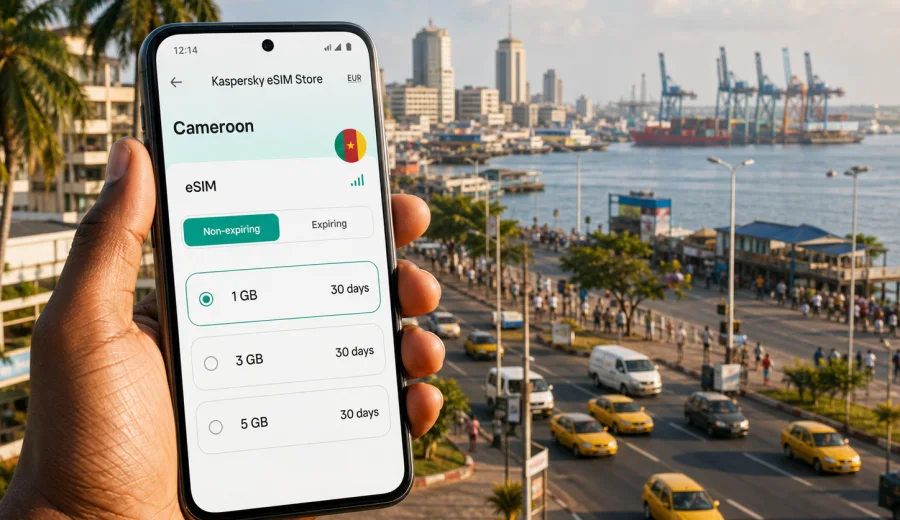
Douala eSIM: mobile connection and internet for a trip to Cameroon’s port city
Douala is where many trips to Cameroon become practical very quickly. You may arrive for meetings near Bonanjo, a port-related project, a stop before Yaounde or Kribi, or a few days around Akwa, Bonapriso, Bali and the Wouri River. Mobile internet affects how you leave Douala International Airport, contact a hotel driver, check a meeting address, follow traffic and keep documents available when Wi-Fi is unreliable.
An eSIM can make that first day easier because you do not need to search for a physical SIM card immediately after landing. With a compatible phone, you can prepare a digital SIM profile before the trip, activate it when the selected tariff allows it, and use mobile data for navigation, messaging, ride coordination, email, banking apps and online check-ins.
This guide focuses on Douala, not Cameroon in general. The country matters because the eSIM tariff is selected for Cameroon, but the real travel problem is local: moving through a large coastal business city where the airport, port, offices, hotels, markets and road traffic can pull you in different directions on the same day.
Why mobile internet matters in Douala
Douala is Cameroon’s largest city and main economic hub. It is busy, humid, commercially active and spread across districts that can feel very different from one another. The airport is close to the city compared with many international destinations, but short distances do not always mean short journeys. Traffic, rain, checkpoints and changing pick-up points can make a reliable data connection more useful than a printed address.
Mobile internet is especially helpful in Douala for:
- confirming airport pick-up details after landing;
- sharing live location with a driver or colleague;
- checking hotel access instructions in Bonapriso, Akwa or Bonanjo;
- comparing routes around the Wouri River crossings;
- keeping messaging apps active during business days;
- using maps while visiting offices, banks, port facilities or conference venues;
- checking onward travel details for Yaounde, Kribi or Limbe;
- translating short messages when several languages appear in the same travel day.
Public Wi-Fi can help in hotels, offices and some cafes, but it is not a complete travel plan. You may need data before you reach the lobby, while a driver is waiting in another lane, or when you are between appointments.
Where a Douala eSIM helps first
The first useful moment is often Douala International Airport. You may want to message that you have landed, open a map, check the address of your hotel, or confirm whether your meeting point is at the terminal exit, a parking area or a nearby road. If your regular roaming is expensive or disabled, these small tasks become awkward.
An eSIM does not replace all travel preparation, but it reduces the number of things you must solve at the airport. You can land with the eSIM profile already installed on your phone, then activate mobile data according to the selected tariff’s instructions. That can be useful if you arrive late, if the airport is crowded, or if you would rather postpone local SIM shopping until later.
Typical first-day data uses in Douala include:
| Situation | Why mobile data helps |
|---|---|
| Airport arrival | Contact a driver, check messages, open booking details |
| Hotel transfer | Follow the route and share your location |
| First meeting | Confirm office entrance, timing and contact person |
| Evening plan | Search a restaurant, call a ride, check road conditions |
| Stopover | Keep messaging and maps active without relying on terminal Wi-Fi |
The main point is control. You do not need a large amount of data for every task, but you need access at the exact moments when Wi-Fi is least predictable.
Choosing data for Douala: match the tariff to the trip
The right eSIM tariff depends on how you use your phone, not just how long you stay. A traveler spending two days between the airport, hotel and a few meetings may need less data than someone using maps all day, uploading photos, joining video calls and tethering a laptop.
Use this simple planning approach:
| Trip style in Douala | Likely data pattern | Practical note |
|---|---|---|
| Overnight stopover | Messaging, maps, bookings | Keep data ready for arrival and departure |
| Business trip | Email, documents, ride coordination, messaging | Allow extra data for file previews and calendar changes |
| City visit | Maps, searches, photos, restaurant planning | Offline maps can reduce usage |
| Regional base | Douala plus trips to Kribi, Limbe or Yaounde | Choose a tariff that fits the whole Cameroon route |
| Remote work day | Hotspot, video calls, cloud files | Check hotspot rules and data volume carefully |
Video calls, cloud backups and app updates can use much more data than maps or messaging. Before you travel, disable automatic updates and background photo uploads on mobile data. If you expect to use your phone as a hotspot for a laptop, check the selected tariff’s conditions and your phone settings before relying on it for a full workday.
Districts and movement: why city focus matters
Douala is not a single compact tourist zone. Business visitors may move between Bonanjo, Akwa, Bonapriso and port-related areas. Longer stays may include Deido, Bonamoussadi, Makepe, Bali, New Bell or roads leading out of the city. Each transfer can involve a different meeting point, entrance gate or driver instruction.
Mobile internet helps with the practical layer of these movements:
- Akwa: restaurants, offices, nightlife addresses and hotel coordination.
- Bonanjo: administrative, banking and business appointments.
- Bonapriso: hotels, restaurants and airport-access planning.
- Deido and Bonamoussadi: local visits and cross-city routes.
- Wouri River area: route checks when bridges and traffic affect timing.
If traffic changes your route while you are moving, mobile data lets you send a location pin, check whether a meeting has shifted, or tell a colleague that you are delayed.
Prepare your phone before you land
Preparation is the difference between “I have an eSIM” and “I can actually use it when I need it.” Before your flight to Douala, do these checks while you still have stable internet:
1. Check that your phone supports eSIM and is not locked to one mobile operator.
2. Make sure your operating system is up to date enough to install an eSIM profile.
3. Save your hotel address and key contacts offline.
4. Download an offline map area for Douala in your maps app.
5. Turn off automatic cloud backups and app updates over mobile data.
6. Keep the eSIM installation details available outside your email inbox, in case you need them while switching connections.
If you are not sure whether your phone supports eSIM, check your device before choosing a tariff. Compatibility is important because eSIM depends on both the device model and its lock status. Some phones sold in different markets have different eSIM support, even when their names look similar.
When to install and activate an eSIM for Douala
It is usually more comfortable to install the eSIM profile before departure, while you are on reliable Wi-Fi. Activation timing depends on the selected tariff, so read the terms before you start. Some tariffs begin when the eSIM connects to a supported network at the destination; others may have different validity rules.
If you need installation guidance, use the official step-by-step pages for your device: Android eSIM setup instructions and iOS eSIM setup instructions. Keep your primary SIM active if you still need calls or SMS on your regular number, and set the eSIM as the mobile data line when you want to use the travel data tariff.
In phone settings, check these points:
- the eSIM profile is installed and named clearly, for example “Cameroon data”;
- mobile data is assigned to the eSIM line when you want to use it;
- data roaming is enabled for the eSIM if the tariff instructions require it;
- your regular SIM remains available for calls or SMS if you need bank codes or work calls;
- low data mode or data saver is configured if you want to reduce usage.
Kaspersky eSIM Store is an app and website where you can choose, arrange and activate an eSIM with a suitable mobile data tariff for international travel. For a Douala itinerary, you can choose an eSIM tariff for Cameroon before your trip and keep the setup ready for airport arrival, hotel transfers and city movement.
Douala scenarios: how much connectivity do you really need?
Different travelers use mobile data differently in the same city. A practical estimate is better than choosing blindly.
| Scenario | Data priority | Planning tip |
|---|---|---|
| Short business visit | Maps, email, ride coordination, urgent documents | Download large presentations over hotel or office Wi-Fi |
| Port, logistics or field work | Location sharing, files, multiple contacts, route changes | Choose a data volume that leaves room for unexpected use |
| Stopover in Douala | Messages, flight updates, airport transfer details | Keep setup simple and ready before landing |
| Douala as a Cameroon base | Douala plus Yaounde, Kribi, Limbe or Buea | Choose for the whole route, not only the first night |
The same Cameroon-focused eSIM tariff can be relevant beyond Douala, but conditions, coverage and speed depend on the selected tariff and local network circumstances.
eSIM, roaming and local SIM cards in Douala
There is no single best option for everyone. Standard roaming may be convenient if your home operator offers a suitable package. A physical local SIM can help on longer stays, especially if you need local voice services. An eSIM is often practical when you want mobile data ready without visiting a shop immediately after arrival.
| Option | Strength | Limitation |
|---|---|---|
| Home roaming | Uses your existing number and billing | May be expensive or limited, depending on your operator |
| Local physical SIM | Can be useful for longer stays and local calling needs | Requires time, a shop visit and local registration process where applicable |
| Travel eSIM | Can be prepared before arrival and used for mobile data | Requires a compatible unlocked device and careful tariff selection |
For many visitors, the practical setup is to keep the regular SIM for calls or SMS and use the eSIM for mobile data.
Arrival checklist for Douala
Use this checklist before leaving the aircraft or airport Wi-Fi area:
- eSIM profile is installed on the phone.
- Mobile data is assigned to the eSIM line.
- Data roaming is enabled for the eSIM if required by the instructions.
- Your hotel address is saved offline.
- Your driver or meeting contact has your arrival update.
- Battery is above a comfortable level or a power bank is ready.
- Your regular SIM remains active if you need calls or SMS.
After you leave the airport, keep your first online tasks simple: confirm the route, message your contact, and avoid large downloads until you reach stable Wi-Fi.
Common mistakes to avoid
Many eSIM problems are not caused by the eSIM itself, but by rushed setup. Avoid these mistakes:
- waiting until the airport exit to read installation instructions for the first time;
- assuming every phone model supports eSIM;
- deleting an eSIM profile after activation without checking whether it can be reinstalled;
- leaving mobile data assigned to the wrong SIM line;
- using video streaming or cloud backup on a small data package;
- forgetting that eSIM data usually does not include a regular phone number, voice calls or SMS unless the tariff states otherwise;
- buying for the wrong country when the trip is focused on Cameroon.
Read the selected tariff’s validity period, data allowance and activation rules before the trip. A calm five-minute check at home is easier than troubleshooting after a long flight.
Quick answers about eSIM in Douala
Is an eSIM useful for Douala International Airport?
Yes, if your phone is compatible and the selected tariff is set up correctly. It can help you contact a driver, check hotel details, use maps and send arrival updates.
Does a travel eSIM give me a Cameroonian phone number?
Usually, travel eSIM tariffs for mobile internet are data-focused and do not include a regular phone number, voice calls or SMS unless this is clearly stated in the tariff conditions.
Can I use eSIM data for trips from Douala to other places in Cameroon?
A Cameroon tariff is selected for the country, so it can be relevant beyond Douala. Actual experience depends on the selected tariff, local network conditions and where you travel.
Should I install the eSIM before flying?
In most cases, yes. Installing the profile before departure on stable Wi-Fi is easier. Activation timing depends on the tariff’s rules, so check the instructions before turning on the data line.
Choose mobile internet for a Douala trip
A Douala trip often depends on small online moments: a driver message at the airport, a map near the Wouri River, a changed meeting time in Bonanjo, a hotel detail in Bonapriso, or a route update before leaving for Yaounde or Kribi. Preparing eSIM data before arrival keeps those moments from turning into avoidable delays.
Before you travel, check device compatibility, choose a data volume that matches your itinerary, install the eSIM profile on reliable Wi-Fi and keep your regular SIM available if you need calls or SMS. For a city-focused trip, you can prepare an eSIM tariff for Cameroon through Kaspersky eSIM Store and arrive in Douala with mobile internet planning already handled.