
Travel connectivity guide
Dresden eSIM: mobile internet for your trip
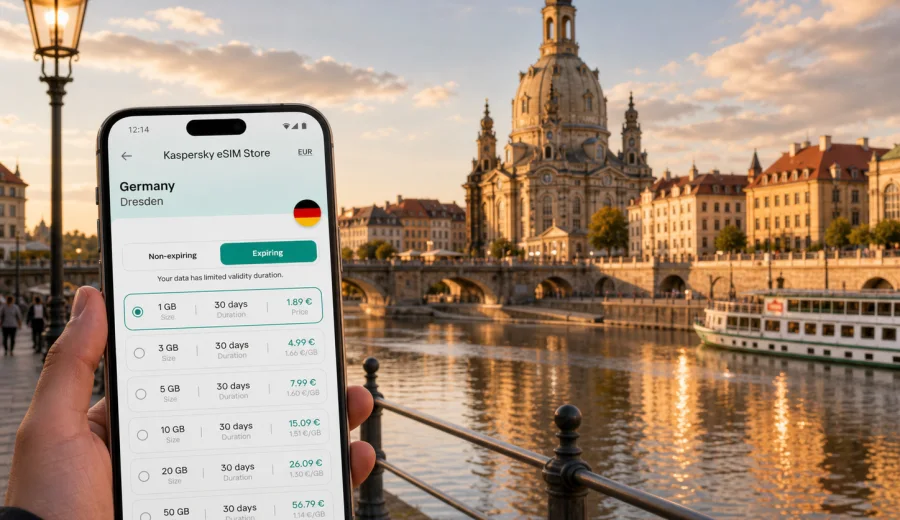
Dresden eSIM for mobile connection and internet: a practical city guide
Dresden is an easy city to enjoy when your phone is ready before you start moving. The airport is north of the city, Dresden Hauptbahnhof sits close to the Altstadt and southern districts, and many first-time routes cross the Elbe between the historic center, Neustadt, hotels, museums, conference venues, and day-trip platforms. An eSIM can make that first hour simpler because you can use mobile internet for maps, tickets, hotel messages, ride apps, and travel updates without looking for a local SIM card shop.
This guide is focused on Dresden, not on Germany in general. It covers arrival, local transport, districts, hotels, business travel, stopovers, and trips from the city, with practical notes on how to plan mobile data for a visit. Kaspersky eSIM Store is an app and website where you can choose, set up, and activate an eSIM with a suitable data plan for international travel. It is useful when you want to prepare mobile internet before departure or shortly after arrival, while keeping the plan conditions visible.
Why mobile internet matters in Dresden
Dresden rewards walking, but it also spreads key places across both sides of the Elbe. A typical day can include the Frauenkirche, Zwinger, Semperoper, Bruehl's Terrace, Neustadt cafes, a tram to a hotel, and an evening booking near the river. Even if your route is short, your phone often handles the details:
- checking the S-Bahn from Dresden Airport to the center;
- opening a hotel confirmation near Altmarkt or Prager Strasse;
- finding the right tram platform after dinner;
- using maps around the Elbe bridges and Neustadt lanes;
- translating menus, museum information, or parking instructions;
- messaging colleagues during a trade visit or conference day;
- checking weather before a boat trip or a walk in Saxon Switzerland.
Public Wi-Fi can help in hotels, cafes, and larger venues, but it is not a complete travel plan. You may need directions while walking, while standing at a tram stop, or while carrying luggage between the station and your accommodation. An eSIM gives you a separate data profile on a compatible device, so you can keep your regular SIM for calls if you need it and use the eSIM for mobile internet during the trip.
Dresden arrival scenarios
Your best eSIM setup timing depends on how you enter the city. Dresden is smaller than Berlin or Frankfurt, but the first route still matters because luggage, weather, and ticket machines can make offline navigation inconvenient.
| Arrival point | What mobile data helps with | Practical eSIM note |
|---|---|---|
| Dresden Airport | S-Bahn timing, hotel address, tickets, ride coordination | Install the eSIM before departure and activate according to the plan instructions when you are ready to use data. |
| Dresden Hauptbahnhof | Walking route, tram stops, hotel check-in messages | Keep the QR code or installation details accessible before you leave your home network. |
| Dresden-Neustadt station | Neustadt hotels, restaurants, and river crossings | Mobile maps are useful because this station serves a different side of the city. |
| Car or coach arrival | Parking, pickup messages, route updates | Check data volume if you expect long navigation sessions. |
For a short city break, a small data plan may be enough if you mostly use maps, messaging, tickets, and light browsing. For a longer stay with laptop tethering, frequent video calls, cloud work, or day trips, choose more data and check whether hotspot use is supported by the selected plan.
Where eSIM helps most inside the city
The Altstadt is compact, but Dresden trips often move in loops. You may start at the Frauenkirche, walk to the Zwinger, cross to Neustadt, return by tram, and then continue to a restaurant or hotel. Mobile internet helps when the day changes in real time: a museum slot moves, rain changes your walking plan, a hotel sends a late check-in note, or a colleague changes the meeting point.
For basic maps, messaging, tickets, and restaurant searches, a smaller data package can be enough. Add more data for video calls, hotspot, photo backup, family coordination, or day trips to Meissen, Pillnitz, Moritzburg, or Saxon Switzerland.
Check device compatibility before you buy
An eSIM works only on devices that support eSIM and are not restricted by a carrier lock. Before choosing a plan, confirm that your phone or tablet can add an eSIM profile and use mobile data abroad. You can use the internal compatibility check here: check your device.
Also review these points before the trip:
- your device supports eSIM for the model and region you own;
- the device is not locked to one carrier;
- you can access Wi-Fi during installation if the plan requires downloading an eSIM profile;
- you know which SIM profile will be used for mobile data;
- you understand whether ordinary phone calls and SMS are included in the selected plan conditions.
In many travel setups, the eSIM is used for mobile internet, while your regular SIM remains available for your usual number. If voice calls or SMS are important, check the conditions of the selected plan instead of assuming they are included.
When to set up your Dresden eSIM
For most travelers, the easiest approach is to prepare the eSIM before leaving home, then activate mobile data when the trip begins or when the plan instructions say activation should happen. This avoids trying to download an eSIM profile while tired, offline, or standing in a station.
A practical setup flow:
1. Choose Germany as the destination because Dresden is in Germany.
2. Select a data plan that matches your trip length and expected data use.
3. Check that your device supports eSIM.
4. Install the eSIM profile while you have stable Wi-Fi.
5. Keep your regular SIM active if you need your usual number.
6. On arrival, select the eSIM for mobile data according to your device settings and plan instructions.
7. Monitor data use if you rely on maps, video calls, or hotspot.
If you need step-by-step setup details, follow the relevant installation guide for your device: Android installation guide or iOS installation guide. Device menus can vary by model and system version, so check the final confirmation screen before you leave your home Wi-Fi.
Dresden districts and mobile data use
Different parts of Dresden create different phone habits. A visitor staying near the main station may use mobile data mostly for walking routes and ticket checks. Someone staying in Neustadt may rely more on restaurant searches, tram times, and late-night navigation. A business traveler moving between a hotel, meeting venue, and train station may need email and calendar access throughout the day.
| Area | Why visitors go there | How mobile internet helps |
|---|---|---|
| Altstadt | Frauenkirche, Zwinger, Semperoper, museums, river views | Walking routes, ticket confirmations, time slots, translation, restaurant searches. |
| Aussere Neustadt | Cafes, nightlife, courtyards, independent shops | Late transport options, group messaging, ride coordination. |
| Prager Strasse and Hauptbahnhof | Shopping, hotels, rail arrival, business stays | Check-in details, train updates, tram planning, luggage-friendly routes. |
| Blasewitz and Loschwitz | Elbe views, Blue Wonder bridge, hillside trips | Maps, weather, route changes, photo sharing. |
| Messe and event areas | Exhibitions, meetings, conferences | Calendar updates, email, document access, taxi or tram coordination. |
This is where a city-focused eSIM plan becomes practical: it supports small decisions all day, not only the first connection after landing. To prepare in advance, you can choose a mobile internet plan for Germany through Kaspersky eSIM Store and keep the setup ready for Dresden before the trip starts.
Public transport, walking, and ride planning
Dresden has a useful network of trams, buses, S-Bahn routes, and regional trains. The city is comfortable for walking, but distances can become longer than they look when you combine the Altstadt, Neustadt, riverside areas, and hotel locations. Mobile data helps you switch between transport modes without losing time.
Use mobile internet for:
- checking whether walking or tram is faster in the moment;
- finding the correct stop direction, not just the stop name;
- confirming platform changes at Hauptbahnhof or Dresden-Neustadt;
- opening digital tickets or booking references;
- sharing live location with a travel companion;
- checking service changes during events, holidays, or bad weather.
If you plan to use maps heavily, download offline maps as a backup before the trip. Offline maps are useful, but they do not replace live transport updates, opening hours, ticket links, hotel messages, or route changes caused by delays. Treat offline maps as a reserve and mobile internet as your working connection.
Business travel in Dresden
Dresden is also a city for technology, research, manufacturing, education, and regional meetings. Business travelers often need mobile internet for calendar changes, email, document links, internet-based calls, taxis, and movement between the hotel, station, and venue. If you expect to use hotspot for a laptop, check the selected plan conditions and choose enough data; one video meeting can use more data than a full day of maps and messaging.
For business trips, make sure the plan duration covers arrival evening and departure morning. A plan that ends before your train or flight home can be inconvenient if you need last-minute messages, boarding details, or route updates.
Short stopovers and one-day visits
Dresden is a strong stopover city because the main station is close to the center. If you have only a few hours, mobile internet helps you move quickly without overplanning.
A simple one-day route might be:
1. Arrive at Dresden Hauptbahnhof.
2. Walk or take a tram toward the Altstadt.
3. Visit the Frauenkirche area and Bruehl's Terrace.
4. Continue to the Zwinger or Semperoper.
5. Cross the Elbe for a Neustadt coffee stop if time allows.
6. Return to the station with live transport timing.
In this scenario, your phone needs are concentrated: maps, tickets, opening hours, restaurant search, and train updates. A small eSIM data plan may be enough, but make sure the validity period fits the exact day and that activation timing is clear.
Hotels, apartments, and digital check-in
Hotel Wi-Fi helps after check-in, but not while you are still outside with luggage. Apartments and smaller guesthouses may send door codes, building instructions, or arrival forms through email or messaging apps. Save the hotel address, booking reference, check-in window, host contact, door code, nearest tram stop, and emergency details offline. Then use mobile data for live route changes, updated messages, and translation.
Day trips from Dresden
Many Dresden trips extend beyond the city. Popular directions include Meissen, Moritzburg, Pillnitz, Saxon Switzerland, and regional rail routes across Saxony. These trips often increase data use because you check train connections, weather, walking routes, river transport, and return times more often than during a museum day in the center.
| Trip from Dresden | Why data helps | Planning note |
|---|---|---|
| Meissen | Regional trains, walking routes, opening hours | Save the return route and allow data for schedule changes. |
| Pillnitz | River or tram and bus combinations, park information | Check weather before leaving because plans are outdoor-heavy. |
| Moritzburg | Bus timing, castle visit details, return connections | Keep extra battery and data margin for less familiar routes. |
| Saxon Switzerland | Train times, hiking maps, weather, return planning | Download offline maps too; mobile data is helpful but should not be your only safety tool on trails. |
| Leipzig or Berlin connection | Rail updates, platform changes, hotel messages | Choose plan duration that covers onward travel, not only Dresden nights. |
If your route includes several German cities, a Germany plan is usually easier than treating Dresden as a standalone connection problem. The key is to match the plan to your whole movement pattern.
Practical data-saving tips
Download offline maps before leaving Wi-Fi, pause automatic cloud photo backup, disable app updates on mobile data, save PDFs for tickets and hotel bookings, and monitor usage after the first full day. These habits are useful on family or business trips, where one phone may handle more searches and coordination than expected.
Quick checklist before departure
Use this checklist before your Dresden trip:
- Your phone supports eSIM and is not carrier-locked.
- You selected Germany as the destination for a Dresden visit.
- The plan duration covers arrival, full days in the city, day trips, and departure.
- The data volume fits your expected use: maps, messages, tickets, work, hotspot, and calls through internet apps.
- You installed the eSIM profile on stable Wi-Fi.
- You know when plan validity starts.
- You saved hotel and transport details offline.
- You know where to switch mobile data between SIM profiles in your phone settings.
Common questions about eSIM in Dresden
Is Dresden large enough to need mobile data?
Yes. The historic center is walkable, but hotels, Neustadt, stations, event venues, restaurants, and day trips can spread your day across multiple routes. Mobile data is useful for live decisions.
Should I choose Germany or Dresden as the destination?
Choose Germany because Dresden is in Germany and city articles use the country plan page. Check the plan conditions and coverage details before purchase.
Does eSIM replace my normal phone number?
Not necessarily. In many travel setups, the eSIM is used for mobile internet while your regular SIM remains available for your usual number. Calls and SMS depend on the selected plan conditions.
Is hotel Wi-Fi enough for a weekend?
Hotel Wi-Fi helps in the room, but it does not cover station arrival, walking routes, tram changes, apartment check-in, or day trips. A mobile data plan fills those gaps.
Prepare your eSIM for Dresden
Dresden is easiest when your phone is ready for the small decisions: which tram to take, where to cross the river, how to reach your hotel, whether a museum time slot changed, and how to get back from Neustadt or a day trip. An eSIM helps you handle those moments with mobile internet on a compatible device, without relying only on public Wi-Fi or searching for a physical SIM card after arrival.
Before you travel, check device compatibility, choose the data volume and duration that fit your route, install the eSIM while you have stable Wi-Fi, and keep the activation instructions available. When you are ready to prepare the connection for your trip, select an eSIM data plan for Germany in Kaspersky eSIM Store and set it up before you start exploring Dresden.