Travel connectivity guide
Dublin eSIM: Mobile Internet and City Travel Guide
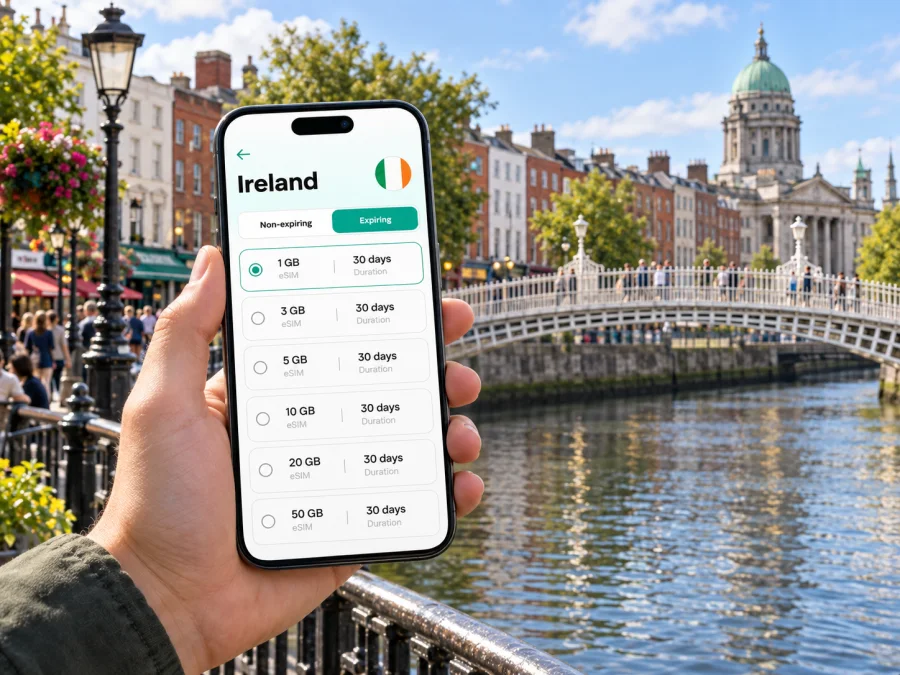
Dublin eSIM: mobile connection and internet for exploring the city
Dublin is easy to approach on foot in its central areas, but a visit can quickly stretch from the airport to a hotel, a meeting across the River Liffey, an evening in Temple Bar or a coastal outing beyond the centre. A reliable way to check maps, messages, tickets and changing plans makes those transitions simpler. An eSIM can give your phone mobile data without swapping out its physical SIM, provided your device supports eSIM and is not locked to a network.
This guide focuses on using mobile internet around Dublin: what to prepare before landing, how to find your way between neighbourhoods, and what to keep in mind on a short stopover or business trip. The aim is practical preparation, not a packed itinerary. Your exact route, accommodation and data use will determine what is useful for you.
Before you leave: set up for the first hour
After a flight, you may need to find a bus, confirm a hotel address or message someone that you have arrived. Save essential details offline, then decide how you want your phone to connect in Ireland.
An eSIM is a digital SIM profile installed on a compatible phone. Depending on the plan, it can provide mobile data for travel. It does not automatically replace your usual number or include voice calls and SMS; check the specific plan details. Many travellers keep their home SIM available for calls or verification messages and use the travel eSIM for data. The settings differ by phone, so review them before departure rather than changing them in a hurry at arrivals.
A few checks before the flight can help:
- Confirm that your phone supports eSIM and is not carrier-locked.
- Check the plan’s destination, data allowance, validity period and activation conditions.
- Install the profile while you have a dependable internet connection, if the plan instructions allow it.
- Keep installation details accessible if you may need them.
- Know which SIM is selected for mobile data and whether data roaming must be enabled for the travel profile.
- Download the part of Dublin you expect to visit in your preferred map app, and save your hotel address.
- Carry a charging cable or power bank if you expect a long travel day; maps and camera use can drain a battery faster.
Follow the plan’s setup guidance and the device instructions for Android or iPhone. Check activation terms: installation and the start of validity may be separate events.
Landing at Dublin Airport and getting into town
Dublin Airport is north of the city centre, with bus connections into town and beyond. The best service depends on your arrival time and final address. Check current route and stop information before travelling, and use a map to compare the stop with your accommodation.
At arrivals, confirm the bus destination and compare its stop with your hotel address. “Central” accommodation may still require a walk. With heavy bags, a late arrival or a colleague to meet, a taxi or pre-arranged transfer may be more convenient. Keep pickup details accessible in case your battery is low.
For a first-time visitor, a simple arrival sequence works well:
- Connect using the data option you prepared and check that maps load.
- Confirm the accommodation’s full address and entrance.
- Compare airport bus options with your destination and arrival time.
- Save the stop or pickup point, then check the final walk when you arrive.
If you plan to use public transport repeatedly, check the current ticket and payment options for each service. Dublin has buses, the Luas tram, DART and commuter rail; they serve different routes. Allow extra time while you learn the stops.
Choose where to stay by the shape of your trip
Dublin’s central districts can be combined on foot, but they have different rhythms and transport links. Choose accommodation around the places you need to reach, not just one landmark. A stop nearby can help with cross-city trips; a central address suits plans clustered around the centre.
| Area or base | Often useful for | Check before booking |
|---|---|---|
| Area or base | Often useful for | Check before booking |
| --- | --- | --- |
| Trinity College and south centre | Central sights and walking routes | Exact street and evening noise |
| Temple Bar and the quays | Evening plans near the river | Crowds and late-night activity |
| Merrion or Fitzwilliam Square | Meetings and museums | Walk to your venue or transit |
| Grand Canal Dock | Offices and events | Whether plans are mostly east of centre |
| Smithfield and north side | North-side venues and tram links | Bridge and stop for daily routes |
| Portobello | Cafés and residential streets | Walk to the centre with luggage |
These are broad areas, not precise boundaries. Compare the street address with your appointments and transit options; avoiding a daily transfer can matter more than staying beside one attraction.
Dublin’s distinct neighbourhoods extend beyond the centre. Coastal areas such as Clontarf and Sandymount can suit a longer stay, but change the balance between city time and local exploration. If you stay outside the centre, check the evening route and the final walk.
Getting around: pair the map with the transport mode
The centre rewards walking, though weather, crowds and fatigue can change the plan. Check the actual route rather than straight-line distance. Many central trips cross the Liffey, and the nearest bridge may affect the route.
The Luas has Red and Green tram lines serving different corridors. Check the line, direction and service updates; it will not be door-to-door for every address. DART and commuter rail suit some longer and coastal journeys. Buses reach many parts of the city, though traffic affects timing.
A quick way to choose between walking, bus, tram and rail is to ask three questions:
- Are both ends near a stop? A direct walk may be simpler than a detour.
- Is timing important? Allow for traffic and finding the right stop or platform.
- Are you carrying bags or travelling late? Fewer changes may be preferable.
Mobile data helps at decision points: leaving a station, crossing the river, changing lines or turning into a smaller street. Preview the route and identify landmarks before setting off. Save an offline map as backup, and do not use a moving map while crossing a busy road.
Check current fares and ticket rules with the relevant transport provider. Payment options and terms differ, so do not assume one ticket covers every bus, rail or airport service.
Planning data for the way you actually travel
The right data allowance depends on how you travel. Maps and messages usually require less than video calls, uploads or streaming. Wi-Fi can reduce mobile use, while data is useful outdoors and between locations.
List the activities you expect to do away from Wi-Fi, then compare the plan’s allowance, validity, data-only terms and activation timing with your trip.
When you are ready to compare an option for your destination, review eSIM plans for Ireland in Kaspersky eSIM Store. The app and website help you select, arrange and activate an eSIM with a suitable plan for mobile internet during an overseas trip. Compare the plan’s data allowance and validity with your expected dates and use, rather than choosing only by headline size.
| Likely use | Consider |
|---|---|
| Maps and messages | Trip length and offline maps |
| Photo or video sharing | Whether uploads can wait for Wi-Fi |
| Remote work | Call duration, backup and hotel Wi-Fi |
| Day trips | Ireland coverage and validity dates |
| Stopover | Whether data is needed beyond the airport transfer |
Your phone’s data-usage screen can help estimate a normal day. To conserve data, pause automatic media backups and large updates before limiting navigation or messaging. A laptop hotspot may use data quickly; check whether the plan supports it.
Dublin for work: reduce the gaps between appointments
A work trip may combine the airport, hotel, office and an evening venue. Save each address, check nearby transit and allow time for connections if your schedule is tight.
Use mobile data for live tasks such as confirming a room change or messaging a colleague. Download files in advance. For calls, test hotel Wi-Fi and check whether your plan supports hotspot use.
For Docklands meetings, a nearby hotel may simplify early starts; a central base can suit appointments across town. Check the walk from the nearest stop and the return route after an event.
A compact workday checklist:
- Save the venue name, full address and contact details.
- Check the return route before an evening event begins.
- Keep calendar details available offline in case a network connection is delayed.
- Confirm data and hotspot terms before relying on a phone for a laptop.
- Carry a charger for a day that combines navigation, calls and photos.
Stopovers and short visits
With only a few hours in Dublin, plan backwards from your required airport return time. Include both transfers, check-in requirements and a traffic margin; usable time is less than the gap between flights.
Choose one compact area and keep boarding details and the airport route accessible. Check the return journey before adding another stop.
For an overnight stop, confirm the airport transfer hours and whether the last leg is walkable with your bags. If continuing within Ireland, save the departure station and route from your hotel.
Day trips from Dublin: keep the city as your base
Dublin is a starting point for trips across Ireland. Options and schedules depend on the destination and date, so check the current timetable and exact departure station or bus stop.
For a coastal outing or longer excursion, download route details, keep tickets offline and note the return time. Connectivity may vary along the route, so do not rely on continuous access.
If your itinerary extends beyond Dublin, confirm Ireland coverage and validity for the full trip.
If the eSIM does not connect as expected
Check that the profile is installed and enabled, selected for mobile data, and set up according to the plan’s network and roaming instructions. Restarting the phone may help it register again.
If needed, confirm the plan is active for your date and destination. Keep Wi-Fi available for troubleshooting and do not delete the profile unless support tells you to. Note your device model and any error message.
Before you leave home, check whether the phone is compatible with eSIM and unlocked for use with another profile. You can check whether your device supports eSIM before choosing a plan. Device support varies by model, region and carrier configuration, so confirm the exact handset rather than relying on its product family name alone.
Frequently asked questions
Is an eSIM useful for a weekend in Dublin?
It can provide data for maps and messages without replacing a physical SIM. Check device support, plan validity and activation timing.
Can I keep my usual phone number?
You may be able to keep your regular SIM installed and use the travel eSIM for data. Check device settings and home-carrier charges, then select the intended data line.
Does a data eSIM include calls and text messages?
Not necessarily. Check plan details for calls or SMS; internet-based messaging apps can use data.
Should I install the eSIM before I arrive?
It depends on activation conditions. Read the plan instructions; installation and validity start may be separate events.
Will mobile data work in every building or on every route?
Signal can vary by location and building. Keep important addresses and tickets available offline.
Do I need data if my hotel has Wi-Fi?
Wi-Fi can cover some tasks at the hotel; mobile data helps with navigation and messages outside. Estimate use based on what you will do away from Wi-Fi.
A calmer first day in Dublin
A little preparation helps: save your address, choose a suitable airport transfer, and compare walking, bus, Luas and rail for your daily routes. Keep maps and tickets available offline.
Before departure, confirm device support, installation steps, activation timing and data allowance. Use Kaspersky eSIM Store to compare and activate an eSIM through the Ireland plan options and choose a plan that fits your dates and expected use.


