
Travel connectivity guide
Dubrovnik eSIM: mobile internet travel guide
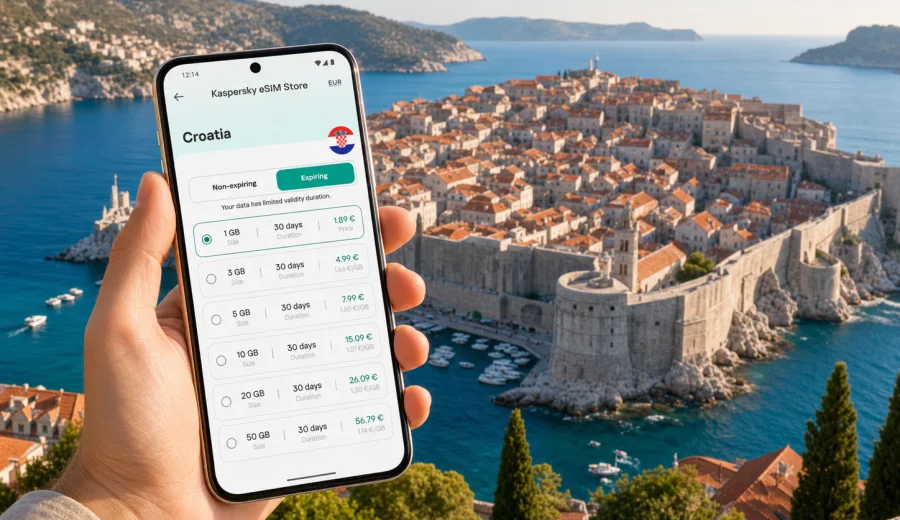
Dubrovnik eSIM: mobile connection and internet for your trip
Dubrovnik is a compact city, but it asks a lot from your phone. You may land at Dubrovnik Airport, message your hotel about a late check-in, open a map for the coastal road, book a transfer, translate a restaurant menu, find the right gate into the Old Town, and share photos from the city walls on the same day. A reliable mobile connection is part of moving through the city calmly.
An eSIM can make that first day easier because you do not need to look for a physical SIM card after arrival. You can choose a data plan for Croatia before the trip, install it on a compatible device, and use mobile internet when the trip begins according to the conditions of the selected plan. For Dubrovnik, this is especially practical because many important travel moments happen outside a hotel lobby: on the airport road, by the Pile Gate, on the ferry pier, in a taxi, or while walking between steep stone streets.
This guide focuses on Dubrovnik, not Croatia in general. You will find practical advice for airport arrival, local transport, Old Town walks, beaches, hotels, business trips, short stopovers, and day trips from the city.
Why mobile internet matters in Dubrovnik
Dubrovnik looks simple on a map: Old Town, port, beaches, hotels, airport road, and nearby islands. In practice, the terrain is hilly, many streets are pedestrian-only, and the best route can change depending on luggage, heat, cruise ship crowds, or ferry times. Mobile internet helps you make small decisions without losing time.
Typical Dubrovnik tasks that need data:
- checking the route from Dubrovnik Airport to your hotel or apartment;
- messaging a host in Ploce, Lapad, Babin Kuk, Gruz, or near the Old Town;
- opening walking navigation where cars cannot enter;
- checking ferry and boat departure points;
- using ride-hailing, taxi apps, or local transfer messages;
- finding a bus stop after dinner or a beach visit;
- managing boarding passes and travel documents;
- keeping in touch with family, colleagues, or a tour provider.
Public Wi-Fi can help in hotels, restaurants, and some public spaces, but Dubrovnik travel rarely stays in one place. The moments when you need connection most are often between Wi-Fi zones: waiting outside the airport, walking uphill to accommodation, finding a meeting point near Pile Gate, or deciding whether to continue to Lapad, Banje Beach, or the port of Gruz.
Arrival at Dubrovnik Airport
Dubrovnik Airport is in Cilipi, southeast of the city. The drive to Dubrovnik often takes around 30 to 45 minutes, depending on traffic, border-season congestion, weather, and where you stay. The route is scenic, but it is also the first moment when you may need a working phone.
Before leaving the airport area, mobile internet can help you:
1. Confirm the exact hotel or apartment entrance.
2. Message the host if your arrival time changes.
3. Open the transfer voucher or shuttle ticket.
4. Check whether your accommodation is inside a pedestrian zone.
5. Decide whether to go first to Old Town, Lapad, Gruz, or Babin Kuk.
If your accommodation is inside or next to the Old Town walls, check the arrival instructions carefully. Drivers usually cannot take you directly to every door. You may be dropped near Pile Gate, Ploce Gate, Buza Gate, or another edge of the pedestrian area, then continue on foot. With luggage, steps, and crowds, online maps and host messages are useful.
Choosing an eSIM plan for Dubrovnik
For Dubrovnik, choose an eSIM plan by matching data volume and validity period to your real travel style. A short weekend in the Old Town needs less data than a week with beaches, islands, video calls, and day trips. The best choice is not simply the largest plan; it is the plan that fits your route, app habits, and length of stay.
| Travel scenario in Dubrovnik | Likely data needs | What to check before choosing |
|---|---|---|
| 2-3 day city break | Low to moderate | Maps, messaging, tickets, restaurant searches |
| 5-7 day holiday | Moderate | Beaches, ferries, photo backup, frequent navigation |
| Business trip | Moderate to high | Video calls, email, documents, hotspot rules |
| Cruise stop or long stopover | Low | Short validity, quick setup, map access |
| Dubrovnik plus islands or Montenegro day trips | Moderate to high | Country or regional coverage in the selected plan |
Most travelers underestimate navigation and messaging rather than video streaming. Dubrovnik has many narrow streets and stairways, so you may open maps repeatedly even when distances are short. If you plan to use cloud photo backup, video calls, or mobile hotspot, choose more data and check whether tethering is allowed under the conditions of the selected plan.
Where an eSIM is especially useful in the city
The Old Town is the main postcard view, but it is also the area where mobile internet can prevent small travel problems. Streets inside the walls are mostly pedestrian, some routes include long staircases, and accommodation entrances can be hard to identify. A live map and a working messenger help more than a printed address.
In Lapad and Babin Kuk, mobile internet helps with buses, beaches, restaurant reservations, and hotel transfers. These areas are popular for resort stays, but they are not always walking distance from the Old Town, especially in summer heat. In Gruz, data is useful for ferry information, port transfers, supermarket stops, and connections to islands. In Ploce, above Banje Beach and near the cable car area, elevation changes make route planning important.
Short practical rule: if you will move between the airport, Old Town, Lapad, Gruz, and beaches on the same trip, prepare mobile internet before the first transfer. It gives you more control when a route changes.
Before you install an eSIM
An eSIM is a digital SIM profile installed on a compatible phone or tablet. It is used for mobile data, while your usual SIM can often remain active for calls or messages if your device supports dual SIM settings. Conditions depend on your device and the selected eSIM plan.
Before choosing a plan, check your device. Make sure it supports eSIM, is not locked by a mobile operator, and can use the eSIM profile in the country where you plan to travel. Some device models differ by region, so do not rely only on the marketing name of the phone.
Also check these points:
- the plan destination is Croatia or covers Croatia as part of a wider region;
- the data volume fits your trip length;
- the validity period covers arrival and departure days;
- voice calls and SMS are not assumed unless they are clearly included;
- data roaming may need to be enabled for the eSIM on some devices;
- the installation instructions are available before you travel.
Kaspersky eSIM Store is an app and website where you can quickly choose, arrange, and activate an eSIM with a suitable data plan for mobile internet during an international trip. It is not a mobile network operator and does not provide its own mobile coverage. The actual network experience depends on the selected plan, local networks, device settings, location, and conditions in Dubrovnik.
A practical data plan approach for Dubrovnik
If you want a simple method, start with your itinerary and then choose the plan. A person staying two nights near Stradun will use mobile internet differently from someone staying in Lapad, taking boat trips, joining work calls, and using maps every day.
Use this checklist:
- Count full days in Dubrovnik, including arrival and departure.
- Add any day trips from Dubrovnik, such as Cavtat, Lokrum, Elaphiti Islands, Ston, or routes toward Montenegro or Bosnia and Herzegovina.
- Decide whether you will use mobile hotspot for a laptop or another traveler.
- Estimate whether you will stream video or mostly use maps and messaging.
- Check if your hotel Wi-Fi is enough for heavy uploads, and keep mobile data for movement.
- Choose a validity period that does not expire before the airport transfer back.
For many city travelers, the strongest reason to prepare an eSIM is not constant heavy usage. It is the ability to get online exactly when a booking, route, ticket, or message matters.
If you are planning a Dubrovnik trip and want to prepare mobile internet in advance, you can choose an eSIM data plan for Croatia through Kaspersky eSIM Store and review the available options for the destination before you travel.
Installing an eSIM before or during the trip
Install the eSIM while you still have stable internet access, such as home Wi-Fi or hotel Wi-Fi. Activation timing and data usage rules depend on the selected plan, so read the plan details before the trip. If you prefer to wait until arrival, make sure you can access the QR code or installation flow without relying on airport Wi-Fi at a stressful moment.
General installation flow:
1. Choose the destination and data plan.
2. Confirm that your phone supports eSIM.
3. Complete the order and open the eSIM details.
4. Add the eSIM to your phone using the on-screen steps or QR code.
5. Set the eSIM as the mobile data line when you want to use it.
6. Enable data roaming for that eSIM if the instructions or device settings require it.
7. Test that the correct line is selected for mobile data.
For device-specific steps, use the Android installation guide or the iOS installation guide. Keep your primary SIM active only if you need it for bank verification, calls, or SMS, and check your home operator's roaming charges before using it abroad.
Dubrovnik neighborhoods and connection needs
Old Town
The Old Town is dense, pedestrian, and full of small turns. Mobile internet is useful for walking routes, tickets, restaurant bookings, audio guides, and messages from accommodation hosts. If you stay inside the walls, ask the host which gate is easiest with luggage.
Pile and Ploce
Pile Gate is one of the main arrival points for the Old Town. Ploce is convenient for Banje Beach, the eastern gate, and hotels with sea views. Data helps when you coordinate transfers, find stairs versus road access, or check bus routes after a late dinner.
Lapad
Lapad is popular for hotels, beaches, cafes, and longer stays. You may use buses or taxis more often here, so mobile internet helps with route checks, pickup points, and restaurant reservations.
Babin Kuk
Babin Kuk is practical for resorts and family trips. A data plan is useful for beach days, hotel-to-Old-Town movement, and shared planning when people split up during the day.
Gruz
Gruz is the port area. You may come here for ferries, boats, supermarkets, or buses. If you plan island trips, keep enough data for schedules, tickets, weather checks, and return messages.
Transport, maps, and movement
Dubrovnik is not a city where every distance should be judged by kilometers alone. Hills, stairs, traffic around the gates, and summer temperatures matter. Mobile internet helps you compare walking, bus, taxi, boat, and transfer options in real time.
Useful travel patterns:
- Use walking navigation inside and near the Old Town, but check elevation when carrying luggage.
- Keep your hotel address saved offline as a backup.
- Screenshot your transfer confirmation, but keep mobile data ready for driver messages.
- Check bus routes when staying in Lapad, Babin Kuk, or Gruz.
- Confirm the correct pier for boat trips before leaving the hotel.
- Use mobile data sparingly for video if your plan is small; save streaming for Wi-Fi.
Business trips to Dubrovnik
Dubrovnik hosts conferences, corporate events, and off-season business travel. For business visitors, eSIM planning is less about sightseeing and more about predictable work access. You may need email, document review, calendar updates, ride coordination, and backup data if venue Wi-Fi is overloaded.
Before a work trip, check:
- whether your phone and laptop workflow needs mobile hotspot;
- whether the selected plan allows tethering;
- how many video calls you expect outside hotel Wi-Fi;
- whether you need data during transfers between the airport, hotel, and venue;
- whether you need a regional plan for meetings outside Croatia.
An eSIM can be useful as a separate travel data line. It lets you keep your primary number for verification while using the eSIM for mobile data, if your device supports that setup. Review device settings before the meeting day, not five minutes before a call.
Cruise stops and short stopovers
Dubrovnik is a major cruise destination. If you have only a few hours, mobile internet helps you make the stop efficient: find the shuttle, navigate to the Old Town, check time back to the port, and message your group if you separate.
For a cruise stop, choose a plan with enough validity for the day and enough data for maps, messages, tickets, and light browsing. Keep mobile data available for the walk through the Old Town, transport back to Gruz, or a quick change of plan.
For a long airport stopover, data can help you decide whether there is enough time to visit Cavtat or Dubrovnik. Be conservative with timing, especially in high season. The airport is outside the city, and road conditions matter.
Day trips from Dubrovnik
Many travelers use Dubrovnik as a base. Common trips include Lokrum, the Elaphiti Islands, Cavtat, Ston, Korcula routes, and sometimes cross-border excursions. This is where plan coverage matters. A Croatia plan is appropriate for travel within Croatia, but cross-border routes may require a plan that covers the other country or a regional option. Check the destination list before relying on mobile data outside Croatia.
For day trips, mobile internet is useful for:
- ferry or boat schedule checks;
- weather changes before a sea trip;
- route planning outside the Old Town;
- messaging tour operators;
- cashless ticket confirmations;
- map access when signage is limited.
Do not assume that one plan covers every nearby route just because the distance looks short. Destination coverage is part of the selected plan's conditions.
How to reduce data use without losing convenience
You can make a smaller data plan go further with a few habits:
- download offline maps for Dubrovnik and nearby areas before the trip;
- disable automatic cloud backup on mobile data;
- update apps on Wi-Fi only;
- send compressed photos in messengers when possible;
- save hotel, airport, and port addresses in your notes;
- keep boarding passes and vouchers available offline;
- use hotel Wi-Fi for large uploads and video calls when practical.
The goal is not to avoid mobile data. The goal is to use it for moments when it creates real travel value: navigation, messages, tickets, transport, and urgent checks.
Quick setup checklist for Dubrovnik
Before departure:
- confirm that your device supports eSIM;
- choose a data plan that includes Croatia;
- install the eSIM while on stable Wi-Fi;
- save the installation instructions;
- keep your primary SIM settings clear;
- download offline maps as a backup.
On arrival:
- select the eSIM for mobile data;
- enable data roaming for the eSIM if needed;
- check that messaging and maps work;
- keep your hotel address ready;
- monitor data use during the first day.
Before leaving Dubrovnik:
- check remaining data before the airport transfer;
- keep your boarding pass available offline;
- switch mobile data settings back if needed after the trip;
- review whether the eSIM profile can remain on your device for future use, depending on its conditions.
FAQ: eSIM and mobile internet in Dubrovnik
Do I need an eSIM for Dubrovnik?
You do not have to use an eSIM, but it can make the trip easier if you want mobile internet without buying a physical SIM card after arrival. It is especially useful for airport transfer, maps, host messages, ferry plans, and movement between Old Town, Lapad, Gruz, and beaches.
Is an eSIM enough for calls in Dubrovnik?
Usually, eSIM data plans for travel are focused on mobile internet. They may not include a local phone number, regular voice calls, or SMS unless the selected plan says so. For calls and messages, many travelers use internet-based apps over mobile data.
Can I install an eSIM after landing?
Yes, if you have internet access to complete the setup and retrieve the eSIM details. It is often calmer to install it before departure while you are on stable Wi-Fi, then select it for mobile data when your trip begins according to the plan conditions.
Will an eSIM help on islands near Dubrovnik?
It can help if the selected plan covers Croatia and your device can connect to available local networks. Actual service depends on location, local network conditions, the selected plan, and device settings. For cross-border trips, check whether the destination is included.
Can I use my usual SIM and eSIM together?
Many modern phones support a primary SIM and an eSIM at the same time, but settings vary. You may be able to keep your usual number for calls or verification and use the eSIM for mobile data. Check your device options before travel.
Choose your eSIM plan before Dubrovnik
Dubrovnik is easiest when your phone is ready before you need it. Prepare your route from the airport, keep accommodation messages available, check your device compatibility, and choose a data volume that matches your real plans in the city.
Kaspersky eSIM Store helps you choose, arrange, and activate an eSIM with a suitable data plan for mobile internet in an international trip. Before you fly, review the available options and prepare an eSIM data plan for Croatia so your Dubrovnik arrival, local movement, and day trips are easier to manage.