Travel connectivity guide
Durban eSIM: Mobile Internet for Your Trip
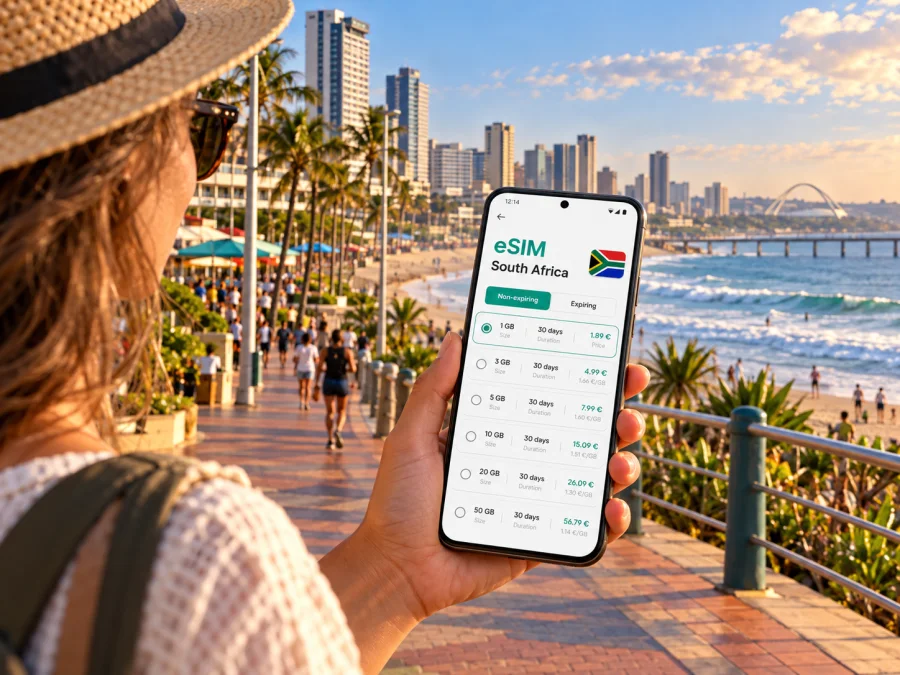
Durban eSIM for mobile connection and internet on your trip
Durban is a coastal city where a day can move between the beachfront, the central business district, a meeting near the convention centre and an evening in a neighbourhood further inland. A reliable way to get online helps with the practical links between those plans: checking a map, confirming an address, messaging a host or looking up a bus route while you are out. Preparing mobile internet before you travel can make the first hours in the city easier, especially if you arrive tired or need to continue straight to a hotel or appointment.
An eSIM is a digital SIM profile installed on a compatible phone. A travel data plan can provide mobile internet without taking out your regular physical SIM. It is useful for maps, ride-hailing, email and messaging apps, but it does not automatically give you a South African phone number or ordinary voice calls and SMS. Keep your usual line active if you need calls or verification texts, and check its roaming terms separately.
Start with the shape of Durban
Durban sits on South Africa’s east coast in KwaZulu-Natal, beside the Indian Ocean. The name is also used for the broader eThekwini metropolitan area, which stretches beyond the compact centre into coastal and inland districts. That distinction matters when planning: an accommodation listing described as “Durban” may be a long drive from the beachfront or your meeting venue. Confirm the full address and estimate the journey before you set off.
The best connectivity plan depends less on a city label and more on your route. A visitor staying around the central beachfront may use mobile data mainly for walking directions, restaurant details and transport connections. Someone based in Umhlanga, Berea, Morningside or near a business venue may travel farther between stops. If your itinerary includes day trips outside the central area, think about the complete South Africa route rather than only the hotel-to-beach portion.
Durban at a glance
| Travel situation | What mobile internet helps you do |
|---|---|
| Arrival at King Shaka International Airport | Check your transfer details, contact your accommodation and follow the route south |
| Beachfront stay | Find entrances, cafés, meeting points and nearby services along the Golden Mile |
| City-centre visit | Navigate between the station area, shops, offices and the Durban ICC precinct |
| Work trip | Open meeting information, email colleagues and coordinate a change of venue |
| Day trip | Check the route, timing and return arrangements before leaving the metro |
Use the table as a planning prompt, not a coverage promise. Mobile service can vary with the local network, indoor conditions, congestion and your exact location. Save key addresses and booking information offline as a useful backup.
Arrival: from King Shaka International Airport into the city
King Shaka International Airport is at La Mercy, north of Durban’s city centre. South African Airways describes the airport as about 30 km from the centre; journey time depends on traffic, pickup arrangements and the final destination. It is not in the central beachfront district, so do not assume that an airport-to-hotel trip is a short walk or a quick hop.
Before leaving the terminal, confirm which pickup point your driver or shuttle uses and whether your accommodation has sent specific instructions. A working data connection can help you compare your current location with the pickup message, contact the driver if plans change and share your estimated arrival time. Keep the hotel name, street address and booking reference available offline in case you need them while arranging transport.
Plan your route around the coast and the centre
The Golden Mile is the best-known central beachfront stretch, with a long promenade and access to beaches and attractions. It is a useful anchor for orientation, but it is only one part of Durban. Inland, the city rises into areas such as Berea and Morningside; north along the coast are Umhlanga and other destinations within the wider metro. These places are related in a visitor’s itinerary but are not interchangeable addresses.
Navigation is especially helpful when a route crosses between the beachfront and inland streets. A map can show the broad direction, while a street address or venue entrance tells you where to finish. Search for the exact hotel, restaurant, office or attraction name, and compare the pin with the message from your host. Large properties may have a vehicle entrance on a different road from the pedestrian entrance.
The People Mover is a city bus service with routes serving points such as the central transfer station, Botanic Gardens, uShaka Marine World, the waterfront and Kings Park Swimming Pool. eThekwini publishes route and timetable information, and schedules can change. Check the current timetable and stop details on the day rather than relying on a saved screenshot from an earlier trip. Mobile internet is handy for checking the latest information, while an offline screenshot can help if you lose signal.
| If your day includes… | A useful preparation step |
|---|---|
| The central beachfront | Save your hotel and the beach access point, not just “Golden Mile” |
| uShaka Marine World | Check the stop or entrance that matches your ticket and starting point |
| Botanic Gardens | Confirm opening details and the route from your current neighbourhood |
| Durban ICC or nearby offices | Save the venue entrance and meeting room information before travelling |
| A north-coast stay | Check whether a plan from the centre to Umhlanga or the airport fits your timing |
Public transport, taxis and app-based rides have different routes, pickup rules and payment methods. Use the operator or service’s current information for fares and availability. A map connection cannot confirm that a particular vehicle is available or that a particular service is operating at that moment.
Choosing an eSIM plan for a Durban itinerary
A city-specific page is a convenient starting point, but the plan’s destination and conditions should match the places you will visit. Durban is in South Africa, so a South Africa travel plan is the relevant country option for a trip centred on this city. If you continue to another country, check whether the chosen plan includes it; a South Africa plan should not be assumed to work across international borders.
Kaspersky eSIM Store is an app and website where you can choose, arrange and activate an eSIM with a suitable plan for mobile internet during an international trip. Review the plan details before checkout, including the data allowance, validity period, supported destination and any activation instructions. The available plan terms can differ, so choose based on your own travel dates and likely use rather than a generic “best plan” label.
For a trip focused on Durban, consider how you will use data:
- Light use: messaging, occasional map checks and searching for opening information while using Wi-Fi at your accommodation.
- Regular use: navigation between neighbourhoods, ride coordination, email, web searches and photo sharing during the day.
- Higher use: frequent video calls, hotspot use, cloud uploads or streaming while away from Wi-Fi. These activities can use data quickly; check the plan allowance and your device settings.
If you will travel from Durban to other parts of South Africa, estimate usage across the whole itinerary. A short city break with hotel Wi-Fi differs from a work trip with hotspot use or a multi-stop journey. Leave room for navigation and essential messages, and download large maps, tickets and entertainment over Wi-Fi where possible.
You can review eSIM options for a South Africa trip and compare the terms shown for the available plans. Check the destination, data amount, validity, price and activation rules on the plan page before choosing. Availability and terms may change, so the information displayed at the time of purchase should guide your decision.
Check your phone before you travel
An eSIM plan is useful only if your device can install it and is not restricted in a way that prevents using another carrier profile. Compatibility can depend on the exact phone model, the regional variant and the country or market where it was sold. Two phones with similar names may have different eSIM capabilities. Do not assume that a model sold in one market has the same SIM configuration in every market.
Before paying, check the manufacturer’s information for your exact model and variant, and confirm that the device is unlocked for use with another provider. You can also check whether your device is compatible with eSIM. If you carry a tablet, a second phone or a work-managed device, check each one separately. A company policy or carrier lock can affect installation even when a model family supports eSIM in general.
Use this quick checklist:
- Identify the full model number and regional variant in your phone settings or on the device documentation.
- Confirm eSIM support for that precise version with the manufacturer or seller.
- Check that your phone is not network-locked.
- Update the operating system before travel if an update is appropriate and you have a backup.
- Make sure you can access the email address or account needed to retrieve the installation details.
- Keep the installation instructions available on another screen or offline if you will install after arrival.
If the phone has both a physical SIM and an eSIM, you may be able to keep your home number available while assigning mobile data to the travel profile. Menu names differ by manufacturer and software version. Confirm the line labels and data selection carefully so that you understand which line is using data and what roaming charges may apply to your home SIM.
Install and activate with a little time to spare
Installation and first use are related but not always the same step. Follow the instructions supplied for the plan you choose: some profiles can be installed before departure, while the start of validity or data use may follow specific activation conditions. Read those conditions instead of assuming that scanning a QR code starts or delays the plan in a particular way.
A practical setup flow is:
- Connect to a stable Wi-Fi network and open the installation details for your chosen plan.
- Follow the relevant Android eSIM installation instructions or iOS eSIM installation instructions.
- Label the new line “South Africa” or “Travel” so that it is easy to recognize in the phone settings.
- Keep your regular line selected for calls or messages if you need it, and choose the travel eSIM for mobile data when the plan is ready to use.
- At your destination, check the plan’s activation steps and enable the required settings. Some plans may require data roaming to be enabled for the travel eSIM; follow the plan instructions.
- Open a simple webpage or map to check that the selected data line is working.
Do not delete an installed eSIM profile as a troubleshooting shortcut unless the plan instructions or support team tells you to. Some profiles cannot be reinstalled or moved freely after removal. If the connection does not start, check the selected data line, the plan’s activation conditions and device settings first, then use the support channel listed with your purchase.
Getting around once you are online
Durban’s distances and hills make it useful to think in journeys rather than a single walkable centre. A morning at the beachfront and an afternoon appointment inland may call for a vehicle or bus connection. If you are arranging a ride, confirm the pickup side of the road and the exact entrance; a pin placed on a large complex can point to the wrong gate. Send a location pin only after checking that it marks the intended meeting place.
For bus travel, use the current city timetable and identify both the boarding and destination stops. The People Mover route names can help orient you around the central area and beachfront, but route maps and services are operational information that can change. Save the route before leaving Wi-Fi, and use mobile data to recheck it if the journey changes. If the route involves an unfamiliar transfer, allow extra time rather than relying on a single estimated arrival time.
For a walking stretch, download an offline map of the area if your mapping app supports it. Keep your phone charged and avoid holding it out continuously in busy public places. You can check a route at a café, hotel lobby or other convenient stop, then put the phone away while walking. Mobile internet is a tool for orientation; it does not replace attention to local signs, traffic and your surroundings.
Beach days, weather and live information
The beachfront is a natural focus for visitors, but beach conditions, facilities and local notices can change. eThekwini publishes updates about beach water quality and bathing conditions. Check the municipality’s latest information before swimming, especially after heavy rain or when signs or lifeguards give different instructions. Do not treat a past report or a social post as a current all-clear.
Mobile data can help you look up a municipal notice, find a nearby facility or message someone if you change beaches. It cannot guarantee that a page is current, that a location has lifeguards at every hour or that conditions are safe. Follow on-site signs and instructions, and use the designated swimming areas when they are open and supervised.
Work trips and meetings
Durban’s business travel often combines a hotel, a meeting venue and transport between them. Save the venue’s full address and entrance instructions before leaving, and download presentation files or tickets over Wi-Fi. A travel eSIM can support email, calendar updates, messaging and maps while you are away from your office connection. For video meetings, check your data allowance and connection quality in advance, and use a stable Wi-Fi network when one is available.
If a meeting changes location, ask the organiser to send the updated venue name and address in writing. Search results can show similarly named buildings or businesses in different parts of the metro. Confirm the pin against the message before starting the trip. When you are sharing a hotspot with a laptop, monitor data use and disconnect devices when the session ends.
Common questions about eSIM and mobile internet in Durban
Is Durban in South Africa, and which country should I select?
Yes. Durban is in KwaZulu-Natal, South Africa. For a trip within Durban and elsewhere in the country, select a plan whose destination terms cover South Africa. A city name does not create a separate national mobile market or guarantee that a plan for another country applies.
Will an eSIM give me a local South African number?
A travel data eSIM is intended for mobile internet and may not include a standard phone number, voice calls or SMS. Check the terms of the specific plan. Internet-based messaging and calling apps can work over data, while your regular SIM may remain useful for calls and verification messages if its roaming settings and charges are acceptable to you.
Can I install the eSIM before flying?
Often it is possible to install a travel profile ahead of the trip, but installation and activation rules vary by plan. Read the instructions and validity conditions attached to the plan you select. Make sure you know when the data period begins and which settings to use after landing.
Does eSIM work throughout Durban?
No provider can promise identical service in every street, building or moment. Coverage and performance depend on the local network, indoor conditions, congestion, device and plan. Check the supported destination and network conditions shown with the plan, and keep offline copies of essential travel information.
What if I am travelling beyond Durban?
Check each destination against the plan terms. For travel elsewhere in South Africa, confirm that the selected plan covers the places on your route. If you cross an international border, check whether a separate plan is needed before departure.
What should I do if mobile data does not connect?
Confirm that the travel eSIM is installed, selected for mobile data and activated according to its instructions. Check that airplane mode is off and that the phone has the required network settings. If the plan requires data roaming on the travel eSIM, enable it for that line. Restarting the phone may help after settings changes; contact the support channel listed with your purchase if the issue continues.
Stay connected to the trip, not just the map
In Durban, mobile internet is most useful when it supports the decisions that shape the day: where to meet, how to get from the coast to an inland address, whether a timetable has changed and how to contact your host. An eSIM can make those everyday tasks easier without replacing your normal number or eliminating the need to check local information. Match the plan to your full South Africa itinerary, understand its activation terms and keep essential details available offline.
Before departure, use the Kaspersky eSIM Store app or website to choose an eSIM plan for South Africa that fits your travel dates and expected data use. Review the plan details, check your device and follow the supplied installation steps so you can arrive in Durban with a clear setup plan.


