
Travel connectivity guide
East End eSIM for Anguilla travel
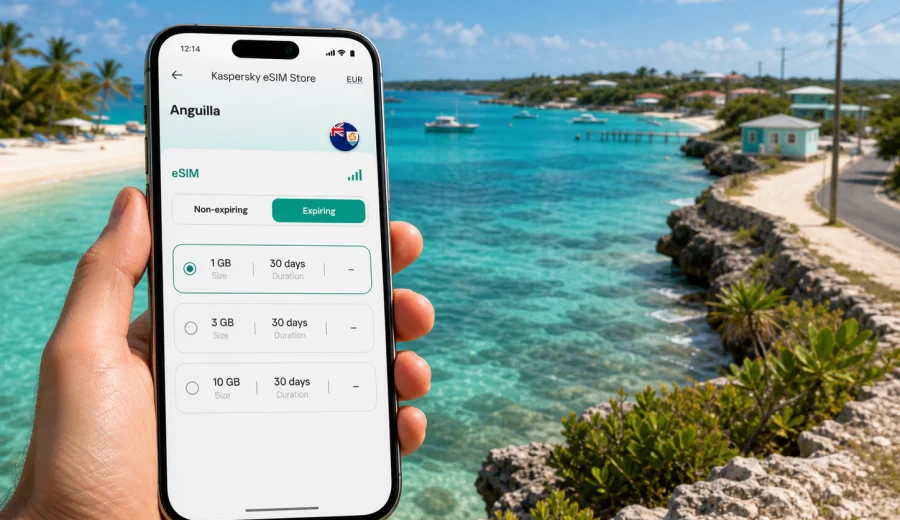
East End eSIM: mobile connection and internet for a trip to East End, Anguilla
East End is one of the quietest parts of Anguilla for travelers who want bright water, open roads, beach time, and a slower rhythm than the island's busier hotel areas. It is also a place where mobile internet quickly becomes practical rather than optional. You may need maps from the airport, a taxi message from a villa, a restaurant booking near Shoal Bay East, a work call from a terrace, or a weather check before driving toward Island Harbour.
An eSIM can make that routine easier because you can prepare mobile data before you arrive, keep your usual physical SIM in the phone, and avoid spending your first hour in Anguilla looking for a shop. For East End in particular, it helps because the area is spread out, trips often involve taxis or rental cars, and many useful decisions happen on the move: which beach access to use, where to stop for lunch, whether to continue to the far eastern coast, or how to share a live location with other travelers.
This guide focuses on using eSIM, mobile connection, and internet for a stay in East End, Anguilla. It covers arrival routes, local movement, beach days, villas and hotels, business travel, short stopovers, and practical checks before choosing a data plan.
Why mobile internet matters in East End
East End is not a dense downtown where you can rely on a hotel lobby, a cafe, or a public Wi-Fi network every few minutes. The area is more about beaches, residential roads, low-rise accommodation, viewpoints, small restaurants, and trips between nearby communities. That makes mobile data useful for simple tasks that are easy to underestimate before a trip.
You may use mobile internet in East End to:
- navigate from Clayton J. Lloyd International Airport or the Blowing Point ferry terminal;
- message a driver or property manager when your arrival time changes;
- find beach access, parking points, and walking routes around Shoal Bay East;
- check restaurant opening hours before driving across the island;
- use messaging apps when voice calls are not included in a travel data plan;
- share photos and short videos without waiting for hotel Wi-Fi;
- keep work email, maps, and authentication apps available during the day;
- compare routes before continuing toward Island Harbour, The Valley, or the west end of Anguilla.
Arrival in Anguilla and the route to East End
Most visitors reach East End in one of two ways. Some fly into Clayton J. Lloyd International Airport near The Valley, then continue by taxi or rental car. Others arrive by ferry from St. Martin at Blowing Point, then drive across the island. In both cases, East End is not usually the first place where formal travel tasks happen, so having data available before the final drive is helpful.
At the airport or ferry terminal, mobile internet can support:
1. confirming your pickup location;
2. sending your estimated arrival time to a villa, hotel, or host;
3. opening a saved map route before you leave the terminal area;
4. checking whether you need to stop for groceries, cash, or a pharmacy;
5. keeping booking confirmations available if immigration, rental, or property staff ask for details.
If you are arriving after a long connection, it is better to avoid relying only on memory. Save the property address, local contact, and map area before departure. Then use mobile data as a live backup when you land or step off the ferry.
East End travel scenarios where eSIM helps
East End is a destination where mobile internet supports many small decisions. The table below shows common situations and the role of an eSIM data plan.
| Trip scenario in East End | Why mobile data helps | Practical tip |
|---|---|---|
| First drive from the airport or ferry | Roads are simple but unfamiliar, and signposting may not match how your booking describes the location | Save the address offline, then use live navigation for the final turns |
| Beach day at Shoal Bay East | Plans can change with weather, parking, shade, or restaurant availability | Check messages and maps before leaving your accommodation |
| Villa or apartment stay | Hosts often coordinate arrival, check-in, and maintenance through messaging apps | Keep the host contact pinned in your messaging app |
| Taxi arrangements | You may need to confirm pickup times for dinner, ferry departures, or airport transfers | Use mobile data for location sharing and last-minute updates |
| Work call during a trip | Hotel Wi-Fi may be enough indoors, but you may need email and authentication on the move | Keep essential files and meeting links available before leaving the room |
| Short trip to Island Harbour or The Valley | You may decide mid-route where to stop | Use maps and search sparingly to conserve data |
Choosing an eSIM data allowance for East End
The right data allowance depends on how you travel. A couple using one phone mainly for maps and messaging needs less than a remote worker who joins calls and uploads photos. East End is not a place where you need data because everything is complicated; you need it because your plans may be spread across beaches, villas, restaurants, and short drives.
Use this simple estimate:
| Stay style | Likely mobile internet use | Suggested planning approach |
|---|---|---|
| Weekend or short stopover | maps, taxi messages, restaurant searches, boarding details | choose a small data package and use Wi-Fi for photo backups |
| Relaxed beach holiday | maps, messaging, social media, light browsing, occasional calls through apps | choose a medium package for the full stay |
| Family or group trip | coordination between rooms, shared locations, bookings, photos | plan extra data for the person managing logistics |
| Business trip or workation | email, cloud documents, authentication apps, video calls as backup | choose more data and keep heavy calls on trusted Wi-Fi when possible |
| Island-hopping route | Anguilla plus nearby or regional travel | compare country and regional options before purchase |
Avoid choosing only by price. Check the amount of data, validity period, destination, activation rules, and whether the plan fits the number of days you will actually spend in Anguilla.
Before you buy: device compatibility and setup checks
An eSIM works only on a compatible, unlocked device. Before arranging mobile internet for East End, check your device and confirm that your phone or tablet supports eSIM. If your device is locked to a mobile operator, a travel eSIM may not install or activate as expected.
Run through this checklist before your trip:
- your phone supports eSIM;
- the device is not locked to one mobile operator;
- your operating system is updated enough to manage eSIM profiles reliably;
- you have access to the email or account where installation details will arrive;
- you can receive important login codes before changing travel settings;
- you understand whether the plan is data-only or includes any additional services;
- you know when the validity period starts for the selected plan.
For many travelers, the best time to install the eSIM is before departure while connected to stable home Wi-Fi. Activation can depend on the specific plan, so read the plan details carefully. Some travelers prefer to install early and activate data after arrival; others complete more of the process once they reach the destination.
When to choose and prepare your plan
The middle of your planning is a good time to prepare mobile internet. By then, you usually know your arrival route, number of nights, accommodation area, and whether you will work during the trip. You can then choose a plan that fits Anguilla rather than guessing at the airport.
Through Kaspersky eSIM Store, you can prepare an eSIM data plan for Anguilla before your East End trip, review the available data amounts and validity periods, and keep the setup ready for a compatible device. This is especially useful if your first day includes a ferry, a taxi transfer, grocery stop, late check-in, or a drive across the island.
Do not wait until you are standing outside the terminal with luggage if you already know you will need data. A few minutes of preparation at home can make the arrival day calmer.
Installing eSIM before or during the trip
Installation is usually easiest on a stable Wi-Fi connection, with your phone charged and your travel documents nearby. The exact steps depend on your device and operating system, so follow the instructions that match your phone. Kaspersky eSIM Store provides separate setup guidance for Android installation and iOS installation.
A practical installation flow looks like this:
1. Check that your device supports eSIM and is unlocked.
2. Choose the destination and data plan that match your trip length.
3. Complete the order and open the installation details on a stable connection.
4. Add the eSIM profile to your phone.
5. Label the line clearly, for example "Anguilla data".
6. Keep your regular SIM active if you need it for calls or banking messages.
7. Turn on mobile data for the eSIM when the plan terms tell you to activate it.
After installation, check your phone settings. Make sure mobile data uses the eSIM line when you need travel internet, and avoid accidental data roaming on your home SIM if that would create extra charges.
Hotels, villas, and beach accommodation in East End
East End accommodation often includes villas, apartments, small properties, and beach-focused stays near the eastern side of the island. Wi-Fi may be available at the property, but mobile data gives you a separate connection for arrival coordination, gate codes, restaurant plans, taxi messages, and morning departure checks. For a group stay, it is useful for at least one traveler to have ready mobile data for shared logistics.
Beach days around East End and Shoal Bay East
Shoal Bay East is one of the most familiar names for travelers staying on this side of Anguilla. Even if your plan is to relax rather than work, mobile internet is useful before and after beach time. You can check the forecast, message a driver, look up a lunch option, or confirm the route back to your accommodation.
Beach-day data habits should be simple:
- download maps before leaving the room;
- take screenshots of key addresses and booking details;
- keep your phone out of direct sun when possible;
- use Wi-Fi later for large photo and video uploads;
- keep a waterproof pouch or dry bag if you carry the phone near the water;
- avoid draining the battery with continuous video streaming.
Trips from East End to the rest of Anguilla
East End is a quiet base, but most travelers move around the island at least once. You may drive to The Valley, visit another beach, go to a restaurant outside your accommodation area, or continue toward the west end. Mobile internet helps because Anguilla's distances are manageable, yet unfamiliar roads and timing still matter.
Good uses of data on island drives include:
- checking whether a restaurant or beach bar is open before crossing the island;
- sending your live location to someone waiting at the destination;
- comparing the return time before sunset or a dinner reservation;
- adjusting plans if weather looks better on another beach;
- keeping ferry or airport departure details close at hand.
If you make several cross-island trips, a little planning reduces data use. Save routes in advance, group errands together, and use mobile data mainly for updates that can change during the day.
FAQ: eSIM and mobile internet in East End
Should I install the eSIM before flying to Anguilla?
For many travelers, yes. Installing before departure on stable Wi-Fi can reduce stress on arrival. Read the activation rules for your selected plan so you know when data use and validity begin.
Can I keep my regular SIM active?
Usually, dual-SIM phones let you keep your regular SIM for calls or messages while using the eSIM for mobile data. Check your device settings carefully, especially if you want to avoid roaming charges on your home SIM.
Is eSIM enough for remote work in East End?
It can be a useful backup and mobile layer for email, messaging, documents, and authentication. For long video calls or large uploads, use stable accommodation Wi-Fi when available and keep mobile data as a backup.
How much data do I need for a beach holiday?
Light users who rely on Wi-Fi for uploads may need only a modest allowance. Travelers who stream, upload videos, work remotely, or manage a group itinerary should choose more data and monitor usage during the first day.
Can I use eSIM for calls?
Many travel eSIM plans are data-focused. You can usually call through internet-based apps when you have data, but ordinary voice calls and SMS are not included unless the selected plan states that they are.
Final preparation before East End
East End is easy to enjoy when the basics are handled before you arrive: your transfer is confirmed, your accommodation details are saved, your maps are ready, and your phone can connect when you need it. eSIM is a useful part of that preparation because it keeps mobile internet available outside the hotel room and away from public Wi-Fi.
Before departure, check your device compatibility, choose a data allowance that matches your stay, install the eSIM on a stable connection, and save the important addresses offline. When you are ready to prepare mobile internet for the trip, you can choose an eSIM data plan for Anguilla through Kaspersky eSIM Store and keep your East End arrival, beach days, and island drives easier to manage.