
Travel connectivity guide
East End eSIM: Mobile Internet Guide
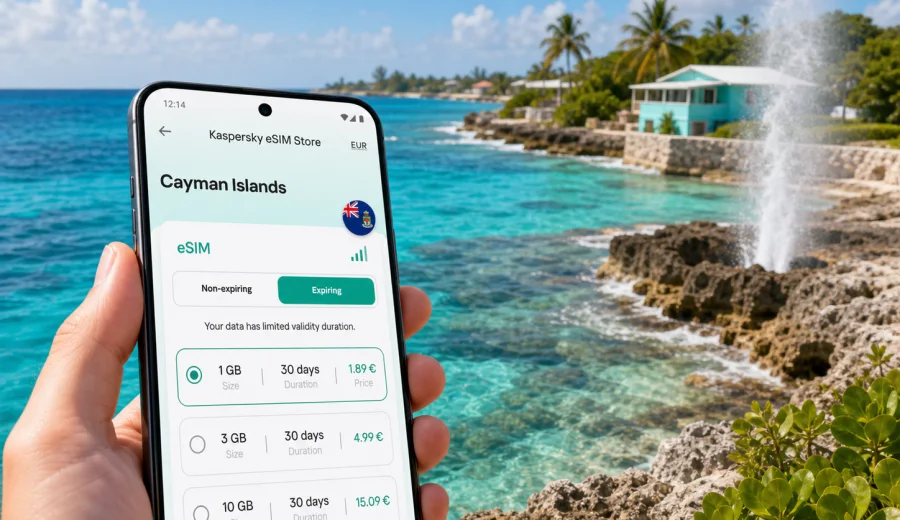
East End eSIM: mobile connection and internet for a Cayman Islands trip
East End is the quieter side of Grand Cayman: a place of reef shallows, limestone coast, blowholes, dive boats, small resorts, beach cottages and long drives along the eastern shore. It is not the part of the island where you can solve every travel question by walking to the next shop. Mobile internet matters here because your day often depends on maps, ride coordination, restaurant hours, weather, dive schedules and messages to your hotel or host.
An eSIM is useful for East End because you can prepare mobile data before you land in the Cayman Islands and start the trip with fewer practical errands. Instead of looking for a physical SIM card after arrival, you can keep your main SIM in the phone, add a travel eSIM on a compatible device and use mobile internet for the tasks that make the eastern district easier: navigation from the airport, route checks along Sea View Road, messages with tour operators and quick searches for dinner or fuel stops.
This guide is focused on East End, not on the Cayman Islands in general. George Town, Seven Mile Beach and West Bay have denser services and more obvious visitor infrastructure. East End has a different rhythm. Distances are manageable, but the area is spread out; beaches, dive sites and small settlements sit along the coast; and a short delay can matter if you are meeting a boat, returning a rental car or checking in after a late flight.
Why mobile internet matters in East End
East End rewards travelers who arrive prepared. The district is peaceful, but that also means you may not always have a convenient reception desk, taxi queue or storefront nearby when you need information. A reliable data setup helps you handle the practical parts of the trip without turning every small question into a detour.
Common moments when mobile internet is useful in East End:
- checking the route from Owen Roberts International Airport to your hotel, villa or rental home;
- messaging a property manager about key pickup or late arrival;
- confirming dive, snorkel, fishing or boat-trip times;
- checking weather and sea conditions before coastal plans;
- comparing restaurant hours, especially outside peak dining times;
- sharing your live location with another traveler;
- finding the correct turnoff after dark on less busy roads;
- using translation, banking, airline and booking apps without relying on public Wi-Fi;
- coordinating day trips toward Rum Point, Bodden Town, George Town or Seven Mile Beach.
East End is especially sensitive to timing because many visitors move between scattered points rather than one compact town center. You might start the morning near Colliers Public Beach, drive to the blowholes, meet a dive operator, stop for lunch, then return to a resort or rental villa. Each step is easier when maps and messages work on your own phone.
Arrival: from the airport to the east side
Most international visitors arrive through Owen Roberts International Airport near George Town. East End is on the opposite side of Grand Cayman, so the first travel task is usually a cross-island transfer. Depending on traffic, stops and the exact address, the drive often feels like a substantial first leg rather than a quick airport hop.
Mobile internet helps immediately after landing because you may need to:
1. Tell your host or hotel that you have cleared the airport.
2. Open your route before leaving the airport area.
3. Check whether you need to stop for groceries or essentials.
4. Coordinate with a rental car desk, transfer driver or family member.
5. Save the destination address in your maps app while you still have time to correct it.
If you plan to activate a travel eSIM on arrival, do it while you are still in a calm place, not while loading bags in a parking lot. Keep your booking details, QR code or activation instructions available offline as a fallback. If you install the eSIM before departure, check that the profile is visible on your phone and that you understand which line will be used for mobile data.
East End travel scenarios and data needs
Different travelers use mobile data differently. A couple staying at a resort may need less data than a remote worker or a family using maps, video calls and cloud photos every day. For East End, the right eSIM tariff is usually about matching your real trip pattern rather than choosing the largest package by habit.
| Trip scenario in East End | What you may use mobile data for | Practical data approach |
|---|---|---|
| Weekend stopover | maps, messaging, restaurant checks, airline app | small package with enough validity for arrival and departure |
| Resort stay | messaging, light browsing, ride coordination, occasional maps | moderate package, especially if hotel Wi-Fi covers evenings |
| Dive or snorkel trip | operator messages, weather, photo sharing, navigation | allow extra data for media and route checks |
| Villa or rental home | maps, grocery searches, host messages, streaming if Wi-Fi is weak | choose a larger package or be ready to top up |
| Business trip | email, calendar, calls through apps, documents, hotspot use | prioritize validity, enough data and device compatibility |
| Island exploration | navigation across Grand Cayman, route changes, attraction searches | moderate to larger package depending on daily driving |
The key is to separate essential mobile internet from heavy entertainment use. Maps, messaging and travel apps are usually modest. Video, cloud backups, social media uploads and hotspot use can consume much more. If your East End accommodation has stable Wi-Fi, you can reserve the eSIM mainly for movement around the island.
Local movement: roads, routes and timing
East End is best approached with a plan for local movement. Many visitors rent a car because the area is less walkable between points than a beach resort strip. The coast road is scenic, but you still need working navigation when you are finding a villa driveway, a dive center, a restaurant entrance or a detour.
Mobile internet supports three practical route habits:
- Save your main destinations before you start the day.
- Recheck the route when you change plans, not after you have already missed a turn.
- Keep your hotel, host and tour operator contacts easy to reach in messaging apps.
This is particularly useful after sunset. East End has a relaxed atmosphere, but unfamiliar roads and low-light turnoffs can make navigation slower. A prepared data connection lets you confirm the address, call through a messaging app or share your location without searching for Wi-Fi.
Where eSIM helps most around East End
East End is not only one point on the map. A city-focused mobile internet plan should account for the places you are likely to move through during a stay.
Useful East End and eastern Grand Cayman contexts include:
- Blowholes and limestone coast: quick weather checks, photo sharing and directions for short scenic stops.
- Colliers and coastal beaches: messaging other travelers, checking tide and wind information, locating parking or nearby food.
- Dive and water-sport bases: operator updates, waivers, meeting-point details and schedule changes.
- Resorts and small hotels: check-in communication, restaurant bookings and backup data if Wi-Fi is weak in outdoor areas.
- Rental homes and villas: host messages, grocery searches, delivery coordination and route confirmation.
- Day trips toward Rum Point or George Town: maps, fuel stops, parking searches and return timing.
The practical benefit is continuity. You do not need mobile internet every second, but you want it available at the moments when plans change.
Choosing an eSIM tariff before you go
Before buying any travel data option, decide how your East End trip will work. You can keep the decision simple by answering five questions:
1. How many days will you be in the Cayman Islands?
2. Will you stay mostly at one hotel, or move around the island every day?
3. Will you use hotel or villa Wi-Fi for large downloads and streaming?
4. Do you need hotspot mode for a laptop or another traveler?
5. Do you need only mobile internet, or do you expect a local phone number? Many travel eSIM tariffs are data-focused and do not include regular calls or SMS unless stated in the specific conditions.
For an East End trip, it is often useful to prepare the eSIM before departure and keep activation instructions saved offline. Kaspersky eSIM Store is an app and website where you can choose, arrange and activate an eSIM with a suitable data tariff for mobile internet during an international trip. For this destination, you can choose a data tariff for a trip to East End and the Cayman Islands before you arrive, then review the conditions for data volume, validity and destination coverage.
When comparing options, look at the details rather than only the headline data size. Validity matters if your trip spans arrival and departure days. Data volume matters if you will use maps daily or share a hotspot. Destination coverage matters if your itinerary includes more than one country or a regional route. The exact terms depend on the selected tariff, so read them before payment.
A practical setup checklist
Use this checklist before leaving for Grand Cayman:
- Confirm that your phone supports eSIM and is not locked to a carrier.
- Save your accommodation address and arrival instructions offline.
- Install your main travel apps before the flight.
- Keep your eSIM purchase details available without needing email access.
- Decide which SIM will handle mobile data and which one will remain for calls or banking messages.
- Turn off automatic cloud backups on mobile data if you want to control usage.
- Download offline maps for Grand Cayman as a backup.
- Check whether your selected eSIM tariff needs data roaming enabled on the eSIM line.
If you are unsure whether your phone can use eSIM, use the device check before buying: check your device. Compatibility is especially important when you travel with an older phone, a company-managed device or a handset bought through a carrier contract.
Installing and activating the eSIM
The exact steps depend on your phone model and operating system, but the general process is straightforward: choose the destination and tariff, complete the purchase, install the eSIM profile, then select it for mobile data when you are ready to use it. Some travelers install the profile at home and activate mobile data after arrival; others do the whole setup at the airport or hotel.
For device-specific setup, use the official installation guides: Android installation instructions and iOS installation instructions. Read the instructions before your flight if you have not installed an eSIM before, because it is easier to handle setup questions while you still have your usual connection.
After installation, check these settings:
- the eSIM line is installed and named clearly, for example "Travel data";
- mobile data is assigned to the eSIM when you want to use the travel tariff;
- data roaming is set according to the selected tariff instructions;
- your primary SIM remains available if you need bank messages or calls;
- background app refresh, cloud photo uploads and video autoplay are limited on mobile data.
Do not delete the eSIM profile after activation unless the instructions or support team tell you to. In many cases, a used eSIM profile cannot simply be moved to another phone.
Data-saving habits for East End
East End encourages outdoor plans, so your phone may move between hotel Wi-Fi and mobile data several times a day. To keep the package under control, download maps and booking details on Wi-Fi, disable video autoplay, pause cloud photo backups, send compressed images when full quality is not needed and keep hotspot use for essential laptop tasks. These habits are especially useful in villas or rental homes, where Wi-Fi quality can vary by room or outdoor area.
Business trips, stopovers and island drives
East End is not a classic business district, but it is used for retreats, remote work and quiet extended stays. If you need to work from this side of Grand Cayman, check whether your company device allows eSIM installation, whether hotspot mode is needed and how much data video meetings may use. Use mobile data for continuity: calendar changes, authentication prompts, email, maps and calls through apps when Wi-Fi drops.
For a short stay, prioritize immediate access to maps after landing, enough validity for arrival and departure, and offline backup for booking details. If East End is your base for wider Grand Cayman travel, mobile internet also helps on routes to Rum Point, Bodden Town, George Town, Seven Mile Beach and the airport. You can check traffic, adjust stops, compare restaurant hours and keep departure timing realistic.
What to remember about eSIM limits
An eSIM for travel is a practical mobile data tool, but the usual limits still matter. Many travel eSIM tariffs are data-only and do not include a regular phone number, voice calls or SMS unless the selected tariff says so. Calls through messaging apps use data. Coverage, speed and availability depend on local network conditions and the selected tariff. Some devices need data roaming enabled for the eSIM line, and compatibility or carrier lock status must be checked before purchase.
Quick answers for East End travelers
Is eSIM useful if my East End hotel has Wi-Fi?
Yes, because Wi-Fi helps at the property, while eSIM mobile data helps during airport transfer, local drives, beach stops, day trips and schedule changes.
Should I install the eSIM before flying to Grand Cayman?
If your selected tariff allows it, installing before departure can reduce arrival stress. Save the instructions offline and activate mobile data when appropriate for the tariff conditions.
Can I use eSIM for normal phone calls in East End?
Many travel eSIM tariffs focus on mobile internet and may not include a regular phone number, calls or SMS. Use internet-based calling apps if that fits your needs, and check the selected tariff details.
How much data do I need for East End?
For maps, messages and searches, a smaller package may be enough. Add more data if you plan daily navigation, hotspot use, video calls or frequent photo and video uploads.
Do I need a Cayman Islands city-specific plan for East End?
For city articles, the relevant landing option is usually the country destination. Choose a Cayman Islands tariff and check whether its conditions match your full itinerary.
Final pre-trip plan
Before you leave for East End, make your mobile internet plan as concrete as your accommodation booking. Check your phone, choose the tariff, install the eSIM profile if suitable, save the instructions and decide how you will control data use. Then you can use mobile internet for the parts of East End travel that actually need it: arrival, navigation, hotel messages, coastal stops, restaurant checks, work tasks and day trips across Grand Cayman.
Kaspersky eSIM Store helps you prepare an eSIM with a suitable data tariff for mobile internet in an international trip. If East End is your base, choose an eSIM data tariff for the Cayman Islands before departure and keep the setup details ready for arrival.