
Travel connectivity guide
Ecuador eSIM: mobile internet travel guide
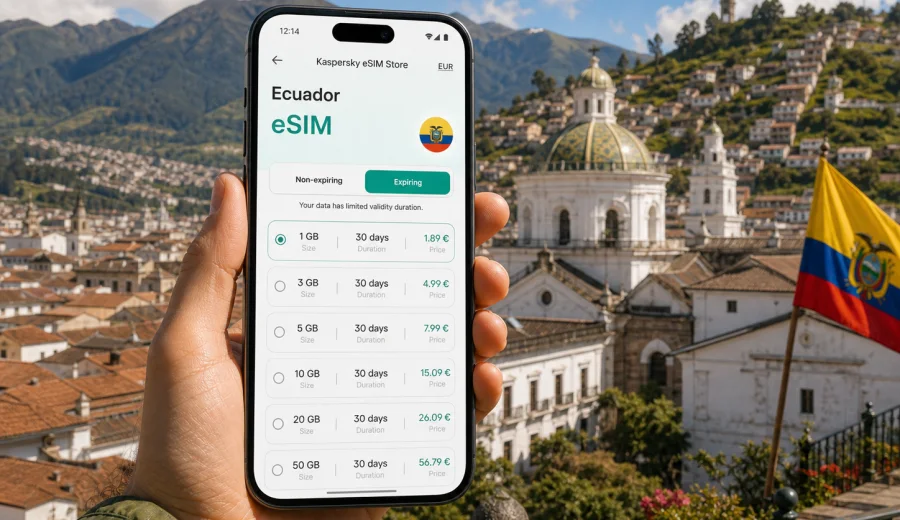
eSIM in Ecuador: mobile connection and internet for your trip
Ecuador is a compact country with very different travel scenarios: highland cities, Pacific beaches, Amazon gateways, volcano routes, cloud forests and the Galapagos Islands. That variety is one reason mobile internet matters so much here. You may need a map in Quito, a ride app after dark, updates, or messaging access while moving between towns.
An eSIM can make this part of the trip easier. Instead of looking for a physical SIM card after arrival, you can prepare a digital SIM profile on a compatible phone and use a prepaid data plan for mobile internet in Ecuador. The exact conditions depend on the selected plan, device settings and the local network, so it is worth checking the details before you travel.
Kaspersky eSIM Store is an app and website that helps you choose, arrange and activate an eSIM with a suitable data plan for mobile internet during an international trip. It is not a mobile operator and does not own a network. The practical value is the travel scenario: select the destination, review data volume and validity, install the eSIM on a compatible device, and keep mobile data ready for the moments when public Wi-Fi is inconvenient or unavailable.
Quick answer
For most travelers, an Ecuador eSIM is useful if you want mobile internet without buying a plastic SIM card after landing. It can help with navigation, hotel check-in, airport transfers, route changes, online tickets and messaging.
Before choosing a plan, check three things:
- your phone supports eSIM;
- the device is not locked to another operator;
- the plan conditions match your route, trip length and expected data use.
If your route includes the Galapagos Islands, the Amazon region or remote mountain areas, remember that mobile experience can vary by location and local network conditions. eSIM is a convenient way to prepare mobile data, but no travel data plan should be treated as a guarantee of identical performance everywhere.
Why mobile internet is important in Ecuador
Ecuador often rewards flexible travel. A day can start with a museum visit in Quito, continue with a mountain viewpoint, and end with a bus ticket search for Baños, Cuenca, Mindo or the coast. Mobile data helps when the plan changes and you need current information quickly.
Common travel tasks that depend on internet access include:
- checking hotel addresses and arrival instructions;
- using maps in Quito, Guayaquil, Cuenca, Otavalo, Baños or coastal towns;
- ordering transport where ride apps are available;
- messaging tour operators and accommodation hosts;
- receiving airline updates for domestic flights;
- storing tickets, QR codes and booking confirmations;
- translating short conversations, menus and signs;
- checking weather before volcano, jungle or island activities;
- using online banking or payment confirmations.
Public Wi-Fi may be available in hotels, cafes, airports and some tourist venues, but relying on it for every essential action can be uncomfortable. A prepared eSIM gives you a cleaner travel workflow: once it is installed, activated according to the plan conditions and connected to an available local network, the phone can use mobile data when Wi-Fi is not practical.
Where an eSIM is especially useful
Ecuador is not just one urban trip. A data plan can be useful in different travel patterns.
| Route or situation | Why mobile data helps |
|---|---|
| Quito and the highlands | Navigation, rides, restaurant bookings, museum tickets and altitude-related route changes |
| Guayaquil and the coast | Airport transfers, hotel coordination, transport to beach towns and ferry or bus information |
| Cuenca and southern Ecuador | Maps, intercity transport, translation and communication with accommodation |
| Baños and adventure routes | Tour confirmations, weather checks and messaging before activities |
| Amazon gateway towns | Coordination with lodges, transfers and guides before moving to areas with limited signal |
| Galapagos trip | Flight updates, hotel messages, digital documents and maps before and between island activities |
For remote areas, download key information in advance as well. Offline maps and ticket PDFs are still useful because mobile coverage and speed depend on local conditions.
eSIM, roaming and local SIM cards
There is no single best option for every traveler. The right choice depends on your phone, trip length, budget and how much effort you want to spend after arrival.
| Option | Strong points | Points to check |
|---|---|---|
| eSIM data plan | No plastic SIM, can be prepared before travel, useful for arrival day, easy to keep your main SIM in the phone | Device compatibility, data volume, validity period, activation rules |
| Standard roaming | Uses your existing mobile number and familiar carrier settings | Daily roaming fees, fair-use limits, speed policy and destination coverage |
| Local physical SIM | May suit longer stays or users who need a local number | Store search, registration process, language barrier, opening hours, plastic SIM slot |
| Public Wi-Fi | Useful for large downloads at hotels or cafes | Not always available, may be slow, may require login, not ideal for urgent tasks on the move |
An eSIM is often practical when your priority is mobile internet rather than a local phone number. Many travel eSIM data plans do not include standard voice calls or SMS unless the plan conditions say otherwise.
Check your phone before you choose a plan
Before you pay for any eSIM plan, confirm that your device can use eSIM and that it is not locked to a specific carrier. Model names can be confusing because some phones have different regional versions. A device may look identical from the outside and still differ in eSIM support depending on where it was sold.
Use this short checklist:
- Open your phone settings and look for eSIM, cellular plan or mobile plan options.
- Confirm that the phone supports adding an eSIM profile.
- Check that the device is not carrier-locked.
- Make sure you can receive the QR code or open the installation flow on another screen if needed.
- Keep your main SIM active if you still need calls or banking SMS from your home number.
You can also check your device before choosing a plan. This step is important because an eSIM cannot work on a phone that does not support eSIM, and installation rules can vary by device.
Once compatibility is clear, you can choose an eSIM plan for your Ecuador trip through Kaspersky eSIM Store and review the available data amounts and validity periods before you travel.
How much data to prepare for Ecuador
Data use depends on habits, not only on the country. A traveler who mostly uses maps and messaging will need much less data than someone who uploads video, joins work calls or uses cloud backups.
Approximate planning logic:
- Light use: maps, messaging, email, tickets and occasional browsing.
- Medium use: frequent navigation, social media, restaurant searches, translation and photo sharing.
- Heavy use: video calls, hotspot use, cloud sync, streaming or uploading large files.
For a short city break, a smaller data package may be enough if hotel Wi-Fi handles large downloads. For a two-week route across Quito, Cuenca, Baños, the coast or the Galapagos, it is safer to choose a plan that covers more than just arrival-day tasks. Always check the validity period: a plan with enough gigabytes can still be a poor fit if it expires before your trip ends.
A practical way to choose an Ecuador eSIM plan
Start with your itinerary rather than the plan table. Your route tells you what kind of mobile data you will actually need.
1. Count the number of travel days in Ecuador, including arrival and departure.
2. Mark days when you will move between cities, airports, ports or hotels.
3. Estimate whether you will use video, hotspot or work apps.
4. Decide whether your main SIM must stay active for calls or SMS.
5. Check device compatibility before purchase.
6. Review plan data volume, validity, destination and price.
7. Install the eSIM while you still have stable Wi-Fi.
When to install and activate your eSIM
Install the eSIM while you have reliable Wi-Fi, ideally before departure or at your hotel before a route change. Activation timing depends on the plan conditions, so read the instructions carefully. Some plans start counting validity after installation, some after the first connection to a supported network, and some may have other rules.
For a smoother setup:
- install the eSIM before you urgently need mobile data;
- keep the QR code or installation details accessible;
- label the eSIM clearly, for example "Ecuador data";
- keep your home SIM as default for calls if you still need it;
- set the eSIM as the line for mobile data when you want to use it;
- disable data roaming on your home SIM if you want to avoid unexpected roaming charges;
- enable data roaming for the eSIM if the plan instructions require it.
For detailed setup steps, use the Android installation guide or the iOS installation guide. Follow the instructions for your phone model and wait a few minutes after activation, because connection time can depend on the device and the local network.
Arrival-day scenario
Arrival day is where prepared mobile internet is most visible. After a long flight, you may need to message your hotel, find the pickup point, check a domestic connection or open a map before leaving the airport.
Confirm that the eSIM is installed, set it as the mobile data line, enable data roaming for the eSIM if the instructions require it, and wait for the phone to register on an available local network. Do not delete the eSIM profile after activation unless you are sure you no longer need it; some profiles cannot be reinstalled or moved to another device.
What to check in the plan details
Before completing your choice, read the plan conditions rather than relying only on the headline data amount. Important details include:
- destination or regional coverage stated for the plan;
- data volume and whether it is fixed or can be topped up;
- validity period and when it starts;
- whether hotspot use is allowed;
- installation and activation instructions;
- support options if installation does not go as expected.
If you are unsure how much data you need, choose based on the highest-risk days: airport arrival, intercity transfers, remote hotel check-in and any work day when mobile data is important.
How to reduce data use while traveling
An eSIM data plan is easier to manage when the phone is configured for travel. A few settings can prevent background apps from using more data than expected.
Use this checklist before departure:
- Download offline maps for Quito, Guayaquil, Cuenca and your route.
- Save hotel addresses, booking confirmations and tickets offline.
- Turn off automatic cloud photo uploads on mobile data.
- Disable automatic app updates on mobile data.
- Restrict background data for apps you do not need during the trip.
- Keep important documents in a wallet app or offline folder.
These steps make mobile internet last longer and reduce the risk of running out of data during an important transfer or check-in.
Common mistakes to avoid
- Buying a plan before checking whether the phone supports eSIM.
- Installing the eSIM on the wrong device.
- Deleting the eSIM profile too early.
- Assuming that data validity starts the same way for every plan.
- Forgetting to switch mobile data from the home SIM to the travel eSIM.
- Leaving cloud backup or video autoplay active on mobile data.
- Depending on mobile coverage in remote areas without offline backups.
- Expecting a travel data eSIM to include a local phone number unless stated in the conditions.
FAQ
Is an eSIM good for travel in Ecuador?
Yes, an eSIM can be a practical option if your phone supports eSIM and you mainly need mobile internet for maps, messaging, bookings and travel coordination. Check the plan conditions and remember that connection quality depends on local network availability and location.
Can I use an Ecuador eSIM immediately after landing?
You can use it after the eSIM is installed, activated according to the plan rules and connected to an available local network. It is best to install it while you still have stable Wi-Fi, then switch mobile data to the eSIM when you are ready to use it.
Does an eSIM include calls and SMS?
Usually, travel eSIM data plans are focused on mobile internet. Standard voice calls, SMS and a local phone number are not included unless the selected plan specifically says so. You can use internet-based calling and messaging apps through mobile data.
Final preparation checklist
Before your Ecuador trip, confirm these points:
- your passport, tickets and hotel confirmations are available offline;
- your phone supports eSIM and is not carrier-locked;
- you understand when the selected plan validity begins;
- the eSIM is installed before you urgently need it;
- mobile data is assigned to the eSIM line;
- your home SIM roaming settings are under control;
- offline maps are downloaded for the route;
- support and installation instructions are easy to find.
Good mobile preparation does not replace travel planning, but it removes a common source of friction. With an eSIM ready on a compatible phone, you can spend less time looking for a SIM card counter after arrival.
For a practical next step, open Kaspersky eSIM Store and prepare an eSIM plan for Ecuador before your departure. Choose the option that fits your route, install it with stable Wi-Fi, and keep mobile internet ready for navigation, messages and travel changes throughout the trip.