
Travel connectivity guide
Edinburgh eSIM: Mobile Connection and Internet
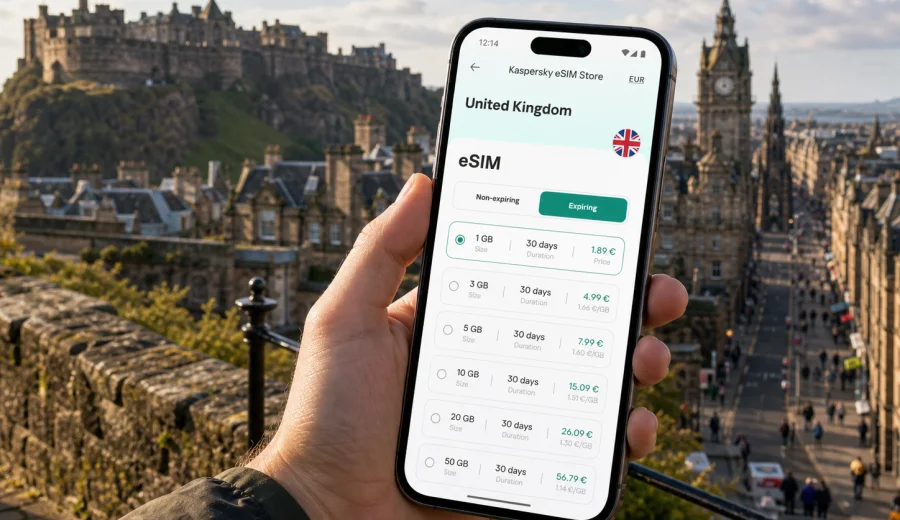
Edinburgh eSIM: mobile connection and internet for your trip
Edinburgh is a compact city, but it asks a lot from your phone. You may land late at night, follow a tram from the airport, check a hotel code in the Old Town, find a quieter route around Princes Street, or join a video call before a meeting near Haymarket. A reliable mobile connection and internet access help you move through these moments without waiting for cafe Wi-Fi or searching for a shop that sells physical SIM cards.
For many travellers, an eSIM is the practical way to prepare mobile internet before a trip to Edinburgh. It is a digital SIM profile that can be installed on a compatible phone or tablet, so you can choose a data plan for the United Kingdom and use mobile data when you arrive. Kaspersky eSIM Store is an app and website where you can quickly choose, arrange and activate an eSIM with a suitable data plan for mobile internet in an international trip.
This guide focuses on Edinburgh travel: the airport, city transport, hotel check-ins, districts, business trips, short stopovers, family travel, and day trips from the city. It is not a general United Kingdom guide. The country matters because the eSIM plan should cover the United Kingdom, but the real question is how to stay online while moving around Edinburgh itself.
Why eSIM is useful in Edinburgh
Edinburgh rewards planning. The same day can include airport transfer, a walk up the Royal Mile, a museum booking, a restaurant reservation, and a train from Waverley Station. Mobile internet keeps the trip flexible because you can check routes, opening hours, messages, and booking details as plans change.
An eSIM can be especially useful in these Edinburgh scenarios:
- Arrival at Edinburgh Airport, when you need maps, tram information, taxi apps, or a message to your hotel.
- Moving between the Old Town, New Town, Leith, Stockbridge, Haymarket, and the university area without relying on offline screenshots.
- Booking or changing timed entries for attractions such as Edinburgh Castle or festival events.
- Checking bus, tram, and train routes while weather or crowds affect your walking plan.
- Using messaging apps for calls and updates if your eSIM plan is data-only.
- Working from a hotel, rented flat, conference venue, or cafe when the local Wi-Fi is crowded or inconsistent.
Edinburgh is walkable, but the streets are layered. A route that looks short on a map can include stairs, closes, steep slopes, or a detour around construction and festival barriers. Live navigation is more useful here than in many grid-based cities.
Arrival: the first online moments
The first hour in Edinburgh often decides how smooth the rest of the day feels. If you arrive by air, you may want mobile data before you leave the terminal. If you arrive by train, you may need directions as soon as you step out of Waverley into a busy street pattern with bridges and levels.
Use this quick arrival checklist:
- Before departure, install the eSIM profile on your compatible device while you still have a stable connection.
- Keep your main SIM active for calls or banking messages if you need them, but set mobile data to the eSIM when the plan is ready.
- Save hotel address, booking confirmation, and the first route offline as a backup.
- After landing, allow a few minutes for the phone to register on a local network.
- If the eSIM plan requires data roaming for that profile, enable it only for the eSIM line, not automatically for every line.
Edinburgh Airport is west of the city centre. Many travellers use the tram towards Princes Street, St Andrew Square, Haymarket, or other stops. Mobile internet helps with ticket information, live disruption checks, and deciding whether the tram, bus, taxi, or ride booking makes more sense for your arrival time and luggage.
If you arrive at Waverley Station, online maps help more than the distance suggests. The station sits below surrounding streets, and exits lead towards different parts of the centre. Being able to confirm whether your hotel is closer to Market Street, Princes Street, the Royal Mile, or North Bridge can prevent a confusing first walk with bags.
Edinburgh areas where mobile internet helps most
Different parts of Edinburgh create different online needs. A data plan is not only for browsing; it supports practical movement across the city.
| Area | Typical travel need | How mobile internet helps |
|---|---|---|
| Old Town and Royal Mile | Walking routes, timed entries, restaurant searches | Live maps, booking confirmations, messaging |
| New Town and Princes Street | Shopping, transport, hotel access | Navigation, payments, ride booking, route checks |
| Leith | Dining, waterfront walks, evenings out | Bus routes, taxi apps, group coordination |
| Haymarket and West End | Business trips, rail connections, airport transfer | Calendar access, maps, train updates |
| Stockbridge and Dean Village | Leisure walks and photos | Route planning, weather checks, cloud backup |
| University and Southside | Study visits, events, conference days | Messaging, venue details, remote work |
The Old Town has narrow closes, stepped lanes, and stone buildings that can make navigation feel less obvious than it looks on a flat map. In the New Town, streets are more regular, but you may still need live information for buses, taxis, parking, and restaurant bookings. In Leith, online route planning is useful because some journeys involve buses rather than the tram.
How much data you may need in Edinburgh
Your data use depends on behaviour, not only the number of days in the city. A traveller who uses maps, messaging, and light browsing may need far less than someone who uploads video, joins meetings, and streams during transit.
Use these practical estimates as a planning guide:
- Light use: maps, messaging, tickets, email, and web searches. A small data package may be enough for a short city break.
- Standard use: daily navigation, social media, restaurant searches, photo backup on selected days, and messenger calls. Choose more data for three to seven days.
- Work-heavy use: laptop tethering, video calls, large file transfers, and frequent cloud tools. Select a larger package and check whether hotspot use is allowed by the chosen plan.
- Family or group coordination: more map checks, ride bookings, shared photo albums, and messaging. Plan extra data if one person becomes the main navigator.
Avoid using mobile data as if it were unlimited hotel broadband unless your selected plan clearly supports that pattern. Download maps, playlists, museum audio, documents, and large app updates over trusted Wi-Fi before travel where possible.
Choosing an eSIM plan for Edinburgh
For a city trip to Edinburgh, choose the plan by country coverage first. The city is in the United Kingdom, so the relevant landing page is the United Kingdom plan page rather than a separate Edinburgh page. Then compare the amount of data, validity period, and any usage conditions.
A simple decision path works well:
1. Confirm that your device supports eSIM and is not locked to one carrier.
2. Choose United Kingdom coverage for a trip focused on Edinburgh.
3. Match validity period to your real stay, including arrival and departure days.
4. Estimate data use based on navigation, messaging, work, and media habits.
5. Check whether the plan supports the features you need, such as hotspot use if you plan to share data with a laptop.
6. Install the eSIM before departure or while connected to stable Wi-Fi.
If your Edinburgh visit is part of a wider route, consider the full itinerary. A United Kingdom plan may suit a trip that includes Glasgow, the Highlands, York, Manchester, London, or other UK stops. If you also visit Ireland or mainland Europe, compare whether a regional option is more practical for your route.
When you are ready to compare options, you can choose a data plan for your trip to Edinburgh through the United Kingdom page in Kaspersky eSIM Store. Review the plan details before payment: data amount, validity, destination coverage, activation terms, and any conditions that matter for your device or itinerary.
Installation before departure or after arrival
It is usually easier to install an eSIM before you travel, while you are on a stable connection and not trying to solve several arrival tasks at once. After arranging the plan, follow the steps shown in your profile, app, or QR-code instructions. If you need device-specific help, use the Android installation guide or the iOS installation guide.
A practical installation flow:
1. Connect to reliable Wi-Fi.
2. Open the eSIM details in your account or app.
3. Add the eSIM profile using the provided method for your device.
4. Label the line clearly, for example Travel or UK data.
5. Keep your primary number available if you need SMS, calls, or banking confirmations.
6. Set mobile data to the eSIM when you are ready to use the plan.
7. Check whether data roaming must be enabled for the eSIM profile according to the plan instructions.
Do not delete the eSIM profile casually after installation. Some eSIM profiles cannot be reinstalled or moved to another device after activation, depending on the plan conditions. If something does not work, check the instructions first or contact support before removing the profile.
Device compatibility: check before you pay
Not every phone or tablet supports eSIM, and some devices are locked to a carrier. Before choosing a plan, check your device and confirm that it can add an eSIM profile. This is especially important if you use an older phone, a regional model, a work-managed device, or a device bought with a carrier contract.
Check these points:
- Your phone or tablet supports eSIM.
- The device is not locked to a single mobile operator.
- You have access to the device settings needed to add a mobile plan.
- You can receive any required account, email, or banking confirmations before travel.
- You understand whether your selected plan is data-only or includes other services.
- You know when the validity period starts and how data consumption is counted.
Many travel eSIM plans are designed for mobile internet. They may not include a traditional phone number, voice calls, or SMS unless the specific plan says so. For calls and messages, travellers often use internet-based messengers, but you should keep your main SIM available if you expect verification texts or standard voice calls.
Transport and navigation in Edinburgh
Edinburgh transport is manageable, yet live data makes it easier. The airport tram is straightforward, but local buses are often the best option for Leith, the Southside, Portobello, or residential districts. A route can change with weather, festival crowds, roadworks, or evening schedules.
Mobile internet helps with:
- Live public transport searches.
- Walking routes that avoid steep sections when needed.
- Ride booking when you travel late or carry luggage.
- Train information for Waverley and Haymarket.
- Group location sharing during busy events.
- Parking and payment apps if you rent a car.
For short stays, the best connection strategy is to reduce friction. Set up the eSIM, save the first route, keep your hotel location pinned, and make sure the phone battery is charged. Edinburgh’s best viewpoints, such as Calton Hill or areas around the castle, can lead to long photo sessions and map use, so a compact power bank can be as useful as the data plan itself.
Business trips and remote work
For business travel in Edinburgh, mobile internet is less about sightseeing and more about reliable transitions: airport to hotel, hotel to meeting, meeting to train. Prepare extra data for calendar syncing, maps, cloud documents, and messenger calls. If you expect to use a laptop through a mobile hotspot, check the selected plan conditions first and keep venue or hotel Wi-Fi for longer video meetings.
Hotels, apartments, and check-ins
Many Edinburgh stays involve digital details: door codes, reception messages, late arrival instructions, apartment access, parking notes, or luggage storage confirmation. These details are easy to overlook until you stand outside a building on a narrow street with a suitcase.
Before arrival, make sure you can access:
- The full hotel or apartment address.
- Check-in time and late arrival process.
- Door code, lockbox details, or reception instructions.
- Booking reference and payment confirmation.
- Host or hotel contact details.
- A saved offline copy of the most important instructions.
Mobile data gives you a fallback if the building Wi-Fi is unavailable before check-in. It also helps when your accommodation is in an area where street names, closes, and entrances are not obvious at first glance.
Short stopovers in Edinburgh
If you have only a few hours in Edinburgh, mobile internet can matter even more than on a long stay. You may have no time to search for a SIM shop, ask for Wi-Fi passwords, or recover from a wrong turn. Save the return route to the airport or Waverley Station, keep boarding passes and tickets easy to access, and use live maps to avoid routes that are short but steep, crowded, or slow during major events.
Day trips from Edinburgh
Edinburgh is also a base for day trips. Common routes include Glasgow, Stirling, St Andrews, North Berwick, the Forth Bridge area, and Highland tours. If the trip remains within the United Kingdom, the same country coverage may be relevant, but always check the destination coverage in the chosen plan details.
For day trips, mobile internet helps with train platforms, delays, meeting points, weather changes, digital tickets, and return options if a plan changes. Rural or coastal areas can have variable signal conditions depending on terrain and local network availability, so download key maps and keep essential route details saved.
Practical data-saving habits
To make a travel eSIM plan last longer, turn off automatic app updates on mobile data, pause cloud photo backup until Wi-Fi is available, download offline maps for central Edinburgh, close apps that sync large files, and track remaining data during the trip. Edinburgh can be photo-heavy, so decide what needs to be shared immediately and what can wait until hotel Wi-Fi.
Common mistakes to avoid
Small setup mistakes can create unnecessary stress. Review these before your trip:
- Choosing a plan for the wrong country or region.
- Waiting until arrival to install the eSIM while relying on unstable airport Wi-Fi.
- Forgetting to check whether the phone supports eSIM.
- Deleting the eSIM profile while troubleshooting.
- Assuming a data-only plan includes ordinary voice calls or SMS.
- Leaving high-data apps running in the background.
- Forgetting that your main SIM may still be needed for bank confirmations.
- Confusing mobile data settings between the travel eSIM and your primary SIM.
If the eSIM does not connect immediately after arrival, give the device a few minutes, check that the correct line is selected for mobile data, confirm the plan instructions, and verify whether data roaming should be enabled for that eSIM profile. Connection behaviour can depend on the device, local network, and selected plan conditions.
FAQ: eSIM for Edinburgh
Do I need a separate Edinburgh eSIM?
Usually no. For a trip to Edinburgh, choose coverage for the United Kingdom. Edinburgh is the city scenario, while the plan coverage is country-based unless the selected plan says otherwise.
Can I install the eSIM before I fly?
In many cases, yes. Installing before travel is often easier because you can use stable Wi-Fi and avoid rushing after arrival. Check the plan instructions so you understand when the validity period starts.
Will eSIM replace my normal phone number?
Not necessarily. Many travel eSIM plans are mainly for mobile internet and may not include a regular phone number, voice calls, or SMS. You can often keep your primary SIM active for calls or verification messages while using the eSIM for data.
Is eSIM enough for maps and transport?
For many travellers, a suitable data plan is enough for maps, messaging, transport checks, booking details, and web searches. Data-heavy use such as video streaming, large uploads, and laptop tethering needs a larger plan and careful review of the conditions.
Should I rely only on public Wi-Fi in Edinburgh?
You can use hotel, venue, or cafe Wi-Fi when available, but mobile data gives you more control during arrival, street navigation, transport changes, and late check-ins. It also reduces the need to connect to unfamiliar public networks for every small task.
What should I do before buying an eSIM plan?
Confirm device compatibility, check that your device is unlocked, review the plan coverage and validity, estimate your data use, and read the installation instructions. Keep your main SIM available if you need ordinary calls, SMS, or banking confirmations.
Final preparation for Edinburgh
The easiest Edinburgh mobile setup is simple: check your device, choose United Kingdom coverage, install the eSIM while you have stable Wi-Fi, and keep the eSIM ready for arrival, transport, maps, hotel access, and day trips. You do not need to turn your trip into a technical project; you only need a clear plan for mobile internet when it matters.
Kaspersky eSIM Store helps you choose, arrange and activate an eSIM with a suitable data plan for mobile internet in an international trip. For an Edinburgh visit, start with the United Kingdom destination page, compare the available data amounts and validity periods, and prepare an eSIM plan for your trip before you leave.