Travel connectivity guide
Education City eSIM: Mobile Internet in Qatar
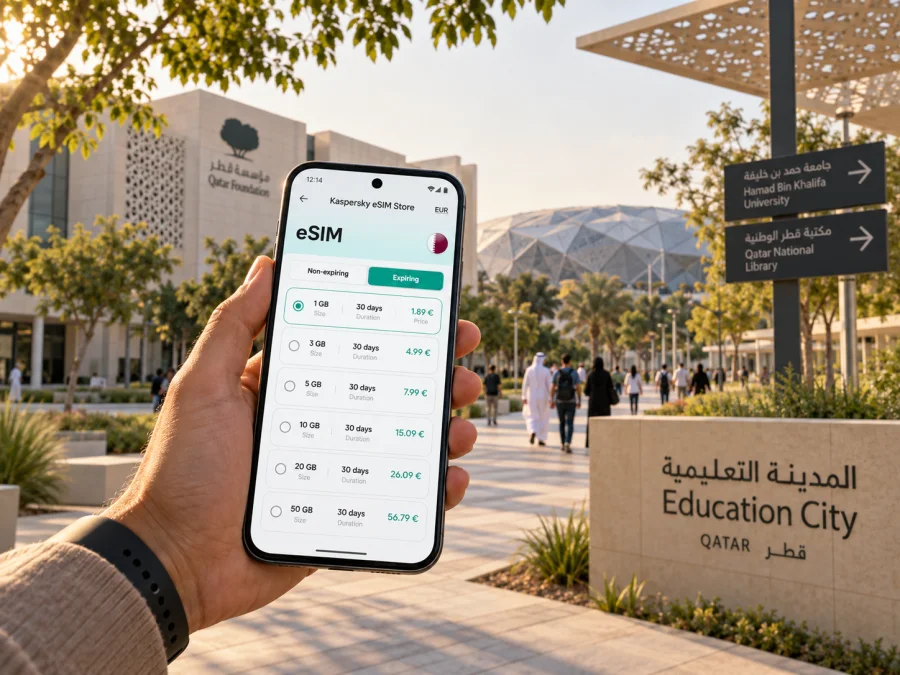
Education City eSIM: mobile connection and internet for your visit
Education City is a large campus district on the western side of Doha, in Al Rayyan. Universities, cultural venues, green spaces and sports facilities are spread across a site where maps and tram information help with everyday coordination. An eSIM can simplify that practical side of a visit: install a compatible profile before you travel, then use a suitable mobile data plan for directions and messages in Qatar.
This is not a compact city center. Destinations span the North and South Campus, so a short-looking map distance may still require a walk, tram ride or car journey. Your needs differ for a university visit, a conference at Qatar National Convention Centre, an appointment or a longer stay.
What to plan before you arrive
Start with your first destination rather than treating “Education City” as a single drop-off point. Qatar National Library, a university and the convention centre may require different final legs. Save the exact building or entrance name and confirm it with your host; a precise destination makes map searches more useful.
A few practical details make a noticeable difference:
- Keep the address or gate information for your first stop somewhere you can open offline.
- Check whether the place you are visiting has its own opening hours or visitor-entry instructions.
- Leave room in your schedule for walking between a station, tram stop and building.
- Keep your phone charged; a day of maps, messages, event updates and photos can use more battery than expected.
- Arrange your mobile data before relying on it for the first journey from the airport.
An eSIM is a digital SIM profile for a supported, unlocked phone. It can keep your regular SIM available while you use a separate travel data plan. Check destination, allowance, validity and activation details. Kaspersky eSIM Store is an app and website that helps travelers choose, purchase and activate an eSIM with a suitable plan for mobile internet abroad.
Getting from Doha to the campus
Education City is connected to the Doha Metro Green Line. The official Education City transportation information identifies three metro stations as access points: Al Shaqab, Qatar National Library and Education City. Which one is useful depends on your destination. Before leaving, compare your destination pin with the station and the campus tram map; the nearest station on a map is not always the most convenient entrance for the building you need.
From Hamad International Airport, decide whether a direct ride or public transport best fits your luggage, arrival time and destination. A taxi or app-based ride may be easier with bags or a fixed meeting time; metro travel can suit visitors who are comfortable with transfers and a final walk. Hours, arrangements and fares can change, so check them on the day.
Mobile internet helps you confirm a pickup point, check a route and update your host. Include the location name or gate number; “I’m at the station” may be unclear on a large campus.
A simple arrival sequence
- Before departure, save your hotel or first meeting address and the full name of the building.
- At the airport, confirm which route best fits your luggage, arrival time and destination.
- Check the current metro or road journey, then share your estimated arrival with your host if needed.
- At the campus, compare the station or drop-off point with the final destination on the wayfinding map.
- Use the tram or walk only after confirming that the relevant stop and route serve your destination.
Do not build a tight connection around an assumed travel time. Doha traffic, waiting for a ride, walking across a large site and event-day access arrangements can all affect the final leg. A little buffer is especially useful when a presentation, appointment or group visit begins at a set time.
Moving around Education City
The campus tram links places around Education City and is described by the campus transportation service as free to use. It has Yellow, Blue and Green lines, with the Yellow and Blue serving the South Campus and the Green connecting the North Campus. The system is a useful way to reduce long walks between destinations, but it does not remove the need to check the map: line patterns and operating schedules differ, and the tram may not stop beside the exact building you are visiting.
Use the official campus map to match a landmark to a tram stop, gate, metro station or walking trail. Timetables can vary by weekday and weekend, and services may have special arrangements around events. Check the current schedule shortly before setting out. If your route includes a transfer between metro and tram, allow time to find the platform and make sure you are following the correct line direction.
| If your destination is… | A useful first check |
|---|---|
| Qatar National Library | Compare its entrance with Qatar National Library Metro Station and nearby tram stops. |
| A university or research center | Confirm the campus, building and visitor entrance with your contact; then check the tram map. |
| Qatar National Convention Centre | Look up the event venue entrance and the tram or metro approach for that specific event. |
| Oxygen Park or a walking trail | Check the access point and opening information, and plan for the weather and time outdoors. |
| Education City Stadium | Review event access instructions and transport arrangements before travel. |
Use the table as a prompt, then check live directions. Buildings may have multiple entrances and access rules differ by visit type. Keep any host-provided pin or gate number with the building name. Save the campus map and key details offline in case your battery runs low or you need to show a driver an address.
Choosing a data plan for a Qatar visit
Estimate your online activities before choosing. A meeting may need maps, messages and email; a multi-day research visit may add cloud documents or video calls; a family outing may use photos and group messaging. Compare allowance and validity with your itinerary.
Before you select a plan, check:
- Destination: Qatar must be included in the plan’s coverage terms.
- Data allowance: Think about navigation, messaging, email, photos and any video use.
- Validity: Confirm how long the plan remains active and when that period begins.
- Device: Make sure the phone supports eSIM and is not locked to a carrier.
- Setup: Read whether installation requires internet access and how activation is triggered.
- Regular number: Decide which SIM should handle calls and texts, if you need those services from your usual number.
Kaspersky eSIM Store helps you choose, purchase and activate a travel eSIM through its app or website. Plans are offered for travel destinations; the plan terms explain the data allowance and validity that apply. It is sensible to review the details while you still have a reliable internet connection and time to complete setup. You can view travel data plan options for Qatar and compare the conditions with your itinerary.
A mobile-data eSIM does not automatically replace your regular phone service. Unless the plan says otherwise, do not assume it includes a local number, standard calls or SMS. You may keep your usual number for those services under your carrier’s settings and charges, while assigning data to the travel eSIM. App calls and messages use data and depend on the app and account.
Match the plan to the shape of your visit
Conference day. For an event at Qatar National Convention Centre, check the hall, entrance, schedule and route from your accommodation. Add file sharing or video calls to your data estimate, and save registration details offline.
University or research visit. Confirm the campus, building and entrance with your host; a generic pin may lead to the wrong side of the site. Use the map and tram information for the final leg, and keep your contact details accessible.
Library, park and culture. For Qatar National Library or Oxygen Park, check visitor information and opening times; facilities do not necessarily share a schedule. If you plan to spend time outdoors, consider water and sun protection, especially in hotter months.
Short stopover. With only a few hours, limit the itinerary to one or two confirmed destinations. Allow time for airport transfers and crossing the campus. A mobile connection helps you reassess a route, but cannot make a tight schedule predictable; keep a generous return buffer.
Multi-day stay. Ask your accommodation which entrance and transit stop are most convenient. If staying elsewhere in Doha, compare the commute with your schedule and check the address and transport options before booking. Directions are useful for early appointments and evening returns.
eSIM setup before you travel
Before purchase, check that your phone supports eSIM and is carrier-unlocked. Support can differ by model and market, so check your device compatibility. Use Wi-Fi for setup and follow the plan’s instructions: installation and the start of validity may be separate events.
A practical setup sequence is:
- Review the plan. Confirm Qatar, data allowance, validity and activation instructions.
- Prepare the phone. Update its operating system if needed and connect to reliable Wi-Fi.
- Add the eSIM. Follow the on-screen steps or the installation details provided with your order.
- Label the lines. Give the travel profile a recognizable name, such as “Qatar data.”
- Choose mobile data. Select the travel eSIM for data when you are ready to use the plan; keep your usual line configured for calls or messages if appropriate.
- Check activation. Allow a few minutes for the phone to register, and follow the plan guidance if roaming data must be enabled.
For device-specific steps, see the Android eSIM installation instructions or the iOS eSIM installation instructions. If you prefer to wait until arrival before using the plan, leave the travel line turned off or keep mobile data assigned to your usual line until you are ready, following the plan’s activation terms. Avoid deleting the eSIM profile while troubleshooting unless the instructions tell you to do so; some profiles cannot be reinstalled in the same way.
What to do if mobile data does not connect
Check that the travel eSIM is on, selected for mobile data and has a signal. Review whether the plan requires data roaming, then follow its troubleshooting guidance. If needed, contact support using the channel provided with your order. Keep your hotel address, event details and campus contact offline as a backup; do not rely on public Wi-Fi as your only navigation plan.
Questions travelers ask
Is Education City in Doha?
Education City is a campus district in Al Rayyan on the western side of the Doha area. Travelers often include it in a Doha itinerary, but should search for the specific campus destination rather than assume it is a single downtown location.
Which metro station should I use?
Al Shaqab, Qatar National Library and Education City stations are listed as metro access points for the campus. Choose based on your building or venue, then check the current map and tram connection. The closest station by name may not be the best final approach for every destination.
Is there a tram inside Education City?
Yes. The campus tram has three lines and serves destinations around the North and South Campus. The transportation service describes the tram as free. Check the current timetable and route map before travelling because schedules and arrangements can change.
Can I rely on mobile internet for maps and messages?
A suitable data plan can support maps, email and messaging, subject to plan coverage, device settings and local network availability. Keep key addresses offline as a backup and check your plan terms before depending on data-intensive services.
Does a travel eSIM include calls and SMS?
Not necessarily. A data-only plan does not automatically include a local phone number, standard calls or SMS. Review the selected plan details and keep your regular SIM available if you need its number, while considering your carrier’s roaming charges.
When should I install my eSIM?
You can prepare before departure if you have a compatible, unlocked phone and reliable internet for setup. Follow the specific plan’s activation instructions, since validity may begin at a particular step or connection event. If unsure, review the instructions before installing.
A calmer way to stay oriented
Education City is easier to navigate when you identify the building, campus and entrance before setting out. Mobile data helps with changing details, while an offline note keeps your itinerary available if you lose signal or battery.
Keep the destination and return route close at hand, then select a plan whose coverage, allowance and validity fit your Qatar visit. Use Kaspersky eSIM Store to prepare an eSIM, and choose a suitable Qatar plan before you leave or whenever you have a reliable connection.


