Travel connectivity guide
Eger eSIM: Mobile Internet for Your City Trip
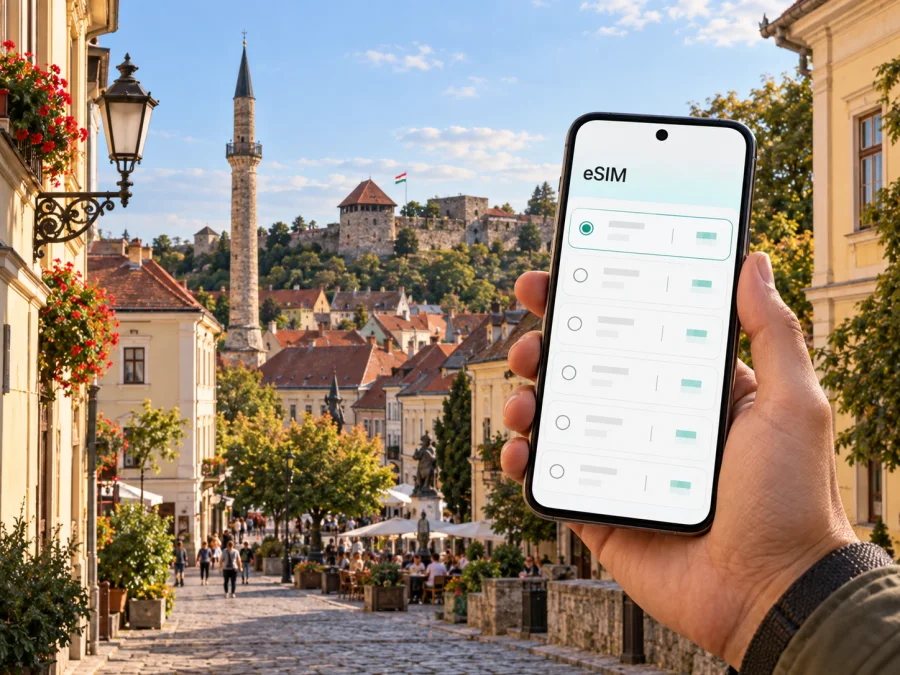
Eger eSIM: mobile connection and internet for exploring the city
Eger rewards the traveller who can slow down and still find the next turn. Its compact historic centre invites you to wander between Baroque streets, squares and cafés; the castle rises above the old town, while the minaret marks the skyline with a reminder of the city’s layered past. A phone with mobile internet can help you join these places into an easy day: check your arrival details, orient yourself after leaving the station, look up opening information, and share a change of plan with your hotel or travel companions.
An eSIM can make that preparation simpler. It is a digital SIM profile installed on a compatible device, so you do not need to handle a small physical card to add a travel data plan. Kaspersky eSIM Store is an app and website where you can choose, purchase and activate an eSIM with a suitable plan for mobile internet on an international trip. The service helps with the plan-selection process; the mobile service itself is provided through the selected plan’s network arrangements and conditions.
This guide focuses on the practical details of using a phone around Eger: arriving by rail or road, walking the centre, visiting the castle and nearby sights, choosing a base, arranging a workday, and making a short excursion beyond town. Prepare the basics before departure, then leave room for the unplanned discoveries that make Eger memorable.
Arriving in Eger and finding your bearings
Eger is in north-eastern Hungary. Many visitors arrive by train or intercity bus, while others come by car or as part of a longer Hungarian itinerary. If you are travelling by rail from Budapest, check the current route and any connection details for your date before leaving; services and timetables can change. The railway station and bus station are useful starting points for orientation, but your accommodation may be in the centre, near a quieter residential street, or closer to the wine cellars south of the historic core.
Before you set out, save the hotel address in a form you can read offline and note the name of the nearest landmark. Hungarian street names can look unfamiliar at first, and a saved map pin is often easier to use than trying to pronounce an address while carrying luggage. If you arrive with a connection through another town, keep the station name and onward departure details in your booking notes.
Eger’s historic centre has pedestrian-friendly areas, and much of a first visit can be done on foot. The station area is outside the central sights, so plan the last part of the arrival rather than assuming your hotel is beside the platform. For heavy bags, late arrival, rain, or a property on a hill, compare the walking route with local transport. A map helps you judge the distance and slope; it does not replace checking current service information.
Moving around the historic centre
Eger is well suited to a day built around walking. Dobó Square is a natural reference point in the old town, with streets leading towards the castle and other central landmarks. The minaret is another distinctive point in the old-town landscape. Its narrow tower is easy to spot from nearby streets, and it helps orient a walk through the centre. Nearby, Eger Basilica and the Lyceum add monumental architecture to a compact sightseeing area. Rather than trying to fit every interior visit into one short stop, group the places by neighbourhood and check current access arrangements before setting out.
| If your plan is… | A useful phone task | A practical approach |
|---|---|---|
| A first walk after check-in | Pin the hotel and Dobó Square | Use the square as a reference, then explore nearby lanes |
| A visit to the castle | Check the entrance and visitor information | Allow time for the uphill approach and the site itself |
| A short stop in the centre | Save two or three places on one map | Prioritise nearby sights instead of criss-crossing town |
| An evening meal | Confirm the address and reservation | Save the return route, especially if your lodging is outside the core |
| A wet-weather change | Check what is open that day | Switch to a nearby indoor visit or a longer café break |
A useful way to keep a walking day relaxed is to pin the castle, the minaret, and one indoor stop before leaving your accommodation. Those reference points help you understand where you are without turning the visit into a rigid checklist. If you change direction for a café or a small museum, update the route from your current position rather than trying to follow a screenshot of the whole day. Save the address of your lodging separately, so the return is easy to find after dinner.
If you would like to prepare mobile data for your stay in Eger, you can review eSIM plan options for Hungary. Consider your whole itinerary, not only the days spent in the centre: maps, messaging, translation, ride coordination, and work calls can all affect how much data you use.
Choosing a neighbourhood and staying connected
For a short break, useful questions include:
- Is the address within comfortable walking distance of the sights you care about?
- Is the route flat enough for your luggage and mobility needs?
- What is the plan for arriving after local buses become less convenient?
- Can the host explain the entrance clearly, including a courtyard or building number?
- Will you need to travel between the centre and a winery, station, or meeting venue?
- Is there a quiet place to work if you need to take a call?
Digital maps can make a hotel search more concrete. Check the walking route at the time of day you expect to travel and look at the actual street layout. “Near the centre” can mean different things on a hilly or winding street. When booking, save the property name, full address, check-in instructions, and a contact method somewhere accessible offline.
Castle, squares, wine cellars and an evening plan
Many first-time visitors organise their day around the castle and old town, then leave time for a longer meal or a visit to the Szépasszony-völgy wine-cellar area. These are distinct settings: the central sights are close enough to combine on foot, while the wine-cellar quarter calls for a separate route decision. Check where your chosen venue is and confirm its opening arrangements; individual businesses may have different schedules, particularly outside peak periods.
A flexible day might look like this:
- Morning: walk through the centre while the streets are quieter; visit the castle if it is part of your plan.
- Midday: pause around Dobó Square or choose a nearby café, leaving enough time for lunch rather than squeezing in another distant stop.
- Afternoon: visit a central landmark such as the Basilica or Lyceum, or take a break at your accommodation.
- Evening: head to a reserved restaurant or the wine-cellar area, with the return journey decided in advance.
This outline is not a timetable. It is a way to avoid spending the day checking directions at every corner. Use a saved list for places you genuinely want to visit, then choose the next stop according to weather, opening hours, and how much walking feels comfortable.
The phone’s camera and map are most helpful when used deliberately. Take a photo of a street sign if you need to remember a turn, but avoid photographing private interiors or people without permission. If your group separates in a busy square, agree on a visible meeting point and a time to regroup. A location pin in a message can be clearer than a long description of a side street.
A short stay, a business visit, or a stopover
Eger can be a destination in its own right or one part of a trip through Hungary. On a short stopover, choose a small cluster of sights and keep your onward departure in view. The castle and central streets are a natural combination; adding a distant venue may make the day feel rushed. If you have only a few hours, store luggage where your accommodation or transport provider permits, confirm the station or bus departure point, and leave a buffer for getting back.
For a business visit, the useful preparation is less scenic but just as important. Confirm the exact address of the meeting venue, whether it is in the centre or on the outskirts, and how you will get there from your hotel. Save the contact name and appointment details offline. If you need a video meeting, do not assume a café or public space will be quiet enough; ask your accommodation about a suitable place and use a headset.
A working-day checklist:
- Save the venue pin and a written address.
- Check the route at the expected departure time.
- Confirm whether the meeting room has Wi-Fi and whether you need mobile data as backup.
- Keep calendar, presentation, and contact details available offline.
- Leave time for a change in transport or an unfamiliar entrance.
- Review your data use if you plan to tether another device; tethering can consume data more quickly.
Planning a trip beyond Eger
Eger is a useful base for exploring nearby parts of Hungary, but regional travel needs its own preparation. Some journeys use rail connections through Füzesabony; other destinations may be easier by bus or car. The right option depends on the place, day, and season, so check current schedules and transfer details before leaving. Do not assume a route that worked on a previous visit still runs at the same times.
Before a day trip, save both the destination and the return stop. Look at the final departure back to Eger before committing to a late lunch or a long visit. If a connection requires changing stations or platforms, note the place name and transfer time. Keep some battery for the return route, ticket details, and any service updates.
A simple excursion plan:
- Choose one main destination rather than filling the day with several distant stops.
- Check outbound and return options on the same date.
- Verify the departure station or bus terminal in Eger.
- Save the destination pin, ticket or booking details, and a backup route.
- Check whether the final leg needs a local taxi or a walk from the stop.
- Tell your accommodation if you expect to return late.
Preparing an eSIM for Eger
An eSIM is stored digitally in a compatible device. Preparing it before departure can reduce the number of errands after arriving, but the exact installation and activation steps depend on your device and the plan. Read the plan details carefully: check the data allowance, validity period, activation conditions, and whether it matches the countries on your itinerary. A Hungary plan may be relevant for Eger, while a multi-country journey may call for a different option.
Kaspersky eSIM Store is an app and website that helps travellers choose, purchase, and activate an eSIM plan for mobile internet abroad. It is not a mobile network operator. The selected plan’s terms determine its coverage, validity, and included data. If ordinary calls or SMS matter to you, check whether the plan includes them; do not assume that a data plan provides a local phone number.
A practical setup sequence:
- Before buying, confirm that your device supports eSIM (check device compatibility) and is not restricted from using another carrier’s eSIM.
- Review the destination, data allowance, validity, and activation instructions shown for the plan.
- Install the eSIM while you have dependable Wi-Fi, following the steps for Android or iOS.
- Label the travel line clearly in your phone settings so you can distinguish it from your usual SIM.
- Decide which line should handle mobile data and check data-roaming settings according to the plan instructions.
- Keep your primary number available for the services that depend on it, if your device allows dual-SIM use.
- On arrival, follow the plan’s activation directions and confirm the data connection before relying on it for a route.
Frequently asked questions
Is Eger easy to explore without a car?
The historic centre is walkable, and many central sights can be linked on foot. A car may be useful for a wider regional itinerary, but local buses can help when your lodging or destination is farther from the centre. Check current route information and choose based on your luggage, mobility, and schedule.
Do I need mobile internet for a city break in Eger?
You can visit without continuous mobile data, especially if you save maps, addresses, and bookings offline. A connection is convenient for route changes, messages, opening updates, and transport checks. An eSIM is one way to prepare mobile data for a compatible phone while travelling.
Can I install the eSIM after I arrive?
That depends on the plan’s activation conditions and your access to a reliable internet connection during installation. Review the instructions before departure and, where possible, install the profile while connected to Wi-Fi. Follow the plan-specific steps for when to enable it.
What should I check before choosing a plan?
Check that the plan is intended for Hungary, confirm its validity and data amount, read the activation instructions, and make sure your device can use eSIM. For a multi-country itinerary, check whether each stop is included rather than assuming that one destination plan covers the whole route.
Get ready for your Eger trip
A little preparation makes Eger easier to enjoy: save your first address, check the route from the station, group nearby sights, and leave room for a slower meal or a turn down an unfamiliar street. Keep current transport details close at hand, and save an offline map in case you need it.
If an eSIM suits your device and travel plans, use Kaspersky eSIM Store to compare the available options and choose a plan for your visit. Choose an eSIM plan for your trip to Hungary before you leave, then follow its instructions to install and activate it. That way, your phone is ready to help with the practical moments of the journey—from finding your accommodation to navigating back after an evening in Eger.


