Travel connectivity guide
Egilsstadir eSIM: Mobile Internet for Your Trip
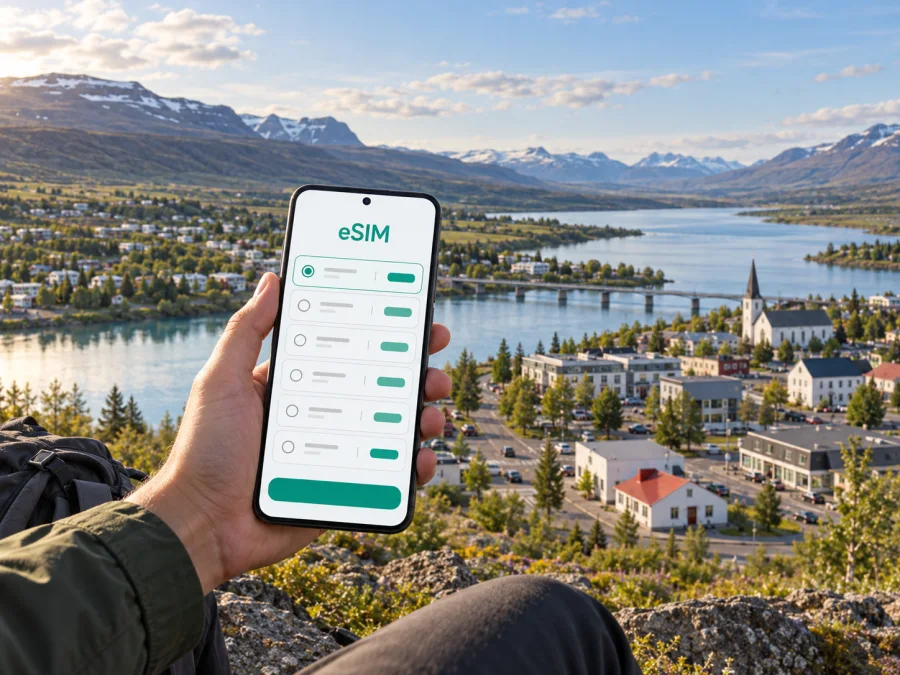
Egilsstadir eSIM: mobile connection and internet for your trip
Egilsstadir is a useful first stop in East Iceland: a small town where you can collect a rental car, find everyday services, settle into a guesthouse, and plan the next leg of a journey. Mobile internet helps with each transition, from checking an airport pickup to following a route around Lagarfljót or confirming a change of plans before heading toward the fjords.
An eSIM can make that preparation simpler. It is a digital SIM profile for mobile data, so you can arrange a travel data plan without swapping the physical SIM in your phone. Kaspersky eSIM Store is an app and website where you can choose, purchase, and activate an eSIM with a suitable plan for an international trip. The right choice depends on your route, how you use data, and the terms shown for the plan.
Arriving in Egilsstadir: make the first hour easier
Egilsstadir Airport is close to the town, on the peninsula beside Lagarfljót between Egilsstadir and Fellabær. The town is a regional transport and service hub, and visitors arrive by air as well as by road. Your first steps may be straightforward, but a little preparation prevents small uncertainties from eating into a short arrival window.
Before leaving home, save your accommodation address, reservation details, car-hire information, and any pickup instructions somewhere you can open offline. If you expect to use a map app, download the relevant map area while connected to Wi-Fi. A downloaded map is a useful backup when mobile data is unavailable or a signal is uneven along a route.
After landing, use mobile data for the tasks that benefit from current information: contacting a host, checking a pickup message, looking up opening hours, or sharing your arrival time. If you are collecting a car, confirm where the handover takes place and keep the booking confirmation accessible. Do not rely on a single message app or cloud document if you can save the essential details locally as well.
A short arrival checklist:
- Keep your accommodation address and access instructions available offline.
- Confirm the meeting point for a rental car or transfer before you leave the terminal.
- Check the plan’s destination, data allowance, validity period, and activation terms.
- Keep your regular SIM active if you need its number for calls or verification messages.
- Charge your phone and carry a suitable power bank for a longer driving day.
Mobile data is useful, but it does not replace local road information or good preparation. Weather and road conditions can change, especially outside built-up areas. Check current conditions before setting out, and do not interact with your phone while driving. If you are the driver, enter the destination before moving and let a passenger handle updates.
Getting around town and across the valley
Egilsstadir is compact enough that visitors often combine a central stay with short local journeys. The bridge connects the town with Fellabær, while the airport lies nearby. For hotels, shops, restaurants, and essential services, maps can help you compare walking and driving options, find an entrance, or locate a business whose name is unfamiliar.
Keep searches specific. A broad search for a place in “East Iceland” may return results far beyond town. Add the neighborhood, business name, or nearby landmark where possible, then check the map pin against the address in your booking. This is especially helpful when a property uses a countryside name or has more than one entrance.
For driving, online maps are helpful for reaching a hotel, fuel stop, or visitor service, but they should not be treated as the only source for route decisions. East Iceland journeys can include open stretches, mountain roads, and changing conditions. Review the day’s route before departure, keep a paper or offline backup if that suits you, and make sure everyone in the car knows the next stop. A connected phone is most valuable when it supports an already sensible plan.
Choose mobile data for the shape of your trip
The best eSIM plan for a stay in Egilsstadir depends less on the town itself than on the full itinerary. A visitor spending most of the time in town has different needs from a driver taking day trips around the lake, heading to the Eastfjords, or continuing around Iceland. Estimate how often you will use maps, upload photos, make video calls, or stream media, then compare that estimate with the plan’s data allowance and validity.
For a brief stop, a modest allowance may be enough if you download maps and entertainment in advance and use Wi-Fi for large updates. For a longer road trip, consider how many days the plan must cover and whether other travelers will rely on your phone’s hotspot. Hotspot use can consume data quickly, particularly when a laptop syncs files or a tablet streams video. Check the chosen plan’s terms rather than assuming that every feature is included.
You can explore eSIM plans for Iceland and compare the displayed data, validity, and price before choosing. The app and website help you select and activate a travel eSIM; the service and mobile network depend on the plan’s stated terms and local network availability. Coverage and performance can vary by location, terrain, device, and conditions, so avoid planning as if a connection were guaranteed on every road.
Match the plan to your travel pattern
| Your itinerary | What to consider | A useful preparation step |
|---|---|---|
| One night in Egilsstadir | Arrival messages, maps, and a few searches | Save your booking and download a map before arrival |
| Several nights in town | Regular navigation, restaurant searches, and messages | Estimate daily use and choose validity that covers the stay |
| Town plus day trips | Longer periods away from accommodation and changing plans | Keep routes offline and leave a data margin for updates |
| A wider Iceland road trip | Multiple destinations and several travel days | Compare the plan’s validity with the whole route, not just the first stop |
| Work during the visit | Email, documents, calls through apps, and possible hotspot use | Check data needs and hotspot terms before purchase |
Data use varies: video, cloud backups, software updates, and tethering can use substantially more than maps or messaging. Disable automatic downloads and large background updates to preserve your allowance.
Where an online connection helps in Egilsstadir
Airport and accommodation handoffs
A message from a host or rental company may include a meeting point, access code, or adjustment to a pickup plan. Keep the original instructions saved, then use data to check for updates shortly before the handoff. If you expect to arrive late, contact the accommodation in advance and save the response; this gives you a fallback if your battery is low or you need to step away from the airport area.
Finding everyday services
Egilsstadir serves travelers as well as local residents, so a stop for food, fuel, supplies, or a meal can be part of a larger drive. Search by the exact business name and check opening information directly before making a detour. Store a short list of likely stops in your notes, including an alternative, rather than assuming the first search result will fit your timing.
Following a route around Lagarfljót
The lake is one of the defining features of the area. A drive around its shores can be part of a day based in Egilsstadir, but the distance and time depend on the chosen stops and road conditions. Save the main route and the locations you want to visit before leaving town. If you change the order of stops, pull over safely before using the map.
Connecting a town stop to nearby sights
Fardagafoss is a waterfall near Egilsstadir, and the wider area includes destinations such as Hengifoss, Skriðuklaustur, and the eastern visitor centre for Vatnajökull National Park. These are outings beyond a town-center walk, so check access, road conditions, daylight, and the amount of time you have before setting out. Keep directions and reservation or opening details available offline in case you lose data on part of the way.
Vök Baths, just outside Fellabær, is another nearby stop that visitors may pair with time in town. If you plan to visit, verify current opening times and booking details before travelling. A live map can help with the final approach, while a saved address is a simple backup.
Hotels, guesthouses, and working from the east
Accommodation around Egilsstadir ranges from town stays to places outside the center. Before booking, check the exact location rather than relying on a property name alone. A map pin, arrival instructions, and confirmation of late check-in arrangements can clarify whether you can walk from the center or will need a car. Save all three before setting out from the airport.
For a business trip, mobile internet may be needed for messages, calendars, document access, and calls through internet-based apps. Check whether your lodging offers Wi-Fi and what facilities you need for work; do not assume a particular connection quality. If you plan to tether a laptop to your phone, check the eSIM plan’s terms and estimate use for email attachments, video meetings, and cloud sync. Download essential documents in advance and keep a copy accessible offline.
An eSIM plan is designed for mobile data. It does not automatically provide a standard local phone number, voice calls, or SMS unless the specific plan says otherwise. Keep access to your normal number if you need it for calls or one-time verification codes, and use internet calling or messaging apps when appropriate.
Set up an eSIM before you need it
Before choosing a plan, make sure your phone supports eSIM and is not restricted by a carrier lock. Device availability can differ between models and regional versions, so check whether your device supports eSIM before purchase. Also review the plan’s destination, data allowance, validity, activation instructions, and any limits on hotspot use.
If you plan to install the eSIM before travelling, follow the instructions shown for the plan and keep a stable internet connection available during setup. You can use the Android eSIM installation instructions or the iOS eSIM installation instructions. Exact menu names can vary by device and operating system version, so follow the on-screen prompts on your phone.
A careful setup sequence:
- Confirm that the selected plan covers Iceland and suits the dates of your trip.
- Check that your phone is compatible and unlocked for use with another eSIM profile.
- Read when the plan’s validity begins; installation and first connection may be separate events.
- Install the profile using the method provided with your order.
- Label the travel eSIM clearly in your phone settings so you can identify it later.
- Set the travel eSIM as the line for mobile data when you want to use it.
- Keep data roaming settings aligned with the instructions for that plan; some eSIMs may require roaming to be enabled.
- Confirm that your primary line remains configured as intended for calls and messages.
If you prefer to install the eSIM after arrival, make sure you have access to Wi-Fi and your order details. Do not delete an installed eSIM profile simply to troubleshoot unless the instructions or support team tell you to; some profiles may not be reusable after removal. If the phone does not connect, check the selected data line, settings, and plan instructions, then contact support through the appropriate channel.
Questions travelers ask
Is an eSIM useful for a visit focused on Egilsstadir?
It can be useful if you want mobile data for arrival coordination, local searches, navigation, and nearby excursions. Whether a particular plan is suitable depends on its Iceland coverage terms, validity, allowance, and your own usage. Download key maps and information as a backup.
Do I need a car to get around Egilsstadir?
That depends on where you stay and what you plan to do. The town and nearby Fellabær are close to each other, but many visitors use Egilsstadir as a starting point for destinations beyond the center. Confirm transport arrangements for your lodging and outings before arrival rather than assuming every stop is walkable or served at the time you need.
Can I rely on mobile internet for navigation outside town?
Use it as one part of your preparation, not as the only navigation method. Terrain, location, weather, device, and local network conditions can affect service. Download maps, save addresses, review road information, and make decisions before driving.
Will the travel eSIM replace my usual phone number?
Not necessarily. The travel eSIM described for mobile data does not provide a standard voice number or SMS unless that is explicitly included in the selected plan. Keep your usual line available if you need calls or verification messages, and check roaming settings and charges with your existing provider.
When should I install the eSIM?
You can prepare before departure or install it later, depending on the plan’s instructions and your preference. Check when validity starts, because the trigger can vary by plan. Make sure you have internet access during installation and follow the order-specific guidance.
When you are ready, choose an eSIM plan for your trip to Iceland through Kaspersky eSIM Store. Compare the terms, select an option that fits your travel dates and expected data use, and follow the setup instructions for your device.


