
Travel connectivity guide
El Calafate eSIM for Mobile Internet
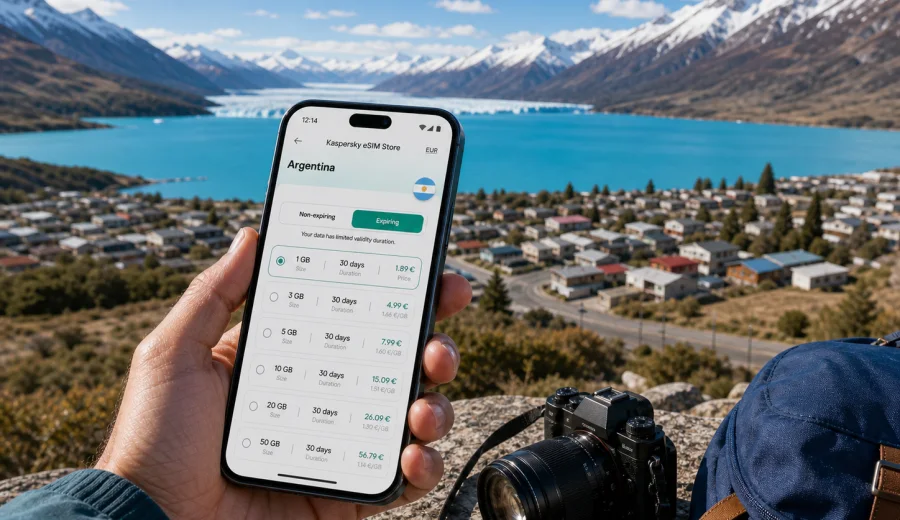
El Calafate eSIM: mobile connection and internet for a Patagonia trip
El Calafate is a small city with a large travel role. For many visitors, it is the practical base for Lago Argentino, Perito Moreno Glacier, Los Glaciares National Park, boat trips, hiking days, and onward routes across southern Patagonia. The distances are long, weather changes quickly, and many travel decisions depend on timing: airport pickup, hotel check-in, bus departures, tour confirmations, restaurant bookings, and maps for roads outside the center.
That makes mobile internet more than a convenience. In El Calafate, a working data connection helps you move from arrival to hotel without waiting for public Wi-Fi, check tour details before an early pickup, share your location with a driver, and keep offline plans backed by live updates. An eSIM can be a practical way to prepare that connection before you leave home or shortly after landing, without looking for a physical SIM card on your first day in town.
This guide focuses on El Calafate as a city trip: arrival, local movement, hotels, excursions, business stopovers, short stays, and trips from the city. Argentina is the country context because your eSIM tariff must match the destination where you will use mobile data.
Why mobile internet matters in El Calafate
El Calafate is compact in the center, but the travel area around it is wide. The airport is outside the city, glacier excursions involve long drives, and many visitors split their time between the main avenue, lakefront viewpoints, restaurants, tour offices, and hotels spread across different parts of town. You may walk short distances in the center, but you will likely depend on transfers, taxis, buses, or organized tours for the airport and national park routes.
Mobile internet is useful in everyday moments:
- confirming your airport transfer after landing at Comandante Armando Tola International Airport;
- checking the pickup time for a Perito Moreno Glacier tour;
- opening maps when moving between Avenida del Libertador, the bus terminal, and lakeside areas;
- contacting a hotel if your flight or bus is delayed;
- translating menus, signs, and messages from tour operators;
- checking weather before a boat trip or a windy viewpoint visit;
- using messaging apps when a standard voice call is not included in your data tariff.
El Calafate is not a city where you want to spend the first evening solving connectivity. The town is calm, but itineraries are often time-sensitive. A prearranged eSIM gives you a cleaner start: you can land, switch on mobile data for the eSIM when appropriate, and focus on getting to your accommodation.
Arrival: airport, transfer, and first evening
Most international visitors reach El Calafate after connecting through Buenos Aires or another Argentine city. On arrival, the first tasks are simple but easier with mobile data: find your driver, check shuttle options, send your arrival message, and open your hotel address. Airport Wi-Fi may be enough for a quick message, but it is not something to build your whole arrival plan around.
For a smooth first hour, prepare these items before the flight:
1. Save your hotel address and booking details offline.
2. Download an offline map of El Calafate and the airport area.
3. Keep your transfer voucher or shuttle booking accessible without internet.
4. Install your eSIM profile in advance if your device allows it.
5. Know which SIM or eSIM should be used for mobile data after arrival.
The last step is important. Many travelers keep their regular SIM active for calls or banking messages and use the travel eSIM for mobile data. On a dual-SIM phone, label the profiles clearly, for example "Home" and "Argentina data", so you do not accidentally use the wrong data line.
Where you will use data around the city
El Calafate has several practical zones where mobile internet supports different travel tasks.
| Area or moment | Why data helps | Useful preparation |
|---|---|---|
| Airport arrival | Transfer messages, hotel route, flight delay updates | Install eSIM before departure and save booking details |
| Avenida del Libertador | Restaurants, tour offices, ATMs, shopping | Keep maps and translation tools ready |
| Bus terminal | Tickets, schedules, onward routes | Save tickets offline and confirm the terminal location |
| Lago Argentino viewpoints | Photos, maps, ride coordination | Carry a charged battery and avoid relying only on Wi-Fi |
| Hotel check-in | Messaging, digital documents, payment checks | Keep your booking reference accessible |
| Glacier day trips | Tour changes, pickup timing, weather checks | Download maps and key documents before leaving town |
This does not mean mobile data will replace every offline habit. In Patagonia, you should still keep addresses, tickets, and essential documents saved locally. The point of an eSIM is to reduce friction in the moments when you need live information.
Choosing an eSIM tariff for El Calafate
For a city article, the correct destination is the country where the city is located. El Calafate is in Argentina, so you should choose a tariff that includes Argentina and matches the length and style of your trip. Kaspersky eSIM Store is an app and website where you can quickly choose, arrange, and activate an eSIM with a suitable tariff for mobile internet in an overseas trip.
Before choosing, estimate your real data needs:
- Light use: maps, messaging, hotel confirmations, occasional browsing.
- Standard use: maps, messaging, email, social media, restaurant searches, weather checks.
- Heavy use: photo uploads, video calls, hotspot use, remote work, cloud files.
For El Calafate, many travelers fall into the standard category. Glacier trips and long transfers are photo-heavy, but you can postpone large uploads until you have reliable hotel Wi-Fi. If you plan to work remotely, share a hotspot, or upload high-resolution photos every day, choose a larger data allowance and check whether tethering is allowed by the selected tariff.
City movement: walking, taxis, buses, and tours
The center of El Calafate is walkable, especially around Avenida del Libertador. Still, the city stretches enough that your hotel may not be right next to every restaurant, tour office, or pickup point. Mobile data helps you check walking times, coordinate with taxis, and compare whether a route is reasonable on foot in the wind or after dark.
For tours, the main connectivity task is coordination. Many glacier excursions start early, and pickup windows can vary by hotel. If your pickup location changes, if the driver cannot find the entrance, or if the operator sends an updated message, a working data connection can prevent a small delay from becoming a missed departure.
For bus travel, data is useful before you leave for the terminal. You can confirm departure time, check whether your ticket is stored locally, and message your hotel if you need luggage storage. Once you leave town, do not assume that every road segment will have stable data. Save key information before the journey.
Hotels, apartments, and remote work
Many El Calafate hotels and apartments provide Wi-Fi, but quality can vary by room, building layout, and time of day. A mobile data eSIM is useful as a backup for messages, check-in details, two-factor authentication, and urgent work tasks. It is also helpful if you are staying outside the most central blocks, where walking back to a cafe just to get online is inconvenient.
If you are traveling for work, treat the eSIM as part of your continuity plan:
- check whether your laptop tasks can wait for hotel Wi-Fi;
- keep video calls on Wi-Fi when possible to save mobile data;
- use mobile data for messaging, calendars, maps, and urgent email;
- download large files before excursions;
- check whether the selected tariff allows hotspot use if you need it.
An eSIM tariff for mobile internet usually does not include a regular phone number, voice calls, or SMS unless the terms of the selected tariff say otherwise. For calls and messages, plan to use internet-based apps over your data connection.
When to prepare the eSIM
The best time to prepare your eSIM is before the travel day, while you still have stable internet and time to check settings calmly. Install the eSIM profile in advance if the selected tariff and your device support that workflow, then activate mobile data for it at the right moment according to the instructions for the tariff.
If you want to prepare mobile internet for El Calafate before you arrive, you can choose an eSIM tariff for your trip to Argentina through Kaspersky eSIM Store and review the available data volume, validity period, destination, and price before checkout.
Do not skip device checks. Before buying a tariff, check your device to confirm that it supports eSIM and is not locked by an operator. Device support can vary by model and region of purchase, so it is better to verify this before you are already in Patagonia.
How to install an eSIM before a trip to El Calafate
The exact setup depends on your device and the selected eSIM profile, but the practical sequence is usually straightforward:
1. Confirm that your phone supports eSIM and is not operator-locked.
2. Choose Argentina as the destination or select a regional tariff that includes Argentina.
3. Complete the tariff selection and payment.
4. Open the eSIM details in your profile, app, or confirmation email.
5. Install the eSIM by following the device instructions.
6. Select the eSIM for mobile data when you are ready to use it.
7. Keep your home SIM active only for the functions you need, such as banking messages.
For device-specific setup, use the Android installation guide or the iOS installation guide. Follow the steps carefully, keep Wi-Fi available during setup, and allow a few minutes for the profile to connect after activation. On some devices, you may need to enable data roaming for the eSIM line for mobile data to work.
Data planning for common El Calafate trips
Your data needs depend less on the city size and more on your itinerary. A quiet two-night stay with one glacier tour is different from a week of remote work, daily uploads, and onward travel to El Chalten.
| Trip style | Typical data use | Practical advice |
|---|---|---|
| 2 or 3 days, one glacier tour | Low to standard | Use data for maps, messaging, weather, bookings, and light browsing |
| 4 to 6 days with several excursions | Standard | Choose enough data for daily navigation, messages, and travel research |
| Remote work stay | Standard to heavy | Keep video calls on Wi-Fi and reserve mobile data for backup |
| Photo-heavy Patagonia route | Heavy if uploading on the go | Upload large albums on Wi-Fi and keep mobile data for essential tasks |
| El Calafate plus El Chalten | Standard to heavy | Save offline maps and choose a tariff duration that covers the full route |
As a rule, do not use mobile data as if it were unlimited unless your selected tariff clearly supports that use. Turn off automatic cloud backups, app updates, and background video previews. These settings can consume more data than maps and messages.
Practical checklist before you leave
Use this checklist before your flight to Argentina or before the domestic connection to El Calafate:
- Your passport, tickets, hotel booking, and tour vouchers are saved offline.
- Your phone supports eSIM and is not operator-locked.
- The selected tariff includes Argentina.
- The validity period covers your arrival day, excursions, and departure day.
- You know when the tariff starts counting down or consuming data.
- You have installed the eSIM profile if the instructions allow pre-trip installation.
- Mobile data is assigned to the correct eSIM line.
- Data roaming settings for the eSIM are understood for your device.
- Offline maps are downloaded for El Calafate and key route areas.
- Battery pack and charging cable are packed for glacier day trips.
This preparation is especially useful because El Calafate itineraries often start early. Solving eSIM setup, maps, transfer messages, and tour timing at 6:30 in the morning is avoidable if you handle the basics the day before.
Short stopovers and one-night stays
Some travelers use El Calafate as a short stop: arrive, sleep, visit Perito Moreno Glacier, and leave the next day. In that scenario, mobile internet is valuable because there is little margin for delay. You need airport transfer details, hotel directions, tour pickup confirmation, and bus or flight updates within a compressed schedule.
For a one-night stay, keep the setup simple. Install the eSIM before arrival, choose a data allowance that covers maps and messaging, and avoid large media uploads until you are on Wi-Fi. Save your next transport ticket offline because you may be moving again before you have time to troubleshoot anything.
Longer stays and day trips from El Calafate
If you are staying longer, El Calafate becomes a base rather than a single stop. You may visit Perito Moreno Glacier, take a boat trip, walk near Laguna Nimez, explore lake viewpoints, or continue toward El Chalten. Mobile data helps with planning, but offline preparation still matters once you move away from the city.
For day trips, use this pattern:
1. Check weather and pickup details while still at the hotel.
2. Save the tour operator contact and meeting point offline.
3. Download map areas before leaving town.
4. Keep data for messages, timing changes, and essential searches.
5. Save large photo uploads for the evening.
This balance keeps your data allowance available for practical use rather than background tasks. It also reduces dependence on public Wi-Fi in cafes, terminals, and shared hotel areas.
Business travel and professional use
El Calafate is mostly known for leisure travel, but it also receives professionals working with tourism, events, conservation, logistics, and regional operations. For business travelers, a mobile data eSIM can support the parts of the trip that should not depend entirely on hotel Wi-Fi: arrival coordination, calendar changes, messaging, document access, and maps between meetings or site visits.
If you need to work from El Calafate, plan your data use by priority:
- High priority: messaging, authentication, maps, email headers, urgent documents.
- Medium priority: cloud documents, light browsing, team chat, calendar updates.
- Low priority on mobile data: system updates, full backups, long video calls, large media uploads.
Use Wi-Fi for heavy tasks when it is stable. Keep the eSIM for mobility and backup. This is a more reliable way to manage a finite data allowance.
Common mistakes to avoid
Several connectivity problems are easy to prevent:
- Buying a tariff for the wrong destination. For El Calafate, the destination must include Argentina.
- Waiting until arrival to check whether the phone supports eSIM.
- Deleting an eSIM profile after activation without checking whether it can be reinstalled.
- Leaving mobile data assigned to the home SIM and creating unexpected roaming costs.
- Using mobile data for automatic photo backup during a glacier excursion.
- Assuming that a data eSIM includes voice calls or SMS.
- Forgetting that activation, validity, and refund conditions depend on the selected tariff terms.
The safest approach is to read the tariff details, install carefully, and test only what the instructions recommend before travel. If you are unsure, keep the QR code or setup details accessible and avoid changing profiles while you are already in transit.
Quick answers for El Calafate travel planning
What is the best eSIM destination for El Calafate?
Choose an eSIM tariff that includes Argentina, because El Calafate is in Argentine Patagonia.
Is an eSIM useful in El Calafate?
Yes. It is useful for airport arrival, hotel check-in, maps, tour pickup coordination, weather checks, messaging, and onward travel planning.
Can I rely only on public Wi-Fi?
You can use Wi-Fi at hotels and some public places, but it is better not to rely on it for airport transfers, tour changes, or navigation outside your accommodation.
Does an eSIM replace a local phone number?
Usually no. A travel eSIM for mobile internet normally provides data. Voice calls and SMS are included only if the selected tariff terms say so.
Should I install the eSIM before arriving in El Calafate?
If the instructions for your selected tariff allow it, installing before travel is often more convenient. You can then activate or select it for mobile data at the appropriate time.
Final preparation for mobile internet in El Calafate
El Calafate rewards travelers who prepare the practical details early. The city is easy to enjoy when your arrival, hotel, tours, maps, and messages are already organized. An eSIM helps you keep that travel flow steady without searching for a physical SIM card during the first hours of the trip.
Before departure, check that your phone supports eSIM, choose a tariff that includes Argentina, save important documents offline, and understand how activation works on your device. When you are ready to prepare the mobile internet part of the trip, use Kaspersky eSIM Store to review eSIM tariff options for Argentina and select the data volume and validity period that fit your El Calafate itinerary.